linkedin
CallAction logo
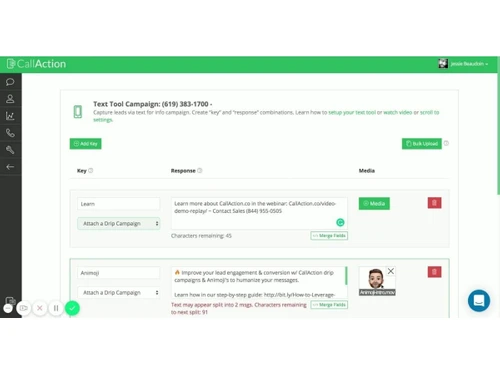
CallAction-campaign
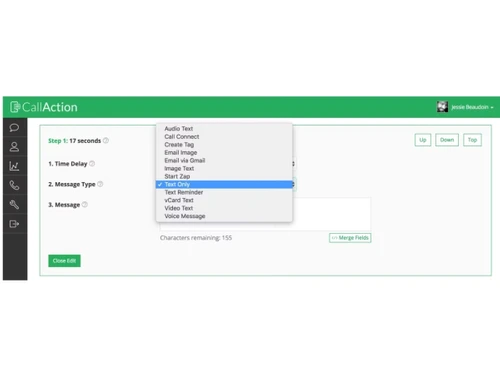
CallAction-text only
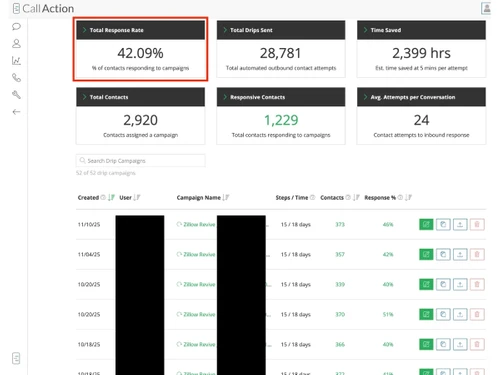
CallAction-total response

CallAction

Brand: CallAction

  • No Ratings & Reviews

Have you used CallAction before?

Share your insights for better experience

Add a Review
Starting Price
$299

View plans

100% Genuine
Products
Best Price
Guaranteed
Safe & Secure
Payment
  • Description

  • Pricing

  • Features

  • Specification

  • Review

Starting at $299

CallAction Software Overview

CallAction Company Details

Founded Year:  2015

CallAction is a automation paltform.

Director/Founders Jessie Beaudoin
Company Size 1-100 Employees

CallAction Pricing & Plans

Solo Advanced
Starting at $299
    • Licenses

      Licenses
      Licenses
    • Monthly

      Monthly
      Monthly

Key Features

  • 200 new leads/month

  • 1 user

  • 90-Day Launch Plan

  • Unlimited calls & texts

Team Pro
Starting at $599
    • Licenses

      Licenses
      Licenses
    • Monthly

      Monthly
      Monthly

Key Features

  • 500 new leads/month

  • 10 users

  • 90-Day Launch Plan

  • Unlimited calls & texts

Platform Elite
Starting at $999
    • Licenses

      Licenses
      Licenses
    • Monthly

      Monthly
      Monthly

Key Features

  • 1250 new leads/month

  • 30 users

  • 90-Day Launch Plan

  • Unlimited calls & texts

CallAction Features

  • icon_check CRM Integration
    Connect with CRM platforms to synchronize lead information, call activity, and engagement data across systems.
  • icon_check Lead Capture
    Capture leads from calls, texts, and other sources and automatically add their information for further engagement.
  • icon_check Call Broadcasting
    Send automated outbound calls to multiple contacts for announcements, campaigns, notifications, or lead engagement.
  • icon_check Email Integration
    Connect email workflows with calling and lead engagement activities to coordinate communication across multiple channels.
  • icon_check Contact Management
    Store and organize contact information, communication history, call records, and engagement details in one place.
  • icon_check Call Analytics
    Analyze call activity and engagement data to understand performance, lead response, and sales communication effectiveness.
  • icon_check Call Tracking
    Track inbound and outbound calls to monitor lead sources, call activity, and sales performance across campaigns.
  • icon_check Lead Management
    Capture, organize, assign, and manage leads while maintaining their contact details and follow-up activity.
  • icon_check Lead Routing
    Automatically route incoming leads to the right agent or team based on predefined assignment rules and availability.
  • icon_check Call Recording
    Record sales conversations for quality monitoring, training, compliance, and reviewing important customer interactions.
  • icon_check Call Transcription
    Convert recorded calls into searchable text to help teams review conversations and identify important lead information.
  • icon_check SMS Automation
    Automatically send personalized text messages to leads based on calls, responses, actions, or predefined workflows.
  • icon_check Drip Campaigns
    Create automated sequences of calls and messages to nurture leads consistently throughout the sales follow-up process.
  • icon_check Sales Dialer
    Use an integrated dialer to quickly contact leads, streamline outbound calling, and improve sales team productivity.
  • icon_check Call Automation
    Automate repetitive calling and follow-up activities to maintain consistent communication with prospects and customers.

CallAction Specifications

Supported Platforms
Ubuntu Ubuntu Windows Windows MacOS MacOS Linux Linux
Devices
Desktop Desktop
Deployment
Cloud-Based Cloud-Based Web-Based Web-Based
Suitable For
Retail E-Commerce Real Estate Insurance Finance Corporations Contact Center
Business Specific
Real Estate e-commerce Banking Retailers Call Center Insurance Finance Services
Business Size
Individual Small Business Startups Medium Business Enterprises SMBs SMEs MSMBs MSMEs
Customer Support
Phone Email Live Chat
Language
English
Integration
API Integration Webhooks
Training Resources
Documentation Videos
AI Features
AI Integrated
Technology
Next Generation

CallAction Review

Techjockey Trusted Reviews from Verified Users

No reviews are currently available for CallAction. Discover similar Lead Management Software reviews

  • Groweon

    4.8

    Whats great - All-in-one: Sales, Orders, AMC, Inventory & WhatsApp in one platform, Smart automation — follow-ups, lead scoring, pipeline t... read more
  • Mylead CRM

    4.8

    Whats great - It has great features such as lead management, tasks followups, email reminders , send alerts etc. read more

  • Realkeeper

    5.0

    Whats great - Lead Management read more

Articles for CallAction

See All Related Articles

20,000+ Software Listed

Best Price Guranteed

Free Expert Consultation

2M+ Happy Customers

Terms and Condtions

close

Users with registered businesses can purchase goods from merchants on the platform to satisfy their business needs. Users are not permitted to utilize any products acquired through the platform for resale, advertising, business, or further distribution.

For each purchase made, users will receive a Tax Invoice (or 'GST invoice') that includes specific details such as:

  • the GSTIN of the user associated with their registered business, and

  • the specified Entity Name for their business.

It should be noted that not all products are eligible for GST Invoice. Only the products displayed by participating sellers with the 'GST-based Invoice Available' callout on the product description page would qualify.

Certain goods and services are not eligible to get a GST Invoice, including items with VAS, i.e., Value Added Services (e.g., Total Mobile Protection/Assured Buyback) and those involving an exchange offer at the time of purchase.

Users must ensure the accuracy of the GSTIN, and business entity name provided for the GST Invoice. Requests for corrections into GST Invoice would not be accommodated by Techjockey.com or any Seller, and any issues arising from user-provided information are the sole responsibility of users.

Techjockey.com is not liable for the GST Invoice or any associated input tax credit. To efficiently claim an input tax credit, users should select the registered place of business address as per the GST authority's data and follow the provisions of the GST Act and rules.

To claim an input tax credit, the delivery and billing addresses must match. Furthermore, input tax credits will not be granted if the delivery address and GSTIN on the invoice are from different states. In case of incorrect GST details provided during the order placement, the order will be canceled automatically.