linkedin
Cedreo logo
play Cedreo, the home design software to draw floor plans and create 3D renderings in a matter of minutes
Cedreo
Cedreo

Cedreo

Brand: Cedreo

  • 4.2

  • 6 Ratings

Cedreo is a floor plan software developed especially for interior designers, home builders and remodelling professionals. With Cedreo, designing teams can create complete proposals for their clients within a time span of 2 hours in a hassle-free manner. From 2D and 3D floor plans, 3D renderings to surface area-based tables, you can design everything with this floor plan software. You can also sha...

See More

Have you used Cedreo before?

Share your insights for better experience

Add a Review

Price Available on Request

Questions about pricing or customization? We’re here to help, just a click away.

100% Genuine
Products
Best Price
Guaranteed
Safe & Secure
Payment
  • Description

  • Pricing

  • Features

  • Specification

  • Review

  • Compare

  • Alternatives

  • FAQ

Cedreo Software Overview

What is Cedreo?

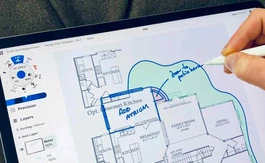
Cedreo is a floor plan software developed especially for interior designers, home builders and remodelling professionals. With Cedreo, designing teams can create complete proposals for their clients within a time span of 2 hours in a hassle-free manner. From 2D and 3D floor plans, 3D renderings to surface area-based tables, you can design everything with this floor plan software.

You can also share your designs with teammates for referencing purposes and modify old designs. Further, Cedero offers a vast product library, housing more than 650 designing elements. All created designs get saved within Cedreo in an automated manner and can be duplicated as well.

What can you do with the wall opening feature of Cedreo house design software?

Cedreo offers a variety of wall opening features like:

  1. You get to choose from a massive library of over six hundred and fifty products, housing elements like front doors, windows, inside doors, garage and more.
  2. You can change the orientation and opening direction of the doors.
  3. The size and color of each product can be customized by the designers as per their requirements.
  4. You can select the depth of doors and windows, add window sills, insert blind with rolling shutters and use geometric openings on their walls.
  5. With Cedreo, you can duplicate individual products and overall applications in an accurate way.

Pricing of Cedreo House Design Software

The pricing of Cedreo is available on request. You can send in a callback request to connect with our experts. They will offer you a negotiable quote along with other necessary support.

Compatible Platforms for Cedreo 3D home design software

Cedreo is compatible with:

  1. Windows 7 and later versions
  2. Mac OS 10.10 and later versions.

Benefits of Cedreo House Design Software

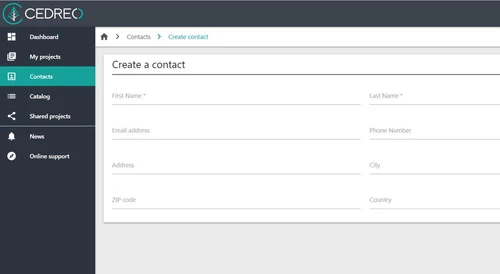
  1. Streamline the Sales Process - Cedreo saves its user’s floor plans and renderings in an automated way along with detailed contact information of related clients. Further, all curated projects can be duplicated and client-specific customization can be added for future use. Designing teams can also share the designs internally for the reference.
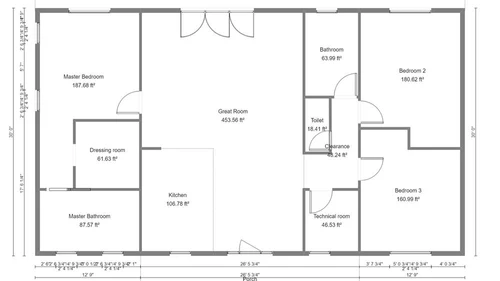
  2. Customizable Final Floor Plans - With Cedreo, you can customize house floor plans as per the client’s requirements. You can add wall-specific dimensions, add names to each room and separate rooms from other spaces by adding identification marks.
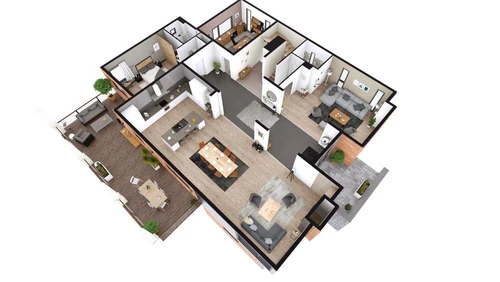
  3. Provides Photorealistic 3D Renderings Improving Client Experience - Cedreo offers a wide variety of 3D rendering tools and options, helping you to create a photorealistic 3D rendering of a house in a seamless manner. You can apply accurate lighting and make adequate changes in surface shading to create a lifelike image within 5 minutes.
Read more

Cedreo Pricing & Plans

Looking for The Right Pricing?

Share your requirements and get a plan built around your business.

  • Define your business needs
  • Get customised pricing
  • Choose features that fit your workflow

Price Available on Request

Get personalised Cedreo pricing that fits your needs. Our team will connect with you.

Cedreo Features

  • icon_check Scalable
    Cedreo offers a scalable platform, with which you can design multiple projects and share them with your team. You can also import
  • icon_check 2D to 3D in an instant
    Designers can start their projects in 2D and change them to 3D with just a single click. This helps get a detailed overview of
  • icon_check Layout Management
    Cedreo offers a wide variety of outdoor layout management tools, helping you to generate detailed floor plans with ease.
  • icon_check Drop Ceiling
    With the intuitive floor plan creation tools offered by Cedreo, you can manage drop ceiling patterns and split level structures
  • icon_check Create Mirror Plans
    With Cedreo, you can create mirror plans of a particular design and use them later as a reference.
  • icon_check 3D Floor Plans
    Cedreo is a professional 3D house design software, offering a wide variety of features related to 3D drawings. From simple floor
  • icon_check Customizable Templates
    The software features a wide variety of floor plan based template designs which you can customize as per the client’s needs,
  • icon_check Roof designs made simple
    Cedreo offers a wide variety of roofing options. You can select from global, multi slope, flat and multi slope roofing options.
Cedreo Demo Video play icon

Get Cedreo Demo

Watch the demo video to explore key features, real workflows, and how the software fits your business needs.

Understand
Key Features
Personal
Demo Insights
Interactive
Demo Support

Cedreo Specifications

Supported Platforms
Windows Windows
Devices
Desktop Desktop
Deployment
Cloud-Based Cloud-Based
Suitable For
All Industries
Business Specific
All Businesses
Language
English

Cedreo Review

4.2

Out of 5

img

Overall Rating

Based on
6 Verified Ratings

Rating Breakdown

  • Features 4.6
  • Value for Money 3.7
  • Ease of Use 4.4
  • Customer Support 4.1

90% Recommend this Product

Add Review

Be the First to Review

This product has no reviews yet. Be the first to leave your feedback.

Add Review

Compare Cedreo With other Floor Plan Software

Products
Ratings
Pricing
Device Supported
Deployment
Supported Platforms
  • img

    Cedreo

  • 4.2

  • Price On Request

  • Desktop

    Mobile

  • Web based

    On Premises

  • Windows

    Mac OS

  • img

    Planner 5D

  • 4.4

  • Price On Request

  • Desktop

    Mobile

  • Web based

    On Premises

  • Windows

    Mac OS

  • img

    Floor Plan Creator

  • 4.5

  • Price On Request

  • Desktop

    Mobile

  • Web based

    On Premises

  • Windows

    Mac OS

  • img

    RoomSketcher

  • 4.2

  • Price On Request

  • Desktop

    Mobile

  • Web based

    On Premises

  • Windows

    Mac OS

  • img

    Floor Planner

  • 4.0

  • Price On Request

  • Desktop

    Mobile

  • Web based

    On Premises

  • Windows

    Mac OS

  • img

    Edraw Max

  • 4.1

  • Price On Request

  • Desktop

    Mobile

  • Web based

    On Premises

  • Windows

    Mac OS

  • img

    Infurnia

  • 4.0

  • Price On Request

  • Desktop

    Mobile

  • Web based

    On Premises

  • Windows

    Mac OS

  • img

    Interior Design 3D

  • 4.2

  • Price On Request

  • Desktop

    Mobile

  • Web based

    On Premises

  • Windows

    Mac OS

  • img

    Space Designer 3D

  • 4.3

  • Price On Request

  • Desktop

    Mobile

  • Web based

    On Premises

  • Windows

    Mac OS

  • img

    CSI Safe

  • 3.8

  • Price On Request

  • Desktop

    Mobile

  • Web based

    On Premises

  • Windows

    Mac OS

(2) Product(s) selected

Cedreo Alternatives

See All Cedreo Alternatives

Available

Price on Request

Starting Price:

$89 /year

Starting Price:

₹34,000

Available

Price on Request

Articles for Cedreo

See All Related Articles

Can I upload blueprints of a floor plan within Cedreo?

Yes, you can import blueprints of a floorplan in .png and .jpeg file format within Cedreo.

How is the Sun Orientation feature of Cedreo useful for its users?

You can customize the Sun’s position within your projects. With this feature, you can visualize the exact amount of sunlight each room will be receiving, by dragging the mouse across the latitude and longitude.

Can I get a demo of Cedreo?

Yes, you can request an online demo of Cedreo. Our software experts will get back to you as per your mentioned time schedule.

Can I make customizations in 3D Rendering images within Cedreo?

Yes, for each 3D rendering image, you can make changes within the interior and exterior perspective of the house. You can also customize the camera angle to top view or at eye level, choose a preferable lighting option and customize sunlight orientation.

Does Cedreo have a mobile app?

No, Cedreo does not have a mobile app as of now.

20,000+ Software Listed

Best Price Guranteed

Free Expert Consultation

2M+ Happy Customers

Terms and Condtions

close

Users with registered businesses can purchase goods from merchants on the platform to satisfy their business needs. Users are not permitted to utilize any products acquired through the platform for resale, advertising, business, or further distribution.

For each purchase made, users will receive a Tax Invoice (or 'GST invoice') that includes specific details such as:

  • the GSTIN of the user associated with their registered business, and

  • the specified Entity Name for their business.

It should be noted that not all products are eligible for GST Invoice. Only the products displayed by participating sellers with the 'GST-based Invoice Available' callout on the product description page would qualify.

Certain goods and services are not eligible to get a GST Invoice, including items with VAS, i.e., Value Added Services (e.g., Total Mobile Protection/Assured Buyback) and those involving an exchange offer at the time of purchase.

Users must ensure the accuracy of the GSTIN, and business entity name provided for the GST Invoice. Requests for corrections into GST Invoice would not be accommodated by Techjockey.com or any Seller, and any issues arising from user-provided information are the sole responsibility of users.

Techjockey.com is not liable for the GST Invoice or any associated input tax credit. To efficiently claim an input tax credit, users should select the registered place of business address as per the GST authority's data and follow the provisions of the GST Act and rules.

To claim an input tax credit, the delivery and billing addresses must match. Furthermore, input tax credits will not be granted if the delivery address and GSTIN on the invoice are from different states. In case of incorrect GST details provided during the order placement, the order will be canceled automatically.