linkedin
CSI Safe logo
play SAFE - 01 Introductory Tutorial: Watch & Learn
csi safe model
csi safe design code

CSI Safe

Brand: CSI Engineering

  • 3.8

  • 3 Ratings

Effortlessly design floors, lay foundations, and integrate comprehensive analysis with CSI Safe, the powerful engineering tool for floor and foundation systems.

See More

Have you used CSI Safe before?

Share your insights for better experience

Add a Review

Price Available on Request

Questions about pricing or customization? We’re here to help, just a click away.

100% Genuine
Products
Best Price
Guaranteed
Safe & Secure
Payment
  • Description

  • Pricing

  • Features

  • Specification

  • Review

  • Compare

  • Alternatives

  • FAQ

CSI Safe Software Overview

What is CSI Safe?

CSI SAFE is a specialized engineering software solution dedicated to the analysis and design of elevated floor and foundation systems. Developed by CSI Engineering, it provides structural engineers with a powerful toolset for creating everything from simple concrete slabs to complex post-tensioned foundation mats. The software integrates all essential aspects of the engineering design process, from framing layouts and detailed drawing to comprehensive analysis and reporting. By combining sophisticated modeling capabilities with user-friendly design tools, CSI SAFE streamlines the workflow for designing concrete slabs and basemats, ensuring both efficiency and accuracy in structural projects.

Why Choose CSI Safe?

  • Efficiency: The software is designed to help engineers draw floors and foundations quickly and effortlessly. Its built-in templates and simplified engineering features accelerate the initial modeling phase.
  • Comprehensive Analysis: CSI SAFE offers robust analysis capabilities, allowing for the evaluation of various load conditions, soil-structure interactions, and long-term deflection, ensuring designs are safe and code-compliant.
  • Integrated Design: It is not just an analysis tool; it fully integrates design and detailing. The software performs code-based checks for flexure, shear, and punching shear, and can automatically generate reinforcement layouts.
  • Advanced Functions: Sophisticated features for post-tensioning (P/T) design, slab cracking analysis, and support for a wide range of international design codes make it a versatile tool for global projects.
  • Detailed Reporting: Generate comprehensive, customizable reports that include graphical plots, schematics, and detailed calculation sheets, facilitating clear communication and project documentation.

Advanced Features of CSI Safe

  • 3D Modeling and Visualization:

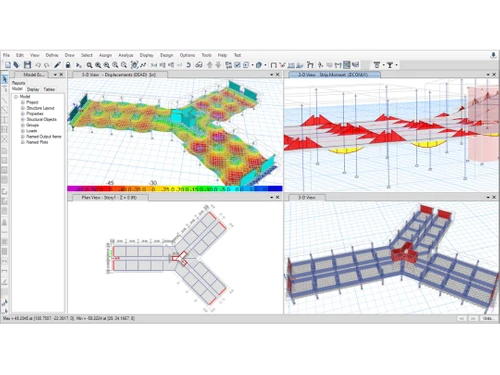
    Develop intricate models of foundations and floor systems in a three-dimensional environment. This allows for a clear visualization of the structural geometry, applied loads, and analysis results, such as deformation shapes and stress contours.

  • Design Templates:

    Leverage a wide array of built-in templates for common systems like flat slabs, two-way slabs, waffle slabs, ribbed slabs, and various foundation types including isolated, combined, and mat footings. These templates provide a rapid starting point for any project.

  • Post-Tensioning (P/T) Design:

    CSI SAFE includes powerful tools for modeling and designing post-tensioned concrete. Users can easily lay out tendons, specify prestressing forces, and check stresses at transfer and service stages, all within a single, integrated interface.

  • Soil-Structure Interaction:

    Accurately model foundation systems by defining soil supports using area springs. The software can calculate the required spring stiffness based on the subgrade modulus, ensuring a realistic analysis of foundation behavior.

Key Capabilities of CSI Safe

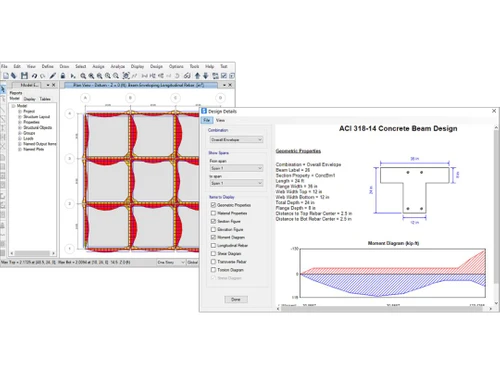
  • Slab and Beam Design: Perform detailed analysis and design of reinforced concrete and post-tensioned beams, T-beams, and slabs according to numerous international codes.
  • Foundation and Basemat Design: Model and analyze complex foundation systems, including mat foundations and combined footings, considering uplift and soil pressure.
  • Punching Shear Check: Automatically identify critical sections around columns and concentrated loads and perform detailed punching shear calculations and design, suggesting reinforcement where needed.
  • Load Combinations: Define and apply a wide range of load cases (dead, live, wind, seismic) and automatically generate code-based load combinations for analysis and design.
  • Detailed Drawing Generation: Create detailed and organized drawings, including framing plans, reinforcement plans, and section cuts, which can be exported to CAD programs.

How to Use CSI Safe?

  1. Model Initialization: Start a new model by selecting a design code and choosing from a variety of built-in templates or a blank grid.
  2. Geometry and Property Definition: Define grid systems and draw structural objects like slabs, beams, columns, and walls. Assign material properties (e.g., concrete strength) and section properties.
  3. Load Application: Define and assign various types of loads, including point, line, and surface loads for different cases such as dead, live, and lateral loads.
  4. Run Analysis: Execute the finite-element analysis to calculate displacements, forces, and stresses throughout the structure.
  5. Perform Design Checks: Run the design engine to check the model against the requirements of the selected building code for flexure, shear, and other criteria.
  6. Review and Refine: Review the analysis and design results using graphical displays and tabular reports. Refine the model as necessary to optimize the design.
  7. Generate Output: Create final reports, drawings, and schedules for construction documentation.

CSI Safe Price

CSI SAFE price is available on request at Techjockey. The pricing model is based on different parameters, including extra features, deployment type, and the total number of users. For further queries related to the product, you can contact our product expert and learn more about the pricing and offers.

Read more

CSI Engineering Company Details

Founded Year:  1975

CSI Engineering provide designs that are not only timely and within budget, but also buildable in the real world. The construction background of our principals is unique in the industry and provides a perspective of a project, unlike any other engineering firm.

Director/Founders Ashraf Habibullah
Company Size 101-500 Employees

CSI Safe Pricing & Plans

Looking for The Right Pricing?

Share your requirements and get a plan built around your business.

  • Define your business needs
  • Get customised pricing
  • Choose features that fit your workflow

Price Available on Request

Get personalised CSI Safe pricing that fits your needs. Our team will connect with you.

CSI Safe Features

  • icon_check 3D Modeling
    Lay foundations and build floors in three dimensions using this specialized software.
  • icon_check Templates
    CSI safe 2014 provides you with modeling templates.
  • icon_check Design tools
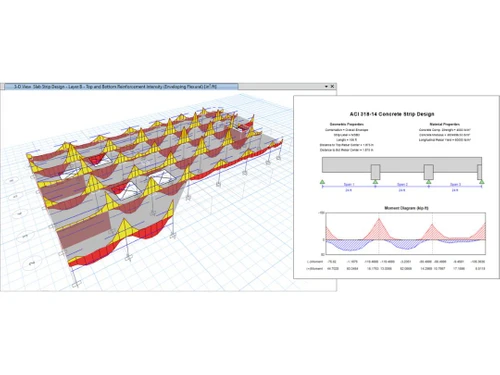
    Designing tools like strip based design, beam design, FEM based slab design, etc are available.
  • icon_check Analysis
    CSI safe 2014 helps you easily analyze large and complex models.  
  • icon_check Drawing management
    The drawing tools let you lay out models quickly and efficiently.
  • icon_check Import/Export Management
    BIM-enabled applications facilitate import/export of data in IFC 2x3 and IFC 4 formats files.
  • icon_check Reporting
    Comprehensive and tailor-made reports are available for analysis.  
CSI Safe Demo Video play icon

Get CSI Safe Demo

Watch the demo video to explore key features, real workflows, and how the software fits your business needs.

Understand
Key Features
Personal
Demo Insights
Interactive
Demo Support

CSI Safe Specifications

Supported Platforms
Windows Windows
Deployment
Cloud-Based Cloud-Based
Suitable For
Architecture Designers
Language
English

CSI Safe Review

3.8

Out of 5

img

Overall Rating

Based on
3 Verified Ratings

Rating Breakdown

  • Features 3.8
  • Value for Money 4
  • Ease of Use 4
  • Customer Support 3.6

96% Recommend this Product

Add Review

Be the First to Review

This product has no reviews yet. Be the first to leave your feedback.

Add Review

Compare CSI Safe With other Floor Plan Software

Products
Ratings
Pricing
Device Supported
Deployment
Supported Platforms
  • img

    CSI Safe

  • 3.8

  • Price On Request

  • Desktop

    Mobile

  • Web based

    On Premises

  • Windows

    Mac OS

  • img

    Floor Plan Creator

  • 4.5

  • Price On Request

  • Desktop

    Mobile

  • Web based

    On Premises

  • Windows

    Mac OS

  • img

    Planner 5D

  • 4.4

  • Price On Request

  • Desktop

    Mobile

  • Web based

    On Premises

  • Windows

    Mac OS

  • img

    RoomSketcher

  • 4.2

  • Price On Request

  • Desktop

    Mobile

  • Web based

    On Premises

  • Windows

    Mac OS

  • img

    Floor Planner

  • 4.0

  • Price On Request

  • Desktop

    Mobile

  • Web based

    On Premises

  • Windows

    Mac OS

  • img

    Cedreo

  • 4.2

  • Price On Request

  • Desktop

    Mobile

  • Web based

    On Premises

  • Windows

    Mac OS

  • img

    Edraw Max

  • 4.1

  • Price On Request

  • Desktop

    Mobile

  • Web based

    On Premises

  • Windows

    Mac OS

  • img

    Interior Design 3D

  • 4.2

  • Price On Request

  • Desktop

    Mobile

  • Web based

    On Premises

  • Windows

    Mac OS

  • img

    Infurnia

  • 4.0

  • Price On Request

  • Desktop

    Mobile

  • Web based

    On Premises

  • Windows

    Mac OS

  • img

    Space Designer 3D

  • 4.3

  • Price On Request

  • Desktop

    Mobile

  • Web based

    On Premises

  • Windows

    Mac OS

(0) Product(s) selected

CSI Safe Alternatives

See All CSI Safe Alternatives

Available

Price on Request

Available

Price on Request

Starting Price:

$89 /year

Starting Price:

₹34,000

Articles for CSI Safe

See All Related Articles

What are the minimum computer system requirements for CSI SAFE 2014?

The minimum computer system requirements for CSI ETABS are minimum Intel Pentium 4 or AMD Athlon 64 processor, a CPU that supports SSE2, minimum 3 GB (for 32-bit O/S) and 4 GB (for 64-bit O/S) memory, 6GB disk space and Windows Vista/7/8/10 operating system.

Does SAFE 2014 check one-way shear in two-way slabs?

Yes, SAFE 2014 solution facilitates check one-way shear in two-way slabs. This check is based on design strips and follows a similar procedure as beam shear design.

What is CSI SAFE used for?

CSI SAFE is a specialized structural engineering software used for the analysis and design of concrete floor slabs and foundation systems.

What is the difference between SAFE and ETABS?

ETABS is used for the analysis and design of the entire building structure, whereas SAFE is specialized for the detailed design and analysis of individual floor slabs and foundation systems.

Is CSI SAFE free?

No, CSI SAFE is commercial software and is not available for free; pricing is provided by the vendor upon request.

How do I export from ETABS to SAFE?

You can export a model from ETABS to SAFE by selecting the desired floor or story and using the 'File > Export > Story as SAFE .f2k file' command.

Does CSI SAFE support 3D modeling?

Yes, CSI SAFE includes 3D modeling capabilities specifically tailored for laying out and designing complex floor systems and foundations.

Who is the target audience for CSI SAFE software?

CSI SAFE is developed primarily for structural engineers who need a specialized tool for the design and analysis of reinforced concrete floor and foundation systems.

How much does CSI SAFE cost?

CSI SAFE price is available on request at Techjockey.com.

What core features are included in CSI SAFE?

The software includes integrated drawing tools, comprehensive analysis and design capabilities, and detailed reporting features for engineering floor and foundation systems.

20,000+ Software Listed

Best Price Guranteed

Free Expert Consultation

2M+ Happy Customers

Terms and Condtions

close

Users with registered businesses can purchase goods from merchants on the platform to satisfy their business needs. Users are not permitted to utilize any products acquired through the platform for resale, advertising, business, or further distribution.

For each purchase made, users will receive a Tax Invoice (or 'GST invoice') that includes specific details such as:

  • the GSTIN of the user associated with their registered business, and

  • the specified Entity Name for their business.

It should be noted that not all products are eligible for GST Invoice. Only the products displayed by participating sellers with the 'GST-based Invoice Available' callout on the product description page would qualify.

Certain goods and services are not eligible to get a GST Invoice, including items with VAS, i.e., Value Added Services (e.g., Total Mobile Protection/Assured Buyback) and those involving an exchange offer at the time of purchase.

Users must ensure the accuracy of the GSTIN, and business entity name provided for the GST Invoice. Requests for corrections into GST Invoice would not be accommodated by Techjockey.com or any Seller, and any issues arising from user-provided information are the sole responsibility of users.

Techjockey.com is not liable for the GST Invoice or any associated input tax credit. To efficiently claim an input tax credit, users should select the registered place of business address as per the GST authority's data and follow the provisions of the GST Act and rules.

To claim an input tax credit, the delivery and billing addresses must match. Furthermore, input tax credits will not be granted if the delivery address and GSTIN on the invoice are from different states. In case of incorrect GST details provided during the order placement, the order will be canceled automatically.