linkedin
Checkpoint Harmony Email Security logo
play Check Point Harmony Email & Collaboration: Detect Zero Day Malware
play Check Point Harmony Email & Collaboration: Block Spam and Phishing
play Check Point Harmony Email & Collaboration: Secure Your Email

Checkpoint Harmony Email Security

Brand: Check Point Software Technologies

  • 4.4

  • 3 Ratings

Safeguard your inbox with Harmony Checkpoint Email Security, protecting against malware, ransomware, and business email compromise, securing your organization's sensitive information.

See More

Have you used Checkpoint Harmony Email Security before?

Share your insights for better experience

Add a Review

Price Available on Request

Questions about pricing or customization? We’re here to help, just a click away.

100% Genuine
Products
Best Price
Guaranteed
Safe & Secure
Payment
  • Description

  • Pricing

  • Features

  • Specification

  • Review

  • Compare

  • Alternatives

  • FAQ

Checkpoint Harmony Email Security Software Overview

What is Checkpoint Harmony Email Security?

Checkpoint Harmony delivers security for users, devices, and access in the hybrid workspace, safeguarding against advanced threats like phishing and ransomware, regardless of team location, application usage, or device preference. With Harmony, you can enjoy unparalleled protection for your hybrid and remote workforce, ensuring the safety of emails, collaboration tools, browsers, and unmanaged devices.

It is a comprehensive solution powered by AI that provides 360° threat prevention and ensures security across all environments and applications. This top-tier cybersecurity platform offers benefits, including security, up to 40% reduction in IT tool expenses, and streamlined operational costs.

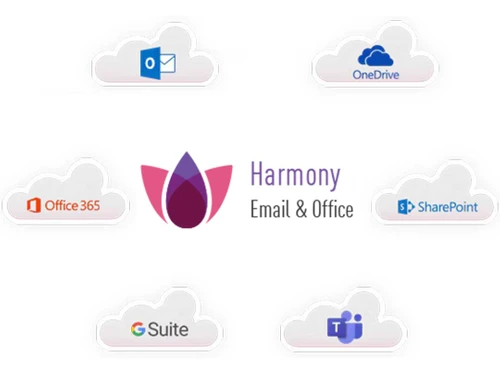
Infact, it provides a comprehensive email security solution, thereby protecting the workspace against harmful emails, phishing attempts, and data breaches. The platform delivers advanced threat prevention, anti-phishing functionalities, and data-loss prevention for cloud-based email services, including Office 365 and G Suite.

Why Choose Checkpoint Harmony Email Security Software?

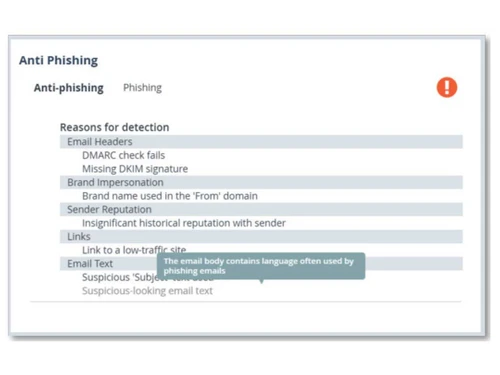
  • Anti-Phishing: It prevents advanced phishing attempts, such as impersonation and Business Email Compromise (BEC), from reaching the inbox.
  • Malware Defense: Stops elusive malware and ransomware and delivers safe files rapidly.
  • Data Loss Prevention: Establishes tailored protocols to safeguard data, ensuring compliance standards.
  • Account Takeover Prevention: Automatically blocks suspicious logins through an event analysis algorithm that detects indicators of malicious activity, ensuring data security and compliance.
  • Multi-Layered Defense: Offers multiple layers of protection against email attacks, including API-based protection for inbound, outbound, and internal communication.
  • Adaptive to Threats: Adapts to changing threat landscapes for continuous protection and easy management.

Benefits of Checkpoint Harmony Email Security Platform

  • Email Encryption: Ensures secure transmission of sensitive information and prevents unauthorized access to emails, both during transit and while stored.
  • Anti-Spam Filtering: Blocks spam, phishing attempts, and unwanted messages to reduce inbox clutter and protect against social engineering attacks.
  • Data Loss Prevention (DLP): Monitors and prevents unauthorized transmission of sensitive data via email, helping organizations comply with data protection regulations.
  • Compliance Assistance: This service helps organizations achieve regulatory compliance by enforcing email security policies and providing audit trials and compliance reports.
  • Real-time Threat Intelligence: Receives real-time threat updates to defend against emerging email threats like phishing and ransomware attacks.
  • User Awareness Training: Supports email security awareness campaigns and provides educational resources to help employees recognize and avoid email threats.
  • Centralized Management: Offers a centralized console for configuring and monitoring email security policies, simplifying administration and enhancing visibility.

Checkpoint Harmony Email Security Pricing

Checkpoint Harmony Email Security software pricing details are available on request at techjockey.com.

The pricing model is based on different parameters, including extra features, deployment type, and the total number of users. If you have further queries related to the product, you can contact our product team to learn more about the pricing and offers.

Read more

Check Point Software Technologies Company Details

Founded Year:  1993

Check Point Software Technologies Ltd. Checkpoint is a leading provider of cyber security solutions to governments and corporate enterprises globally. Its solutions protect customers from 5th generation cyber-attacks with an industry-leading catch rate of malware, ransomware and other types.

Director/Founders Gil Shwed
Company Size 1000+ Employees

Checkpoint Harmony Email Security Pricing & Plans

Looking for The Right Pricing?

Share your requirements and get a plan built around your business.

  • Define your business needs
  • Get customised pricing
  • Choose features that fit your workflow

Price Available on Request

Get personalised Checkpoint Harmony Email Security pricing that fits your needs. Our team will connect with you.

Checkpoint Harmony Email Security Features

  • icon_check Phishing Protection
    Protects against phishing attempts to protect your emails from fraudulent schemes.
  • icon_check Malware Protection
    Guards against malware threats to prevent malicious software from infecting your systems.
  • icon_check Email Scanning
    Scans emails thoroughly to detect and block any harmful content or attachments.
  • icon_check Collaboration Security
    Ensures secure collaboration by safeguarding emails shared among team members.
  • icon_check User Awareness
    Provides tools and resources to enhance user awareness and recognition of email threats.
  • icon_check Quarantine Management
    Manages quarantined emails effectively, handling suspicious emails appropriately.
  • icon_check Prevent Data Loss
    Implements measures to prevent sensitive data from being leaked or compromised via email.
  • icon_check Prevent Account Takeover
    Protects against unauthorized access to email accounts, safeguarding sensitive information and communications.
Checkpoint Harmony Email Security Demo Video play icon

Get Checkpoint Harmony Email Security Demo

Watch the demo video to explore key features, real workflows, and how the software fits your business needs.

Understand
Key Features
Personal
Demo Insights
Interactive
Demo Support

Checkpoint Harmony Email Security Specifications

Supported Platforms
Windows Windows MacOS MacOS Linux Linux
Devices
Desktop Desktop
Deployment
Cloud-Based Cloud-Based
Suitable For
All Industries
Business Specific
All Businesses
Business Size
Medium Business Enterprises SMBs SMEs MSMBs MSMEs
Customer Support
Email
Language
English
Training Resources
In Person Live Online Documentation

Explore the Best Alternative Solutions Similar to Your Business Size and Needs

Checkpoint Harmony Email Security Review

4.4

Out of 5

img

Overall Rating

Based on
3 Verified Ratings

Rating Breakdown

  • Features 4.1
  • Value for Money 4.8
  • Ease of Use 4.3
  • Customer Support 4.3

90% Recommend this Product

Add Review

Techjockey Trusted Reviews from Verified Users

No reviews are currently available for Checkpoint Harmony Email Security. Discover similar Email Security Software reviews

  • Galaxkey

    4.7

    Whats great - galaxkey I discovered this little pearl on the AppStore, it doesn't look like a lot to begin, yet when I utilized it I made s... read more

  • MDaemon Security Gateway For Email Servers

    4.3

    Whats great - Was a bit sceptical about buying from here. Had issue trying to register with the company of the product I purchased. Emailed... read more

  • Sophos Email Security

    4.5

    Whats great - they helped me locate the right software for my business read more

Compare Checkpoint Harmony Email Security With other Email Security Software

Products
Ratings
Pricing
Device Supported
Deployment
Supported Platforms
  • img

    Checkpoint Harmony Email Security

  • 4.4

  • Price On Request

  • Desktop

    Mobile

  • Web based

    On Premises

  • Windows

    Mac OS

  • img

    Galaxkey

  • 4.7

  • Price On Request

  • Desktop

    Mobile

  • Web based

    On Premises

  • Windows

    Mac OS

  • img

    Zoho eProtect

  • 4.1

  • Price On Request

  • Desktop

    Mobile

  • Web based

    On Premises

  • Windows

    Mac OS

  • img

    FourCore ATTACk

  • 4.5

  • ₹ 50000

  • Desktop

    Mobile

  • Web based

    On Premises

  • Windows

    Mac OS

  • img

    Tessian

  • 4.2

  • Price On Request

  • Desktop

    Mobile

  • Web based

    On Premises

  • Windows

    Mac OS

  • img

    VIPRE SafeSend

  • 4.4

  • Price On Request

  • Desktop

    Mobile

  • Web based

    On Premises

  • Windows

    Mac OS

  • img

    GoDMARC

  • 4.6

  • Price On Request

  • Desktop

    Mobile

  • Web based

    On Premises

  • Windows

    Mac OS

  • img

    MxToolBox

  • 4.0

  • Price On Request

  • Desktop

    Mobile

  • Web based

    On Premises

  • Windows

    Mac OS

(0) Product(s) selected

Checkpoint Harmony Email Security Alternatives

See All Checkpoint Harmony Email Security Alternatives

Available

Price on Request

Starting Price:

$129 /Month

Starting Price:

$4

Available

Price on Request

Articles for Checkpoint Harmony Email Security

See All Related Articles

How does Checkpoint Harmony Email Security stop phishing attacks?

It uses smart techniques to check email content, URLs, and sender reputation, blocking phishing attempts before they reach your inbox.

Does Checkpoint Harmony Email Security encrypt emails?

It encrypts emails to keep sensitive data safe and prevent unauthorized access.

Can Harmony Email Security spot and block harmful email attachments?

It scans for malware in attachments and blocks them if harmful.

Is Checkpoint Harmony Email Security compliant with data protection laws?

It helps meet regulations by stopping data leaks and ensuring secure data transmission.

How does Checkpoint Harmony Email Security handle spam?

It filters out spam, phishing, and unwanted messages, making your inbox safer and cleaner.

Does Checkpoint Harmony Email Security software give real-time threat updates?

Yes, Checkpoint Harmony Email Security is designed to provide all the updates on new threats to keep your email security up to date.

Does Checkpoint Harmony Email Security Software offer user training?

It provides training to help users recognize and avoid email threats.

20,000+ Software Listed

Best Price Guranteed

Free Expert Consultation

2M+ Happy Customers

Terms and Condtions

close

Users with registered businesses can purchase goods from merchants on the platform to satisfy their business needs. Users are not permitted to utilize any products acquired through the platform for resale, advertising, business, or further distribution.

For each purchase made, users will receive a Tax Invoice (or 'GST invoice') that includes specific details such as:

  • the GSTIN of the user associated with their registered business, and

  • the specified Entity Name for their business.

It should be noted that not all products are eligible for GST Invoice. Only the products displayed by participating sellers with the 'GST-based Invoice Available' callout on the product description page would qualify.

Certain goods and services are not eligible to get a GST Invoice, including items with VAS, i.e., Value Added Services (e.g., Total Mobile Protection/Assured Buyback) and those involving an exchange offer at the time of purchase.

Users must ensure the accuracy of the GSTIN, and business entity name provided for the GST Invoice. Requests for corrections into GST Invoice would not be accommodated by Techjockey.com or any Seller, and any issues arising from user-provided information are the sole responsibility of users.

Techjockey.com is not liable for the GST Invoice or any associated input tax credit. To efficiently claim an input tax credit, users should select the registered place of business address as per the GST authority's data and follow the provisions of the GST Act and rules.

To claim an input tax credit, the delivery and billing addresses must match. Furthermore, input tax credits will not be granted if the delivery address and GSTIN on the invoice are from different states. In case of incorrect GST details provided during the order placement, the order will be canceled automatically.