USA
USA UAE
UAESmall Business
Designed for startups and growing businesses
See More





Brand: PDS Infotech
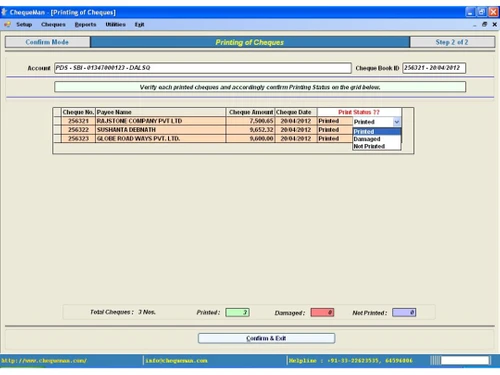
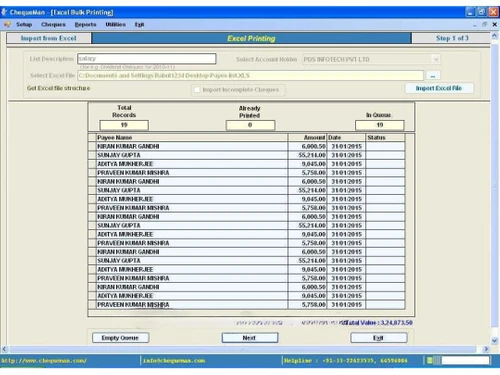
ChequeMan streamlines cheque printing with batch and bulk printing, post-dated cheques, cheque book management, and support for multiple account holders and bank accounts.
See MoreHave you used ChequeMan before?
Share your insights for better experience
View plans
 Save upto 18%, Get GST Invoice on your business purchase T&C Buy Now & Pay Later, Check offer on payment page.
 Brand: PDS Infotech
Founded Year: 2008
PDS is an IT service company that offers TDS software, check printing software, TDS returns, enterprise TDS, and TDS online filing.
 Password Protection Account & Bank Support Multi User Smart Cheque Preparation Simple Installation / setup Bulk & EMI Cheque Reports Security User Preferences Excel Import Data Printing Manual Cheque Recording Cancelled Cheque Management Cheque Inventory Management Cheque Book System Backup & Restore Data

Watch the demo video to explore key features, real workflows, and how the software fits your business needs.
 Windows
  Desktop
  Perpetual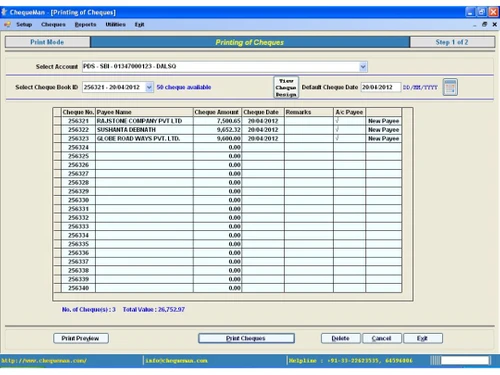
Small Business
Designed for startups and growing businesses
Medium Business
Built for business growth and flexibility
Enterprises
Designed for complex and large-scale business needs
4.1
Out of 5

Overall Rating
Based on
5 Verified Ratings
Rating Breakdown
94% Recommend this Product
Add ReviewTechjockey Trusted Reviews from Verified Users
No reviews are currently available for ChequeMan. Discover similar Cheque Printing Software reviews
ChequePOT
Whats great - Free plan lets me print up to 25 cheques/day—perfect for small biz. read more

Qelocity Cheque Printing Software
Whats great - Techjockey listened to our needs, found companies that matched and got us connected. Eliminated hours of work for me. read more

Cheque 360
Whats great - Reporting read more

ChequeMan
₹ 5500.00 excl. GST
Desktop
Mobile
Web based
On Premises
Windows
Mac OS

MoneyFlex
Price On Request
Desktop
Mobile
Web based
On Premises
Windows
Mac OS
ChequePOT
₹ 395
Desktop
Mobile
Web based
On Premises
Windows
Mac OS

Cheque Printing Solution
Price On Request
Desktop
Mobile
Web based
On Premises
Windows
Mac OS
QUICK CHEQUE
Price On Request
Desktop
Mobile
Web based
On Premises
Windows
Mac OS

Sterling Cheque Printing Software
Price On Request
Desktop
Mobile
Web based
On Premises
Windows
Mac OS

MLM Cheque Printing Software
Price On Request
Desktop
Mobile
Web based
On Premises
Windows
Mac OS

Dumisoft Cycle
Price On Request
Desktop
Mobile
Web based
On Premises
Windows
Mac OS
Qelocity Cheque Printing Software
Price On Request
Desktop
Mobile
Web based
On Premises
Windows
Mac OS

Bulk Cheque Printing Software
Price On Request
Desktop
Mobile
Web based
On Premises
Windows
Mac OS

Cheque360
Price On Request
Desktop
Mobile
Web based
On Premises
Windows
Mac OS
(2) Product(s) selected
Available
Price on Request
Available
Price on Request
Available
Price on Request
Available
Price on Request
Available
Price on Request

Starting Price:
₹950 /License ₹7,999
Starting Price:
$90 /Year
Starting Price:
$180 /Year
Starting Price:
$160 /License
Starting Price:
$50 /Month

Starting Price:
$155 /License
The after sale support is limited for a period of one year from the date of initial installation. However, the software is licensed with unlimited validity and you can continue using it.
The software has an in-built feature for checking for the latest version of the software and updating itself automatically. For this internet connectivity is essential on the system. There is also a system in place for off-line updates in the absence of internet connectivity.
The licensed software has unlimited validity for use which is only limited by change in technology.
ChequeMan has the interface of importing data from Excel worksheets for printing of cheques. The format for the excel sheet is provided within the software. You can export data in excel using Tally, ERP or any other software and import the same in ChequeMan for cheque printing.
Yes, ChequeMan has a simple method for preparing and printing EMI cheques. You need to define the Payee, Amount, No. of EMIs and its frequency (monthly, quarterly, etc.). The EMI cheques with incremental dates are automatically prepared and you can go ahead with the printing. To prepare 24 – 36 cheques, the entire process should take less than five minutes.
The pricing of ChequeMan is available at INR 5500(excluding GST) at techjockey.com.
ChequeMan is a smart and easy cheque printing software designed to automate and streamline the process of printing cheques accurately and efficiently.
ChequeMan price starts at INR 5,500 at techjockey.com.
ChequeMan includes features such as importing pre-formatted cheques from the web, recording manual cheques, Excel import for printing, printing post-dated cheques, a reporting system, and password protection, with advanced features like batch printing and EMI cheque printing available in higher editions.
ChequeMan is suitable for individuals, businesses, and organizations of various sizes that require an efficient and accurate solution for printing cheques, ranging from single users to multi-user environments.
Yes, ChequeMan supports printing post-dated cheques across all editions, and the Professional and Multi User editions specifically include the functionality to print EMI cheques.
Yes, the Multi User Edition of ChequeMan is designed for multi-user environments, starting with 3 users and offering options for additional user add-ons.
Yes, all editions of ChequeMan provide the functionality to import cheque data directly from Excel, streamlining the printing process.
20,000+ Software Listed
Best Price Guranteed
Free Expert Consultation
2M+ Happy Customers
Terms and Condtions

Users with registered businesses can purchase goods from merchants on the platform to satisfy their business needs. Users are not permitted to utilize any products acquired through the platform for resale, advertising, business, or further distribution.
For each purchase made, users will receive a Tax Invoice (or 'GST invoice') that includes specific details such as:
the GSTIN of the user associated with their registered business, and
the specified Entity Name for their business.
It should be noted that not all products are eligible for GST Invoice. Only the products displayed by participating sellers with the 'GST-based Invoice Available' callout on the product description page would qualify.
Certain goods and services are not eligible to get a GST Invoice, including items with VAS, i.e., Value Added Services (e.g., Total Mobile Protection/Assured Buyback) and those involving an exchange offer at the time of purchase.
Users must ensure the accuracy of the GSTIN, and business entity name provided for the GST Invoice. Requests for corrections into GST Invoice would not be accommodated by Techjockey.com or any Seller, and any issues arising from user-provided information are the sole responsibility of users.
Techjockey.com is not liable for the GST Invoice or any associated input tax credit. To efficiently claim an input tax credit, users should select the registered place of business address as per the GST authority's data and follow the provisions of the GST Act and rules.
To claim an input tax credit, the delivery and billing addresses must match. Furthermore, input tax credits will not be granted if the delivery address and GSTIN on the invoice are from different states. In case of incorrect GST details provided during the order placement, the order will be canceled automatically.