USA
USA UAE
UAESmall Business
Designed for startups and growing businesses
See More





Brand: Qelocity
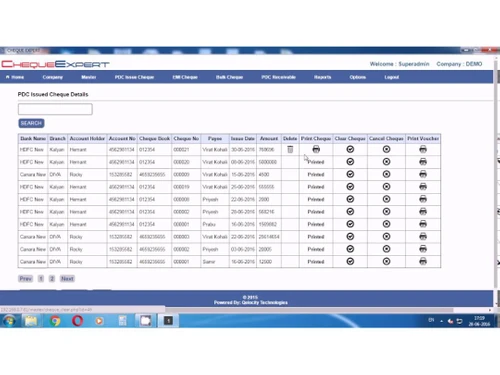
ChequeExpert is an Intelligent Cheque printing software. It helps printing professional looking neat & clean cheques and also reduce the drudgery of following up on the status with reminder alerts feature. The software comes with modules such as printing a single cheque, EMI posted cheques or m...
See MoreHave you used Qelocity Cheque Printing Software before?
Share your insights for better experience
Brand: Qelocity
Founded Year: 2015
Qelocity
Looking for The Right Pricing?
Share your requirements and get a plan built around your business.
Price Available on Request
Get personalised Qelocity Cheque Printing Software pricing that fits your needs. Our team will connect with you.
 Payee Management Received Cheques Module Excel Import Facility Backup & Restore Multi-User Support Printer Compatibility Cheque Book Management Signature Printing Cheque History Tracking Create Account Cheque Printing Payee Details Can Be Printed On Cover Bulk Printing Reporting Manage Unlimited Banks

Watch the demo video to explore key features, real workflows, and how the software fits your business needs.
 Windows
  Desktop
  Perpetual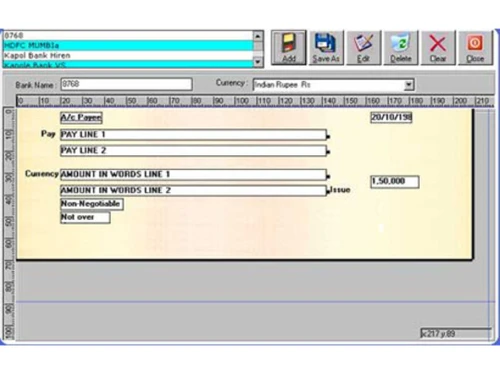
Small Business
Designed for startups and growing businesses
Medium Business
Built for business growth and flexibility
Enterprises
Designed for complex and large-scale business needs
4.4
Out of 5

Overall Rating
Based on
3 Verified Reviews
Rating Breakdown
96% Recommend this Product
Add ReviewUsers generally appreciate Qelocity Cheque Printing Software for its efficiency in handling bulk cheque printing and comprehensive reporting capabilities, which significantly saves time and simplifies processes. Many find the software to be intelligent and innovative, with strong customization options and compatibility with various printers. However, a common concern is the absence of a mobile app, which some users see as a significant limitation. Additionally, there are suggestions for improving customer support and providing more training on features.

Jan 3, 2017
Techjockey Verified
“It was a great experience for me ”
Pros
Techjockey listened to our needs, found companies that matched and got us connected. Eliminated hours of work for me.
Cons
N/A
Jun 13, 2018
Techjockey Verified
“Intelligent and innovative software but lacks mobile app.”
Pros
Will help you to handle post cheque, you will get bank wise reports, supports all sort of printers and full customization.
Cons
Not many cons as it is almost near to perfect. However, the lack of mobile app is a major drawback.
Mar 10, 2018
Techjockey Verified
“It has enabled us to do bulk cheque printing and saves huge time.”
Pros
Multi-tier security, easy navigation, composite features, bulk printing, compatibility with all leading printers and robust connection with multiple banks
Cons
They should improve their customer support. Little training about features is highly recommended.

Qelocity Cheque Printing Software
Price On Request
Desktop
Mobile
Web based
On Premises
Windows
Mac OS

MoneyFlex
Price On Request
Desktop
Mobile
Web based
On Premises
Windows
Mac OS

ChequeMan
₹ 5500
Desktop
Mobile
Web based
On Premises
Windows
Mac OS
ChequePOT
₹ 395
Desktop
Mobile
Web based
On Premises
Windows
Mac OS

Cheque Printing Solution
Price On Request
Desktop
Mobile
Web based
On Premises
Windows
Mac OS

Sterling Cheque Printing Software
Price On Request
Desktop
Mobile
Web based
On Premises
Windows
Mac OS

MLM Cheque Printing Software
Price On Request
Desktop
Mobile
Web based
On Premises
Windows
Mac OS

Dumisoft Cycle
Price On Request
Desktop
Mobile
Web based
On Premises
Windows
Mac OS

Bulk Cheque Printing Software
Price On Request
Desktop
Mobile
Web based
On Premises
Windows
Mac OS
QUICK CHEQUE
Price On Request
Desktop
Mobile
Web based
On Premises
Windows
Mac OS

Cheque360
Price On Request
Desktop
Mobile
Web based
On Premises
Windows
Mac OS
(2) Product(s) selected
Available
Price on Request
Available
Price on Request
Available
Price on Request
Available
Price on Request
Available
Price on Request
Starting Price:
₹950 /License ₹7,999
Starting Price:
$90 /Year
Starting Price:
$180 /Year
Starting Price:
$160 /License
Starting Price:
$50 /Month

Starting Price:
$155 /License
Qelocity Cheque Printing Software ID & Photo Printing Software is compatible with Windows operating systems.
Qelocity Cheque Printing Software ID & Photo Printing Software app is not available.
Qelocity Cheque Printing Software ID & Photo Printing Software supports Web-Based.
Qelocity Cheque Printing Software ID & Photo Printing Software is typically used in All Industries.
Qelocity Cheque Printing Software ID & Photo Printing Software demo is available for free with Techjockey.com
Qelocity Cheque Printing Software ID & Photo Printing Software offers a free trial. However, the premium plan with advanced features available at Techjockey .
For Qelocity Cheque Printing Software ID & Photo Printing Software installation, insert the given CD/USB flash storage in your system and open the Setup Wizard to get started.
Qelocity Cheque Printing Software ID & Photo Printing Software helps with Create Account,Cheque Printing,Payee Details Can Be Printed On Cover and Bulk Printing. It's a complete solution for Reporting and Manage Unlimited Banks.
Qelocity Cheque Printing Software price is available on request on techjoceky.com.
20,000+ Software Listed
Best Price Guranteed
Free Expert Consultation
2M+ Happy Customers
Terms and Condtions

Users with registered businesses can purchase goods from merchants on the platform to satisfy their business needs. Users are not permitted to utilize any products acquired through the platform for resale, advertising, business, or further distribution.
For each purchase made, users will receive a Tax Invoice (or 'GST invoice') that includes specific details such as:
the GSTIN of the user associated with their registered business, and
the specified Entity Name for their business.
It should be noted that not all products are eligible for GST Invoice. Only the products displayed by participating sellers with the 'GST-based Invoice Available' callout on the product description page would qualify.
Certain goods and services are not eligible to get a GST Invoice, including items with VAS, i.e., Value Added Services (e.g., Total Mobile Protection/Assured Buyback) and those involving an exchange offer at the time of purchase.
Users must ensure the accuracy of the GSTIN, and business entity name provided for the GST Invoice. Requests for corrections into GST Invoice would not be accommodated by Techjockey.com or any Seller, and any issues arising from user-provided information are the sole responsibility of users.
Techjockey.com is not liable for the GST Invoice or any associated input tax credit. To efficiently claim an input tax credit, users should select the registered place of business address as per the GST authority's data and follow the provisions of the GST Act and rules.
To claim an input tax credit, the delivery and billing addresses must match. Furthermore, input tax credits will not be granted if the delivery address and GSTIN on the invoice are from different states. In case of incorrect GST details provided during the order placement, the order will be canceled automatically.