linkedin
QUICK CHEQUE logo
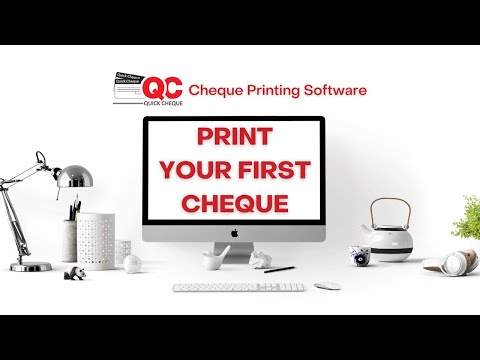
play How to print Checks using Quick Cheque Free Edition
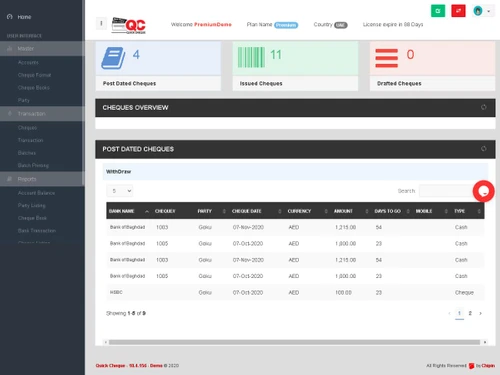
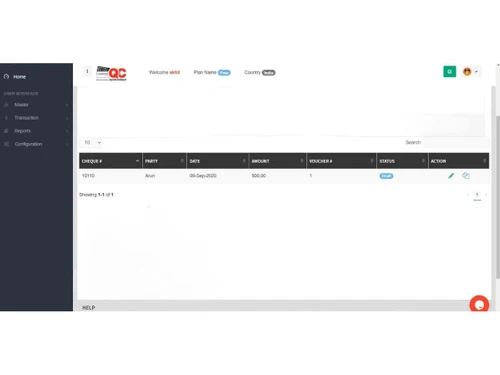
QUICK CHEQUE-overview
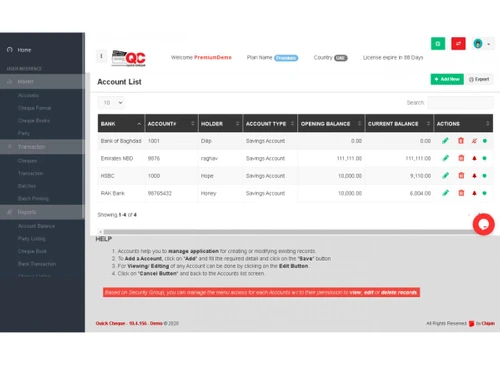
QUICK CHEQUE-account-list

QUICK CHEQUE

Brand: Chipin Corp

  • 4.3

  • 4 Ratings

QUICK CHEQUE simplifies cheque printing and bank book management, eliminating manual errors and presenting a more professional and secure way to handle cheque payments for individuals and businesses.

See More

Have you used QUICK CHEQUE before?

Share your insights for better experience

Add a Review

Price Available on Request

Questions about pricing or customization? We’re here to help, just a click away.

100% Genuine
Products
Best Price
Guaranteed
Safe & Secure
Payment
  • Description

  • Pricing

  • Features

  • Specification

  • Review

  • Compare

  • Alternatives

  • FAQ

QUICK CHEQUE Software Overview

What is QUICK CHEQUE?

QUICK CHEQUE is a software designed to eliminate the hassles of manually writing checks. It's aimed at both individuals and businesses looking for a more accurate, secure, and professional way to manage their cheque payments. The software helps avoid common issues like spelling errors, illegible handwriting, and transaction tracking problems that often occur with manual cheque writing.

By printing cheques with QUICK CHEQUE, users can present a better image of themselves or their company, making a more positive impression. The software not only makes cheque creation easier and faster but also enhances security, as printed cheques are more resistant to tampering compared to handwritten ones. QUICK CHEQUE is marketed as a cost-effective solution that is easy to use, making it accessible to a wide range of users, regardless of their technical expertise. It also functions as a bank book management system.

Why Choose QUICK CHEQUE Software?

  • Eliminates Errors: Reduces spelling mistakes and writing errors common in manual cheque writing.
  • Enhances Security: Printed cheques are more secure against tampering than handwritten ones.
  • Presents a Professional Image: Makes cheques look professional, improving the impression of you and your company.
  • Easy to Use: Designed to be user-friendly, offering an easy solution for cheque printing.
  • Cost-Effective: Provides a cost-effective solution for managing and printing cheques.
  • Accurate Transaction Tracking: Helps in properly tracking transactions, addressing a common issue with manual cheques.
  • Bank Book Management: Serves as a bank book management software.
  • Saves Time: Quick Cheque helps you manage and write cheques fast and easy, saving you time and effort.
  • Reduces Tedious Tasks: It makes cheque creation easier, and faster than manually creating cheques.

Benefits of QUICK CHEQUE Software

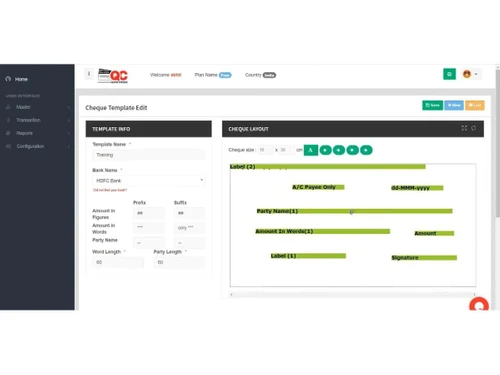
  • Customizable Cheque Formats: Users can create and adjust cheque formats to match their specific requirements or use predefined templates for different countries.
  • Master Information Management: Easily manage and maintain key information such as bank accounts, cheque books, and payee details, reducing the risk of errors.
  • Comprehensive Reporting Features: Generates detailed reports on cheque transactions, allowing for better financial oversight and auditing.
  • Payment and Receipt Vouchers: Enables printing of company-branded payment and receipt vouchers for a complete transaction record.
  • Multi-Currency Support: Allows printing cheques in different currencies, catering to international transactions.
  • User-Friendly Interface: Designed with a straightforward interface that simplifies the cheque printing process for all users.
  • Integration with Accounting Systems: Can easily connect with existing accounting software to streamline financial operations.
  • Post-Dated Cheque Management: Offers features to track post-dated cheques, ensuring timely follow-ups and management.
  • Digital Record-Keeping: Maintains a digital archive of all transactions for easy access and reference during audits or reconciliations.
  • Batch Printing Capability: Facilitates printing multiple cheques at once, saving time during payroll or bulk payment processes.
  • Enhanced Financial Control: Provides businesses with greater control over their financial operations by allowing them to print cheques on demand.

Pricing of QUICK CHEQUE

QUICK CHEQUE price is available on request at techjockey.com.

The pricing model is based on different parameters, including extra features, deployment type, and the total number of users. For further queries related to the product, you can contact our product team and learn more about the pricing and offers.

Read more

Chipin Corp Company Details

Founded Year:  2009

CHIPIN was formed with the aim of providing reliable and hassle free IT services in Dubai.

Director/Founders Dilip Sabharwal
Company Size 101-500 Employees

QUICK CHEQUE Pricing & Plans

Looking for The Right Pricing?

Share your requirements and get a plan built around your business.

  • Define your business needs
  • Get customised pricing
  • Choose features that fit your workflow

Price Available on Request

Get personalised QUICK CHEQUE pricing that fits your needs. Our team will connect with you.

QUICK CHEQUE Features

  • icon_check Templates
    Pre-designed cheque templates for easy and consistent formatting.
  • icon_check File Handling
    Efficiently manage and organize cheque-related files.
  • icon_check Multiple Accounts
    Supports handling multiple bank accounts within the software.
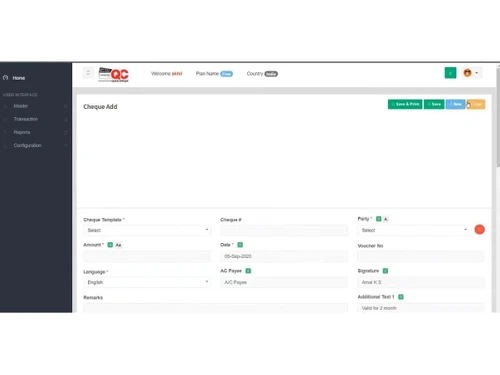
  • icon_check Cheque Printing
    Enables hassle-free and accurate cheque printing.
  • icon_check Reporting
    Generates detailed financial reports for better tracking.
  • icon_check Plug And Play Usage
    Easy installation and setup without complex configurations.
  • icon_check Backup & Restore
    Safeguards data with backup and quick restoration options.
  • icon_check Audit Logs
    Keeps track of cheque transactions and modifications for security.
  • icon_check Multi Currency
    Supports multiple currencies for global transactions.
  • icon_check Security
    Ensures data protection with advanced security features.
  • icon_check Voucher/Cheque Printing
    Prints both vouchers and cheques with ease.
  • icon_check Currency Convertor
    Converts currencies within the software for accurate payments.
  • icon_check Bulk Cheque Printing
    Print multiple drafted cheques at once to save time on payroll or vendor payments.
  • icon_check Cheque Book Management
    Maintain cheque book details like start number, leaf count, usage, and status in the system.
  • icon_check Security & Audit Logs
    Track cheque transactions and modifications to help compliance and auditing.
QUICK CHEQUE Demo Video play icon

Get QUICK CHEQUE Demo

Watch the demo video to explore key features, real workflows, and how the software fits your business needs.

Understand
Key Features
Personal
Demo Insights
Interactive
Demo Support

QUICK CHEQUE Specifications

Supported Platforms
Windows Windows
Devices
Desktop Desktop
Deployment
Perpetual Perpetual
Suitable For
All Industries
Business Specific
All Businesses
Business Size
Small Business Startups Medium Business SMBs SMEs MSMEs Freelancers
Customer Support
Phone Email
Language
English
Training Resources
Documentation

Explore the Best Alternative Solutions Similar to Your Business Size and Needs

QUICK CHEQUE Review

4.3

Out of 5

img

Overall Rating

Based on
4 Verified Ratings

Rating Breakdown

  • Features 4.1
  • Value for Money 4.1
  • Ease of Use 4.5
  • Customer Support 4.6

87% Recommend this Product

Add Review

Techjockey Trusted Reviews from Verified Users

No reviews are currently available for QUICK CHEQUE . Discover similar Cheque Printing Software reviews
  • ChequePOT

    4.5

    Whats great - Free plan lets me print up to 25 cheques/day—perfect for small biz. read more

  • Qelocity Cheque Printing Software

    4.4

    Whats great - Techjockey listened to our needs, found companies that matched and got us connected. Eliminated hours of work for me. read more

  • Cheque 360

    4.6

    Whats great - Reporting read more

Compare QUICK CHEQUE With other Cheque Printing Software

Products
Ratings
Pricing
Device Supported
Deployment
Supported Platforms
  • img

    QUICK CHEQUE

  • 4.3

  • Price On Request

  • Desktop

    Mobile

  • Web based

    On Premises

  • Windows

    Mac OS

  • img

    MoneyFlex

  • 4.4

  • Price On Request

  • Desktop

    Mobile

  • Web based

    On Premises

  • Windows

    Mac OS

  • img

    ChequeMan

  • 4.1

  • ₹ 5500

  • Desktop

    Mobile

  • Web based

    On Premises

  • Windows

    Mac OS

  • img

    ChequePOT

  • 4.3

  • ₹ 395

  • Desktop

    Mobile

  • Web based

    On Premises

  • Windows

    Mac OS

  • img

    Dumisoft Cycle

  • 4.4

  • Price On Request

  • Desktop

    Mobile

  • Web based

    On Premises

  • Windows

    Mac OS

  • img

    Cheque360

  • 4.1

  • Price On Request

  • Desktop

    Mobile

  • Web based

    On Premises

  • Windows

    Mac OS

(0) Product(s) selected

QUICK CHEQUE Alternatives

See All QUICK CHEQUE Alternatives

Available

Price on Request

SAVE UPTO 88%

Starting Price:

$50 /Month

How much does QUICK CHEQUE Software cost?

QUICK CHEQUE price is available on request at techjockey.com.

Is there a QUICK CHEQUE Software app?

No, QUICK CHEQUE does not have an iOS and Android app.

Which operating system does QUICK CHEQUE Software support?

QUICK CHEQUE supports Windows operating systems.

Does QUICK CHEQUE offer a free trial?

No, QUICK CHEQUE does not offer a free trial.

How does QUICK CHEQUE Software work?

QUICK CHEQUE Software eliminates manual cheque writing hassles by providing an easy, accurate, and secure way to print and manage cheques, reducing errors and enhancing professionalism.

Who are the potential users of QUICK CHEQUE Software?

Potential users of QUICK CHEQUE include businesses and individuals.

Is there a free demo for QUICK CHEQUE Software?

Yes, QUICK CHEQUE offers a free demo upon request.

Is QUICK CHEQUE Software free?

No, QUICK CHEQUE is not available for free.

20,000+ Software Listed

Best Price Guranteed

Free Expert Consultation

2M+ Happy Customers

Terms and Condtions

close

Users with registered businesses can purchase goods from merchants on the platform to satisfy their business needs. Users are not permitted to utilize any products acquired through the platform for resale, advertising, business, or further distribution.

For each purchase made, users will receive a Tax Invoice (or 'GST invoice') that includes specific details such as:

  • the GSTIN of the user associated with their registered business, and

  • the specified Entity Name for their business.

It should be noted that not all products are eligible for GST Invoice. Only the products displayed by participating sellers with the 'GST-based Invoice Available' callout on the product description page would qualify.

Certain goods and services are not eligible to get a GST Invoice, including items with VAS, i.e., Value Added Services (e.g., Total Mobile Protection/Assured Buyback) and those involving an exchange offer at the time of purchase.

Users must ensure the accuracy of the GSTIN, and business entity name provided for the GST Invoice. Requests for corrections into GST Invoice would not be accommodated by Techjockey.com or any Seller, and any issues arising from user-provided information are the sole responsibility of users.

Techjockey.com is not liable for the GST Invoice or any associated input tax credit. To efficiently claim an input tax credit, users should select the registered place of business address as per the GST authority's data and follow the provisions of the GST Act and rules.

To claim an input tax credit, the delivery and billing addresses must match. Furthermore, input tax credits will not be granted if the delivery address and GSTIN on the invoice are from different states. In case of incorrect GST details provided during the order placement, the order will be canceled automatically.