linkedin
Clerk logo
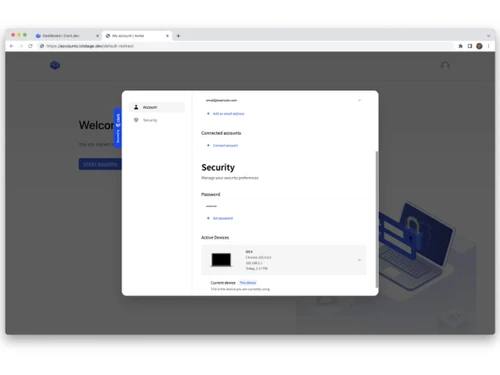
Clerk-security
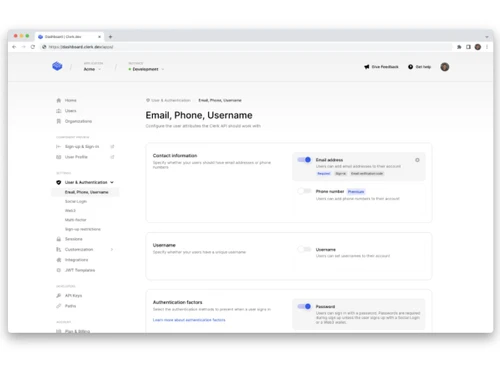
Clerk-authentication
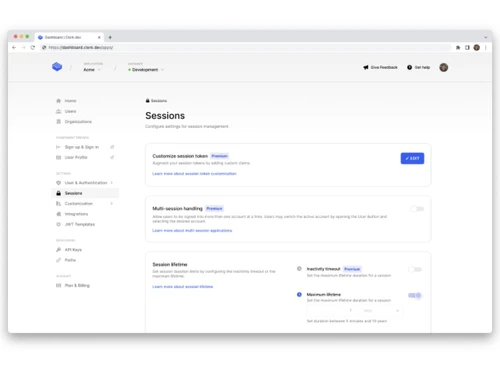
Clerk-sessions

Clerk

Brand: Clerk Inc

  • 4.1

  • 4 Ratings

An identity access management software that helps developers easily add secure authentication and user management features to their apps.

See More

Have you used Clerk before?

Share your insights for better experience

Add a Review
Starting Price
$25

View plans

100% Genuine
Products
Best Price
Guaranteed
Safe & Secure
Payment
  • Description

  • Pricing

  • Features

  • Specification

  • Review

  • FAQ

Starting at $25

Clerk Software Overview

What is Clerk?

Clerk is a secure authentication and identity access management software that helps developers add login, signup, and account features to apps quickly.

It provides ready-to-use, customizable sign-in screens and UI components that match your brand. Clerk supports password and social logins, multi-factor authentication, and session management to keep users safe.

It also helps manage user data, roles, permissions, and organizations within applications. Developers can integrate it easily with frameworks like React and Next.js. Clerk ensures secure, scalable, and compliant user management.

Why Choose Clerk Software?

  • Easy Authentication Setup: Quickly add secure login/signup features.
  • Pre-built UI Components: Ready-to-use sign-in, sign-up, and profile forms.
  • Developer-Friendly APIs: Clean, well-documented APIs for customization.
  • Secure User Management: Built-in tools to manage users and sessions safely.
  • Multi-Factor Authentication: Enhanced account security with MFA.
  • Social Login Support: Users can sign in with Google, Apple, Facebook, etc.
  • Customizable Workflows: Tailor authentication flows to your app's needs.
  • User Profile Features: Built-in user metadata and profile editing.
  • Session Protection: Safe session handling with automatic refresh.
  • Organization & Team Support: Manage teams, roles, and permissions easily.
  • Scalable Architecture: Handles growth from small apps to large platforms.
  • OAuth & External Providers: Integrates smoothly with third-party identity providers.
  • Security Compliance: Designed to meet modern security best practices.

Benefits of Clerk Software

  • Low Maintenance: Most complex authentication logic handled by Clerk.
  • Dashboards & Analytics: Monitor user activity and system health.
  • Internationalization: Supports multiple languages and locales.
  • Strong Documentation: Clear guides, examples, and SDKs for many languages.
  • Custom Branding: Match login UIs to your product's look and feel.
  • Performance Optimized: Fast, reliable infrastructure for auth flows.
  • Active Community & Support: Helpful community and responsive support channels.

Clerk Pricing

Clerk price starts at USD 25 at techjockey.com. The pricing model is based on different parameters, including extra features, deployment type, and the total number of users. For further queries related to the product, you can contact our product team and learn more about the pricing and offers.

Read more

Clerk Inc Company Details

Founded Year:  2020

Clerk develops a software application to provide a sign-up and sign-in page for any website and profile management.

Director/Founders Braden Sidoti, Colin Sidoti
Company Size 101-500 Employees

Clerk Pricing & Plans

Pro
Key Features
  • $0.02 per MAU (your first 10,000 are free)
  • Remove Clerk branding
  • Allowlist / blocklist
  • Customizable session duration
  • Custom email & SMS templates
Starting at $25
    • Licenses

      Licenses
      Licenses
    • Monthly

      Monthly
      Monthly

Key Features

  • $0.02 per MAU (your first 10,000 are free)

  • Remove Clerk branding

  • Allowlist / blocklist

  • Customizable session duration

  • Custom email & SMS templates

Clerk Features

  • icon_check User Authentication
    Provides secure sign-up and sign-in flows using email, password, magic links, and OAuth providers.
  • icon_check Social Login
    Supports OAuth-based login with providers like Google, GitHub, and others for faster user onboarding.
  • icon_check Multi-Factor Authentication (MFA)
    Adds extra security layers using OTPs, authenticator apps, or SMS-based verification methods.
  • icon_check User Management
    Allows users to view and update personal details, credentials, and security settings from a hosted UI.
  • icon_check Session Management
    Handles secure session creation, validation, refresh, and expiration across devices automatically.
  • icon_check Role-Based Access Control (RBAC)
    Enables defining user roles and permissions to restrict or allow access to specific app features.
  • icon_check Organization Management
    Supports multi-tenant SaaS apps with organizations, members, roles, and shared resources.
  • icon_check Single sign-on
    Enterprise-grade SSO support using SAML or OAuth for seamless authentication across services.
  • icon_check Prebuilt Authentication UI
    Offers customizable, production-ready UI components for login, signup, and account management.
  • icon_check API & SDK
    Provides REST APIs and SDKs for React, Next.js, Expo, and other frameworks for easy integration.
  • icon_check Webhooks
    Sends real-time event notifications for user creation, deletion, and authentication lifecycle events.
  • icon_check Password Manager
    Allows users to authenticate without passwords using magic links or one-time passcodes.
  • icon_check Dashboards
    Centralized dashboard to manage users, sessions, organizations, security policies, and settings.
  • icon_check Fraud & Bot Protection
    Includes protections against automated attacks, suspicious logins, and abusive authentication traffic.
  • icon_check Multi-Environment Support
    Supports development, staging, and production environments with isolated keys and configurations.

Clerk Specifications

Supported Platforms
Windows Windows MacOS MacOS Linux Linux
Devices
Desktop Desktop
Deployment
Cloud-Based Cloud-Based
Suitable For
All Industries
Business Specific
All Businesses
Business Size
Small Business Medium Business Enterprises
Customer Support
Email
Language
English
Integration
API Integration
Training Resources
Documentation Videos

Clerk Review

4.1

Out of 5

img

Overall Rating

Based on
4 Verified Ratings

Rating Breakdown

  • Features 4
  • Value for Money 3.8
  • Ease of Use 4.2
  • Customer Support 4.6

80% Recommend this Product

Add Review

Techjockey Trusted Reviews from Verified Users

No reviews are currently available for Clerk. Discover similar Identity Access Management Software reviews

  • PureAUTH

    4.4

    Whats great - The platform has strong fundamentals: passwordless, device context, zero trust access. read more
  • Instasafe Secure Access

    4.7

    Whats great - It works well consistently and is pretty basic. I like that it doesn't have such a large number of features. It's a truly sta... read more

  • Saaspass Identity & Access Solution

    4.6

    Whats great - The best thing I enjoyed about SaasPass is that the information can be backed up and run off multiple devices, so so on the o... read more

Articles for Clerk

See All Related Articles

How much does Clerk cost?

Clerk pricing starts from USD 25 on Techjockey.com.

Is there a mobile app available for Clerk Software?

No, Clerk has no mobile app available.

Which operating systems are compatible with Clerk Software?

Clerk works on Windows, MacOS and Linux operating systems.

Does Clerk Software offer a free trial?

Yes, Clerk provides a free tier for testing and development.

How does Clerk Software function?

Clerk provides authentication, user management, and secure login via APIs and pre-built UI components.

Who uses Clerk Software?

Developers and businesses building web or mobile applications with user accounts.

Is a free demo available for Clerk Software?

Yes, you can explore Clerk features via a free account/demo.

Is Clerk Software available for free?

Yes, Clerk has a free tier for small projects and testing purposes.

20,000+ Software Listed

Best Price Guranteed

Free Expert Consultation

2M+ Happy Customers

Terms and Condtions

close

Users with registered businesses can purchase goods from merchants on the platform to satisfy their business needs. Users are not permitted to utilize any products acquired through the platform for resale, advertising, business, or further distribution.

For each purchase made, users will receive a Tax Invoice (or 'GST invoice') that includes specific details such as:

  • the GSTIN of the user associated with their registered business, and

  • the specified Entity Name for their business.

It should be noted that not all products are eligible for GST Invoice. Only the products displayed by participating sellers with the 'GST-based Invoice Available' callout on the product description page would qualify.

Certain goods and services are not eligible to get a GST Invoice, including items with VAS, i.e., Value Added Services (e.g., Total Mobile Protection/Assured Buyback) and those involving an exchange offer at the time of purchase.

Users must ensure the accuracy of the GSTIN, and business entity name provided for the GST Invoice. Requests for corrections into GST Invoice would not be accommodated by Techjockey.com or any Seller, and any issues arising from user-provided information are the sole responsibility of users.

Techjockey.com is not liable for the GST Invoice or any associated input tax credit. To efficiently claim an input tax credit, users should select the registered place of business address as per the GST authority's data and follow the provisions of the GST Act and rules.

To claim an input tax credit, the delivery and billing addresses must match. Furthermore, input tax credits will not be granted if the delivery address and GSTIN on the invoice are from different states. In case of incorrect GST details provided during the order placement, the order will be canceled automatically.