linkedin
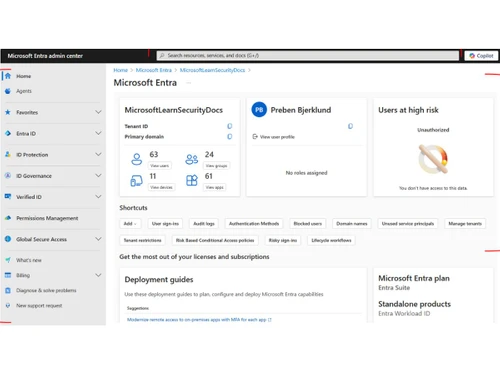
Microsoft Entra ID logo
Microsoft Entra ID sso
Microsoft-Entra ID features
Microsoft-Entra-ID identity

Microsoft Entra ID

Brand: Microsoft Corporation

  • 4.2

  • 6 Ratings

Microsoft Entra ID is a cloud-based identity and access management solution that helps organizations manage user identities, secure access to resources, and ensure compliance. It provides capabilities for authentication, authorization, and identity governance.

See More

Have you used Microsoft Entra ID before?

Share your insights for better experience

Add a Review
Starting Price 7% OFF
₹696 excl.GST  ₹752
₹ 821 incl. GST

View plans

offer Save upto 18%, Get GST Invoice on your business purchase T&C
offer Buy Now & Pay Later, Check offer on payment page.
Buy Now
100% Genuine
Products
Best Price
Guaranteed
Safe & Secure
Payment
  • Description

  • Pricing

  • Features

  • Specification

  • Review

  • Compare

  • Alternatives

  • FAQ

Starting at ₹696
Buy Now

Microsoft Entra ID Software Overview

What is Microsoft Entra ID?

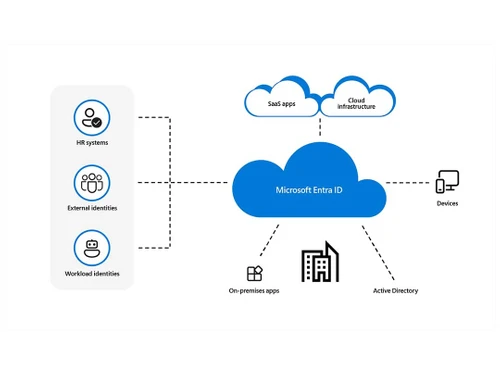
Microsoft Entra ID is a cloud-based identity access management software that helps organizations securely manage user identities and control access to applications and resources across cloud and on-premises environments.

Formerly known as Azure Active Directory, it provides features like single sign-on (SSO), multi factor authentication (MFA), conditional access policies, and identity protection to enhance security and streamline user access. Entra ID supports integration with various Microsoft services, such as Microsoft 365 and Azure, as well as thousands of third-party SaaS applications, enabling seamless and secure access for employees, partners, and customers.

Why Choose Microsoft Entra ID Software?

  • Zero Trust Access: Establishes Zero Trust access controls for enhanced security.
  • Identity Attack Prevention: Helps protect against and block identity attacks in real time.
  • Unified Identity Management: Manages identities and access across cloud and on-premises environments centrally.
  • Seamless User Experience: Provides easy sign-in across multi cloud environments, reducing password management and increasing productivity.
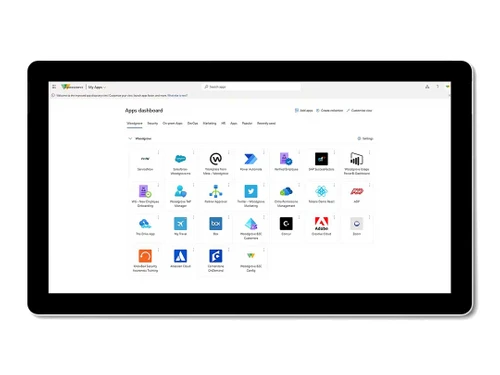
  • Comprehensive App Integration: Connects your workforce to all apps from any location with single sign-on (SSO).
  • Strong Authentication: Offers passwordless and multifactor authentication (MFA) options.
  • Conditional Access: Applies the right access controls to strengthen organizational security.
  • Privileged Identity Management: Strengthens the security of privileged accounts.
  • End-User Self-Service: Empowers employees to securely manage their identities.
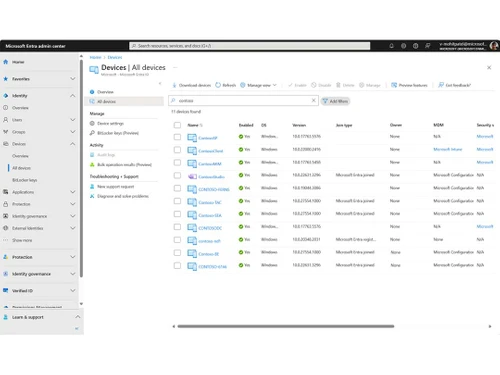
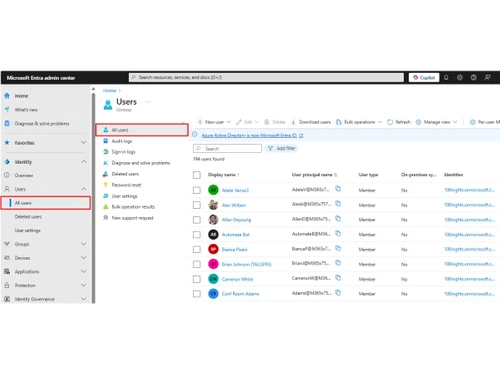
  • Unified Admin Center: Manages Microsoft Entra solutions in one place.
  • Secure Multi Cloud Access: Secures access to apps and resources in any cloud or on-premises environment.

Benefits of Microsoft Entra ID Software

  • Cost Savings: Offers potential cost savings and business benefits, as highlighted in the Forrester Consulting study.
  • Compliance: Helps organizations meet compliance requirements through robust identity and access controls.
  • Enhanced Productivity: Simplifies access to resources, boosting workforce productivity.
  • Better Visibility: Provides centralized visibility and control over all identities and application access.
  • Improved Security Posture: Strengthens overall security by implementing a Zero Trust framework.
  • Risk Reduction: Reduces the risk of data breaches and unauthorized access through adaptive access policies.
  • Streamlined Management: Manages multi-cloud identity and network access solutions in a single, unified admin center.
  • Free Edition Availability: Offers a free edition with essential features for basic identity management needs.
  • Market Recognition: Recognized as a leader in access management by industry analysts like Gartner and KuppingerCole.
  • Customer and Partner Access: Secures not only workforce access but also access for customers and partners.

Microsoft Entra ID Pricing

Microsoft Entra ID price in India starts at INR 696 at techjockey.com.

The pricing model is based on different parameters, including extra features, deployment type, and the total number of users. For further queries related to the product, you can contact our product team and learn more about the pricing and offers.

Read more

Microsoft Corporation Company Details

Founded Year:  1975

Microsoft Corporation is an American multinational technology company with headquarters in Redmond, Washington.

Director/Founders Paul Allen , Bill Gates
Company Size 1000+ Employees

Microsoft Entra ID Pricing & Plans

Microsoft Entra ID P1

Calculated Price

696 ₹752
SAVE UPTO 7%
Exclusive of all taxes
  • Options

    • Quantity

      Quantity
      Quantity
    • Monthly

      Monthly
      Monthly

Key Features

  • Conditional Access

  • Role-based access control (RBAC)

  • Advanced group management

  • Cross-tenant user synchronization

  • Session lifetime management

  • Advanced security and usage reports

Microsoft Entra ID P2

Calculated Price

996 ₹1300
SAVE UPTO 23%
Exclusive of all taxes
  • Options

    • Quantity

      Quantity
      Quantity
    • Monthly

      Monthly
      Monthly

Key Features

  • All Features of Microsoft Entra ID P1

  • Risk-based Conditional Access

  • Real-time dynamic sign-in assessment

  • Real-time dynamic user assessment

  • Token protection

  • Risk event investigation

Microsoft Entra ID Features

  • icon_check Integrations
    Works with Azure, Microsoft 365, Power Platform, SaaS, enabling unified identity across services.
  • icon_check Multi-Tenant Support & Synchronization
    Manage users across tenants, sync users/groups across multiple organizations efficiently.
  • icon_check Identity Governance
    Automate lifecycle access-manage who gets access, review periodically, and remove stale privileges.
  • icon_check Secure Adaptive Access
    Adjusts access permissions based on real-time risk factors and user behavior.
  • icon_check Seamless User Experiences
    Simplifies user authentication with a smooth and intuitive sign-on process.
  • icon_check Unified Identity Management
    Centralized management of both cloud and on-premises identities.
  • icon_check Secure single sign-on (SSO)
    Enables users to access multiple applications with one set of credentials.
  • icon_check MultiFactor Authentication
    Adds an extra layer of security by requiring multiple forms of verification.
  • icon_check Conditional Access
    Controls user access based on specific conditions like location or device type.
  • icon_check Identity Protection
    Detects and prevents identity-related risks through AI and machine learning.
  • icon_check End-User Self-Service
    Allows users to reset passwords and manage profiles, reducing IT support workload.

Microsoft Entra ID Specifications

Supported Platforms
Windows Windows iOS iOS Android Android MacOS MacOS Linux Linux
Devices
Desktop Desktop
Deployment
Cloud-Based Cloud-Based
Suitable For
All Industries
Business Specific
All Businesses
Business Size
Small Business Medium Business Enterprises SMBs SMEs MSMBs
Customer Support
Phone Email Live Chat Forums
Language
English
Integration
API Integration
Training Resources
In Person Live Online Webinars Videos

Explore the Best Alternative Solutions Similar to Your Business Size and Needs

Microsoft Entra ID Review

4.2

Out of 5

img

Overall Rating

Based on
6 Verified Ratings

Rating Breakdown

  • Features 4.3
  • Value for Money 4.2
  • Ease of Use 4.2
  • Customer Support 4

90% Recommend this Product

Add Review

Techjockey Trusted Reviews from Verified Users

No reviews are currently available for Microsoft Entra ID. Discover similar Identity Access Management Software reviews

  • PureAUTH

    4.4

    Whats great - The platform has strong fundamentals: passwordless, device context, zero trust access. read more

  • Instasafe Secure Access

    4.7

    Whats great - It works well consistently and is pretty basic. I like that it doesn't have such a large number of features. It's a truly sta... read more

  • Saaspass Identity & Access Solution

    4.6

    Whats great - The best thing I enjoyed about SaasPass is that the information can be backed up and run off multiple devices, so so on the o... read more

Compare Microsoft Entra ID With other Identity Access Management Software

Products
Ratings
Pricing
Device Supported
Deployment
Supported Platforms
  • img

    Microsoft Entra ID

  • 4.2

  • ₹ 696.00 excl. GST

  • Desktop

    Mobile

  • Web based

    On Premises

  • Windows

    Mac OS

  • img

    Zoho OneAuth

  • 4.5

  • Price On Request

  • Desktop

    Mobile

  • Web based

    On Premises

  • Windows

    Mac OS

  • img

    Zoho Directory

  • 4.0

  • ₹ 120

  • Desktop

    Mobile

  • Web based

    On Premises

  • Windows

    Mac OS

  • img

    ClassLink

  • 4.2

  • Price On Request

  • Desktop

    Mobile

  • Web based

    On Premises

  • Windows

    Mac OS

  • img

    Jamf Connect

  • 4.2

  • Price On Request

  • Desktop

    Mobile

  • Web based

    On Premises

  • Windows

    Mac OS

  • img

    Authyo

  • 4.3

  • ₹ 999

  • Desktop

    Mobile

  • Web based

    On Premises

  • Windows

    Mac OS

  • img

    Clerk

  • 4.1

  • Price On Request

  • Desktop

    Mobile

  • Web based

    On Premises

  • Windows

    Mac OS

  • img

    PureAUTH

  • 4.4

  • Price On Request

  • Desktop

    Mobile

  • Web based

    On Premises

  • Windows

    Mac OS

(0) Product(s) selected

Microsoft Entra ID Alternatives

See All Microsoft Entra ID Alternatives

Available

Price on Request

Starting Price:

$25 /Month

Available

Price on Request

Available

Price on Request

Available

Price on Request
Starting Price:

$125 /Month

Available

Price on Request

Articles for Microsoft Entra ID

See All Related Articles

How much does Microsoft Entra ID Software cost?

The price of Microsoft Entra ID in India starts at INR 696, available on techjockey.com.

Is there a mobile app available for Microsoft Entra ID Software?

Yes, Microsoft Entra ID can be accessed via mobile apps for both iOS and Android.

Which operating systems are compatible with Microsoft Entra ID Software?

Microsoft Entra ID is compatible with Linux, Windows, macOS, iOS, and Android devices.

Does Microsoft Entra ID Software offer a free trial?

Yes, Microsoft Entra ID offers a free trial for certain features.

How does Microsoft Entra ID Software function?

Microsoft Entra ID functions as a cloud-based identity and access management service that authenticates users and controls their access to applications and resources across cloud and on-premises environments.

Who uses Microsoft Entra ID Software?

Businesses of all sizes, IT administrators, and security teams can benefit from Microsoft Entra ID.

Is a free demo available for Microsoft Entra ID Software?

Yes, Microsoft Entra ID offers a free demo to showcase its features and capabilities.

Is Microsoft Entra ID Software available for free?

Yes, there is a free version of Microsoft Entra ID with basic features for smaller organizations.

What is the primary purpose of Microsoft Entra ID?

Microsoft Entra ID is designed to provide secure identity and access management for cloud-based and on-premises applications.

Can Microsoft Entra ID integrate with third-party applications?

Yes, Microsoft Entra ID supports integration with a wide range of third-party applications and services.

20,000+ Software Listed

Best Price Guranteed

Free Expert Consultation

2M+ Happy Customers

Terms and Condtions

close

Users with registered businesses can purchase goods from merchants on the platform to satisfy their business needs. Users are not permitted to utilize any products acquired through the platform for resale, advertising, business, or further distribution.

For each purchase made, users will receive a Tax Invoice (or 'GST invoice') that includes specific details such as:

  • the GSTIN of the user associated with their registered business, and

  • the specified Entity Name for their business.

It should be noted that not all products are eligible for GST Invoice. Only the products displayed by participating sellers with the 'GST-based Invoice Available' callout on the product description page would qualify.

Certain goods and services are not eligible to get a GST Invoice, including items with VAS, i.e., Value Added Services (e.g., Total Mobile Protection/Assured Buyback) and those involving an exchange offer at the time of purchase.

Users must ensure the accuracy of the GSTIN, and business entity name provided for the GST Invoice. Requests for corrections into GST Invoice would not be accommodated by Techjockey.com or any Seller, and any issues arising from user-provided information are the sole responsibility of users.

Techjockey.com is not liable for the GST Invoice or any associated input tax credit. To efficiently claim an input tax credit, users should select the registered place of business address as per the GST authority's data and follow the provisions of the GST Act and rules.

To claim an input tax credit, the delivery and billing addresses must match. Furthermore, input tax credits will not be granted if the delivery address and GSTIN on the invoice are from different states. In case of incorrect GST details provided during the order placement, the order will be canceled automatically.