linkedin
DealStrike logo
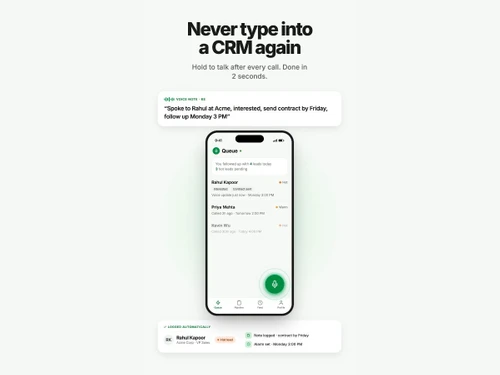
DealStrike never
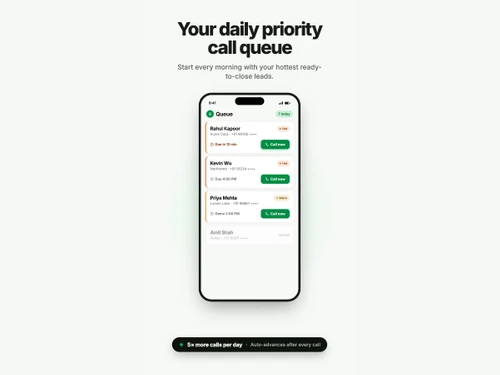
DealStrike call queue
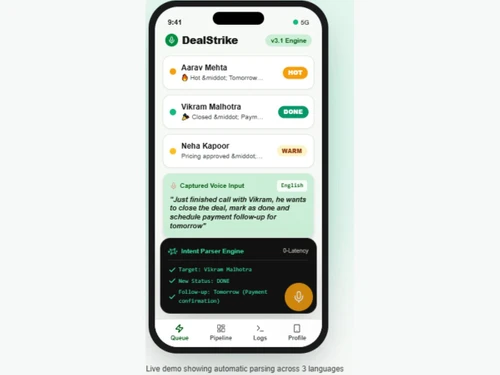
DealStrike pipeline

DealStrike

Brand: DealStrike

  • No Ratings & Reviews

Have you used DealStrike before?

Share your insights for better experience

Add a Review
Starting Price
$14

View plans

100% Genuine
Products
Best Price
Guaranteed
Safe & Secure
Payment
  • Pricing

  • Features

  • Specification

  • Review

Starting at $14

DealStrike Pricing & Plans

Agent Tier
Key Features
  • 2,000 Included Monthly Credits
  • Fast-Path Local Voice Matcher (0ms)
  • Prioritized Call Queue + Speed Dialer
  • Voice Notes, Deal Stages & Reminders
  • WhatsApp Handoff & Brochure Dispatch
Starting at $14
    • Users

      Users
      Users
    • Monthly

      Monthly
      Monthly

Key Features

  • 2,000 Included Monthly Credits

  • Fast-Path Local Voice Matcher (0ms)

  • Prioritized Call Queue + Speed Dialer

  • Voice Notes, Deal Stages & Reminders

  • WhatsApp Handoff & Brochure Dispatch

DealStrike Features

Customer Data Management (CDM)

  • icon_check Contact Management
    Store, organize, and access customer contact details for easy retrieval and updates.
  • icon_check Account Management
    Track and manage business relationships with key accounts and clients.
  • icon_check Customer Profiles
    Build comprehensive profiles with data on preferences, interactions, and purchase history.
  • icon_check Contact Segmentation
    Group contacts based on behavior, demographics, or interests for personalized engagement.
  • icon_check Activity History
    Record and review all past customer interactions, including calls, emails, and meetings.

Lead Management

  • icon_check Lead Nurturing
    Engage with leads over time through automated follow-ups and relevant content.
  • icon_check Lead Tracking
    Track lead activity and behavior across multiple channels and touchpoints.
  • icon_check Lead Qualification
    Assess lead quality based on criteria to focus on high-potential prospects.
  • icon_check Lead Assignment
    Assign & distribute leads to specific reps or teams based on predefined rules.
  • icon_check Lead Prioritization
    Rank leads by their potential to close, ensuring focus on the most promising.
  • icon_check Lead Generation
    Capture and create leads through multiple channels for sales growth.

Sales Pipeline Management

  • icon_check Opportunity Management
    Manage and track sales opportunities from prospect to closed deal.
  • icon_check Task Management
    Assign, track, and manage tasks and activities to ensure team productivity and accountability.
  • icon_check Deal Management
    Manage the entire deal lifecycle, from negotiation to final agreement.
  • icon_check Deal Rotting
    Flag and manage deals that are stalling or not progressing as expected.
  • icon_check Territory Management
    Organize and assign sales territories to optimize coverage and performance.
  • icon_check Order Management
    Handle order processing and ensure smooth transaction flow post-sale.
  • icon_check Quote & Proposal Management
    Create and send tailored quotes and proposals for potential clients.

Collaboration and Communication

  • icon_check Internal Communication
    Enable real-time internal communication between teams with built-in messaging or chat features.
  • icon_check Document Sharing & File Storage
    Store and share important files, documents, and customer resources easily.
  • icon_check Built-in Dialer
    Call prospects directly from CRM in just one click to ensure high compliance and productivity.
  • icon_check Activity Logging
    Recording all customer interactions like calls, emails, meetings, and text messages within the CRM system
  • icon_check Call Tracking and Recording
    Track and record sales calls for better analysis and performance review.
  • icon_check Bulk Email and SMS
    Send emails & SMS in bulk to leads or clients for promotions or updates.

Integrations

  • icon_check API Access
    Customizable API for integrating with other business applications or extending CRM capabilities.
  • icon_check Calendar Integration
    Sync CRM with calendars to schedule and manage appointments and follow-ups.
  • icon_check Third Party Integrations
    Connect CRM with a variety of third-party tools and services to enhance functionality.
  • icon_check Email Marketing Tools
    Connect CRM with email tracking tools like Mailsuite or LeadSquared for measuring open rates.
  • icon_check Interactive Voice Response (IVR) Integration
    Integrate CRM with IVR systems to manage customer calls and enhance support.

Workflow Automation and Management

  • icon_check Workflow Automation
    Automate repetitive tasks and workflows to improve sales team efficiency.
  • icon_check Task Automation
    Automate tasks like follow-up emails, lead assignment, and reminder notifications.
  • icon_check Lead Capture Automation
    Automatically capture leads from forms, websites, and social media.
  • icon_check Customizable Workflows
    Create, modify, and automate sequences of tasks, actions, or processes within the CRM.
  • icon_check Auto Qualify Leads
    Automatically evaluate leads for sales readiness using predefined criteria.

Security & Compliance

  • icon_check Audit Logs
    Maintain a log of all user actions for accountability and security auditing.
  • icon_check Data Encryption
    Encrypt data both at rest and in transit to safeguard customer information.
  • icon_check Role-Based Access Control (RBAC)
    Control user access based on their roles, limiting access to sensitive data.
  • icon_check Audit Trails
    Used for auditing and compliance purposes to ensure transparency and traceability.
  • icon_check Backup & Disaster Recovery
    Ensure business continuity with secure backups and disaster recovery plans.
  • icon_check GDPR and CCPA Compliance
    Comply with regulations such as GDPR, HIPAA, and CCPA. to protect customer privacy.
  • icon_check IP Whitelisting
    Prevents unauthorized access from unknown or unsecure locations.

AI Capabilities

  • icon_check Predictive Analytics
    Leverage AI to predict future trends, sales, and customer behavior for better decision-making.
  • icon_check Lead and Deal Scoring
    Score leads and deals to prioritize efforts based on engagement or value.
  • icon_check Chatbots
    Automate customer interactions with AI-driven chatbots to assist or direct inquiries efficiently.

Analytics and Reporting

  • icon_check Sales Forecasting
    Predict future sales revenue based on trends, historical data, and leads.
  • icon_check Custom Dashboards
    Create personalized dashboards to visualize key metrics and data relevant to your business.
  • icon_check Sales Funnel Analysis
    Monitor and analyze real-time data to make timely, informed decisions.
  • icon_check Conversion Reports
    Track individual and team sales metrics, including revenue, win rates, and pipeline health.
  • icon_check Activity Overview Reports
    Analyze customer behavior and interactions to gain actionable insights for better engagement.
  • icon_check Sales Performance Tracking
    Monitor team performance across sales activities, tracking progress against KPIs.
  • icon_check Forecasting & Trends
    Use historical data to forecast future sales and trends for improved business planning.
  • icon_check Customizable Pipeline Views
    Create customized views of sales pipeline stages for better oversight.

Alerts & Notifications

  • icon_check Event-Triggered Notifications
    Automatically notify users of key events, such as new leads, meetings, or customer actions.
  • icon_check Custom Workflow Alerts
    Create custom alerts for specific workflows or actions, ensuring nothing gets missed.
  • icon_check System Errors/Failures
    Receive immediate notifications for any system failures or errors for quick resolution.
  • icon_check Customer Interaction Alerts
    Get notified when customers engage with emails, forms, or other touchpoints.
  • icon_check Workflow Trigger Alerts
    Alert users when specific workflow conditions or triggers are met.
  • icon_check SLA Violations
    Receive notifications when service level agreements are breached or approaching deadlines.
  • icon_check Lead Activity Alerts
    Get alerts when leads take important actions (e.g., filling out a form or making a purchase).

DealStrike Specification

Supported Platforms
Windows Windows MacOS MacOS
Devices
Desktop Desktop
Deployment
Web-Based Web-Based
Suitable For
All Industries
Business Specific
All Businesses
Business Size
Small Business Medium Business Enterprises
Customer Support
Email
Language
English
Training Resources
Live Online

DealStrike Review

Techjockey Trusted Reviews from Verified Users

No reviews are currently available for DealStrike. Discover similar Sales CRM Software reviews

  • Salescamp

    4.3

    Whats great - Simple to use, one of the main benefits is the availability of a free plan for the user interface. It is an excellent tool fo... read more

  • SalesBabu CRM

    4.2

    Whats great -  I have been using the SalesBabu CRM Software, and I am happy to have it since whenever this company's help was provided, my ... read more

  • LEDSAK

    4.7

    Whats great - I like the simple dashboard and the way I can keep lead details and follow-up activities together. It helps me stay organized... read more

Articles for DealStrike

See All Related Articles

20,000+ Software Listed

Best Price Guranteed

Free Expert Consultation

2M+ Happy Customers

Terms and Condtions

close

Users with registered businesses can purchase goods from merchants on the platform to satisfy their business needs. Users are not permitted to utilize any products acquired through the platform for resale, advertising, business, or further distribution.

For each purchase made, users will receive a Tax Invoice (or 'GST invoice') that includes specific details such as:

  • the GSTIN of the user associated with their registered business, and

  • the specified Entity Name for their business.

It should be noted that not all products are eligible for GST Invoice. Only the products displayed by participating sellers with the 'GST-based Invoice Available' callout on the product description page would qualify.

Certain goods and services are not eligible to get a GST Invoice, including items with VAS, i.e., Value Added Services (e.g., Total Mobile Protection/Assured Buyback) and those involving an exchange offer at the time of purchase.

Users must ensure the accuracy of the GSTIN, and business entity name provided for the GST Invoice. Requests for corrections into GST Invoice would not be accommodated by Techjockey.com or any Seller, and any issues arising from user-provided information are the sole responsibility of users.

Techjockey.com is not liable for the GST Invoice or any associated input tax credit. To efficiently claim an input tax credit, users should select the registered place of business address as per the GST authority's data and follow the provisions of the GST Act and rules.

To claim an input tax credit, the delivery and billing addresses must match. Furthermore, input tax credits will not be granted if the delivery address and GSTIN on the invoice are from different states. In case of incorrect GST details provided during the order placement, the order will be canceled automatically.