USA
USA UAE
UAESmall Business
Designed for startups and growing businesses

See More





Brand: LEDSAK
LEDSAK is a business software, specifically a CRM, for managing customer relationships and sales processes. It's designed for fast-paced sales teams, automating tasks and providing real-time insights. This software integrates with various communication platforms. It streamlines sales and lead manage...
See MoreHave you used LEDSAK before?
Share your insights for better experience
Brand: LEDSAK
Founded Year: 2024
Ledsak AI transforms customer engagement with smart, automated CRM solutions designed for speed, clarity, and growth. Our platform empowers businesses to manage leads, conversations, and sales effortlessly—turning data into decisions and interactions into
Customer Data Management (CDM)
 Activity History Contact Management Account Management Customer Profiles Contact Segmentation
 Lead Management
Lead Assignment Lead Prioritization Lead Tracking Lead Nurturing Lead Generation Lead Qualification Sales Pipeline Management
Task Management Deal Management Opportunity Management Deal Rotting Order Management Quote & Proposal Management Territory Management Collaboration and Communication
Internal Communication Activity Logging Document Sharing & File Storage Bulk Email and SMS Built-in Dialer Call Tracking and Recording Integrations
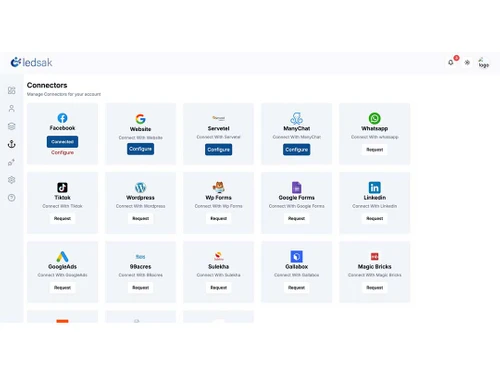
Third Party Integrations Calendar Integration Email Marketing Tools API Access Interactive Voice Response (IVR) Integration Workflow Automation and Management
Workflow Automation Task Automation Customizable Workflows Lead Capture Automation Auto Qualify Leads Security & Compliance
Role-Based Access Control (RBAC) Data Encryption Backup & Disaster Recovery Audit Logs Audit Trails IP Whitelisting GDPR and CCPA Compliance AI Capabilities
Predictive Analytics Lead and Deal Scoring Chatbots Analytics and Reporting
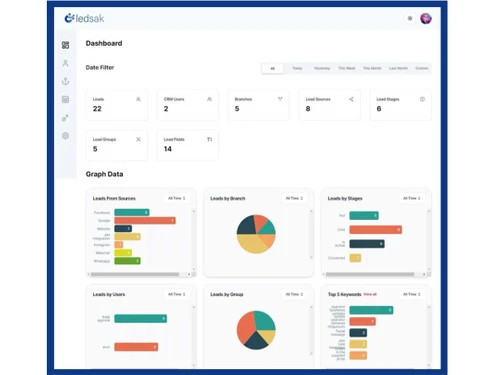
Conversion Reports Activity Overview Reports Sales Funnel Analysis Sales Performance Tracking Sales Forecasting Custom Dashboards Forecasting & Trends Customizable Pipeline Views Alerts & Notifications
Lead Activity Alerts Custom Workflow Alerts Workflow Trigger Alerts Customer Interaction Alerts Event-Triggered Notifications System Errors/Failures SLA Violations Others
Customization Options Touchpoint Monitoring Data Import/Export Real-Time Alerts Performance Metrics 

Watch the demo video to explore key features, real workflows, and how the software fits your business needs.
 Ubuntu
  Windows
  iOS
iOS  Android MacOS Windows(Phone)
  Desktop
  Mobile
  Cloud-Based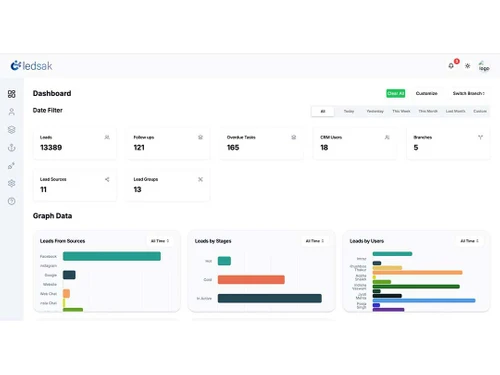
Small Business
Designed for startups and growing businesses
Medium Business
Built for business growth and flexibility
Enterprises
Designed for complex and large-scale business needs
4.5
Out of 5

Overall Rating
Based on
13 Verified Reviews
Rating Breakdown
89% Recommend this Product
Add ReviewCustomers generally appreciate LEDSAK for its user-friendly interface and effective organization of leads and follow-ups, which enhances daily management tasks across various industries, particularly healthcare. Users highlight the clear dashboard and centralized access to information as significant benefits that streamline workflows. However, some reviews mention that new users may require time to familiarize themselves with the platform's features, and the initial setup can be somewhat time-consuming. Overall, LEDSAK is viewed as a valuable tool for improving inquiry management and operational efficiency.
Pros
"I like the simple dashboard and the way I can keep lead details and follow-up activities together. It helps me stay organized when there are multiple enquiries to handle."
"The dashboard is clear and I can find lead information without spending much time searching. I also like being able to check previous activities before following up."
"User-friendly interface, Faster data access & visibility, Workflow automation & consistency, better collaboration across teams, Clean design & minimal clutter."
Cons
"I haven't faced any major issues so far. I’m still exploring some of the features to understand how they can fit into my regular sales work."
"I haven't experienced any major issues with LEDSAK so far. I’m still exploring some of the features."
"I haven't faced any major issues with LEDSAK so far, though I am still exploring some of its features."

Aug 27, 2026
Techjockey Verified
“Simple CRM for Managing Online Leads and Sales”
I use LEDSAK to manage leads and follow-ups for our online business. We get enquiries from different sources, and it was becoming difficult for me to keep track of every lead manually. With LEDSAK, I can check the lead details, update the status, and see which enquiries still need attention. The dashboard is also easy to understand, which makes it comfortable for me to use regularly.
Pros
I like the simple dashboard and the way I can keep lead details and follow-up activities together. It helps me stay organized when there are multiple enquiries to handle.
Cons
I haven't faced any major issues so far. I’m still exploring some of the features to understand how they can fit into my regular sales work.
Reason to switch
LEDSAK helps me track online enquiries from the initial contact until the follow-up stage. I can see the status of each lead and know which ones need attention. This saves me from maintaining separate lists and makes it easier for me to manage my daily sales follow-ups.
Aug 27, 2026
Techjockey Verified
“Helps Me Stay on Top of Daily Clinic Follow-Ups”
I use LEDSAK mainly to keep track of enquiries and follow-ups at the clinic. Since we receive enquiries for different treatments, it helps me see the details of each lead and check what needs to be followed up. I also find the dashboard easy to understand, which makes it easier for me to use the CRM during a busy day.
Pros
The dashboard is clear and I can find lead information without spending much time searching. I also like being able to check previous activities before following up.
Cons
I haven't experienced any major issues with LEDSAK so far. I’m still exploring some of the features.
Reason to switch
It helps me keep my enquiries and follow-ups organized. I can check the status of a lead, see the previous activity, and know what I need to do next. This makes my daily follow-up work easier and more manageable.
Aug 26, 2026
Techjockey Verified
“Easy-to-Use CRM for Managing IVF Enquiries”
LEDSAK has made it easier to manage IVF clinic enquiries and follow-ups in one place. The clear dashboard and activity history help me quickly identify pending tasks and review previous communication. Overall, it keeps enquiry management simple during busy days.
Pros
LEDSAK offers a simple dashboard, easy access to lead details, and useful follow-up tracking. Its activity history also helps keep previous communications organized for better enquiry management.
Cons
I haven't faced any major issues with LEDSAK so far, though I am still exploring some of its features.
Reason to switch
LEDSAK helps me manage patient enquiries, follow-ups, and lead updates in one place. I can quickly check the status of an enquiry and see what action is pending. This helps me stay on top of follow-ups and manage my daily work more efficiently.

LEDSAK
Price On Request
Desktop
Mobile
Web based
On Premises
Windows
Mac OS

Freshsales CRM
₹ 899
Desktop
Mobile
Web based
On Premises
Windows
Mac OS
OttoCRM
₹ 99
Desktop
Mobile
Web based
On Premises
Windows
Mac OS

Kommo Sales CRM
₹ 13800
Desktop
Mobile
Web based
On Premises
Windows
Mac OS

monday CRM
Price On Request
Desktop
Mobile
Web based
On Premises
Windows
Mac OS
Pepper Cloud
Price On Request
Desktop
Mobile
Web based
On Premises
Windows
Mac OS

SalesBabu CRM
₹ 9000
Desktop
Mobile
Web based
On Premises
Windows
Mac OS

Pipeline CRM
Price On Request
Desktop
Mobile
Web based
On Premises
Windows
Mac OS

Cratio CRM
₹ 2997
Desktop
Mobile
Web based
On Premises
Windows
Mac OS

Nexved CRM
₹ 799
Desktop
Mobile
Web based
On Premises
Windows
Mac OS

Teamgate CRM
Price On Request
Desktop
Mobile
Web based
On Premises
Windows
Mac OS
(0) Product(s) selected
Starting Price:
₹99 /Month
Starting Price:
₹13,800 /Year
Available
Price on Request
Starting Price:
$29 /Month
Starting Price:
₹2,997 /User/Month
Starting Price:
$50 /Month

Starting Price:
$25 /Month

Available
Price on Request

Starting Price:
$20 /User/Month

Starting Price:
₹1,000 /Month

Starting Price:
$65 /Month
Product software pricing starts at INR 2500/month at techjockey.com. Pricing is customised based on specific business needs. Contact techjockey.com for detailed pricing information.
Yes, LEDSAK is suitable for small businesses. LEDSAK provides features like streamlined sales processes, automated lead management, and customizable workflows, which can significantly benefit small business owners by improving efficiency and lead conversion rates.
Contact techjockey.com to explore trial options for LEDSAK. They can provide information about available testing periods.
LEDSAK targets sales professionals, entrepreneurs, and business owners keen on enhancing lead generation, improving sales and communication efficiency, and driving customer satisfaction. It's designed to streamline sales processes and empower sales teams to focus on customer interactions.
LEDSAK supports Windows, iOS, Android, MacOS, and Linux operating systems.
LEDSAK software is available as an app on the Google Play Store and Apple Store for iOS and Android devices.
The level of security features in LEDSAK is not explicitly detailed in the provided context .However, efficient CRM programs often prioritise security through multiple layers like authentication protocols, encrypted data storage, access controls, regular updates, and backup systems. These measures protect sensitive data from unauthorised access and ensure data integrity.
LEDSAK is a cloud-based sales execution and lead management software. It automates and analyses sales processes, schedules appointments, engages and nurtures leads. It streamlines sales operations and improves lead conversion and customer engagement.
20,000+ Software Listed
Best Price Guranteed
Free Expert Consultation
2M+ Happy Customers
Terms and Condtions

Users with registered businesses can purchase goods from merchants on the platform to satisfy their business needs. Users are not permitted to utilize any products acquired through the platform for resale, advertising, business, or further distribution.
For each purchase made, users will receive a Tax Invoice (or 'GST invoice') that includes specific details such as:
the GSTIN of the user associated with their registered business, and
the specified Entity Name for their business.
It should be noted that not all products are eligible for GST Invoice. Only the products displayed by participating sellers with the 'GST-based Invoice Available' callout on the product description page would qualify.
Certain goods and services are not eligible to get a GST Invoice, including items with VAS, i.e., Value Added Services (e.g., Total Mobile Protection/Assured Buyback) and those involving an exchange offer at the time of purchase.
Users must ensure the accuracy of the GSTIN, and business entity name provided for the GST Invoice. Requests for corrections into GST Invoice would not be accommodated by Techjockey.com or any Seller, and any issues arising from user-provided information are the sole responsibility of users.
Techjockey.com is not liable for the GST Invoice or any associated input tax credit. To efficiently claim an input tax credit, users should select the registered place of business address as per the GST authority's data and follow the provisions of the GST Act and rules.
To claim an input tax credit, the delivery and billing addresses must match. Furthermore, input tax credits will not be granted if the delivery address and GSTIN on the invoice are from different states. In case of incorrect GST details provided during the order placement, the order will be canceled automatically.