
Description
Pricing
Features
Specification
Review
Compare
FAQs
Alternatives


Brand : Deskflow Systems Private Limited


4.0 
4 Ratings
Have Questions?
₹ 3,900 excl. GST ₹ 4,900 20% off
₹ 4,602 incl. GST
View plans
MRP: ₹4,900 /Year
Save Extra with 2 Offers
 Save upto 18%, Get GST Invoice on your business purchase |
Users with registered businesses can purchase goods from merchants on the platform to satisfy their business needs. Users are not permitted to utilize any products acquired through the platform for resale, advertising, business, or further distribution.
For each purchase made, users will receive a Tax Invoice (or 'GST invoice') that includes specific details such as:
the GSTIN of the user associated with their registered business, and
the specified Entity Name for their business.
It should be noted that not all products are eligible for GST Invoice. Only the products displayed by participating sellers with the 'GST-based Invoice Available' callout on the product description page would qualify.
Certain goods and services are not eligible to get a GST Invoice, including items with VAS, i.e., Value Added Services (e.g., Total Mobile Protection/Assured Buyback) and those involving an exchange offer at the time of purchase.
Users must ensure the accuracy of the GSTIN, and business entity name provided for the GST Invoice. Requests for corrections into GST Invoice would not be accommodated by Techjockey.com or any Seller, and any issues arising from user-provided information are the sole responsibility of users.
Techjockey.com is not liable for the GST Invoice or any associated input tax credit. To efficiently claim an input tax credit, users should select the registered place of business address as per the GST authority's data and follow the provisions of the GST Act and rules.
To claim an input tax credit, the delivery and billing addresses must match. Furthermore, input tax credits will not be granted if the delivery address and GSTIN on the invoice are from different states. In case of incorrect GST details provided during the order placement, the order will be canceled automatically.
Buy Now & Pay Later, Check offer on payment page.  Get Instant Expert
  Safe & Secure
  Assured Best Price
 Calculated Price (Exclusive of all taxes)
₹ 3900 ₹4900Calculated Price (Exclusive of all taxes)
₹ 8900 ₹9900Calculated Price (Exclusive of all taxes)
₹ 15900 ₹17900
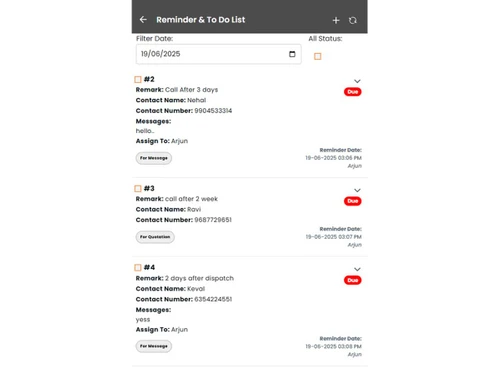
Customer Data Management (CDM)
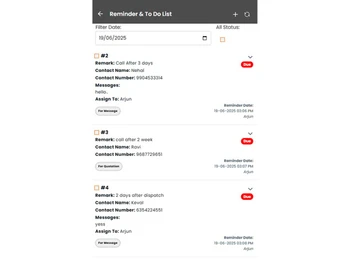
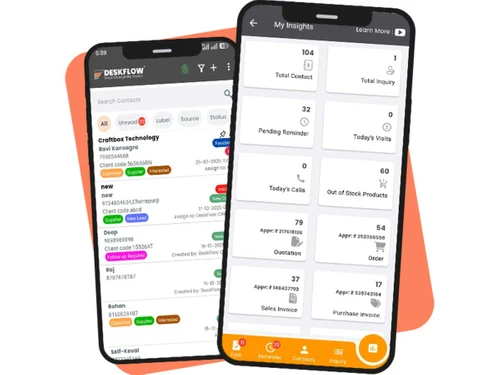
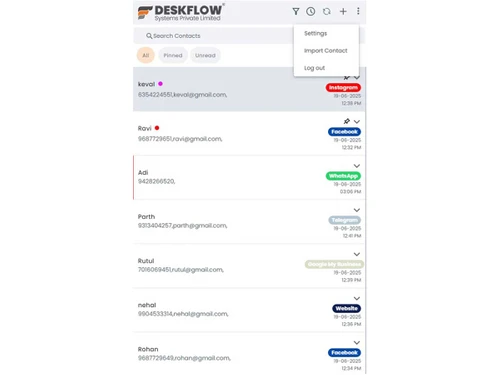
 Contact Management Store, organize, and access customer contact details for easy retrieval and updates. Account Management Track and manage business relationships with key accounts and clients. Customer Profiles Build comprehensive profiles with data on preferences, interactions, and purchase history. Contact Segmentation Group contacts based on behavior, demographics, or interests for personalized engagement. Activity History Record and review all past customer interactions, including calls, emails, and meetings.
 Sales Management
Lead Management Capture, track, and nurture leads across different stages of the sales cycle. Order Management Track and manage orders from customers to ensure timely fulfillment and accurate billing. Quote Management Generate accurate, branded quotes and proposals to accelerate sales processes. Sales Forecasting Predict future sales and revenue using historical data and current opportunities. Deal Management Organize, prioritize, and manage deals, ensuring timely follow-up and closure. Sales Automation Automate tasks like follow-up emails, lead assignment, and reminder notifications. Workflow Automation and Management Automate repetitive tasks and workflows to improve sales team efficiency. Opportunity & Pipeline Management Visualize and track deals through stages from lead generation to closing. Contract Management Managing contracts from their creation, execution, and performance tracking to their eventual termination. Territory Management Assign, monitor, and optimize sales territories to improve regional sales efforts. Marketing Automation
Email Marketing Design and send personalized email campaigns, track opens, clicks, and conversions. Campaign Management Plan, execute, and monitor marketing campaigns across channels and touchpoints. Lead Nurturing Engage and educate leads over time with targeted content to move them toward conversion. Customer Journey Tracking Monitor and analyze the customer journey from awareness to purchase. Customer Segmentation Group customers based on behavior, demographics, or preferences for tailored campaigns. Event-Triggered Workflows Automate responses and actions based on customer behaviors (e.g., email opens, site visits). Automated Campaigns Automatically trigger campaigns based on customer behavior, interests, or milestones. Data Sourcing / Integrations
Social Media Integration Manage social media accounts and track customer engagement directly within the CRM. Data Import/Export Easily import/export customer and business data in bulk or via integration with other systems. API Access Customizable API for integrating with other business applications or extending CRM capabilities. Calendar Integration Sync CRM with calendars to schedule and manage appointments and follow-ups. Third Party Integrations Connect CRM with a variety of third-party tools and services to enhance functionality. Email Marketing Tools Integration Connect CRM with email platforms like Mailchimp or SendGrid for seamless campaigns. Marketing Tools Integration Integrate with marketing platforms (e.g., Google Ads, HubSpot) to enhance campaign effectiveness. eCommerce Integrations Sync CRM with eCommerce platforms like Shopify, WooCommerce for a unified customer experience. Interactive Voice Response (IVR) Integration Integrate CRM with IVR systems to manage customer calls and enhance support. Collaboration Tools
Team Communication Enable real-time internal communication between teams with built-in messaging or chat features. Task / Activity Management Assign, track, and manage tasks and activities to ensure team productivity and accountability. Document Sharing & File Storage Store and share important files, documents, and customer resources easily. Omnichannel Support & Engagement Provide consistent customer support across multiple channels, including email, chat, and social media. Security & Compliance
Audit Trail Track changes and updates within the system for enhanced security and transparency. Data Encryption Encrypt data both at rest and in transit to safeguard customer information. Role-Based Access Control (RBAC) Control user access based on their roles, limiting access to sensitive data. Backup & Disaster Recovery Ensure business continuity with secure backups and disaster recovery plans. GDPR & Data Privacy Comply with regulations such as GDPR, HIPAA, and CCPA. to protect customer privacy. AI & Machine Learning
Predictive Analytics Leverage AI to predict future trends, sales, and customer behavior for better decision-making. Lead Scoring Use AI to score leads based on their likelihood to convert, helping prioritize sales efforts. Chatbots Automate customer interactions with AI-driven chatbots to assist or direct inquiries efficiently. Reporting & Analytics
Predictive Analytics Leverage AI to predict future trends, sales, and customer behavior for better decision-making. Real Time Analytics Monitor and analyze real-time data to make timely, informed decisions. Campaign Performance Measure the effectiveness of marketing campaigns, including ROI, reach, and conversion rates. Custom Dashboards Create personalized dashboards to visualize key metrics and data relevant to your business. Sales Performance Reports Track individual and team sales metrics, including revenue, win rates, and pipeline health. Customer Insights Analyze customer behavior and interactions to gain actionable insights for better engagement. Forecasting & Trends Use historical data to forecast future sales and trends for improved business planning. Performance Tracking Monitor team performance across various functions, tracking progress against KPIs. Alerts & Notifications
Event-Triggered Notifications Automatically notify users of key events, such as new leads, meetings, or customer actions. Custom Workflow Alerts Create custom alerts for specific workflows or actions, ensuring nothing gets missed. System Errors/Failures Receive immediate notifications for any system failures or errors for quick resolution. Customer Interaction Alerts Get notified when customers engage with emails, forms, or other touchpoints. Workflow Trigger Alerts Alert users when specific workflow conditions or triggers are met. SLA Violations Receive notifications when service level agreements are breached or approaching deadlines. Lead Activity Alerts Get alerts when leads take important actions (e.g., filling out a form or making a purchase). | Brand Name | Deskflow Systems Private Limited |
| Information | Fuerte Developers is a leading IT and digital marketing company offering web design, web development, app development, SEO, PPC, social media marketing, branding, and creative solutions to help businesses generate quality leads and build strong digital br |
| Founded Year | -0001 |
| Director/Founders | Mr. Aditya Prakash |
| Company Size | 1-100 Employees |


Top Selling Products
 20,000+ Software Listed
 Best Price Guaranteed
 Free Expert Consultation
 2M+ Happy Customers
 USA
USA UAE
UAE




 4.5
4.5 
