linkedin
DigiProctor logo
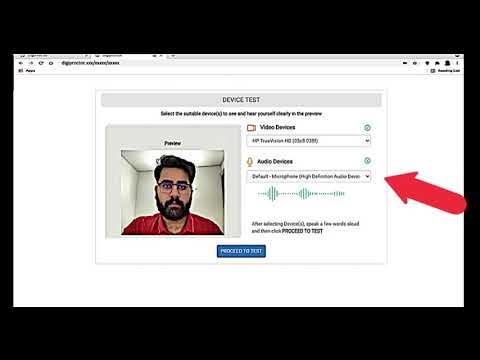
play How to take a Proctored test in DigiProctor Browser Application?How to take a Proctored test in DigiProctor Browser Application?
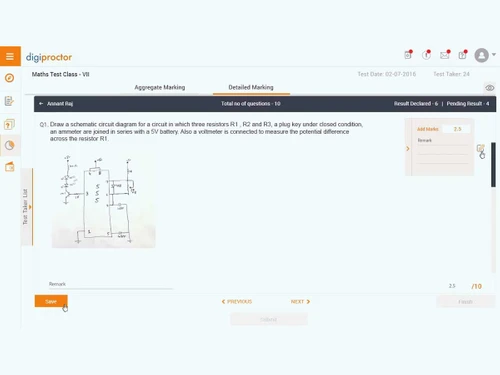
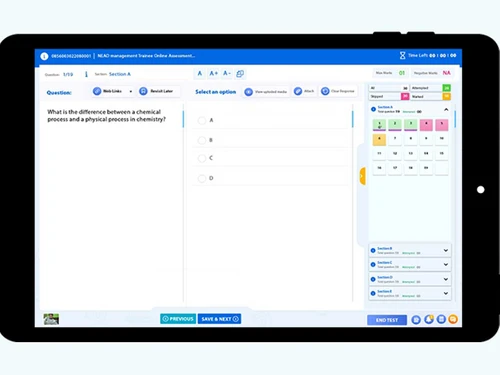
DigiProctor-dashboard
DigiProctor detailed

DigiProctor

Brand: DigiProctor

  • 3.9

  • 4 Ratings

DigiProctor is an AI-powered online proctoring software that helps to execute secure, fair, and monitored digital examinations.

See More

Have you used DigiProctor before?

Share your insights for better experience

Add a Review

Price Available on Request

Questions about pricing or customization? We’re here to help, just a click away.

100% Genuine
Products
Best Price
Guaranteed
Safe & Secure
Payment
  • Description

  • Pricing

  • Features

  • Specification

  • Review

  • Compare

  • Alternatives

  • FAQ

DigiProctor Software Overview

What is DigiProctor?

DigiProctor is an advanced online proctoring software designed to help execute secure digital examinations. It monitors candidates through webcams, facial recognition, and screen activity tracking during examination to ensure fair tests. This educational software provides a user-friendly interface and is accessible via web browsers or mobile apps.

DigiProctor provides both formative and summative assessments. Uses automated cheating detection, continuous video recording, facial recognition, and restricted device navigation during exams. It supports mobile uploads for handwritten answers, dynamic reporting, and real-time alerts for suspicious activity.

It also provides AI-based student exam assessment and its performance analysis to help students progress and learn on strengths and weaknesses for improvement. The software provides scalable modules for both academic and corporate assessments, ISO-certified data security, flexible scheduling, and integration with institutional systems.

Why Choose DigiProctor?

  • Remote Exam Monitoring: Enables the secure conduct of assessments online, tracking candidates through webcams and screen activity for fair procedures.
  • Cheating Prevention: Uses AI-driven facial recognition and behavioral analysis to detect suspicious actions, so that the exam conduct is fair and transparent.
  • Mobile Exam Support: Allows students to take tests on smartphones, including uploading handwritten answers, giving better options for accessibility and flexibility.
  • Subjective evaluation: It assesses the student's performance and grades, and gives detailed feedback for improvement and better performance.
  • Data Security Compliance: Protects sensitive exam information with ISO-certified encryption and privacy standards, maintaining trust and safeguarding institutional image.

Benefits of DigiProctor

  • Fair Assessments: It helps to conduct fair examinations by preventing malpractice and maintaining examination integrity consistently.
  • Convenient Access: Allows students to participate in exams remotely using laptops or mobile devices without location restrictions.
  • Time Efficiency: Reduces administrative workload by automating monitoring, reporting, and evaluation processes during digital examinations.
  • Enhanced Security: Protects sensitive exam data with ISO-certified encryption and privacy standards, ensuring institutional trust and compliance.
  • Scalable Usage: Adapts to small classrooms or large corporate assessments, supporting diverse examination requirements effectively.
  • Real-Time Alerts: Provides immediate notifications of suspicious activity, enabling quick intervention and safeguarding exam credibility.

Pricing of DigiProctor

DigiProctor details are available on request at techjockey.com.

DigiProctor may vary based on factors like customization, additional features required, number of users, and the deployment type. Please request a callback for subscription-related details and to avail offers on premium packages at techjockey.com.

Read more

DigiProctor Company Details

Founded Year:  2023

DigiProctor is your trusted partner for AI powered online exams & remote invigilation, ensuring authenticity, integrity, and seamless scalability anytime, anywhere.

Director/Founders DigiProctor
Company Size 1-100 Employees

DigiProctor Pricing & Plans

Looking for The Right Pricing?

Share your requirements and get a plan built around your business.

  • Define your business needs
  • Get customised pricing
  • Choose features that fit your workflow

Price Available on Request

Get personalised DigiProctor pricing that fits your needs. Our team will connect with you.

DigiProctor Features

  • icon_check Question Bank
    Manages MCQs, subjective questions; file uploads for handwritten answers via mobile.
  • icon_check Reporting & Analytics
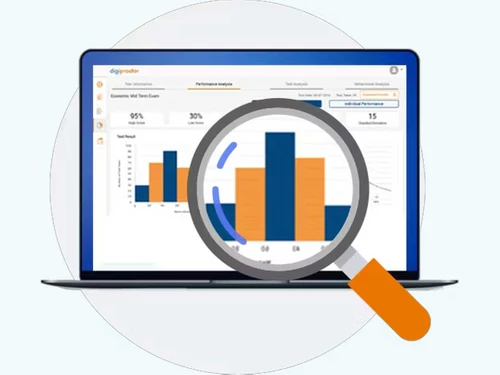
    Post-exam analytics, reports on candidate performance, compliance and system usage.
  • icon_check Exam Authoring & Schedulin
    Tools to create tests, schedule sessions, assign invigilation roles and manage workflows.
  • icon_check Screen & Audio Monitoring
    Monitors candidate’s screen, webcam feed, microphone and behaviour for any rule violations.
  • icon_check Identity Verification
    Uses face recognition, ID verification and environment scans during the exam.
  • icon_check Security & Compliance
    Secure infrastructure, hash/encrypted questions, controlled access and audit logs.
  • icon_check Anomaly Detection
    AI detects odd patterns, unexpected behaviour and potential cheating in real time.
  • icon_check Multiple Exam Modes
    Supports remote, centre-based, and hybrid modes for flexibility in delivery.
  • icon_check LMS Integration
    Seamlessly integrates with existing Learning Management Systems (LMS) like Moodle or Blackboard.
  • icon_check 360° Environment Scan
    Request candidates to perform room scans to ensure no unauthorized aids or persons present.
  • icon_check Real Time Monitoring
    Live webcam, screen, and mic monitoring; proctors can pause/terminate a session if needed.
  • icon_check Performance Comparison & Benchmarking
    Compare individual or cohort skill levels, track improvements and highlight gaps.
  • icon_check Deep Proctoring Engine
    Beyond webcams: monitors OS‐level activities, credentials, hidden tools and unauthorised apps during tests.
DigiProctor Demo Video play icon

Get DigiProctor Demo

Watch the demo video to explore key features, real workflows, and how the software fits your business needs.

Understand
Key Features
Personal
Demo Insights
Interactive
Demo Support

DigiProctor Specifications

Supported Platforms
Windows Windows iOS iOS Android Android MacOS MacOS
Devices
Desktop Desktop Mobile Mobile Tablet Tablet iPad iPad
Deployment
Cloud-Based Cloud-Based
Suitable For
Education Schools & Institutes Schools
Business Specific
All Businesses
Business Size
Small Business Startups Medium Business SMBs SMEs
Customer Support
Phone Email
Language
English
Training Resources
Live Online Documentation
Technology
Next Generation

Explore the Best Alternative Solutions Similar to Your Business Size and Needs

DigiProctor Review

3.9

Out of 5

img

Overall Rating

Based on
4 Verified Ratings

Rating Breakdown

  • Features 4.3
  • Value for Money 3.6
  • Ease of Use 4.1
  • Customer Support 3.8

80% Recommend this Product

Add Review

Techjockey Trusted Reviews from Verified Users

No reviews are currently available for DigiProctor. Discover similar Online Exam Software reviews

  • Testbook

    4.6

    Whats great - The user experience of Testbook is very smooth. It prepares you for the state and central-level exams. The quality of these c... read more

  • Testpress

    4.4

    Whats great - Free tier/demo works well for small batches; great test of concept read more

  • ConductExam Offline Test Software

    4.9

    Whats great - Ease of Use read more

Compare DigiProctor With other Online Exam Software

Products
Ratings
Pricing
Device Supported
Deployment
Supported Platforms
  • img

    DigiProctor

  • 3.9

  • Price On Request

  • Desktop

    Mobile

  • Web based

    On Premises

  • Windows

    Mac OS

  • img

    Testbook

  • 4.6

  • ₹ 499

  • Desktop

    Mobile

  • Web based

    On Premises

  • Windows

    Mac OS

  • img

    McQuick

  • 4.3

  • ₹ 59

  • Desktop

    Mobile

  • Web based

    On Premises

  • Windows

    Mac OS

  • img

    ExamOnline

  • 4.1

  • Price On Request

  • Desktop

    Mobile

  • Web based

    On Premises

  • Windows

    Mac OS

  • img

    Conker AI

  • 4.8

  • Price On Request

  • Desktop

    Mobile

  • Web based

    On Premises

  • Windows

    Mac OS

  • img

    ScoreExam

  • 4.0

  • Price On Request

  • Desktop

    Mobile

  • Web based

    On Premises

  • Windows

    Mac OS

  • img

    Eklavvya

  • 4.2

  • ₹ 30000

  • Desktop

    Mobile

  • Web based

    On Premises

  • Windows

    Mac OS

  • img

    Merittrac Pariksha

  • 4.1

  • Price On Request

  • Desktop

    Mobile

  • Web based

    On Premises

  • Windows

    Mac OS

  • img

    SpeedExam

  • 3.9

  • ₹ 17500

  • Desktop

    Mobile

  • Web based

    On Premises

  • Windows

    Mac OS

  • img

    BlinkExam

  • 4.2

  • ₹ 5000

  • Desktop

    Mobile

  • Web based

    On Premises

  • Windows

    Mac OS

(2) Product(s) selected

DigiProctor Alternatives

See All DigiProctor Alternatives
SAVE UPTO 44%

Starting Price:

₹59 /User ₹118

SAVE UPTO 50%

Available

Price on Request

Starting Price:

$4 /month

Available

Price on Request

Available

Price on Request

Available

Price on Request

Available

Price on Request

Articles for DigiProctor

See All Related Articles

How much does DigiProctor cost?

DigiProctor pricing details can be requested at techjockey.com.

Who uses DigiProctor?

DigiProctor is used by universities, schools, and corporate organizations for conducting secure online examinations and assessments.

How does DigiProctor work?

DigiProctor works by using AI-powered monitoring tools such as webcam tracking, facial recognition, and screen recording to ensure exam integrity.

Which operating systems are compatible with DigiProctor Software?

DigiProctor runs smoothly on OS like Windows, macOS, and Linux.

Is a free demo available for DigiProctor software?

Yes, DigiProctor offers a free demo to its users.

Does DigiProctor support mobile examinations?

Yes, DigiProctor provides a mobile app that allows students to take exams and upload handwritten answers securely.

Can DigiProctor detect cheating automatically?

Yes, DigiProctor uses AI-driven facial recognition and behavioral analysis to detect suspicious activity during exams in real time.

Does DigiProctor provide reporting and analytics?

Yes, DigiProctor generates dynamic reports and analytics to review exam performance and monitor candidate behavior effectively.

Is DigiProctor secure for sensitive exam data?

Yes, DigiProctor is ISO/IEC 27001 and ISO/IEC 27701 certified, ensuring encrypted communication and compliance.

20,000+ Software Listed

Best Price Guranteed

Free Expert Consultation

2M+ Happy Customers

Terms and Condtions

close

Users with registered businesses can purchase goods from merchants on the platform to satisfy their business needs. Users are not permitted to utilize any products acquired through the platform for resale, advertising, business, or further distribution.

For each purchase made, users will receive a Tax Invoice (or 'GST invoice') that includes specific details such as:

  • the GSTIN of the user associated with their registered business, and

  • the specified Entity Name for their business.

It should be noted that not all products are eligible for GST Invoice. Only the products displayed by participating sellers with the 'GST-based Invoice Available' callout on the product description page would qualify.

Certain goods and services are not eligible to get a GST Invoice, including items with VAS, i.e., Value Added Services (e.g., Total Mobile Protection/Assured Buyback) and those involving an exchange offer at the time of purchase.

Users must ensure the accuracy of the GSTIN, and business entity name provided for the GST Invoice. Requests for corrections into GST Invoice would not be accommodated by Techjockey.com or any Seller, and any issues arising from user-provided information are the sole responsibility of users.

Techjockey.com is not liable for the GST Invoice or any associated input tax credit. To efficiently claim an input tax credit, users should select the registered place of business address as per the GST authority's data and follow the provisions of the GST Act and rules.

To claim an input tax credit, the delivery and billing addresses must match. Furthermore, input tax credits will not be granted if the delivery address and GSTIN on the invoice are from different states. In case of incorrect GST details provided during the order placement, the order will be canceled automatically.