linkedin
DriveStrike logo
play DriveStrike SAML Setup with ADFS
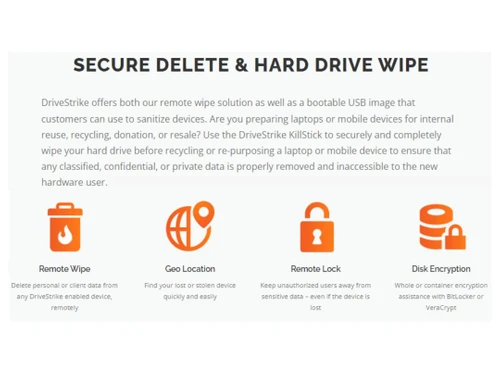
DriveStrike-Secure Delete & Hard Drive Wipe
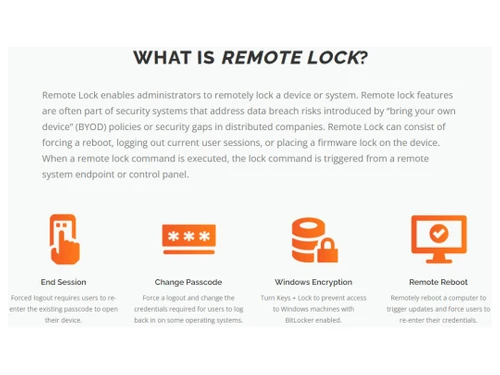
DriveStrike-What is Remote Lock

DriveStrike

Brand: DriveStrike Remote Wipe

  • 4.1

  • 3 Ratings

DriveStrike is a comprehensive security solution designed to protect your data and manage your devices, whether they're desktops, laptops, or mobile devices. Offering features like remote wipe, encryption, and geo-tracking, DriveStrike ensures your sensitive information remains secure, even in the e...

See More

Have you used DriveStrike before?

Share your insights for better experience

Add a Review
Starting Price
$2

View plans

100% Genuine
Products
Best Price
Guaranteed
Safe & Secure
Payment
  • Description

  • Pricing

  • Features

  • Specification

  • Review

  • Compare

  • Alternatives

  • FAQ

Starting at $2

DriveStrike Software Overview

What is DriveStrike?

DriveStrike is a multifaceted data protection and device management solution that caters to the ever-growing need for robust security in today's digital landscape. It empowers businesses of all sizes to safeguard their sensitive data and maintain control over their devices, regardless of location. The software provides a centralized platform for remotely managing and securing a fleet of devices, including desktops, laptops, smartphones, and tablets. Its core functionality revolves around preventing data breaches and mitigating the risks associated with lost or stolen devices.

DriveStrike offers a suite of powerful features, including remote data wiping, encryption, geo-tracking, access control, and compliance management. It is designed to be user-friendly, allowing administrators to easily implement security policies, monitor device activity, and respond swiftly to potential threats.

Whether you're a small business looking to protect customer data or a large enterprise managing a global network of devices, DriveStrike offers a scalable and customizable solution to meet your specific security needs. The web-based interface also ensures accessibility from anywhere, providing real-time control and peace of mind.

Why Choose DriveStrike Encryption Software?

  • Comprehensive Data Protection: DriveStrike goes beyond basic security measures by providing a multi-layered approach to data protection. Features like encryption, secure delete, and data breach monitoring ensure your data remains safe, even in the event of a lost or stolen device.
  • Real-Time Monitoring and Control: Stay informed and in control with DriveStrike's real-time monitoring capabilities. Track device locations, monitor access attempts, and receive alerts for suspicious activity, allowing you to respond swiftly to potential threats.
  • Flexible Deployment Options: DriveStrike adapts to your business needs with support for a wide range of platforms, including Windows, iOS, Android, and macOS. Whether you manage desktops, laptops, smartphones, or tablets, DriveStrike provides consistent security across your entire fleet.
  • Compliance Made Easy: Meet industry regulations and maintain compliance with DriveStrike's compliance management features. Enforce security policies, track device usage, and generate reports to demonstrate your commitment to data protection.
  • Remote Wipe for Rapid Response: In the event of a data breach or device loss, DriveStrike's remote wipe functionality allows you to quickly and completely erase sensitive data from the compromised device, preventing unauthorized access and mitigating potential damage.
  • User-Friendly Interface: DriveStrike's intuitive web-based interface makes it easy to manage devices and configure security settings. No specialized technical skills are required, allowing you to quickly deploy and manage your data protection strategy.
  • Affordable Pricing: DriveStrike offers competitive pricing plans starting at just $2, making it an accessible solution for businesses of all sizes. Protect your data without breaking the bank.

Benefits of DriveStrike Encryption Software

  • Enhanced Data Security: Protect sensitive business data from unauthorized access, theft, or loss. DriveStrike's robust security features provide peace of mind knowing your information is safe.
  • Reduced Risk of Data Breaches: Minimize the risk of costly data breaches with proactive monitoring and control. DriveStrike helps you identify and address potential vulnerabilities before they can be exploited.
  • Improved Compliance Posture: Simplify compliance with industry regulations and data privacy laws. DriveStrike's compliance management tools help you meet requirements and demonstrate due diligence.
  • Increased Operational Efficiency: Streamline device management tasks with DriveStrike's centralized platform. Remotely manage devices, enforce policies, and track activity from a single, user-friendly interface.
  • Rapid Incident Response: Quickly respond to security incidents with remote wipe and other data protection tools. Minimize the impact of data breaches by rapidly isolating and securing compromised devices.

Pricing of DriveStrike

DriveStrike pricing starts at $2 per month at techjockey.com.

The pricing model is based on different parameters, including the amount of devices you need to manage, the level of security and compliance required, and the features essential for your business operations. For further queries related to the product, you can contact our product team and learn more about the pricing and offers.

Read more

DriveStrike Remote Wipe Company Details

Founded Year:  2012

DriveStrike protects devices and data in the event of loss, theft, or use in remote locations. It enables you to remotely locate, lock, and wipe the devices you manage to prevent data compromise.

Director/Founders N/A
Company Size 1-100 Employees

DriveStrike Pricing & Plans

Devices-(1 to 20)
Key Features
  • Remotely Erase Data
  • Mobile Device Management
  • Most Granular Location
  • Track Mileage & Routes
  • Change Passcode
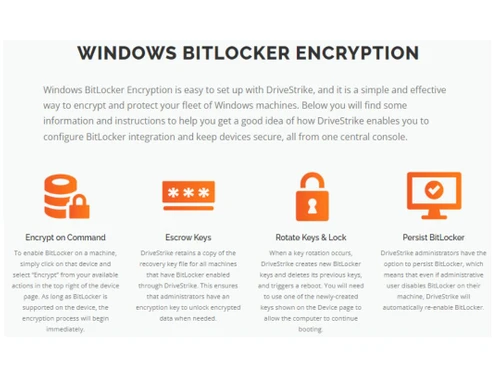
  • Encrypt on Command
  • Rotate Keys & Lock
  • Encrypt on Command
Starting at $2
    • Device

      Device
      Device
    • Monthly

      Monthly
      Monthly

Key Features

  • Remotely Erase Data

  • Mobile Device Management

  • Most Granular Location

  • Track Mileage & Routes

  • Change Passcode

  • Encrypt on Command

  • Rotate Keys & Lock

  • Encrypt on Command

DriveStrike Features

  • icon_check Encryption..
    Data is protected using robust encryption methods.
  • icon_check Compliance Management
    Easily manage compliance with industry regulations.
  • icon_check Real Time Monitoring
    Monitor system activity in real time for immediate insights.
  • icon_check Access Control
    Manage user access and permissions effectively.
  • icon_check Permission Management
    Granular control over user permissions and access rights.
  • icon_check Policy Management
    Establish and enforce security policies easily.
  • icon_check Data Protection
    Comprehensive data protection measures are implemented.
  • icon_check Fleet Management
    Efficiently manage and track your fleet of devices.
  • icon_check Mobile Device Management
    Securely manage mobile devices within your organization.
  • icon_check Data Breach Monitoring
    Continuously monitor for and detect data breaches.
  • icon_check Erase Data
    Securely and completely erase sensitive data.
  • icon_check Geo tracking
    Track the location of devices in real-time.
  • icon_check Secure Delete
    Permanently and securely delete data.
DriveStrike Demo Video play icon

Get DriveStrike Demo

Watch the demo video to explore key features, real workflows, and how the software fits your business needs.

Understand
Key Features
Personal
Demo Insights
Interactive
Demo Support

DriveStrike Specifications

Supported Platforms
Windows Windows iOS iOS Android Android MacOS MacOS
Devices
Desktop Desktop Mobile Mobile iPad iPad
Deployment
Cloud-Based Cloud-Based
Suitable For
All Industries
Business Specific
All Businesses
Business Size
Small Business Medium Business Enterprises
Customer Support
Phone Email Live Chat Forums
Language
English
Training Resources
Documentation

Explore the Best Alternative Solutions Similar to Your Business Size and Needs

DriveStrike Review

4.1

Out of 5

img

Overall Rating

Based on
3 Verified Ratings

Rating Breakdown

  • Features 4.3
  • Value for Money 4
  • Ease of Use 4
  • Customer Support 4.3

93% Recommend this Product

Add Review

Be the First to Review

This product has no reviews yet. Be the first to leave your feedback.

Add Review

Compare DriveStrike With other Encryption Software

Products
Ratings
Pricing
Device Supported
Deployment
Supported Platforms
  • img

    DriveStrike

  • 4.1

  • Price On Request

  • Desktop

    Mobile

  • Web based

    On Premises

  • Windows

    Mac OS

  • img

    GhostVolt

  • 4.4

  • ₹ 1145

  • Desktop

    Mobile

  • Web based

    On Premises

  • Windows

    Mac OS

  • img

    NordLocker

  • 4.4

  • Price On Request

  • Desktop

    Mobile

  • Web based

    On Premises

  • Windows

    Mac OS

  • img

    AES Crypt

  • 4.3

  • Price On Request

  • Desktop

    Mobile

  • Web based

    On Premises

  • Windows

    Mac OS

  • img

    Formify Pro

  • 4.6

  • ₹ 247

  • Desktop

    Mobile

  • Web based

    On Premises

  • Windows

    Mac OS

  • img

    AxCrypt

  • 4.2

  • Price On Request

  • Desktop

    Mobile

  • Web based

    On Premises

  • Windows

    Mac OS

  • img

    Virtru

  • 4.3

  • Price On Request

  • Desktop

    Mobile

  • Web based

    On Premises

  • Windows

    Mac OS

  • img

    SecureZIP

  • 4.5

  • Price On Request

  • Desktop

    Mobile

  • Web based

    On Premises

  • Windows

    Mac OS

  • img

    VeraCrypt

  • 4.0

  • Price On Request

  • Desktop

    Mobile

  • Web based

    On Premises

  • Windows

    Mac OS

(2) Product(s) selected

DriveStrike Alternatives

See All DriveStrike Alternatives

Starting Price:

$30 /License

Starting Price:

$44 /Quantity

Available

Price on Request

Starting Price:

€8 /Seat/Month

Articles for DriveStrike

See All Related Articles

Which operating system does DriveStrike support?

DriveStrike supports Windows, macOS, Android, and iOS operating systems, providing a versatile solution for various devices.

Is there any DriveStrike app for mobile devices?

Yes, DriveStrike offers a mobile app for both Android and iOS platforms, allowing users to manage their devices on the go.

How much does DriveStrike cost?

DriveStrike pricing starts at $2 per month at techjockey.com. Contact techjockey.com for more detailed pricing options.

Who are the potential users of DriveStrike?

DriveStrike Encryption Software is ideal for small to large businesses across all industries that need robust mobile device management, data protection, and compliance solutions to safeguard their business assets.

Does DriveStrike offer a free trial or demo?

A demo of DriveStrike is available at techjockey.com. You can also contact our product experts to explore trial options.

Is DriveStrike suitable for small businesses?

Yes, DriveStrike is perfect for small businesses looking to enhance their data security, manage company devices, and ensure compliance at an affordable price.

How secure is DriveStrike Encryption Software?

DriveStrike incorporates advanced encryption, access control, data breach monitoring, and real-time device management, ensuring that sensitive information is protected against unauthorized access.

How does DriveStrike Encryption Software work?

DriveStrike Encryption Software operates by providing comprehensive device management, real-time monitoring, and data protection features that help businesses oversee their mobile and desktop devices efficiently while safeguarding their data.

What features does DriveStrike offer?

Key features of DriveStrike include encryption, compliance management, data protection, mobile device management, and geo-tracking. You can contact our product experts for more information.

20,000+ Software Listed

Best Price Guranteed

Free Expert Consultation

2M+ Happy Customers

Terms and Condtions

close

Users with registered businesses can purchase goods from merchants on the platform to satisfy their business needs. Users are not permitted to utilize any products acquired through the platform for resale, advertising, business, or further distribution.

For each purchase made, users will receive a Tax Invoice (or 'GST invoice') that includes specific details such as:

  • the GSTIN of the user associated with their registered business, and

  • the specified Entity Name for their business.

It should be noted that not all products are eligible for GST Invoice. Only the products displayed by participating sellers with the 'GST-based Invoice Available' callout on the product description page would qualify.

Certain goods and services are not eligible to get a GST Invoice, including items with VAS, i.e., Value Added Services (e.g., Total Mobile Protection/Assured Buyback) and those involving an exchange offer at the time of purchase.

Users must ensure the accuracy of the GSTIN, and business entity name provided for the GST Invoice. Requests for corrections into GST Invoice would not be accommodated by Techjockey.com or any Seller, and any issues arising from user-provided information are the sole responsibility of users.

Techjockey.com is not liable for the GST Invoice or any associated input tax credit. To efficiently claim an input tax credit, users should select the registered place of business address as per the GST authority's data and follow the provisions of the GST Act and rules.

To claim an input tax credit, the delivery and billing addresses must match. Furthermore, input tax credits will not be granted if the delivery address and GSTIN on the invoice are from different states. In case of incorrect GST details provided during the order placement, the order will be canceled automatically.