linkedin
VeraCrypt logo
play Veracrypt Get Started Guide: Encryption Made Easy
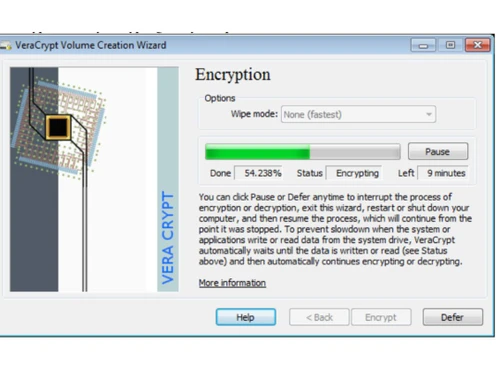
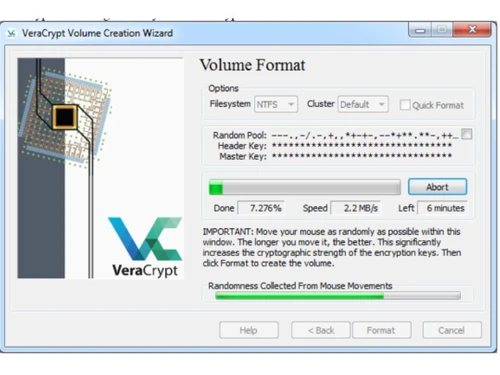
VeraCrypt Encryption
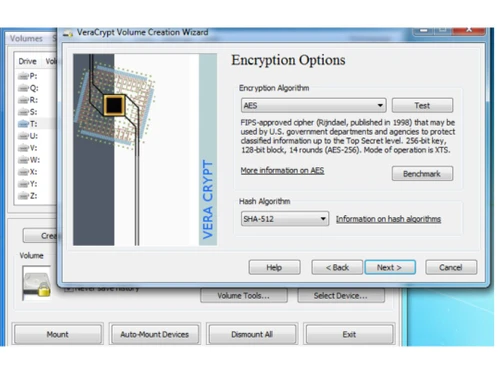
VeraCrypt Encryption options

VeraCrypt

Brand: VeraCrypt

  • 4.0

  • 3 Ratings

VeraCrypt is the most powerful open-source software to encrypt and decrypt all digital assets automatically for everyone.

See More

Have you used VeraCrypt before?

Share your insights for better experience

Add a Review

Free Forever

Get started immediately at no cost. Upgrade anytime if your business demand more.

100% Genuine
Products
Best Price
Guaranteed
Safe & Secure
Payment
  • Description

  • Pricing

  • Features

  • Specification

  • Review

  • Compare

  • Alternatives

  • FAQ

VeraCrypt Software Overview

What is VeraCrypt?

VeraCrypt is the best free encryption software that automatically encrypts and decrypts data during loading without any manual intervention. No one can access these data without the private encryption key.

This software encrypts the entire file system, folders, contents, metadata, documents, etc. Users can drag and drop to copy and paste files from VeraCrypt-mounted folders. This encryption software does not require extra RAM space to operate.

VeraCrypt is powerful software with encryption options and unique features. This encryption software supports multiple encryption algorithms such as AES, Camellia, Kuznyechik, Serpent, and Twofish.

It creates volumes on the user's machine, appearing as separate disks. Users can create new volumes, encrypt existing partitions, and even encrypt the entire disk where the operating system is installed.

This encryption software introduces a whole-system encryption layer that enhances security.

The software offers a fail-safe mechanism through a rescue disk, ensuring data recovery in case of launcher issues or decryption-related problems.

Why Choose VeraCrypt Software?

  • Robust Encryption:This encryption software offers versatile encryption to encrypt entire disks, partitions, and even the operating system for comprehensive data protection.
  • Unique Security Features:With hidden volumes and operating systems, this powerful encryption software ensures plausible deniability to enhance security for sensitive information.
  • Fail-Safe Rescue Mechanism:This software includes a rescue disk feature to address potential issues during system encryption, providing a fail-safe method for data recovery and access restoration.
  • Multiple Encryption Algorithms:Users can choose from multiple encryption algorithms, including AES, Camellia, Kuznyechik, Serpent, and Twofish, for customization and individual security preferences.
  • Cost-Effective Solution:As a free and open-source software, this encryption software provides powerful encryption features without paid subscriptions, making it a cost-effective choice for privacy-conscious users.

Benefits of VeraCrypt Platform

  • Offers top security solutions using advanced AES algorithms like Camellia, Kuznyechik, Serpent, and Twofish to protect confidential data.
  • Offers flexibility for users to encrypt individual files, entire disks, partitions, and even the operating system to safeguard data.
  • Users can choose from multiple encryption algorithms based on their preferences to customize security measures.
  • VeraCrypt is a free, open-source, and economical choice for businesses seeking powerful encryption without breaking the bank.
  • This software's local operation enhances security and lets users retain complete control and autonomy over encrypted data.

Pricing of VeraCrypt Encryption Software

VeraCrypt is an open-source software, so it is available for free at techjockey.com.

For subscription-related details and offers on premium packages, please request a call back from our product experts.

Read more

VeraCrypt Company Details

Founded Year:  2013

VeraCrypt is an open-source disk encryption software for windows, mac OSX and linux.

Director/Founders VeraCrypt
Company Size 1-100 Employees

VeraCrypt Pricing & Plans

This Product is Available Free Forever.

Start instantly with no fees, no subscriptions, and no commitments.

  • Full access to basic version available
  • No credit card or sign-up required

Free Forever Plan

Get started immediately at no cost. Upgrade anytime if your business demand more.

Free Forever

VeraCrypt Features

  • icon_check Protection of Hidden Volumes
    This open-source encryption software helps users protect hidden volumes of disks to read and write data.
  • icon_check VeraCrypt Rescue Disk
    This feature of this encryption software allows you to create backup disks and restore the data if necessary.
  • icon_check Parallelization
    It works best with multi-core processors by simultaneously encrypting and decrypting parallelly.
  • icon_check Pipelining
    It utilizes pipelining for faster encryption and decryption to access encrypted drives in Windows.
  • icon_check Hardware Acceleration
    This software optimizes speed using hardware-accelerated AES encryption with Intel AES-NI instructions for faster performance.
  • icon_check Security Tokens & Smart Cards
    It integrates with security tokens and smart cards to enhance cryptographic protection for system encryption.
  • icon_check EMV Smart Cards
    Enhance security using EMV Smart Cards as key files, leveraging global banking standards for robust encryption.
  • icon_check Default Mount Parameters
    Customize default mount parameters by specifying the PRF algorithm and TrueCrypt mode to enhance security.
  • icon_check Trim Operation
    Control trim operations on Windows & enhance plausible deniability by managing trim settings.
  • icon_check Defragmenting
    Prevent security risks by avoiding defragmentation on file systems containing VeraCrypt volumes.
VeraCrypt Demo Video play icon

Get VeraCrypt Demo

Watch the demo video to explore key features, real workflows, and how the software fits your business needs.

Understand
Key Features
Personal
Demo Insights
Interactive
Demo Support

VeraCrypt Specifications

Supported Platforms
Windows Windows MacOS MacOS Linux Linux
Devices
Desktop Desktop
Deployment
Perpetual Perpetual
Suitable For
All Industries
Business Specific
All Businesses
Business Size
Small Business Startups Medium Business Enterprises
Customer Support
Email Communities Forums
Language
English
Training Resources
Documentation Videos

Explore the Best Alternative Solutions Similar to Your Business Size and Needs

VeraCrypt Review

4.0

Out of 5

img

Overall Rating

Based on
3 Verified Ratings

Rating Breakdown

  • Features 4
  • Value for Money 4
  • Ease of Use 4.5
  • Customer Support 3.6

83% Recommend this Product

Add Review

Be the First to Review

This product has no reviews yet. Be the first to leave your feedback.

Add Review

Compare VeraCrypt With other Encryption Software

Products
Ratings
Pricing
Device Supported
Deployment
Supported Platforms
  • img

    VeraCrypt

  • 4.0

  • FREE

  • Desktop

    Mobile

  • Web based

    On Premises

  • Windows

    Mac OS

  • img

    GhostVolt

  • 4.4

  • ₹ 1145

  • Desktop

    Mobile

  • Web based

    On Premises

  • Windows

    Mac OS

  • img

    NordLocker

  • 4.4

  • Price On Request

  • Desktop

    Mobile

  • Web based

    On Premises

  • Windows

    Mac OS

  • img

    AES Crypt

  • 4.3

  • Price On Request

  • Desktop

    Mobile

  • Web based

    On Premises

  • Windows

    Mac OS

  • img

    Formify Pro

  • 4.6

  • ₹ 247

  • Desktop

    Mobile

  • Web based

    On Premises

  • Windows

    Mac OS

  • img

    AxCrypt

  • 4.2

  • Price On Request

  • Desktop

    Mobile

  • Web based

    On Premises

  • Windows

    Mac OS

  • img

    Virtru

  • 4.3

  • Price On Request

  • Desktop

    Mobile

  • Web based

    On Premises

  • Windows

    Mac OS

  • img

    SecureZIP

  • 4.5

  • Price On Request

  • Desktop

    Mobile

  • Web based

    On Premises

  • Windows

    Mac OS

  • img

    DriveStrike

  • 4.1

  • Price On Request

  • Desktop

    Mobile

  • Web based

    On Premises

  • Windows

    Mac OS

(2) Product(s) selected

VeraCrypt Alternatives

See All VeraCrypt Alternatives

Starting Price:

$30 /License

Starting Price:

$44 /Quantity

Available

Price on Request

Articles for VeraCrypt

See All Related Articles

Which operating system does VeraCrypt support?

This encryption software is compatible with Windows, macOS, and Linux operating systems.

Is there any VeraCrypt app?

The VeraCrypt app is not available for Android and iOS devices.

What is the deployment type of VeraCrypt?

VeraCrypt encryption software supports on-premises deployment.

How much does VeraCrypt cost?

VeraCrypt is a free and open-source software available at techjockey.com.

Who are the potential users of VeraCrypt?

VeraCrypt encryption software is typically used in small to large business enterprises like healthcare, fintech, defence, etc., by team leaders, team members, security specialists, and more to secure sensitive company files and data.

Is there any free trial or demo for VeraCrypt?

The VeraCrypt demo is available for free on techjockey.com.

Is VeraCrypt free?

Yes, VeraCrypt encryption software is free and open-source software.

How can you download VeraCrypt?

For VeraCrypt software installation, you can go directly to Techjockey's official website and buy this solution. Once purchased, you will receive a key to download the same via email.

How does VeraCrypt Work?

VeraCrypt encrypts data on storage volumes, creating secure containers or encrypting entire drives. It uses advanced encryption algorithms and provides features like pipelining, hardware acceleration, and support for security tokens.

20,000+ Software Listed

Best Price Guranteed

Free Expert Consultation

2M+ Happy Customers

Terms and Condtions

close

Users with registered businesses can purchase goods from merchants on the platform to satisfy their business needs. Users are not permitted to utilize any products acquired through the platform for resale, advertising, business, or further distribution.

For each purchase made, users will receive a Tax Invoice (or 'GST invoice') that includes specific details such as:

  • the GSTIN of the user associated with their registered business, and

  • the specified Entity Name for their business.

It should be noted that not all products are eligible for GST Invoice. Only the products displayed by participating sellers with the 'GST-based Invoice Available' callout on the product description page would qualify.

Certain goods and services are not eligible to get a GST Invoice, including items with VAS, i.e., Value Added Services (e.g., Total Mobile Protection/Assured Buyback) and those involving an exchange offer at the time of purchase.

Users must ensure the accuracy of the GSTIN, and business entity name provided for the GST Invoice. Requests for corrections into GST Invoice would not be accommodated by Techjockey.com or any Seller, and any issues arising from user-provided information are the sole responsibility of users.

Techjockey.com is not liable for the GST Invoice or any associated input tax credit. To efficiently claim an input tax credit, users should select the registered place of business address as per the GST authority's data and follow the provisions of the GST Act and rules.

To claim an input tax credit, the delivery and billing addresses must match. Furthermore, input tax credits will not be granted if the delivery address and GSTIN on the invoice are from different states. In case of incorrect GST details provided during the order placement, the order will be canceled automatically.