USA
USA UAE
UAESmall Business
Designed for startups and growing businesses


See More


Brand: Gpg4win
Gpg4win is an encryption software that utilizes the GnuPG (GNU Privacy Guard) framework, an open-source symmetric and public-key cryptography implementation.
See MoreHave you used Gpg4win before?
Share your insights for better experience
This Product is Available Free Forever.
Start instantly with no fees, no subscriptions, and no commitments.
Free Forever Plan
Get started immediately at no cost. Upgrade anytime if your business demand more.
Free Forever OpenPGP & S/MIME High algorithmic strength of GnuPG SmartCard Signing & Encrypting Checksums User-friendly Certificate Selection Manage certificates securely & comfortably Certificate Server Certify OpenPGP Certificates Free Software

Watch the demo video to explore key features, real workflows, and how the software fits your business needs.
 Windows
  MacOS
MacOS  Linux
Linux  Desktop
  Perpetual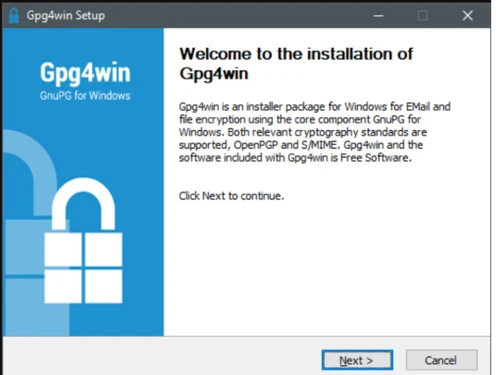
Small Business
Designed for startups and growing businesses
Medium Business
Built for business growth and flexibility
Enterprises
Designed for complex and large-scale business needs
4.2
Out of 5

Overall Rating
Based on
4 Verified Ratings
Rating Breakdown
90% Recommend this Product
Add ReviewThis product has no reviews yet. Be the first to leave your feedback.
Add Review
Gpg4win
FREE
Desktop
Mobile
Web based
On Premises
Windows
Mac OS

ionCube PHP Encoder
Price On Request
Desktop
Mobile
Web based
On Premises
Windows
Mac OS

GhostVolt
₹ 1145
Desktop
Mobile
Web based
On Premises
Windows
Mac OS

NordLocker
Price On Request
Desktop
Mobile
Web based
On Premises
Windows
Mac OS

AES Crypt
Price On Request
Desktop
Mobile
Web based
On Premises
Windows
Mac OS

Formify Pro
₹ 247
Desktop
Mobile
Web based
On Premises
Windows
Mac OS

AxCrypt
Price On Request
Desktop
Mobile
Web based
On Premises
Windows
Mac OS

SecureZIP
Price On Request
Desktop
Mobile
Web based
On Premises
Windows
Mac OS

Virtru
Price On Request
Desktop
Mobile
Web based
On Premises
Windows
Mac OS

DriveStrike
Price On Request
Desktop
Mobile
Web based
On Premises
Windows
Mac OS

SecureAge Security Suite
Price On Request
Desktop
Mobile
Web based
On Premises
Windows
Mac OS
(2) Product(s) selected
Starting Price:
$3 /Month
Starting Price:
$30 /License
Starting Price:
$44 /Quantity
Starting Price:
$2 /Device
Available
Price on Request

Starting Price:
€50 /License

Starting Price:
$15 /User/Month

Available
Price on Request

Starting Price:
€8 /Seat/Month

Starting Price:
$40 /Month
Gpg4win is compatible with Ubuntu, MacOS, and Linux operating systems.
Gpg4win app is unavailable for android and iOS app users.
Gpg4win supports web-based deployment.
Gpg4win is available for free at techjockey.com.
Gpg4win can help organizations of all sizes to protect their data and communications.
Gpg4win free trial is available at techjockey.com.
Gpg4win allows the user to securely transfer their emails and files with utmost security using encryption and digital signatures. Encryption saves the data from being read by a third party and digital signature saved the data from being modified.
Gpg4win installation is not required, as it is web-based. Just open the Setup Wizard to get started.
The open-source encryption software lets you securely lock up files and emails with powerful GnuPG technology.
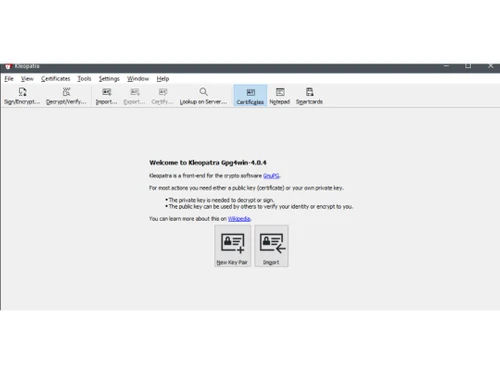
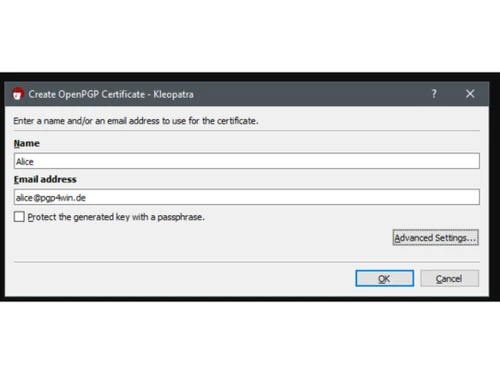
To encrypt a message in Gpg4win, you can use KLEOPATRA certificate manager to create a key pair, then use the Sign/Encrypt function in text or file.
0 0
To encrypt using Gpg4win, choose Encrypt from the menu bar. Choose the file that you want to encrypt. If you are encrypting for another person then enter his contact details. Select the key to that email. Finally click on the Encrypt button. At last, enter the desired Password and then click OK.
0 0
Kleopatra is the graphical user interface client for Gpg4win, hence allowing the user to manage their OpenPGP and S/MIME certificates proficiently.
0 0
To encrypt a file in Gpg4win, choose Sign/Encrypt. Open the file that you want to encrypt. Enter the credentials of the person for whom you are encrypting. Click the key to that email to encrypt the data. Click Encrypt. Enter the desired password and click OK.
0 0
To decrypt with Gpg4win, copy the message that you want to encrypt. Open Kleopatra Component and select Clipboard and Decrypt/Verify. Input the passphrase and click OK. Followed by Finish. Open a text editor and paste the message that has been decrypted.
0 0
20,000+ Software Listed
Best Price Guranteed
Free Expert Consultation
2M+ Happy Customers
Terms and Condtions

Users with registered businesses can purchase goods from merchants on the platform to satisfy their business needs. Users are not permitted to utilize any products acquired through the platform for resale, advertising, business, or further distribution.
For each purchase made, users will receive a Tax Invoice (or 'GST invoice') that includes specific details such as:
the GSTIN of the user associated with their registered business, and
the specified Entity Name for their business.
It should be noted that not all products are eligible for GST Invoice. Only the products displayed by participating sellers with the 'GST-based Invoice Available' callout on the product description page would qualify.
Certain goods and services are not eligible to get a GST Invoice, including items with VAS, i.e., Value Added Services (e.g., Total Mobile Protection/Assured Buyback) and those involving an exchange offer at the time of purchase.
Users must ensure the accuracy of the GSTIN, and business entity name provided for the GST Invoice. Requests for corrections into GST Invoice would not be accommodated by Techjockey.com or any Seller, and any issues arising from user-provided information are the sole responsibility of users.
Techjockey.com is not liable for the GST Invoice or any associated input tax credit. To efficiently claim an input tax credit, users should select the registered place of business address as per the GST authority's data and follow the provisions of the GST Act and rules.
To claim an input tax credit, the delivery and billing addresses must match. Furthermore, input tax credits will not be granted if the delivery address and GSTIN on the invoice are from different states. In case of incorrect GST details provided during the order placement, the order will be canceled automatically.