linkedin
Ayoya logo
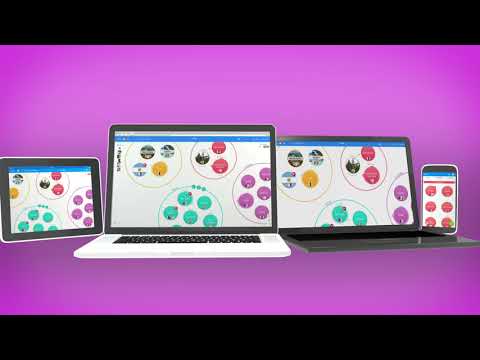
play DropTask - A simple and fluid way to get things done
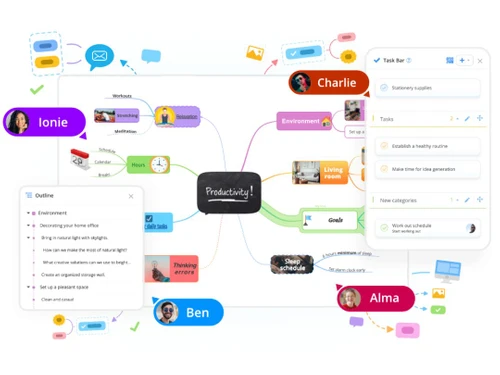
Ayoya outline
Ayoya members

Ayoya

Brand: OpenGenius Ltd

  • 4.1

  • 4 Ratings

A task management software with mind mapping, Gantt charts, and visual boards to help users efficiently organize projects, track tasks, and communicate seamlessly.

See More

Have you used Ayoya before?

Share your insights for better experience

Add a Review
Starting Price
₹1,075 excl.GST
₹ 1,269 incl. GST

View plans

offer Save upto 18%, Get GST Invoice on your business purchase T&C
offer Buy Now & Pay Later, Check offer on payment page.
Buy Now
100% Genuine
Products
Best Price
Guaranteed
Safe & Secure
Payment
  • Description

  • Pricing

  • Features

  • Specification

  • Review

  • Compare

  • Alternatives

  • FAQ

Starting at ₹1,075
Buy Now

Ayoya Software Overview

What is Ayoya?

Ayoya is a versatile task management and collaboration software designed to help individuals and teams organize their work efficiently. It combines features like mind mapping, Gantt charts, and visual boards, allowing users to manage projects creatively rather than relying on traditional lists and spreadsheets.

With Ayoya, users can communicate directly through instant messaging, track task progress, and assign responsibilities easily. This task management software also offers a flexible planner to prioritize tasks based on urgency. Accessible from various devices, Ayoya enables users to work anytime and anywhere, making it a convenient tool for both personal and professional project management. Its user-friendly interface and in-app onboarding help new users get started quickly.

Why Choose Ayoya Software?

  • Integrated Mind Mapping and Task Management: It combines mind mapping with task management features, enabling users to brainstorm ideas and turn them into actionable tasks within a single platform.
  • Visual Project Management: Users can utilize various visual boards, such as Kanban and Gantt charts, to organize projects creatively and track progress easily.
  • Centralized Workspace: The software provides a central hub for uploading files, setting reminders, and collaborating with team members, reducing the need to switch between multiple applications.
  • Flexible Task Scheduling: It allows users to prioritize tasks using a planner that can adapt to changing workloads and deadlines, enhancing productivity.
  • Real-Time Collaboration: Built-in messaging features enable seamless communication among team members, ensuring everyone stays updated on project developments.
  • User-Friendly Interface: The intuitive design and in-app onboarding help new users get started quickly without extensive training.
  • Mobile Accessibility: It is available on various devices, allowing users to manage their tasks and projects anytime and anywhere.
  • Customizable Templates: Users can choose from various templates to streamline their project setup process.

Benefits of Ayoya Software

  • Mind Mapping: Helps organize thoughts and ideas visually, making brainstorming sessions more effective.
  • Visual Diagrams: Allows for the creation of flowcharts, organizational charts, and other visual aids to simplify complex information.
  • Task Management: Keeps track of tasks and deadlines, ensuring nothing falls through the cracks.
  • Collaboration: Facilitates teamwork with features like shared whiteboards and real-time collaboration.
  • Templates: Provides a variety of templates to get started quickly and efficiently.
  • AI Integration: Uses AI to prompt ideas and enhance creativity.
  • Accessibility: Available on any device, making it easy to access and use anywhere.
  • User-Friendly: Easy to use, even for those who are not tech-savvy.

Pricing of Ayoya

The pricing details for Ayoya is available at INR 1075 per month at techjockey.com.

The pricing model is based on different parameters, including extra features, deployment type, and the total number of users. For further queries related to the product, you can contact our product team and learn more about the pricing and offers.

Read more

OpenGenius Ltd Company Details

Founded Year:  2005

OpenGenius

Director/Founders Chris
Company Size 1-100

Ayoya Pricing & Plans

Ayoa Ultimate
Key Features
  • Multiple mind mapping modes
  • Integrated whiteboards
  • Task board and gantt views
  • Document and outline views
  • Presentation modes
  • Importers (with AI summaries)
  • Export to Docs, PDFs, & images
  • Google & Microsoft Integrations

Calculated Price

₹ 1075 Exclusive of all taxes
    • Users

      Users
      Users
    • Monthly

      Monthly
      Monthly

Key Features

  • Multiple mind mapping modes

  • Integrated whiteboards

  • Task board and gantt views

  • Document and outline views

  • Presentation modes

  • Importers (with AI summaries)

  • Export to Docs, PDFs, & images

  • Google & Microsoft Integrations

Ayoya Features

  • icon_check Collaboration
    Invite others to collaborate on tasks, improving teamwork and communication for both personal and business projects.
  • icon_check Projects
    Categorize tasks into organized projects for better clarity and focus on responsibilities.
  • icon_check Synchronisation
    Access Ayoya via the web or mobile apps, allowing seamless usage across devices for convenient task management.
  • icon_check Alerts & Notifications
    Receive timely updates on significant changes or noteworthy events within projects, keeping you informed and engaged.
  • icon_check Status Management
    Add and edit details for tasks, including their current status (e.g., in progress, on hold), to track progress effectively.
  • icon_check Integration
    Streamline your workflow by integrating with email and other tools, making it easier to manage incoming tasks and actions.
  • icon_check Calendar
    Schedule tasks using Start and Due Dates to stay organized and ensure timely completion of responsibilities.
  • icon_check Templates
    Create and save reusable project templates for convenience, allowing for quick setup of recurring tasks and projects.
  • icon_check Support
    Access priority support for faster responses to queries, ensuring you receive assistance when needed.
  • icon_check Whiteboard
    Utilize a visual workspace for brainstorming and planning, fostering creativity and organization.
  • icon_check Automated Workflow Optimization
    Automate repetitive tasks to enhance efficiency and streamline workflows.
  • icon_check Gantt Chart
    Visualize project timelines and dependencies with Gantt charts, aiding in planning and resource allocation.
Ayoya Demo Video play icon

Get Ayoya Demo

Watch the demo video to explore key features, real workflows, and how the software fits your business needs.

Understand
Key Features
Personal
Demo Insights
Interactive
Demo Support

Ayoya Specifications

Supported Platforms
Ubuntu Ubuntu Windows Windows iOS iOS Android Android MacOS MacOS Linux Linux
Devices
Desktop Desktop Mobile Mobile Tablet Tablet iPad iPad
Deployment
Cloud-Based Cloud-Based
Suitable For
All Industries
Business Specific
All Businesses
Business Size
Individual Small Business Startups Medium Business Enterprises Freelancers
Customer Support
Phone Email Communities Forums
Language
English français Italiano 日本人 한국어 Português
Integration
API Integration
Training Resources
Webinars Documentation Videos
AI Features
AI Integrated
Compliance Regulation
CCPA

Explore the Best Alternative Solutions Similar to Your Business Size and Needs

Ayoya Review

4.1

Out of 5

img

Overall Rating

Based on
4 Verified Ratings

Rating Breakdown

  • Features 4.3
  • Value for Money 4.1
  • Ease of Use 3.8
  • Customer Support 4.2

92% Recommend this Product

Add Review

Techjockey Trusted Reviews from Verified Users

No reviews are currently available for Ayoya. Discover similar Task Management Software reviews

  • Task Tracker

    4.9

    Whats great - Task Tracker is a very easy-to-use application, as it is having attendance feature with accurate geolocation, assigning tasks... read more

  • Kerika

    4.9

    Whats great - Ease of Use: The software is designed to be user-friendly, making it accessible to a wide range of users within the organisat... read more

  • TaskOPad

    4.8

    Whats great - Would recommend this app for managing your daily activities. After-service is quite nice. read more

Compare Ayoya With other Task Management Software

Products
Ratings
Pricing
Device Supported
Deployment
Supported Platforms
  • img

    Ayoya

  • 4.1

  • ₹ 1075.00 excl. GST

  • Desktop

    Mobile

  • Web based

    On Premises

  • Windows

    Mac OS

  • img

    TickTick

  • 4.3

  • Price On Request

  • Desktop

    Mobile

  • Web based

    On Premises

  • Windows

    Mac OS

  • img

    TaskOPad

  • 4.7

  • Price On Request

  • Desktop

    Mobile

  • Web based

    On Premises

  • Windows

    Mac OS

  • img

    Task Tracker

  • 4.9

  • ₹ 225

  • Desktop

    Mobile

  • Web based

    On Premises

  • Windows

    Mac OS

  • img

    Zoho ToDo

  • 4.5

  • Price On Request

  • Desktop

    Mobile

  • Web based

    On Premises

  • Windows

    Mac OS

  • img

    Taskmaan

  • 4.5

  • ₹ 2000

  • Desktop

    Mobile

  • Web based

    On Premises

  • Windows

    Mac OS

  • img

    Akiflow

  • 4.7

  • Price On Request

  • Desktop

    Mobile

  • Web based

    On Premises

  • Windows

    Mac OS

  • img

    Todoist

  • 4.5

  • ₹ 330

  • Desktop

    Mobile

  • Web based

    On Premises

  • Windows

    Mac OS

  • img

    Sunsama

  • 4.4

  • Price On Request

  • Desktop

    Mobile

  • Web based

    On Premises

  • Windows

    Mac OS

(2) Product(s) selected

Ayoya Alternatives

See All Ayoya Alternatives

Starting Price:

$4 /Month

SAVE UPTO 17%

Available

Price on Request

Starting Price:

$34 /month

Starting Price:

$20 /month

Starting Price:

$7 /month

SAVE UPTO 50%

Starting Price:

$4 /Month

Starting Price:

$30 /Month

Articles for Ayoya

See All Related Articles

What is the pricing structure for Ayoya Software?

The pricing details for Ayoya is available at INR 1075 per month at techjockey.com.

Is there a mobile application available for Ayoya Software?

Yes, Ayoya Software has mobile applications available for both iOS and Android devices.

Which operating systems are compatible with Ayoya Software?

Ayoya Software is compatible with major operating systems, including Windows, Ubuntu, iOS, and Android.

Does Ayoya Software provide a free trial option?

Yes, Ayoya Software usually offers a free trial option for users to explore its features before committing to a subscription.

What is the functionality of Ayoya Software?

Ayoya Software provides tools for project management, task tracking, collaboration, and workflow optimization.

Who can benefit from using Ayoya Software?

Teams, businesses, and individuals looking to enhance their project management and collaboration capabilities can benefit from Ayoya Software.

Is a free demo available for Ayoya Software?

Yes, Ayoya Software offers a free demo for potential users to experience its features and functionality.

Is Ayoya Software available for free?

Ayoya Software offers a limited free version, but full access usually requires a subscription.

Can I integrate Ayoya Software with other applications?

Yes, Ayoya Software supports integration with various third-party applications, enhancing its functionality and allowing for seamless workflow.

20,000+ Software Listed

Best Price Guranteed

Free Expert Consultation

2M+ Happy Customers

Terms and Condtions

close

Users with registered businesses can purchase goods from merchants on the platform to satisfy their business needs. Users are not permitted to utilize any products acquired through the platform for resale, advertising, business, or further distribution.

For each purchase made, users will receive a Tax Invoice (or 'GST invoice') that includes specific details such as:

  • the GSTIN of the user associated with their registered business, and

  • the specified Entity Name for their business.

It should be noted that not all products are eligible for GST Invoice. Only the products displayed by participating sellers with the 'GST-based Invoice Available' callout on the product description page would qualify.

Certain goods and services are not eligible to get a GST Invoice, including items with VAS, i.e., Value Added Services (e.g., Total Mobile Protection/Assured Buyback) and those involving an exchange offer at the time of purchase.

Users must ensure the accuracy of the GSTIN, and business entity name provided for the GST Invoice. Requests for corrections into GST Invoice would not be accommodated by Techjockey.com or any Seller, and any issues arising from user-provided information are the sole responsibility of users.

Techjockey.com is not liable for the GST Invoice or any associated input tax credit. To efficiently claim an input tax credit, users should select the registered place of business address as per the GST authority's data and follow the provisions of the GST Act and rules.

To claim an input tax credit, the delivery and billing addresses must match. Furthermore, input tax credits will not be granted if the delivery address and GSTIN on the invoice are from different states. In case of incorrect GST details provided during the order placement, the order will be canceled automatically.