USA
USA UAE
UAESmall Business
Designed for startups and growing businesses


See More





Brand: DVDFab
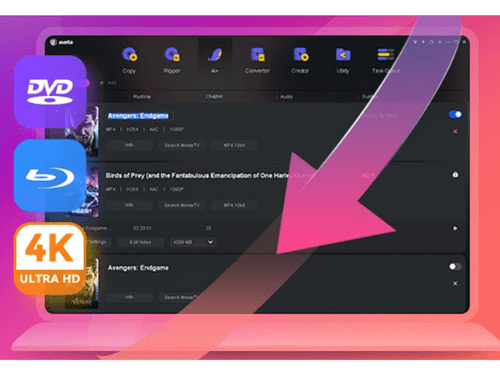
DVDFab Video Editing Software empowers users to create professional-quality videos effortlessly, offering a wide range of advanced editing tools, an intuitive interface, and support for various video formats.
See MoreHave you used DVDFab before?
Share your insights for better experience
Brand: DVDFab
Founded Year: 2003
DVDFab company is a software development and sales high-tech enterprises which are professional in audio and video sharing area.
This Product is Available Free Forever.
Start instantly with no fees, no subscriptions, and no commitments.
Free Forever Plan
Get started immediately at no cost. Upgrade anytime if your business demand more.
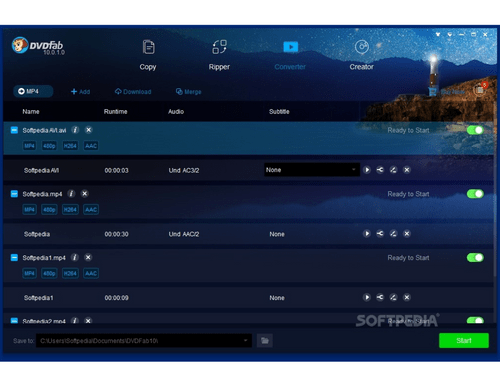
Free Forever Multimedia Files Video Editing Media Library Social Sharing Video Stabilization Video Converter Brand Overlay Text Overlay Split / Merge

Watch the demo video to explore key features, real workflows, and how the software fits your business needs.
 Windows
  Desktop
  Cloud-Based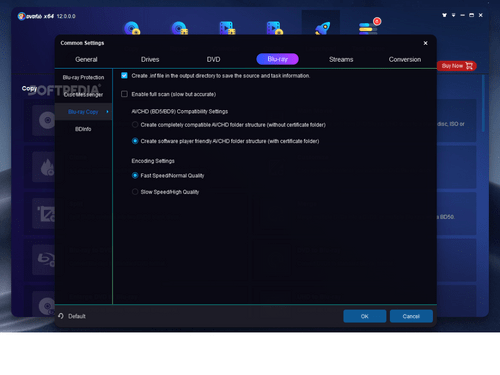
Small Business
Designed for startups and growing businesses
Medium Business
Built for business growth and flexibility
Enterprises
Designed for complex and large-scale business needs
4.0
Out of 5

Overall Rating
Based on
3 Verified Ratings
Rating Breakdown
93% Recommend this Product
Add ReviewTechjockey Trusted Reviews from Verified Users
No reviews are currently available for DVDFab. Discover similar File Converter reviews

MailsDaddy OST to PST Converter
Whats great - It is easy to use and makes the conversion process simple. The software works smoothly, maintains mailbox data properly, and ... read more

Wondershare UniConverter
Whats great - The program also comes with a disc burner that can burn videos onto a DVD or Blu-ray disc. read more

AiseeSoft HEIC Convertor
Whats great - This web application changes over HEIC photographs to JPG. It does this through an online interface and you can just move you... read more

DVDFab
FREE
Desktop
Mobile
Web based
On Premises
Windows
Mac OS

Vectorizer AI
Price On Request
Desktop
Mobile
Web based
On Premises
Windows
Mac OS

Shoviv OST to PST Converter
₹ 4748
Desktop
Mobile
Web based
On Premises
Windows
Mac OS
Wondershare UniConverter
Price On Request
Desktop
Mobile
Web based
On Premises
Windows
Mac OS

PDFtoExcel
₹ 69
Desktop
Mobile
Web based
On Premises
Windows
Mac OS
XnConvert
Price On Request
Desktop
Mobile
Web based
On Premises
Windows
Mac OS
MacSonik OLM Converter
Price On Request
Desktop
Mobile
Web based
On Premises
Windows
Mac OS

Power ISO
Price On Request
Desktop
Mobile
Web based
On Premises
Windows
Mac OS

GainTools
Price On Request
Desktop
Mobile
Web based
On Premises
Windows
Mac OS

Zamzar
Price On Request
Desktop
Mobile
Web based
On Premises
Windows
Mac OS

BalenaEtcher
Price On Request
Desktop
Mobile
Web based
On Premises
Windows
Mac OS
(0) Product(s) selected
Starting Price:
$10 /Month
Starting Price:
₹69 /month
Starting Price:
€15 /License
Available
Price on Request
Starting Price:
$29 /One-Time
Starting Price:
$25
Starting Price:
$159 /Month

Available
Price on Request

Starting Price:
$9

Available
Price on Request

Starting Price:
$30 /Lifetime $40
DVDFab software is compatible with the macOS operating system.
DVDFab Video Editing app is unavailable on Android and iOS devices.
DVDFab is completely legal for copying and ripping your discs. Although DVDFab’s copyright laws may differ in different countries, they may prohibit the user from copying data without permission.
DVDFab Video Editor pricing is available on request at techjockey.com.
DVDFab Video Editing Software can be used by filmmakers, video editors, content creators, and anyone seeking high-quality video production with creative flexibility.
DVDFab demo is available for free with techjockey.com.
DVDFab does not offer a free trial.
For DVDFab software installation, you can go directly to Techjockey’s official website and buy this solution. Once purchased, you will receive a key to download the same via email.
DVDFab is a versatile video editing software that excels in DVD/Blu-ray/4K UHD copying, ripping, converting, authoring, and playback. It also provides powerful video conversion features, making it a comprehensive tool for various multimedia tasks.
DVDFab allows their users to convert, play and even backup their digital media with ease. It can be used to cut, copy, burn or even decrypt your DVDs, Blu-ray and UHD files.
DVDFab is a legitimate and safe program with a ton of amazing features that allow the user to cut, copy, burn and decrypt your DVDs, Blu-ray and UHD files.
A few factors can cause DVDFab to function slowly like insufficient RAM, a DVD driver that reads and writes at a very slow pace or your CPU/GPU that cannot handle the ripping speed.
20,000+ Software Listed
Best Price Guranteed
Free Expert Consultation
2M+ Happy Customers
Terms and Condtions

Users with registered businesses can purchase goods from merchants on the platform to satisfy their business needs. Users are not permitted to utilize any products acquired through the platform for resale, advertising, business, or further distribution.
For each purchase made, users will receive a Tax Invoice (or 'GST invoice') that includes specific details such as:
the GSTIN of the user associated with their registered business, and
the specified Entity Name for their business.
It should be noted that not all products are eligible for GST Invoice. Only the products displayed by participating sellers with the 'GST-based Invoice Available' callout on the product description page would qualify.
Certain goods and services are not eligible to get a GST Invoice, including items with VAS, i.e., Value Added Services (e.g., Total Mobile Protection/Assured Buyback) and those involving an exchange offer at the time of purchase.
Users must ensure the accuracy of the GSTIN, and business entity name provided for the GST Invoice. Requests for corrections into GST Invoice would not be accommodated by Techjockey.com or any Seller, and any issues arising from user-provided information are the sole responsibility of users.
Techjockey.com is not liable for the GST Invoice or any associated input tax credit. To efficiently claim an input tax credit, users should select the registered place of business address as per the GST authority's data and follow the provisions of the GST Act and rules.
To claim an input tax credit, the delivery and billing addresses must match. Furthermore, input tax credits will not be granted if the delivery address and GSTIN on the invoice are from different states. In case of incorrect GST details provided during the order placement, the order will be canceled automatically.