USA
USA UAE
UAESmall Business
Designed for startups and growing businesses


See More


![MailsDaddy OST to PST Converter [Official] – Convert OST to PST Format](https://img.youtube.com/vi/FKYkWe-L9xw/default.jpg)


Brand: MailsDaddy
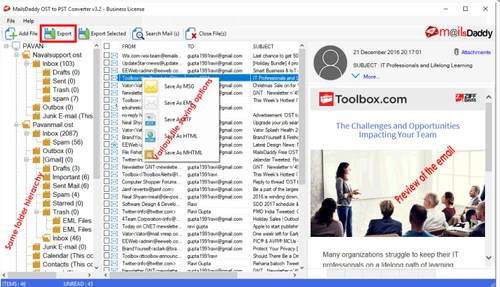
An affordable solution to recover mail items from corrupted, damaged or orphaned Outlook offline folders and convert OST to PST, MSG, EML & MBOX formats. The tool is embedded with several helpful features to make OST to PST conversion task easier.
See MoreHave you used MailsDaddy OST to PST Converter before?
Share your insights for better experience
Brand: MailsDaddy
Founded Year: 2017
MailsDaddy is a software development organization which provides solutions for Data Recovery, cloud backup and Email Migration.
 Split PST File into Required Size Quickly Convert OST to PST File Multiple Export Options Multiple Naming Convention Preserve Folder Hierarchy Convert Email Attachments Maintain Mail Properties Export Selected Folders or Items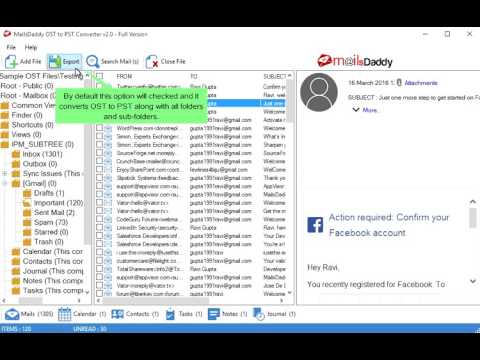

Watch the demo video to explore key features, real workflows, and how the software fits your business needs.
 Windows
  MacOS
MacOS  Desktop
  Mobile
  Perpetual
Small Business
Designed for startups and growing businesses
Medium Business
Built for business growth and flexibility
Enterprises
Designed for complex and large-scale business needs
4.9
Out of 5

Overall Rating
Based on
3 Verified Reviews
Rating Breakdown
100% Recommend this Product
Add Review
Sep 15, 2026
Techjockey Verified
“Reliable and Easy-to-Use OST to PST Converter”
I had a good experience using MailsDaddy OST to PST Converter. The software was simple to install and easy to use, and the conversion process was smooth and straightforward. I was able to access my mailbox data without much hassle, and I appreciated the focus on data safety during the conversion. Overall, it is a reliable and user-friendly tool for OST to PST conversion.
Pros
It is easy to use and makes the conversion process simple. The software works smoothly, maintains mailbox data properly, and provides a reliable way to convert OST files to PST. I also like the focus on data safety and the straightforward interface.
Cons
I didn’t find any major issues with MailsDaddy OST to PST Converter. The only thing I felt could be improved is the overall conversion speed when working with larger OST files. Apart from that, the tool worked well for my needs.
Reason to switch
speed issue
Jun 25, 2025
Techjockey Verified
“Great!!”
super easy to use OST to PST converter tool that can be used to recover data from Corrupted OST files.
Pros
Easily and safely converts OST to PST files.
Cons
NO CONS
Nov 16, 2017
Techjockey Verified
“A lifesaver to recover your PST files”
Pros
Used this software for recovering lost pst files to recover the data
Cons
NO CONS

MailsDaddy OST to PST Converter
Price On Request
Desktop
Mobile
Web based
On Premises
Windows
Mac OS

MailsDaddy PST Attachment Extractor
Price On Request
Desktop
Mobile
Web based
On Premises
Windows
Mac OS

Vectorizer AI
Price On Request
Desktop
Mobile
Web based
On Premises
Windows
Mac OS

Shoviv OST to PST Converter
₹ 4748
Desktop
Mobile
Web based
On Premises
Windows
Mac OS

XnConvert
Price On Request
Desktop
Mobile
Web based
On Premises
Windows
Mac OS

PDFtoExcel
₹ 69
Desktop
Mobile
Web based
On Premises
Windows
Mac OS
MacSonik OLM Converter
Price On Request
Desktop
Mobile
Web based
On Premises
Windows
Mac OS

Wondershare UniConverter
Price On Request
Desktop
Mobile
Web based
On Premises
Windows
Mac OS

Power ISO
Price On Request
Desktop
Mobile
Web based
On Premises
Windows
Mac OS

GainTools
Price On Request
Desktop
Mobile
Web based
On Premises
Windows
Mac OS

WholeClear NSF To PST Converter
₹ 4681
Desktop
Mobile
Web based
On Premises
Windows
Mac OS
(0) Product(s) selected
Starting Price:
$10 /Month
Starting Price:
€15 /License
Starting Price:
₹69 /month
Starting Price:
$49 /Year
Available
Price on Request
Starting Price:
$29 /One-Time

Starting Price:
$159 /Month

Starting Price:
$25

Available
Price on Request

Starting Price:
$9

Available
Price on Request
Yes, the OST to PST recovery tool is capable to find out all OST files from the selected directory or drive.
Yes, The OST file exporter also allows recovering soft deleted emails, contacts, tasks, calendars and notes etc. from the OST file.
Yes, OST to PST converter provides an advance search option by using which you can find out required emails, and directly export them to the needed format by right clicking on the respective email.
No, This is the best thing about this utility which does not require MS Exchange Server or any additional program.
No, The software allows recovering or converting a large (any size) OST file without hanging or taking much time. You can simply export an OST file to PST if the OST file is oversized.
20,000+ Software Listed
Best Price Guranteed
Free Expert Consultation
2M+ Happy Customers
Terms and Condtions

Users with registered businesses can purchase goods from merchants on the platform to satisfy their business needs. Users are not permitted to utilize any products acquired through the platform for resale, advertising, business, or further distribution.
For each purchase made, users will receive a Tax Invoice (or 'GST invoice') that includes specific details such as:
the GSTIN of the user associated with their registered business, and
the specified Entity Name for their business.
It should be noted that not all products are eligible for GST Invoice. Only the products displayed by participating sellers with the 'GST-based Invoice Available' callout on the product description page would qualify.
Certain goods and services are not eligible to get a GST Invoice, including items with VAS, i.e., Value Added Services (e.g., Total Mobile Protection/Assured Buyback) and those involving an exchange offer at the time of purchase.
Users must ensure the accuracy of the GSTIN, and business entity name provided for the GST Invoice. Requests for corrections into GST Invoice would not be accommodated by Techjockey.com or any Seller, and any issues arising from user-provided information are the sole responsibility of users.
Techjockey.com is not liable for the GST Invoice or any associated input tax credit. To efficiently claim an input tax credit, users should select the registered place of business address as per the GST authority's data and follow the provisions of the GST Act and rules.
To claim an input tax credit, the delivery and billing addresses must match. Furthermore, input tax credits will not be granted if the delivery address and GSTIN on the invoice are from different states. In case of incorrect GST details provided during the order placement, the order will be canceled automatically.