 USA
USA UAE
UAESmall Business
Designed for startups and growing businesses
See More





Brand: Harris Geospatial Solutions
ENVI GIS software is designed for GIS professionals that help in analyzing and processing geographic information and imagery. It offers high-quality and accurate remote sensing for smooth geographic data management. The software comes with geo-imaging and mapping features that enable users to capture, store, monitor and display geographic or spatial data. ENVI is an image science software used on...
See MoreHave you used ENVI GIS Software before?
Share your insights for better experience
Looking for The Right Pricing?
Share your requirements and get a plan built around your business.
Price Available on Request
Get personalised ENVI GIS Software pricing that fits your needs. Our team will connect with you.
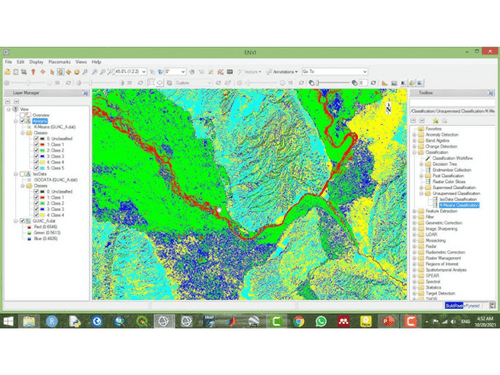
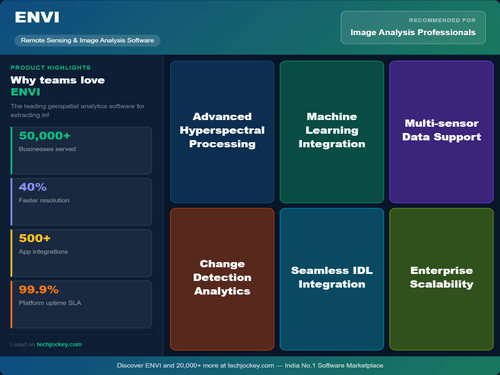
 FX Editor ACM photogrammetry Integration Initiate Workflows Reporting & Analytics Extendable Deep Learning Hyperspectral Analysis SARscape Processing Change Detection Spectral Unmixing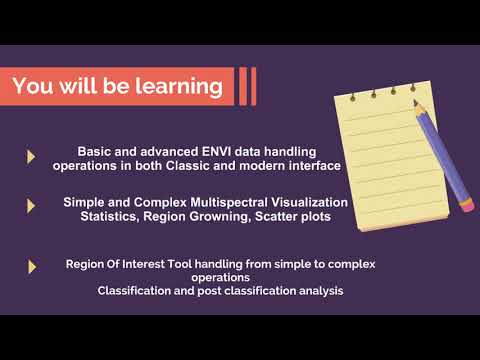

Watch the demo video to explore key features, real workflows, and how the software fits your business needs.
 Windows
  Desktop
  Perpetual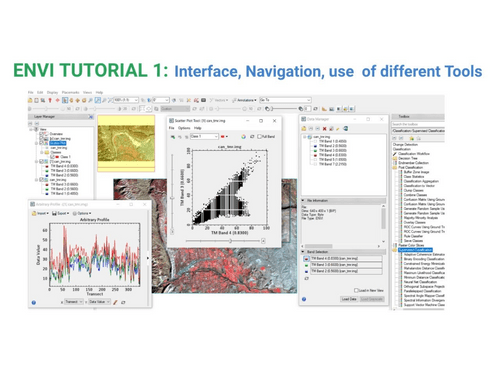
Small Business
Designed for startups and growing businesses
Medium Business
Built for business growth and flexibility
Enterprises
Designed for complex and large-scale business needs
4.1
Out of 5

Overall Rating
Based on
2 Verified Reviews
Rating Breakdown
95% Recommend this Product
Add Review
Jan 22, 2020
Techjockey Verified
“Applications in so many modules!”
Pros
It is a useful software that has successfully catered to my geo-imaging needs. GIS professionals like me would really find this application suitable for generating high-quality imagery or for capturing and storing spatial data efficiently.
Cons
I found the setting up of the software to be very difficult and quite time-consuming. It needs a little improvement.
Jan 14, 2020
Techjockey Verified
“User-friendly”
Pros
I have heard about GIS software before but the nice insightful description given by the Techjockey team regarding this product helped me become more sure about its advantages. ENVI GIS has features like geo-imaging and better data availability. It also integrates with a few radar applications.
Cons
Sometimes the system runs slowly, affecting the flow of work. If the technical issue can be resolved, it will be a really good software for professionals like me.

ENVI GIS Software
Price On Request
Desktop
Mobile
Web based
On Premises
Windows
Mac OS

DEM Extraction
Price On Request
Desktop
Mobile
Web based
On Premises
Windows
Mac OS

ArcGIS Desktop Basic
Price On Request
Desktop
Mobile
Web based
On Premises
Windows
Mac OS

ArcGIS Enterprise
Price On Request
Desktop
Mobile
Web based
On Premises
Windows
Mac OS

GeoFlow Suit of Geo-Enabled Applications
Price On Request
Desktop
Mobile
Web based
On Premises
Windows
Mac OS

ArcGIS Online
Price On Request
Desktop
Mobile
Web based
On Premises
Windows
Mac OS

Surfer GIS Software
Price On Request
Desktop
Mobile
Web based
On Premises
Windows
Mac OS

ArcGIS Pro
Price On Request
Desktop
Mobile
Web based
On Premises
Windows
Mac OS

Nearmap
Price On Request
Desktop
Mobile
Web based
On Premises
Windows
Mac OS

Geosoft Target
Price On Request
Desktop
Mobile
Web based
On Premises
Windows
Mac OS

Mango GIS Software
Price On Request
Desktop
Mobile
Web based
On Premises
Windows
Mac OS
(0) Product(s) selected
Available
Price on Request
Starting Price:
$100 /Month
Available
Price on Request
Starting Price:
$49

Starting Price:
$99

Available
Price on Request

Available
Price on Request
Yes, the Satellite and UAV imagery generated by ENVI GIS provides an efficient way to run surveys on small to large scale farming operations. Its remote sensing techniques help users examine aerial image of the field to get a knowledge of affected areas of crops and devise remedial solutions accordingly.
Yes, ENVI can be easily used over web-based platforms other than a computer. Users can also keep a track of their ongoing operations from smartphones and tablets.
Yes, ENVI GIS allows the users to search results as per their needs. Users can gather essential information from imagery generated on various spatial objects. The flexibility of ENVI FX module allows the users to alter and filter the set parameters at any stage
ENVI GIS software runs on Windows 7 (SP1) OS and the later versions; Linux Kernel 2.6.32 and above. The software requires a total of 4GB RAM to function efficiently. The processor should be Intel/AMD 64-bit with a minimum disk space of 2 GB.
ENVI GIS is designed for GIS professionals, researchers, environmental scientists and image analysts around the globe. However, it can also be used by other industries, departments and institutions including health organisations, land-use planners and government agencies.
20,000+ Software Listed
Best Price Guranteed
Free Expert Consultation
2M+ Happy Customers
Terms and Condtions

Users with registered businesses can purchase goods from merchants on the platform to satisfy their business needs. Users are not permitted to utilize any products acquired through the platform for resale, advertising, business, or further distribution.
For each purchase made, users will receive a Tax Invoice (or 'GST invoice') that includes specific details such as:
the GSTIN of the user associated with their registered business, and
the specified Entity Name for their business.
It should be noted that not all products are eligible for GST Invoice. Only the products displayed by participating sellers with the 'GST-based Invoice Available' callout on the product description page would qualify.
Certain goods and services are not eligible to get a GST Invoice, including items with VAS, i.e., Value Added Services (e.g., Total Mobile Protection/Assured Buyback) and those involving an exchange offer at the time of purchase.
Users must ensure the accuracy of the GSTIN, and business entity name provided for the GST Invoice. Requests for corrections into GST Invoice would not be accommodated by Techjockey.com or any Seller, and any issues arising from user-provided information are the sole responsibility of users.
Techjockey.com is not liable for the GST Invoice or any associated input tax credit. To efficiently claim an input tax credit, users should select the registered place of business address as per the GST authority's data and follow the provisions of the GST Act and rules.
To claim an input tax credit, the delivery and billing addresses must match. Furthermore, input tax credits will not be granted if the delivery address and GSTIN on the invoice are from different states. In case of incorrect GST details provided during the order placement, the order will be canceled automatically.



