linkedin
FSM Grid logo
play FSM GRID- A comprehensive Field Service Management Software
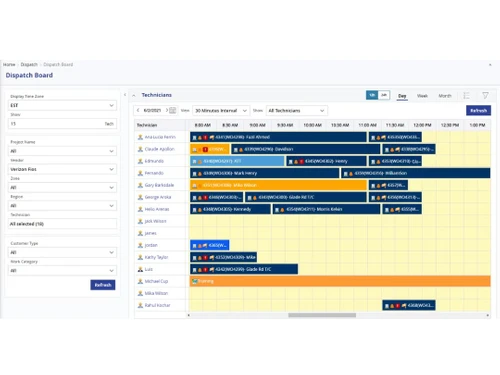
fsm grid refresh
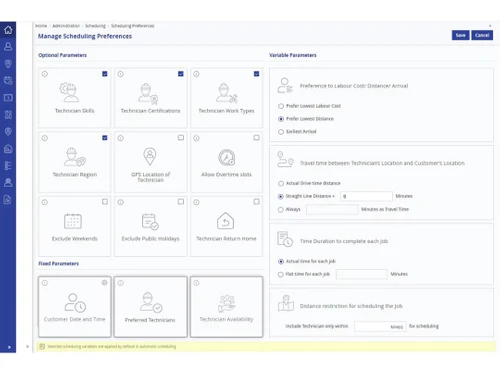
fsm grid preferences

FSM Grid

Brand: FSM Global Technologies

  • 4.1

  • 5 Ratings

FSM Grid helps businesses manage their field service operations, like scheduling and work orders, more efficiently. It connects field teams with the office and integrates with other systems to streamline processes and improve customer service.

See More

Have you used FSM Grid before?

Share your insights for better experience

Add a Review

Price Available on Request

Questions about pricing or customization? We’re here to help, just a click away.

100% Genuine
Products
Best Price
Guaranteed
Safe & Secure
Payment
  • Description

  • Pricing

  • Features

  • Specification

  • Review

  • Compare

  • Alternatives

  • FAQ

FSM Grid Software Overview

What is FSM Grid?

FSM Grid is an AI-driven Field Service Management (FSM) software designed to streamline and automate various aspects of field service operations. It helps businesses manage scheduling, work orders, routing, and inventory control, aiming to eliminate human error and boost efficiency. The software connects in-field teams to the back office seamlessly and integrates with existing CRM, ERP, and accounting systems. With IoT integration, FSM Grid can predict equipment failures and proactively schedule technicians, reducing downtime.

It offers features like real-time location tracking, dynamic forms for data collection, and a customer portal for feedback and issue resolution. FSM Grid caters to a mobile workforce by managing technicians, agents, dispatchers, and vendors effectively. The system supports contracts and SLAs, multivendor management, and generates analytics and reports to improve team performance and customer satisfaction. It's a comprehensive solution for businesses looking to optimize their field service operations and enhance customer service.

Why Choose FSM Grid Software?

  • AI-Driven Technology: Automates service management, scheduling, routing, work orders, and inventory control, eliminating human error.
  • Seamless Integration: Connects your in-field team to your back-office and integrates your existing CRM, ERP, and accounting systems effortlessly.
  • IoT Integration: Predicts equipment failures and proactively schedules technicians before the problem occurs.
  • Enhanced Mobile Workforce Management: Provides real-time visibility to better manage technicians, agents, dispatchers, and vendors.
  • Objective-Based Resource Allocation: Enables seamless objective-based resource allocation and improves dispatch efficiency.
  • AI-Driven Predictive Maintenance: Offers improved field services through AI-driven predictive maintenance, responding to emergencies with the right tools and insights.
  • Brilliant Work Order Management: Automates job assignments based on clients’ work order parameters, refining scheduling processes and prioritizing tasks.
  • Contracts & SLA Management: Configures various service level agreements (SLAs) to foster long-term relationships with clients.
  • Multi Vendor Management: Effectively manages third-party vendors by automating vendor assignments and monitoring their activities in real-time.
  • Dynamic Forms: Creates dynamic, customizable forms for data collection from on-field workers, cross-departmental cohesion, and customer feedback.
  • Customer Portal: Helps respond faster to customer complaints and feedback by automatically converting them into tickets and assigning technicians.
  • Parts & Inventory Management: Ensures seamless inventory management by enabling allocation and real-time assessment of availability.
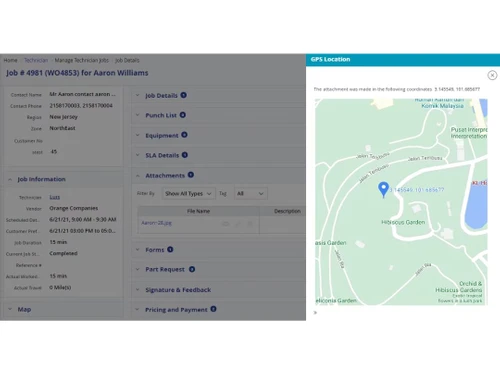
  • Location Management: Tracks the location of technicians and work orders in real-time for optimized central management.
  • BackOffice Integration: Keeps critical data on customer history, job completions, tasks, parts inventory, and pricing in sync with your financial systems.
  • Analytics and Reports: Provides instant progress and work order reports with actionable insights to improve team efficiency and customer satisfaction.

Benefits of FSM Grid Software

  • Reduced Downtime: Minimizes equipment downtime through proactive maintenance and quick response to emergencies.
  • Improved Customer Satisfaction: Enhances customer satisfaction by quickly addressing complaints and feedback through a dedicated customer portal.
  • Enhanced Collaboration: Improves collaboration between field technicians, back-office staff, and customers through real-time data sharing and communication tools.
  • Increased Efficiency: Boosts overall operational efficiency by automating and streamlining various field service processes.
  • Real-Time Data Visibility: Provides real-time visibility into key metrics and performance indicators, enabling data-driven decision-making.
  • Proactive Issue Resolution: Enables technicians to address potential issues before they escalate into major problems.
  • Paperless Operations: Reduces paperwork by digitizing forms, work orders, and other documents.
  • Optimized Routes: FSM Grid enables you to deliver fuel-optimized route planning for your field technicians.

Pricing of FSM Grid

FSM Grid price details are available on request at techjockey.com.

The pricing model is based on different parameters, including extra features, deployment type, and the total number of users. For further queries related to the product, you can contact our product team and learn more about the pricing and offers.

Read more

FSM Global Technologies Company Details

Founded Year:  1996

FSM Global is a quantum leap in Field Service Management software that’s easier to deploy, easier to learn, and easier to use.

Director/Founders Ganesh Ramakrishnan
Company Size 101-500 Employees

FSM Grid Pricing & Plans

Looking for The Right Pricing?

Share your requirements and get a plan built around your business.

  • Define your business needs
  • Get customised pricing
  • Choose features that fit your workflow

Price Available on Request

Get personalised FSM Grid pricing that fits your needs. Our team will connect with you.

FSM Grid Features

  • icon_check Intelligent Scheduling & Dynamic Dispatching
    AI-driven scheduling assigns the right technician based on skills, location, and availability.
  • icon_check Work Order Management
    Streamlines job creation, assignment, tracking, and completion for efficient workflow.
  • icon_check Technicians Management
    Tracks technician availability, performance, and work progress in real-time.
  • icon_check Customer/Site Management
    Maintains customer profiles, service history, and site-specific job details.
  • icon_check Vendor Management
    Helps businesses manage vendor relationships, contracts, and service agreements.
  • icon_check IoT Enabled Predictive Maintenance
    Uses IoT sensors to predict failures and schedule preventive maintenance.
  • icon_check Contracts & SLA Management
    Ensures compliance with service-level agreements (SLAs) and contract management.
  • icon_check Dynamic Forms and Check lists
    Customizable digital forms for inspections, audits, and job completion.
  • icon_check Location Management
    Tracks job sites, technician movements, and service zones for optimized operations.
  • icon_check Inventory Management
    Manages stock levels, parts tracking, and automated restocking for field services.
  • icon_check Quotation Management
    Generates, tracks, and manages service quotations and pricing approvals.
  • icon_check Reports & Analytics
    Provides data insights and performance reports for better decision-making.
  • icon_check Admin/User Portal
    A centralized dashboard for admins and users to manage operations and monitor tasks.
  • icon_check Customer Portal
    Allows customers to track service requests, view invoices, and communicate with support.
  • icon_check Vendor Portal
    Enables vendors to access job details, submit invoices, and manage service requests.
  • icon_check Mobile Application
    A field-ready app that allows technicians to access job details, update status, and communicate in real-time.
FSM Grid Demo Video play icon

Get FSM Grid Demo

Watch the demo video to explore key features, real workflows, and how the software fits your business needs.

Understand
Key Features
Personal
Demo Insights
Interactive
Demo Support

FSM Grid Specifications

Supported Platforms
Windows Windows iOS iOS Android Android MacOS MacOS
Devices
Desktop Desktop
Deployment
Cloud-Based Cloud-Based Perpetual Perpetual
Suitable For
All Industries
Business Specific
All Businesses
Business Size
Small Business Startups Medium Business Enterprises
Customer Support
Phone Email Communities
Language
English
Integration
API Integration
Training Resources
Webinars Documentation Videos

Explore the Best Alternative Solutions Similar to Your Business Size and Needs

FSM Grid Review

4.1

Out of 5

img

Overall Rating

Based on
5 Verified Ratings

Rating Breakdown

  • Features 4.2
  • Value for Money 4.1
  • Ease of Use 3.9
  • Customer Support 4.3

88% Recommend this Product

Add Review

Techjockey Trusted Reviews from Verified Users

No reviews are currently available for FSM Grid. Discover similar Field Service Management Software reviews

  • Empfly Field Service Management

    4.8

    Whats great - We urgently needed offline capabilities since our field teams often work in no-network zones, and this solution delivered. Da... read more

  • Service CRM

    4.6

    Whats great - I am looking for Car Wash Management System since long time. I am fully satisfied with the product. read more

  • Field Force Connect

    4.6

    Whats great - Had a great experience. Our service agent was very knowledgeable and wanted to now how to help our organization. It was wonde... read more

Compare FSM Grid With other Field Service Management Software

Products
Ratings
Pricing
Device Supported
Deployment
Supported Platforms
  • img

    FSM Grid

  • 4.1

  • Price On Request

  • Desktop

    Mobile

  • Web based

    On Premises

  • Windows

    Mac OS

  • img

    Service CRM

  • 4.6

  • Price On Request

  • Desktop

    Mobile

  • Web based

    On Premises

  • Windows

    Mac OS

  • img

    QuikAllot

  • 4.5

  • ₹ 9000

  • Desktop

    Mobile

  • Web based

    On Premises

  • Windows

    Mac OS

  • img

    Lystloc

  • 4.3

  • Price On Request

  • Desktop

    Mobile

  • Web based

    On Premises

  • Windows

    Mac OS

  • img

    TrackoField

  • 4.3

  • ₹ 3600

  • Desktop

    Mobile

  • Web based

    On Premises

  • Windows

    Mac OS

  • img

    Intelomatic

  • 4.3

  • Price On Request

  • Desktop

    Mobile

  • Web based

    On Premises

  • Windows

    Mac OS

  • img

    Fieldy

  • 4.2

  • ₹ 6000

  • Desktop

    Mobile

  • Web based

    On Premises

  • Windows

    Mac OS

  • img

    Zuper

  • 4.7

  • Price On Request

  • Desktop

    Mobile

  • Web based

    On Premises

  • Windows

    Mac OS

  • img

    Zoho FSM

  • 4.2

  • ₹ 1800

  • Desktop

    Mobile

  • Web based

    On Premises

  • Windows

    Mac OS

  • img

    MetricInfo

  • 4.3

  • ₹ 1000

  • Desktop

    Mobile

  • Web based

    On Premises

  • Windows

    Mac OS

(0) Product(s) selected

FSM Grid Alternatives

See All FSM Grid Alternatives

Available

Price on Request

Starting Price:

$40 /Month

Starting Price:

$39 /Month

Starting Price:

$7 /License

Starting Price:

₹199 /Month ₹699

SAVE UPTO 72%

Available

Price on Request

Starting Price:

$225 /Month

Available

Price on Request

Articles for FSM Grid

See All Related Articles

What is the cost of FSM Grid Software?

FSM Grid pricing details are available upon request on Techjockey.com.

Does FSM Grid Software have a mobile app?

Yes, FSM Grid Software offers an Android and iOS mobile app for managing field operations on the go.

Which operating systems are compatible with FSM Grid Software?

FSM Grid Software is compatible with Windows, macOS, Android, and iOS.

Is a free trial available for FSM Grid Software?

No, FSM Grid Software does not provide a free trial.

What is the working mechanism of FSM Grid Software?

FSM Grid uses AI to automate and streamline field service operations, connecting field teams with the back office and integrating with other systems for efficient management of scheduling, work orders, and inventory.

Who can benefit from using FSM Grid Software?

Businesses in industries like HVAC, telecom, healthcare, utilities, and construction can benefit from FSM Grid.

Does FSM Grid Software provide a free demo?

Yes, FSM Grid Software offers a free demo upon request.

Is FSM Grid Software available for free?

No, FSM Grid Software is a paid solution.

Does FSM Grid Software support multi-location businesses?

Yes, FSM Grid allows businesses to manage multiple locations and track field operations across different regions.

20,000+ Software Listed

Best Price Guranteed

Free Expert Consultation

2M+ Happy Customers

Terms and Condtions

close

Users with registered businesses can purchase goods from merchants on the platform to satisfy their business needs. Users are not permitted to utilize any products acquired through the platform for resale, advertising, business, or further distribution.

For each purchase made, users will receive a Tax Invoice (or 'GST invoice') that includes specific details such as:

  • the GSTIN of the user associated with their registered business, and

  • the specified Entity Name for their business.

It should be noted that not all products are eligible for GST Invoice. Only the products displayed by participating sellers with the 'GST-based Invoice Available' callout on the product description page would qualify.

Certain goods and services are not eligible to get a GST Invoice, including items with VAS, i.e., Value Added Services (e.g., Total Mobile Protection/Assured Buyback) and those involving an exchange offer at the time of purchase.

Users must ensure the accuracy of the GSTIN, and business entity name provided for the GST Invoice. Requests for corrections into GST Invoice would not be accommodated by Techjockey.com or any Seller, and any issues arising from user-provided information are the sole responsibility of users.

Techjockey.com is not liable for the GST Invoice or any associated input tax credit. To efficiently claim an input tax credit, users should select the registered place of business address as per the GST authority's data and follow the provisions of the GST Act and rules.

To claim an input tax credit, the delivery and billing addresses must match. Furthermore, input tax credits will not be granted if the delivery address and GSTIN on the invoice are from different states. In case of incorrect GST details provided during the order placement, the order will be canceled automatically.