linkedin
URVA Service logo
play URVA Service — All-in-one Field Service Management Software — FSM Mobile App & Web Portal
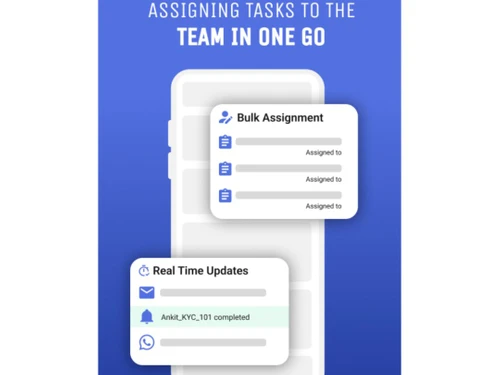
URVA Service Assign task
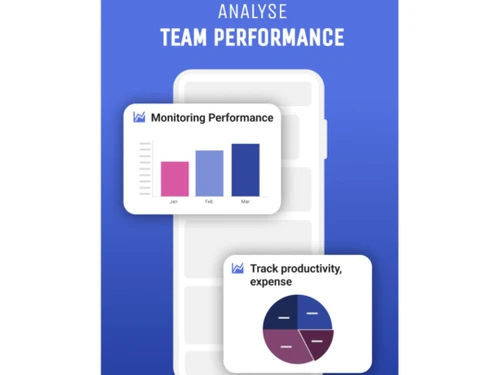
URVA Service Clear visibility

URVA Service

Brand: URVA

  • 4.5

  • 3 Ratings

URVA Service is a field service management software with a simple mobile app that helps in route planning and service management.

See More

Have you used URVA Service before?

Share your insights for better experience

Add a Review
Starting Price
$10

View plans

100% Genuine
Products
Best Price
Guaranteed
Safe & Secure
Payment
  • Description

  • Pricing

  • Features

  • Specification

  • Review

  • Compare

  • Alternatives

  • FAQ

Starting at $10

URVA Service Software Overview

What is URVA Service Software?

URVA Service is a web-based field service management software built to increase activity management, manage sales, and increase business revenue. A user-friendly interface and a mobile application help field employees plan and complete their orders, route planning, and digital job sheets for efficient task completion.

The database comprises task data, employee data, business data, customer data, time sheets, etc., and helps users easily access customer information, product catalogs, and critical data. The application optimizes time with features like quick task assignment, location intelligence, and time-saving process automation.

It also helps the leaders and managers with insights on task status through analytics and reports, helping in productivity and customer service.

URVA Service comprises a range of features for excellent field service management. Field employees benefit from a user-friendly mobile app enabling work order completion, customer signature capture, and pricing estimates.

The service team gains task visibility, easy route planning with Google Maps integration, and digital job sheets. Other features include a TAT tracker for timely task management, a facial recognition and geolocation-based attendance system, a quick estimate calculator, customer information access, intelligent task assignment, location intelligence, dashboards for real-time business insights, and time-saving process automation. Senior leadership benefits from productivity metrics, analytics, and virtual performance assistance.

Why Choose URVA Service?

  • Work order completion: Field employees utilize the application to complete work orders, capture signatures, and provide accurate pricing estimates.
  • Route planning: Service teams benefit from integrated Google Maps, ensuring the most optimal routes for assigned tasks and reducing travel time.
  • Automation: Provides drag-and-drop automation for intelligent work allocation, managing processes, and enhancing efficiency.
  • Analytical insights: Executives access real-time metrics and analytics for faster decision-making, performance assistance, and assessments.

Benefits of URVA Service Field Service Management Software

  • Increased efficiency: Manage field operations with ease, automation, user-friendly interface, and the right data, saving time and resources.
  • Better customer service: Deliver quality customer service with quick task assignments, digital job sheets, and accessible customer information.
  • Planned routes: Decrease the travel time and fuel costs using its route planning feature for efficient task allocation.
  • Detailed insights: Help leadership gain valuable insights through dashboards and analytics for making informed decisions.
  • Increased productivity: Boost team performance with smart auto-allocation, reducing manual steps and enhancing overall productivity.

URVA Service Pricing

URVA Service price in India starts at $10. URVA Service has multiple pricing plans and caters to a diverse customer base.

For subscription-related details and offers on premium packages, please request a call back from our product experts.

Read more

URVA Company Details

Founded Year:  2015

URVA is a Field Force Automation Software which enables an organisation to manage, track and analyse the working of their entire workforce. With powerful features built directly into URVA, you can be assured to minimize your costs, effectively utilise your resources and boost your sales.

Director/Founders Saraansh Tandon
Company Size 1-100 Employees

URVA Service Pricing & Plans

Basic
Key Features
  • Attendance with Geotags
  • Location Tracking
  • Customer 360
  • Digital Job Sheets
  • Live Notifications
  • Feedback Forms
  • Order Taking on App
  • Product Directory Sync
  • Daily Visit Reports
  • Real-time Dashboards
Starting at $10
    • Users

      Users
      Users
    • Monthly

      Monthly
      Monthly

Key Features

  • Attendance with Geotags

  • Location Tracking

  • Customer 360

  • Digital Job Sheets

  • Live Notifications

  • Feedback Forms

  • Order Taking on App

  • Product Directory Sync

  • Daily Visit Reports

  • Real-time Dashboards

URVA Service Features

  • icon_check Simple Mobile Application
    The intuitive app helps field workers with work order completion and efficient operations.
  • icon_check View Tasks on the Fly
    Instantly access and manage daily tasks, enhancing on-the-go productivity for service teams.
  • icon_check Easy Route Planning
    Integrated Google Maps manages task routes, optimizing travel efficiency for field personnel.
  • icon_check Fast Tasks on Digital Job Sheets
    Manage operations with easy-to-use digital forms, including text, photo, and signature capture.
  • icon_check Better TAT with Tracker
    Timely task completion assisted by a Tracker, ensuring deadlines are met with alerts.
  • icon_check Accessible Product Catalog
    Centrally manage and update product catalogs, providing easy access to the latest information for everyone.
  • icon_check Simple Attendance & Expense
    Hassle-free clock-ins with facial recognition, geolocation, and easy expense tracking.
  • icon_check Quick Estimate Calculator
    Technicians create estimates based on customer preferences, enhancing service delivery accuracy.
  • icon_check Know Your Customer
    Access critical customer information, fostering personalized interactions and improved engagement.
  • icon_check Plan Tasks Efficiency
    Intelligent scheduling and task assignment optimize operations, prioritizing and planning tasks efficiently.
URVA Service Demo Video play icon

Get URVA Service Demo

Watch the demo video to explore key features, real workflows, and how the software fits your business needs.

Understand
Key Features
Personal
Demo Insights
Interactive
Demo Support

URVA Service Specifications

Supported Platforms
Ubuntu Ubuntu Windows Windows iOS iOS Android Android MacOS MacOS Linux Linux
Devices
Desktop Desktop Mobile Mobile Tablet Tablet iPad iPad
Deployment
Cloud-Based Cloud-Based
Suitable For
Insurance Finance Telecom Banking Field Sales
Business Specific
All Businesses
Business Size
Small Business Startups Medium Business Enterprises
Customer Support
Email Live Chat Communities Forums
Language
English
Integration
API Integration
Training Resources
Documentation Videos

Explore the Best Alternative Solutions Similar to Your Business Size and Needs

URVA Service Review

4.5

Out of 5

img

Overall Rating

Based on
3 Verified Ratings

Rating Breakdown

  • Features 4.3
  • Value for Money 4.8
  • Ease of Use 4.3
  • Customer Support 4.6

93% Recommend this Product

Add Review

Techjockey Trusted Reviews from Verified Users

No reviews are currently available for URVA Service. Discover similar Field Service Management Software reviews

  • Empfly Field Service Management

    4.8

    Whats great - We urgently needed offline capabilities since our field teams often work in no-network zones, and this solution delivered. Da... read more
  • Service CRM

    4.6

    Whats great - I am looking for Car Wash Management System since long time. I am fully satisfied with the product. read more

  • Field Force Connect

    4.6

    Whats great - Had a great experience. Our service agent was very knowledgeable and wanted to now how to help our organization. It was wonde... read more

Compare URVA Service With other Field Service Management Software

Products
Ratings
Pricing
Device Supported
Deployment
Supported Platforms
  • img

    URVA Service

  • 4.5

  • Price On Request

  • Desktop

    Mobile

  • Web based

    On Premises

  • Windows

    Mac OS

  • img

    URVA Comply

  • 4.5

  • Price On Request

  • Desktop

    Mobile

  • Web based

    On Premises

  • Windows

    Mac OS

  • img

    Service CRM

  • 4.6

  • Price On Request

  • Desktop

    Mobile

  • Web based

    On Premises

  • Windows

    Mac OS

  • img

    QuikAllot

  • 4.5

  • ₹ 9000

  • Desktop

    Mobile

  • Web based

    On Premises

  • Windows

    Mac OS

  • img

    Lystloc

  • 4.3

  • Price On Request

  • Desktop

    Mobile

  • Web based

    On Premises

  • Windows

    Mac OS

  • img

    TrackoField

  • 4.3

  • ₹ 3600

  • Desktop

    Mobile

  • Web based

    On Premises

  • Windows

    Mac OS

  • img

    Intelomatic

  • 4.3

  • Price On Request

  • Desktop

    Mobile

  • Web based

    On Premises

  • Windows

    Mac OS

  • img

    Fieldy

  • 4.2

  • ₹ 6000

  • Desktop

    Mobile

  • Web based

    On Premises

  • Windows

    Mac OS

  • img

    Zuper

  • 4.7

  • Price On Request

  • Desktop

    Mobile

  • Web based

    On Premises

  • Windows

    Mac OS

  • img

    Zoho FSM

  • 4.2

  • ₹ 1800

  • Desktop

    Mobile

  • Web based

    On Premises

  • Windows

    Mac OS

(0) Product(s) selected

URVA Service Alternatives

See All URVA Service Alternatives

Available

Price on Request

Starting Price:

$40 /Month

Starting Price:

$39 /Month

Starting Price:

$7 /License

Starting Price:

₹199 /Month ₹699
SAVE UPTO 72%

Available

Price on Request

Starting Price:

$225 /Month

Articles for URVA Service

See All Related Articles

Which operating system does URVA Service support?

URVA Service is compatible with Windows, Linux, Ubuntu, and macOS.

Is there any URVA Service app?

The URVA Service app is available for Android and iOS mobile devices.

What is the deployment type of URVA Service?

URVA Service supports web-based deployment.

How much does URVA Service cost?

URVA Service pricing starts at $10 at techjockey.com.

Who are the potential users of URVA Service?

URVA Service is typically used in industries like manufacturing, telecommunications, and utilities by field employees, managers, and senior leadership for managing field operations.

Is there any free trial or demo for URVA Service?

The URVA Service demo is available for free on techjockey.com.

Is URVA Service free?

URVA Service offers a free trial. However, the premium plan with advanced features starts at $6.

How can you download URVA Service?

URVA Service installation is not required, as it is web-based. Just open the Setup Wizard to get started.

How does URVA Service work?

URVA Service helps with field management services like efficient task management, route planning, and automation, providing benefits such as real-time insights, accessibility, and processes.

20,000+ Software Listed

Best Price Guranteed

Free Expert Consultation

2M+ Happy Customers

Terms and Condtions

close

Users with registered businesses can purchase goods from merchants on the platform to satisfy their business needs. Users are not permitted to utilize any products acquired through the platform for resale, advertising, business, or further distribution.

For each purchase made, users will receive a Tax Invoice (or 'GST invoice') that includes specific details such as:

  • the GSTIN of the user associated with their registered business, and

  • the specified Entity Name for their business.

It should be noted that not all products are eligible for GST Invoice. Only the products displayed by participating sellers with the 'GST-based Invoice Available' callout on the product description page would qualify.

Certain goods and services are not eligible to get a GST Invoice, including items with VAS, i.e., Value Added Services (e.g., Total Mobile Protection/Assured Buyback) and those involving an exchange offer at the time of purchase.

Users must ensure the accuracy of the GSTIN, and business entity name provided for the GST Invoice. Requests for corrections into GST Invoice would not be accommodated by Techjockey.com or any Seller, and any issues arising from user-provided information are the sole responsibility of users.

Techjockey.com is not liable for the GST Invoice or any associated input tax credit. To efficiently claim an input tax credit, users should select the registered place of business address as per the GST authority's data and follow the provisions of the GST Act and rules.

To claim an input tax credit, the delivery and billing addresses must match. Furthermore, input tax credits will not be granted if the delivery address and GSTIN on the invoice are from different states. In case of incorrect GST details provided during the order placement, the order will be canceled automatically.