USA
USA UAE
UAESmall Business
Designed for startups and growing businesses
See More




Brand: Ginger
Ginger software is a remarkably useful plagiarism checker tool used to check plagiarism as well as grammar in a content. Content must be completely plagiarism free before it goes up online to avoid copyright issues. We understand the importance of original creative content, and Ginger software will detect any copied work. Ginger application guides users to create errorless write-ups with no gram...
See MoreHave you used Ginger Grammar Checker before?
Share your insights for better experience
Brand: Ginger
Founded Year: 2008
Ginger Software helps you communicate better and faster with AI-based writing tools. It corrects all types of mistakes based on context and works on the sentence level,not just locally. You can use Ginger Writer in your browser, on your PC, mobile device and deploy it in your company or organization
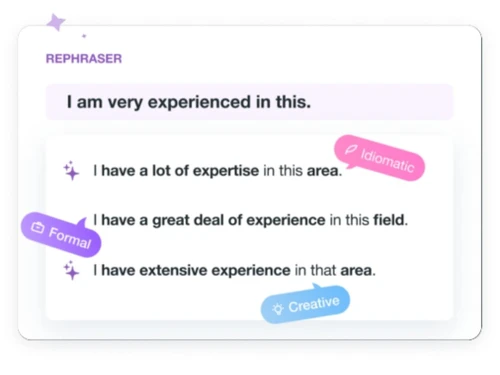
 Translation Browser Extensions US / UK English Dialect Support Ginger API Word Prediction Theme Customization Grammar Checker Sentence Rephraser Language Translator Dictionary Text-to-Speech Practice Management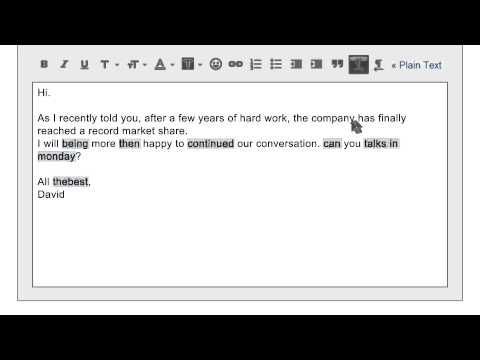

Watch the demo video to explore key features, real workflows, and how the software fits your business needs.
 Windows
  iOS
iOS  Android MacOS
  Desktop
  Mobile
  Tablet
  iPad
iPad  Cloud-Based
Small Business
Designed for startups and growing businesses
Medium Business
Built for business growth and flexibility
Enterprises
Designed for complex and large-scale business needs
4.4
Out of 5

Overall Rating
Based on
6 Verified Reviews
Rating Breakdown
80% Recommend this Product
Add ReviewUsers generally appreciate Ginger Grammar Checker for its effectiveness in proofreading and grammar checking, particularly valuing its time-saving capabilities and data protection features. It is highly recommended for research scholars and academics due to its user-friendly interface and accuracy in checking plagiarism. However, some users express concerns about the limited language options, particularly the inability to accommodate both British and US English simultaneously, and issues with recognizing technical terms. Additionally, there are requests for better file management options and improvements in identifying punctuation and sentence structure.
Pros
"Thanks to the team at Techjockey for saving me some leg-work."
"It makes my work easier by suggesting the closer words and most times, it gives me the best words that would serve my audience while developing a blog, news or company profiles."
"The Ginger spell checker is one of the great software. It also checks grammar and auto suggest correct sentence. It is good software for English beginners."
Cons
"Sometimes fails to identify punctuation or sentence structure and does not explain the reasons behind the errors. Also, it fails to identify plagiarism. "

Jan 29, 2021
Techjockey Verified
“Ginger software is the best and useful for people who work in research field”
Pros
When I planned to buy Ginger software, I didn't have any idea about it's working pattern. Later I cross checked with similar software and found Ginger has more good quality and the data would not be shared. The data will be protected. When I proofread with Ginger software, it minimizes the time and stress.
Cons
Ginger software was given to me with the in-built US word dictionary. Initially it will ask whether to follow British English or US English. Drawback is we use both languages. And it won't accept some scientific names of microbes and technical words. Every time, we need to ignore it or skip it. And it takes full sentences to access perfectly. Overall The best software to proofread.
Jan 29, 2021
Techjockey Verified
“Good and easy to use. Best software for research scholars.”
Pros
It's highly recommended for research scholars and professors. Handy and simple to use. Accuracy of checking plagiarism was appreciable. It takes a little longer time that depends on length of the work to check plagiarism. But it won't take much time to upload any kind of file.
Cons
I feel the uploaded files to check plagiarism are saved and there is no provision to delete the files. Otherwise no negatives are there. There must a provision to delete the files. Also, it doesn't take full sentence, instead it takes few words sometimes more words.
Jun 16, 2020
Techjockey Verified
“Ginger software is the best and useful for people who work in research field.”
Pros
When I planned to buy Ginger software, I did not have any idea of its working pattern. Later, I cross checked with similar software and found that Ginger offers supportive features with complete data protection. Every time I proofread with Ginger, good amount of time is saved and stress is minimized.
Cons
Ginger software is available in language US English. Initially it will ask whether to follow British English or US English. Drawback is we use both the languages. Secondly, the software wouldn't accept some scientific names of microbes and other technical words. Every time we need to ignore it or skip it. However rest all features working fine and overall it is the best software to proofread.

Ginger Grammar Checker
₹ 2900.00 excl. GST
Desktop
Mobile
Web based
On Premises
Windows
Mac OS

Sapling
Price On Request
Desktop
Mobile
Web based
On Premises
Windows
Mac OS

Grammarly
₹ 4692
Desktop
Mobile
Web based
On Premises
Windows
Mac OS

Trinka
₹ 1880
Desktop
Mobile
Web based
On Premises
Windows
Mac OS

Twain AI
Price On Request
Desktop
Mobile
Web based
On Premises
Windows
Mac OS

Linguix
Price On Request
Desktop
Mobile
Web based
On Premises
Windows
Mac OS

Outwrite(Gradeproof)
Price On Request
Desktop
Mobile
Web based
On Premises
Windows
Mac OS

LanguageTool
₹ 554
Desktop
Mobile
Web based
On Premises
Windows
Mac OS

ProWritingAid
₹ 1650
Desktop
Mobile
Web based
On Premises
Windows
Mac OS

WhiteSmoke
Price On Request
Desktop
Mobile
Web based
On Premises
Windows
Mac OS

Slick Write
Price On Request
Desktop
Mobile
Web based
On Premises
Windows
Mac OS
(0) Product(s) selected
Starting Price:
$25 /Month
Starting Price:
$49 /Month

Starting Price:
$8 /Month

Starting Price:
CAD16 /Year

Starting Price:
€10 /Month

Starting Price:
$24 /Month

Starting Price:
$8 /Month

Starting Price:
$115 /Year

Starting Price:
$10 /Month
Ginger Grammar provides the plagiarism checking service with its paid subscription plans.
Ginger Grammar comes with three types of subscriptions- monthly, yearly and biyearly. And the prices vary depending upon the number of users you are buying for.
The price of Ginger grammar and plagiarism checking software starts at Rs. 2900/- per year at techjockey.com.
Yes, Ginger is completely safe to use; it does not contain any malware or virus that will result in corrupted systems.
Ginger has a free version available for primary grammar check and rectification.
Once you complete your purchase, go to your mail, download the file and run it. You will have to use your license code to get access to the full version of the software.
Yes, Ginger is available for both Android and iPhone platforms. You can avail the mobile app after the software purchase.
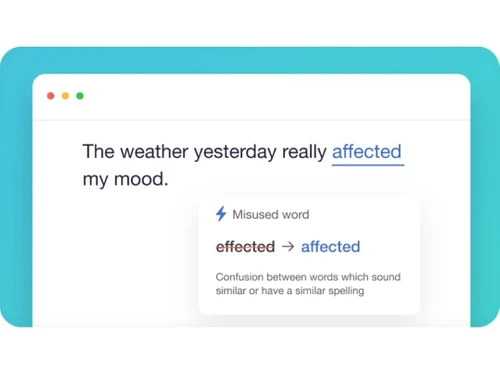
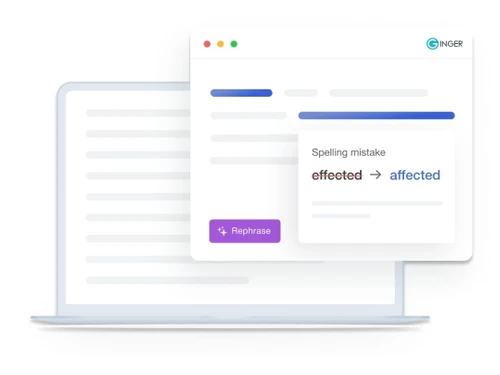
Ginger sentence checker helps rectify all types of grammatical mistakes. It also suggests alternatives for misused words and correcting contextual spelling to help users write quality content faster.
20,000+ Software Listed
Best Price Guranteed
Free Expert Consultation
2M+ Happy Customers
Terms and Condtions

Users with registered businesses can purchase goods from merchants on the platform to satisfy their business needs. Users are not permitted to utilize any products acquired through the platform for resale, advertising, business, or further distribution.
For each purchase made, users will receive a Tax Invoice (or 'GST invoice') that includes specific details such as:
the GSTIN of the user associated with their registered business, and
the specified Entity Name for their business.
It should be noted that not all products are eligible for GST Invoice. Only the products displayed by participating sellers with the 'GST-based Invoice Available' callout on the product description page would qualify.
Certain goods and services are not eligible to get a GST Invoice, including items with VAS, i.e., Value Added Services (e.g., Total Mobile Protection/Assured Buyback) and those involving an exchange offer at the time of purchase.
Users must ensure the accuracy of the GSTIN, and business entity name provided for the GST Invoice. Requests for corrections into GST Invoice would not be accommodated by Techjockey.com or any Seller, and any issues arising from user-provided information are the sole responsibility of users.
Techjockey.com is not liable for the GST Invoice or any associated input tax credit. To efficiently claim an input tax credit, users should select the registered place of business address as per the GST authority's data and follow the provisions of the GST Act and rules.
To claim an input tax credit, the delivery and billing addresses must match. Furthermore, input tax credits will not be granted if the delivery address and GSTIN on the invoice are from different states. In case of incorrect GST details provided during the order placement, the order will be canceled automatically.