USA
USA UAE
UAESmall Business
Designed for startups and growing businesses
See More


Brand: SpellCheckPlus
SpellCheckPlus is a comprehensive grammar and spell checker software that helps users identify and correct errors in their writing. This software is designed to provide users with a seamless writing experience, taking care of grammar, syntax, and spelling mistakes, allowing them to focus on the cont...
See MoreHave you used SpellCheckPlus before?
Share your insights for better experience
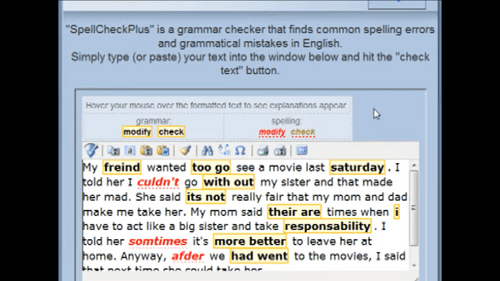
 Pedagogical Approach Error Explanations Text Anonymity Learning Materials Spelling Feedback No Ads Disturb Fullscreen Editor Text Archiving Summary of errors Interactive Grammar
  Windows
  iOS
iOS  Android
  Desktop
  Mobile
  Cloud-Based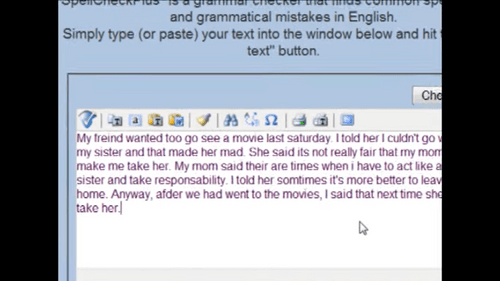
Small Business
Designed for startups and growing businesses
Medium Business
Built for business growth and flexibility
Enterprises
Designed for complex and large-scale business needs
4.1
Out of 5

Overall Rating
Based on
6 Verified Ratings
Rating Breakdown
81% Recommend this Product
Add ReviewTechjockey Trusted Reviews from Verified Users
No reviews are currently available for SpellCheckPlus. Discover similar Grammar Checker Software reviews

Grammarly
Whats great - This is the best tool for simple office email communications, letterheads and Blogs read more

Ginger Grammar Checker
Whats great - When I planned to buy Ginger software, I didn't have any idea about it's working pattern. Later I cross checked with similar ... read more

WhiteSmoke
Whats great - A worthy software for use read more

SpellCheckPlus
Price On Request
Desktop
Mobile
Web based
On Premises
Windows
Mac OS

Sapling
Price On Request
Desktop
Mobile
Web based
On Premises
Windows
Mac OS
Grammarly
₹ 4692
Desktop
Mobile
Web based
On Premises
Windows
Mac OS

Trinka
₹ 1880
Desktop
Mobile
Web based
On Premises
Windows
Mac OS

Twain AI
Price On Request
Desktop
Mobile
Web based
On Premises
Windows
Mac OS

Linguix
Price On Request
Desktop
Mobile
Web based
On Premises
Windows
Mac OS

Outwrite(Gradeproof)
Price On Request
Desktop
Mobile
Web based
On Premises
Windows
Mac OS

LanguageTool
₹ 554
Desktop
Mobile
Web based
On Premises
Windows
Mac OS

ProWritingAid
₹ 1650
Desktop
Mobile
Web based
On Premises
Windows
Mac OS
WhiteSmoke
Price On Request
Desktop
Mobile
Web based
On Premises
Windows
Mac OS
Ginger Grammar Checker
₹ 2900
Desktop
Mobile
Web based
On Premises
Windows
Mac OS
(0) Product(s) selected
Starting Price:
$25 /Month
Starting Price:
$49 /Month
Starting Price:
$15 /Monthly

Starting Price:
$8 /Month

Starting Price:
€10 /Month
Starting Price:
$24 /Month

Starting Price:
$8 /Month
Starting Price:
$115 /Year

Starting Price:
$10 /Month
SpellCheckPlus doesn't explicitly mention anything about mouse gesture support. However, the software does offer a full screen editor, which suggests that it may support similar intuitive navigation. For more information about features and pricing, please visit techjockey.com.
SpellCheckPlus supports Microsoft Windows, iOS, Android, and offers a desktop and mobile experience.
SpellCheckPlus pricing starts from CAD 15.99 at techjockey.com.
SpellCheckPlus is suitable for individuals, writers, and editors who use a computer or mobile device to write, proofread, and edit text. Its features, such as the fullscreen editor and automated grammar checking, make it an ideal tool for professionals and students who need to write and edit text.
A demo of SpellCheckPlus is available at techjockey.com. You can explore the features and functionality to understand how the software can benefit your writing and editing tasks.
Yes, SpellCheckPlus can be used by small businesses that need to ensure high-quality writing and editing across multiple devices. Its features help reduce grammatical errors, improve writing efficiency, and enhance the overall writing experience, making it a valuable tool for small business writers and editors.
SpellCheckPlus does not have any explicit security features mentioned in its description. However, as a tool for writing and editing, it may not intentionally collect or compromise user data. For more information about the software's security features, you can contact our product experts at techjockey.com.
SpellCheckPlus is a writing and grammar checking tool that suggests improvements to written content. It offers features like full screen editing, text archiving, and summary of errors to help users refine their writing. By using SpellCheckPlus, users can improve the quality and efficiency of their writing and editing tasks.
20,000+ Software Listed
Best Price Guranteed
Free Expert Consultation
2M+ Happy Customers
Terms and Condtions

Users with registered businesses can purchase goods from merchants on the platform to satisfy their business needs. Users are not permitted to utilize any products acquired through the platform for resale, advertising, business, or further distribution.
For each purchase made, users will receive a Tax Invoice (or 'GST invoice') that includes specific details such as:
the GSTIN of the user associated with their registered business, and
the specified Entity Name for their business.
It should be noted that not all products are eligible for GST Invoice. Only the products displayed by participating sellers with the 'GST-based Invoice Available' callout on the product description page would qualify.
Certain goods and services are not eligible to get a GST Invoice, including items with VAS, i.e., Value Added Services (e.g., Total Mobile Protection/Assured Buyback) and those involving an exchange offer at the time of purchase.
Users must ensure the accuracy of the GSTIN, and business entity name provided for the GST Invoice. Requests for corrections into GST Invoice would not be accommodated by Techjockey.com or any Seller, and any issues arising from user-provided information are the sole responsibility of users.
Techjockey.com is not liable for the GST Invoice or any associated input tax credit. To efficiently claim an input tax credit, users should select the registered place of business address as per the GST authority's data and follow the provisions of the GST Act and rules.
To claim an input tax credit, the delivery and billing addresses must match. Furthermore, input tax credits will not be granted if the delivery address and GSTIN on the invoice are from different states. In case of incorrect GST details provided during the order placement, the order will be canceled automatically.