USA
USA UAE
UAESmall Business
Designed for startups and growing businesses
See More





Brand: Globus Infocom
Transform education and boost productivity with Globus Infocom, the reliable Make-in-India virtual classroom software for streamlined, efficient operations.
See MoreHave you used Globus Infocom before?
Share your insights for better experience
Brand: Globus Infocom
Founded Year: 2001
A leading Make-in-India EdTech brand, we are committed to transform education. We understand how technology has the power to change lives for the better, therefore, we have tapped into its potential to build better futures, enriching learning experiences and making education accessible to all.
Looking for The Right Pricing?
Share your requirements and get a plan built around your business.
Price Available on Request
Get personalised Globus Infocom pricing that fits your needs. Our team will connect with you.
 Virtual Classroom Management Learning Management User Friendly Interface Video with Whiteboard/Content Multiple Videos in Tiled Layout Video Layout Full Screen Whiteboard/Content Feedbacks Save time and money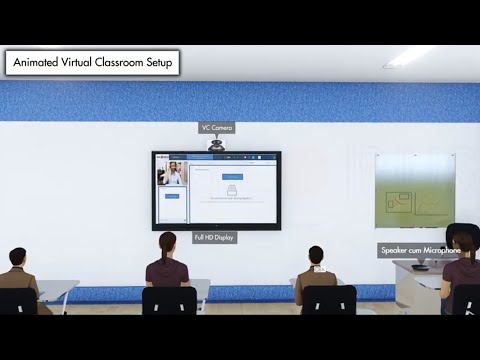

Watch the demo video to explore key features, real workflows, and how the software fits your business needs.
 Ubuntu
  Windows
  MacOS
MacOS  Linux
Linux  Desktop
  Mobile
  Cloud-Based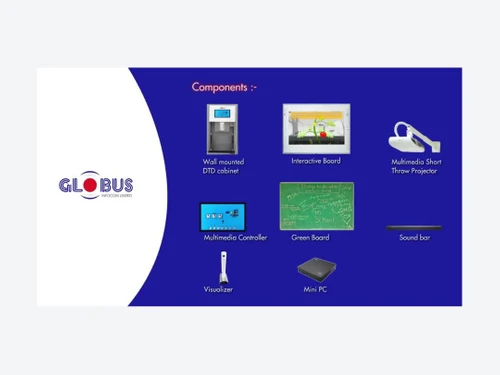
Small Business
Designed for startups and growing businesses
Medium Business
Built for business growth and flexibility
Enterprises
Designed for complex and large-scale business needs
4.6
Out of 5

Overall Rating
Based on
6 Verified Reviews
Rating Breakdown
88% Recommend this Product
Add ReviewCustomers generally express high satisfaction with Globus Infocom, praising its innovative software, excellent service, and reliable quality. Users appreciate the smooth experience and effective support, particularly for recording and sharing learning sessions. However, some complaints highlight issues with customer support and technical glitches, which can hinder user experience, especially for those less familiar with technology. While many recommend the product, a few users note that training may be necessary for optimal use.

Feb 13, 2026
Techjockey Verified
“Amazing Products”
Amazing products and reliable quality! Globus Infocom delivers innovative tech classrooms software. Great support, smooth experience, and real value for money. Highly recommended!
Pros
Great support, smooth experience, and real value for money.
Cons
Nothing as
Feb 10, 2026
Techjockey Verified
“Excellent service and quality”
Excellent service and quality! The team was professional, timely, and delivered beyond expectations. Highly recommended.
Pros
Excellent service and quality, fast onboard and easy to use.
Cons
Nothing as of now
Mar 15, 2024
Techjockey Verified
“Product is good but easily getteing corrupted”
Customer support is not up to the mark. Really frustrating and very expensive.
Pros
The sensitivity of the board is good
Cons
Service support is very poor
Reason to switch
Helped my lectures to be more interactive

Globus Infocom
Price On Request
Desktop
Mobile
Web based
On Premises
Windows
Mac OS

MyClassRoom
Price On Request
Desktop
Mobile
Web based
On Premises
Windows
Mac OS
Groupworld
Price On Request
Desktop
Mobile
Web based
On Premises
Windows
Mac OS

Classin
Price On Request
Desktop
Mobile
Web based
On Premises
Windows
Mac OS

Elvis ERP Virtual
₹ 5084
Desktop
Mobile
Web based
On Premises
Windows
Mac OS

LearnCube
Price On Request
Desktop
Mobile
Web based
On Premises
Windows
Mac OS

Fluxy AI
Price On Request
Desktop
Mobile
Web based
On Premises
Windows
Mac OS

Campusdean Virtual Classroom
Price On Request
Desktop
Mobile
Web based
On Premises
Windows
Mac OS

BrainCert Virtual Classroom Software
Price On Request
Desktop
Mobile
Web based
On Premises
Windows
Mac OS

K12 Online
Price On Request
Desktop
Mobile
Web based
On Premises
Windows
Mac OS
Class
Price On Request
Desktop
Mobile
Web based
On Premises
Windows
Mac OS
(0) Product(s) selected
Starting Price:
$25 /Month
Starting Price:
$19
Available
Price on Request
Available
Price on Request
Available
Price on Request

Starting Price:
$30

Available
Price on Request

Available
Price on Request

Available
Price on Request

Available
Price on Request

Available
Price on Request
Yes, Globus E-Learning Management offers a separate panel for the instructors which allows them to schedule live classes, set grading criteria, engage students and conduct exams at regular intervals as well.
Yes, Globus E-Learning Management allows users to customize the self-paced lessons as per their needs and requirements.
Yes, Techjockey does provide an online demo for Globus E-Learning Management. You have to send us a request stating a preferable time and date.
Yes, the software provides its users with a private chat and group chat forum, enabling the teachers and students to discuss relevant topics as per their needs.
Globus E-Learning Management app is for Android and iOS operated mobile devices.
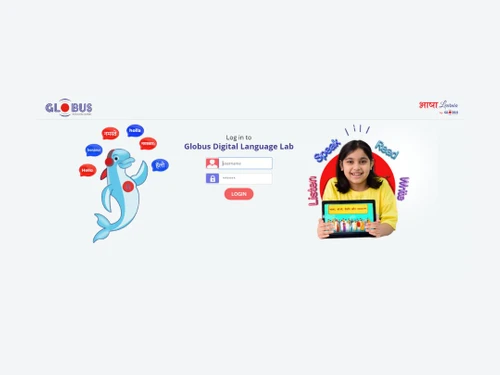
Globus Infocom offers a wide range of technology products and solutions, including Interactive Displays, conferencing cameras, smart classroom solutions, LED display walls, language labs, and various software for learning management.
The Globus virtual classroom is a software solution designed to transform education by enabling the effective implementation of online training and learning, helping educators augment learning outcomes through a comprehensive technology ecosystem.
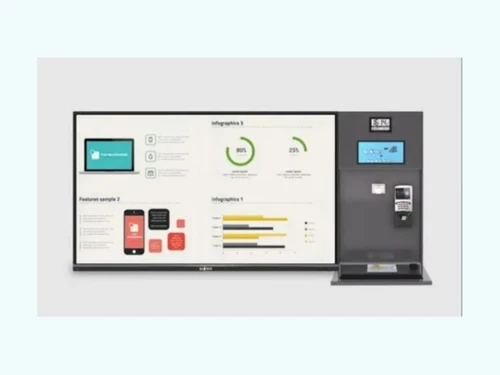
The Globus Infocom digital board, also known as an Interactive Display, is a key component of their smart classroom and collaborative conferencing solutions, designed to enrich user experiences and modernize operations for educational institutions.
Globus Infocom can be used by educational institutions, corporate training teams, and businesses of all sizes looking to deliver interactive online learning, virtual classrooms, and employee training programs through a centralized e-learning platform.
Globus Infocom price is available on request at techjockey.com.
Yes, Globus Infocom is a leading "Make-in-India" EdTech brand that is committed to developing its comprehensive technology solutions within India.
Yes, Globus Infocom's solutions are designed to cater to a wide range of domains, including transforming education in institutions and modernizing operations for businesses and other organizations.
Yes, you can request a free demo of the Globus E-Learning Management software to get hands-on experience with the solution and see how it fits your needs.
Yes, all products and solutions from Globus Infocom are available for procurement on the Government e-Marketplace (GeM) portal.
20,000+ Software Listed
Best Price Guranteed
Free Expert Consultation
2M+ Happy Customers
Terms and Condtions

Users with registered businesses can purchase goods from merchants on the platform to satisfy their business needs. Users are not permitted to utilize any products acquired through the platform for resale, advertising, business, or further distribution.
For each purchase made, users will receive a Tax Invoice (or 'GST invoice') that includes specific details such as:
the GSTIN of the user associated with their registered business, and
the specified Entity Name for their business.
It should be noted that not all products are eligible for GST Invoice. Only the products displayed by participating sellers with the 'GST-based Invoice Available' callout on the product description page would qualify.
Certain goods and services are not eligible to get a GST Invoice, including items with VAS, i.e., Value Added Services (e.g., Total Mobile Protection/Assured Buyback) and those involving an exchange offer at the time of purchase.
Users must ensure the accuracy of the GSTIN, and business entity name provided for the GST Invoice. Requests for corrections into GST Invoice would not be accommodated by Techjockey.com or any Seller, and any issues arising from user-provided information are the sole responsibility of users.
Techjockey.com is not liable for the GST Invoice or any associated input tax credit. To efficiently claim an input tax credit, users should select the registered place of business address as per the GST authority's data and follow the provisions of the GST Act and rules.
To claim an input tax credit, the delivery and billing addresses must match. Furthermore, input tax credits will not be granted if the delivery address and GSTIN on the invoice are from different states. In case of incorrect GST details provided during the order placement, the order will be canceled automatically.