USA
USA UAE
UAESmall Business
Designed for startups and growing businesses
See More


Brand: Class Technologies
Class enhances virtual learning by integrating with your LMS and empowering active engagement, collaboration, and real-time accountability across Zoom and Microsoft Teams.
See MoreHave you used Class before?
Share your insights for better experience
Brand: Class Technologies
Founded Year: 2020
Class Technologies provides Class for Zoom, which integrates the Class software for teachers on the Zoom Meetings platform.
Looking for The Right Pricing?
Share your requirements and get a plan built around your business.
Price Available on Request
Get personalised Class pricing that fits your needs. Our team will connect with you.
 Virtual Classroom Management Attendance Tracking Breakout Rooms Screen Sharing Interactive Whiteboard Polls & Surveys Assessments and Quizzes Session Recording Learning Analytics Chat and Messaging Content Management LMS Integration Role-Based Access Control (RBAC) Assignment Management Engagement Monitoring Calendar and Scheduling Multi-Device Support File Sharing Collaboration Tools Reporting and Insights
  Ubuntu
  Windows
  MacOS
MacOS  Linux
Linux  Desktop
  Cloud-Based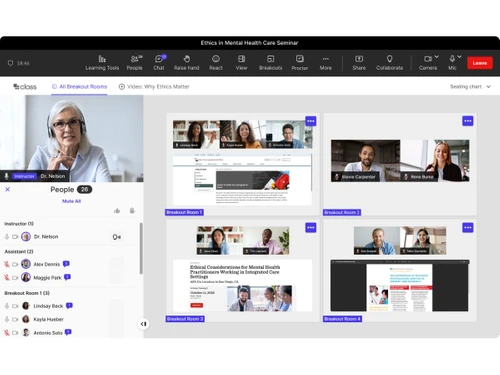
Small Business
Designed for startups and growing businesses
Medium Business
Built for business growth and flexibility
Enterprises
Designed for complex and large-scale business needs
Techjockey Trusted Reviews from Verified Users
No reviews are currently available for Class. Discover similar Virtual Classroom Software reviews

Globus Infocom
Whats great - Great support, smooth experience, and real value for money. read more

Softlogic Smart Classroom Software
Whats great - No Service manual. Warranty Terms are not written down and shared. No supply of peripherals. read more

ZeClassroom
Whats great - We have been using ZeClassroom for few months now. This has turned out to be a game changer in the way we conduct classes in ... read more
Class
Price On Request
Desktop
Mobile
Web based
On Premises
Windows
Mac OS

MyClassRoom
Price On Request
Desktop
Mobile
Web based
On Premises
Windows
Mac OS

Groupworld
Price On Request
Desktop
Mobile
Web based
On Premises
Windows
Mac OS

Classin
Price On Request
Desktop
Mobile
Web based
On Premises
Windows
Mac OS

Elvis ERP Virtual
₹ 5084
Desktop
Mobile
Web based
On Premises
Windows
Mac OS

LearnCube
Price On Request
Desktop
Mobile
Web based
On Premises
Windows
Mac OS

Fluxy AI
Price On Request
Desktop
Mobile
Web based
On Premises
Windows
Mac OS

Campusdean Virtual Classroom
Price On Request
Desktop
Mobile
Web based
On Premises
Windows
Mac OS

BrainCert Virtual Classroom Software
Price On Request
Desktop
Mobile
Web based
On Premises
Windows
Mac OS

K12 Online
Price On Request
Desktop
Mobile
Web based
On Premises
Windows
Mac OS
Globus Infocom
Price On Request
Desktop
Mobile
Web based
On Premises
Windows
Mac OS
(0) Product(s) selected
Starting Price:
$25 /Month
Starting Price:
$19
Available
Price on Request
Available
Price on Request
Available
Price on Request

Starting Price:
$30

Available
Price on Request

Available
Price on Request

Available
Price on Request

Available
Price on Request

Available
Price on Request
Class Technologies provides a virtual classroom software designed for learning and development, integrating deeply with LMS and built to enhance platforms like Zoom and Microsoft Teams for educational purposes.
Class pricing details are available on request on techjockey.com.
Class is a specialized virtual classroom software built on top of platforms like Zoom, offering enhanced features specifically for active learning, engagement, and accountability before, during, and after live virtual sessions, unlike Zoom which is a general meeting tool.
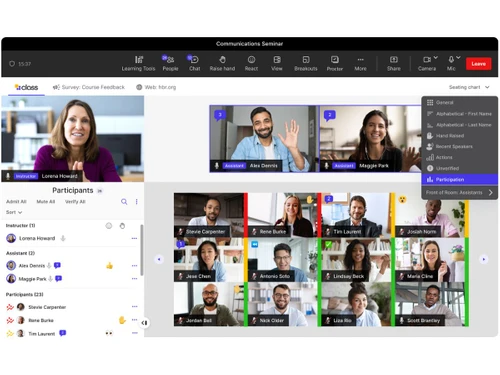
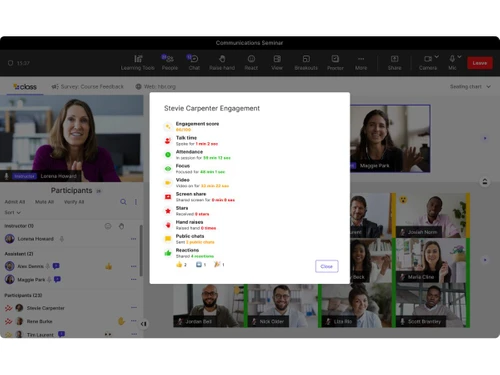
Class for Zoom offers features like streamlined course setup with templates, enhanced engagement tools for active learning, real-time monitoring of breakout rooms, interactive recordings with polls and assessments, and analytics on engagement and knowledge retention.
Class is not a standalone separate app but rather an enhancement layer built for leading meeting platforms like Zoom and Microsoft Teams, integrating with them to provide a specialized virtual classroom experience.
Class is designed for a wide range of users including businesses for corporate training, government agencies, higher education institutions, and K-12 schools to facilitate effective virtual learning and development.
Class improves learner engagement through embedded learning tools, real-time analytics, and enhanced breakout rooms that allow facilitators to monitor activity and ensure learners are seen, heard, and fully involved.
Class integrates deeply with Learning Management Systems (LMS) and is specifically built to enhance leading meeting platforms such as Zoom and Microsoft Teams.
20,000+ Software Listed
Best Price Guranteed
Free Expert Consultation
2M+ Happy Customers
Terms and Condtions

Users with registered businesses can purchase goods from merchants on the platform to satisfy their business needs. Users are not permitted to utilize any products acquired through the platform for resale, advertising, business, or further distribution.
For each purchase made, users will receive a Tax Invoice (or 'GST invoice') that includes specific details such as:
the GSTIN of the user associated with their registered business, and
the specified Entity Name for their business.
It should be noted that not all products are eligible for GST Invoice. Only the products displayed by participating sellers with the 'GST-based Invoice Available' callout on the product description page would qualify.
Certain goods and services are not eligible to get a GST Invoice, including items with VAS, i.e., Value Added Services (e.g., Total Mobile Protection/Assured Buyback) and those involving an exchange offer at the time of purchase.
Users must ensure the accuracy of the GSTIN, and business entity name provided for the GST Invoice. Requests for corrections into GST Invoice would not be accommodated by Techjockey.com or any Seller, and any issues arising from user-provided information are the sole responsibility of users.
Techjockey.com is not liable for the GST Invoice or any associated input tax credit. To efficiently claim an input tax credit, users should select the registered place of business address as per the GST authority's data and follow the provisions of the GST Act and rules.
To claim an input tax credit, the delivery and billing addresses must match. Furthermore, input tax credits will not be granted if the delivery address and GSTIN on the invoice are from different states. In case of incorrect GST details provided during the order placement, the order will be canceled automatically.