linkedin
Electa logo
electa lms
electa devices
electa virtual classroom

Electa

Brand: Electa

  • 4.4

  • 5 Ratings

A virtual classroom and learning management software that helps educators teach and manage online courses with live classes and interactive tools.

See More

Have you used Electa before?

Share your insights for better experience

Add a Review
Starting Price
$30

View plans

100% Genuine
Products
Best Price
Guaranteed
Safe & Secure
Payment
  • Description

  • Pricing

  • Features

  • Specification

  • Review

  • Compare

  • Alternatives

  • FAQ

Starting at $30

Electa Software Overview

What is Electa?

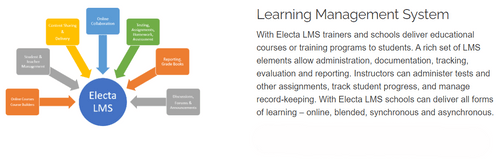
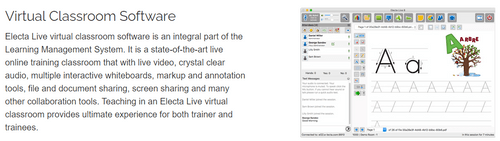
Electa is a virtual classroom and learning management software designed for online teaching and training. It allows educators to conduct live online classes, meetings, and tutoring sessions with tools like video conferencing, interactive whiteboards, screen sharing, and file sharing.

Electa also includes a Learning Management System (LMS) where teachers can create online courses, manage student progress, give assignments, and grade them. It supports both live and recorded sessions, enabling flexibility for students to learn at their own pace. This virtual classroom software is suitable for individual tutors, schools, and training organizations, providing a user-friendly platform for online education.

Why Choose Electa Software?

  • Comprehensive Tools: It provides everything needed for online teaching, including live classes, interactive whiteboards, screen sharing, and session recording.
  • Ease of Use: Electa is user-friendly, allowing teachers to easily create courses, manage students, and track progress.
  • Flexible: It supports both synchronous (live) and asynchronous learning, making it adaptable to different teaching styles.
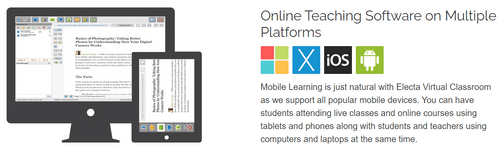
  • Mobile Access: Electa works on all devices, allowing students and teachers to join classes from anywhere.
  • Customizable: The platform can be integrated into existing websites and learning systems, with a wide range of customization options.
  • Student Management: Easily manage student profiles, attendance, grading, and assignments in one system.
  • Safe and Secure: Electa ensures a secure environment with a protected student database and data privacy.
  • Affordable: It offers flexible licensing models suitable for individual tutors, schools, and universities.

Benefits of Electa Software

  • Virtual Classroom: Offers live video sessions, interactive whiteboards, screen sharing, and file sharing for online teaching and collaboration.
  • Course Builder: Allows educators to create and organize online courses with multimedia content such as videos, audio, and text lessons.
  • Student Management: Manages student profiles, groups, and course access, making it easy to organize and monitor progress.
  • Live Sessions: Facilitates live online classes, meetings, and webinars with tools like audio, video, whiteboards, and breakout rooms.
  • Homework & Quizzes: Enables the creation of assignments, quizzes, and automatic grading to assess student performance.
  • Recorded Sessions: Records live classes for later playback, allowing students to review lessons at their convenience.
  • Resource Libraries: Stores learning materials and organizes them into libraries for easy access and use in courses.
  • Forums & Discussions: Engages students in online forums and discussions to promote collaboration and peer learning.
  • Customization & Integration: Integrates with websites and learning management systems, offering custom branding and easy integration via API.
  • Mobile Learning: Supports mobile access, enabling students and teachers to participate in learning from any device.

Pricing of Electa

Electa price in India starts at $30 at techjockey.com.

The pricing model is based on different parameters, including extra features, deployment type, and the total number of users. For further queries related to the product, you can contact our product team and learn more about the pricing and offers.

Read more

Electa Pricing & Plans

Live Virtual Classroom
Starting at $30
    • Users (Attendees per live class)

      Users (Attendees per live class)
      Users (Attendees per live class)
    • Monthly

      Monthly
      Monthly

Key Features

  • Live Classes and Online Meetings-Unlimited

  • Advanced Collaboration Tools

  • Class Scheduling Tools, Recurring Classes

  • Class Scheduling Tools, Recurring Classes

  • Storage for Libraries & Recordings

  • 24/7 Free Unlimited Support

Live Virtual Classroom Pro
Starting at $40
    • Users (Attendees per live class)

      Users (Attendees per live class)
      Users (Attendees per live class)
    • Monthly

      Monthly
      Monthly

Key Features

  • All features of Live Virtual Classroom +

  • Student Management & Student Profiles

  • Individual Class Access & Playback Control

  • Advanced Student Grouping and Access Control

  • Accept Payments from Students, No fees paid to us.

  • HTML, Advanced API & Moodle Integration

Electa LMS Complete Suite
Starting at $70
    • Users (Attendees per live class)

      Users (Attendees per live class)
      Users (Attendees per live class)
    • Monthly

      Monthly
      Monthly

Key Features

  • All features of Electa LMS Complete Suite +

  • Number of Teacher Profiles- 3 rooms/3 teachers

Electa Features

  • icon_check Learning Mangement System
    Manages courses, student records, assignments, grading, and progress tracking.
  • icon_check HD Video Conferencing
    Facilitates high-quality video meetings and live virtual classes with clear audio and video.
  • icon_check Collaboration Tools
    Offers tools like shared whiteboards, file sharing, and screen sharing for real-time teamwork.
  • icon_check Interactive Whiteboard
    Allows educators and students to draw, write, and present ideas visually during lessons.
  • icon_check Screen Sharing
    Lets users share their screen for demonstrations, presentations, or collaborative work.
  • icon_check Remote Control
    Gives users control over another participant’s screen for hands-on support or training.
  • icon_check Session Recording
    Records live classes and meetings for playback, allowing students to review content later.
  • icon_check Team Chat
    Provides a chat feature for real-time communication during classes or meetings without interrupting the session.
  • icon_check Breakout Rooms
    Splits participants into smaller groups for discussions, activities, or collaborative projects.
  • icon_check Polls & Surveys
    Allows users to create polls and surveys for gathering feedback or conducting assessments during sessions.

Electa Specifications

Supported Platforms
Windows Windows
Devices
Desktop Desktop
Deployment
Cloud-Based Cloud-Based
Suitable For
All Industries
Business Specific
All Businesses
Business Size
Small Business Startups Medium Business
Customer Support
Phone Email Forums
Language
English
Training Resources
Live Online

Explore the Best Alternative Solutions Similar to Your Business Size and Needs

Electa Review

4.4

Out of 5

img

Overall Rating

Based on
5 Verified Ratings

Rating Breakdown

  • Features 4.3
  • Value for Money 4.4
  • Ease of Use 4.4
  • Customer Support 4.6

88% Recommend this Product

Add Review

Techjockey Trusted Reviews from Verified Users

No reviews are currently available for Electa. Discover similar Virtual Classroom Software reviews

  • Globus Infocom

    4.5

    Whats great - Great support, smooth experience, and real value for money. read more

  • Softlogic Smart Classroom Software

    3.7

    Whats great - No Service manual. Warranty Terms are not written down and shared. No supply of peripherals. read more

  • ZeClassroom

    5.0

    Whats great - We have been using ZeClassroom for few months now. This has turned out to be a game changer in the way we conduct classes in ... read more

Compare Electa With other Virtual Classroom Software

Products
Ratings
Pricing
Device Supported
Deployment
Supported Platforms
  • img

    Electa

  • 4.4

  • Price On Request

  • Desktop

    Mobile

  • Web based

    On Premises

  • Windows

    Mac OS

  • img

    MyClassRoom

  • 4.0

  • Price On Request

  • Desktop

    Mobile

  • Web based

    On Premises

  • Windows

    Mac OS

  • img

    Groupworld

  • 4.4

  • Price On Request

  • Desktop

    Mobile

  • Web based

    On Premises

  • Windows

    Mac OS

  • img

    Classin

  • 4.1

  • Price On Request

  • Desktop

    Mobile

  • Web based

    On Premises

  • Windows

    Mac OS

  • img

    LearnCube

  • 4.4

  • Price On Request

  • Desktop

    Mobile

  • Web based

    On Premises

  • Windows

    Mac OS

  • img

    Fluxy AI

  • 4.3

  • Price On Request

  • Desktop

    Mobile

  • Web based

    On Premises

  • Windows

    Mac OS

  • img

    K12 Online

  • 4.3

  • Price On Request

  • Desktop

    Mobile

  • Web based

    On Premises

  • Windows

    Mac OS

  • img

    Globus Infocom

  • 4.6

  • Price On Request

  • Desktop

    Mobile

  • Web based

    On Premises

  • Windows

    Mac OS

(0) Product(s) selected

Electa Alternatives

See All Electa Alternatives

Starting Price:

$25 /Month

Available

Price on Request

Available

Price on Request
Available

Price on Request

Available

Price on Request

Available

Price on Request

Available

Price on Request

Articles for Electa

See All Related Articles

What is the cost of Electa Software?

The price of Electa in India starts at $30, as listed on techjockey.com.

Is there a mobile app available for Electa Software?

o, Electa Software does not offer a mobile app.

Which operating systems are compatible with Electa Software?

Electa Software is compatible with Windows only.

Does Electa Software provide a free trial option?

Yes, Electa Software offers a free trial period, allowing users to explore its features before committing to a subscription.

What is the functionality of Electa Software?

Electa Software functions as a comprehensive platform for online teaching, offering virtual classrooms, learning management tools, HD video conferencing, and collaboration features for educators and students.

Who can benefit from using Electa Software?

Educators, trainers, schools, and online learning institutions can benefit from using Electa Software for virtual classrooms, course management, and online collaboration.

Is there a free demo available for Electa Software?

Yes, Electa Software provides a free demo to showcase its features and capabilities to potential users.

Is Electa Software available for free?

o, Electa Software is not free, it operates on a subscription model with various pricing plans.

20,000+ Software Listed

Best Price Guranteed

Free Expert Consultation

2M+ Happy Customers

Terms and Condtions

close

Users with registered businesses can purchase goods from merchants on the platform to satisfy their business needs. Users are not permitted to utilize any products acquired through the platform for resale, advertising, business, or further distribution.

For each purchase made, users will receive a Tax Invoice (or 'GST invoice') that includes specific details such as:

  • the GSTIN of the user associated with their registered business, and

  • the specified Entity Name for their business.

It should be noted that not all products are eligible for GST Invoice. Only the products displayed by participating sellers with the 'GST-based Invoice Available' callout on the product description page would qualify.

Certain goods and services are not eligible to get a GST Invoice, including items with VAS, i.e., Value Added Services (e.g., Total Mobile Protection/Assured Buyback) and those involving an exchange offer at the time of purchase.

Users must ensure the accuracy of the GSTIN, and business entity name provided for the GST Invoice. Requests for corrections into GST Invoice would not be accommodated by Techjockey.com or any Seller, and any issues arising from user-provided information are the sole responsibility of users.

Techjockey.com is not liable for the GST Invoice or any associated input tax credit. To efficiently claim an input tax credit, users should select the registered place of business address as per the GST authority's data and follow the provisions of the GST Act and rules.

To claim an input tax credit, the delivery and billing addresses must match. Furthermore, input tax credits will not be granted if the delivery address and GSTIN on the invoice are from different states. In case of incorrect GST details provided during the order placement, the order will be canceled automatically.