USA
USA UAE
UAESmall Business
Designed for startups and growing businesses
See More


Brand: Zermelo Technologies
A virtual classroom software and e-learning platform that helps educational institutions conduct, manage, and enhance online learning experiences.
See MoreHave you used ZeClassroom before?
Share your insights for better experience
Looking for The Right Pricing?
Share your requirements and get a plan built around your business.
Price Available on Request
Get personalised ZeClassroom pricing that fits your needs. Our team will connect with you.
 Online Session Attendance Timetable entry/schedule Online Assessments Interactive Quiz Branding Study Materials bulk Upload Users Data Email & SMS Integration Sales Reports No Installation Least Internet Bandwidth Integrated Viewer Streaming Video Player Upload Videos Help Manual
  Ubuntu
  Windows
  iOS
iOS  Android MacOS Windows(Phone)
  Desktop
  Mobile
  Cloud-Based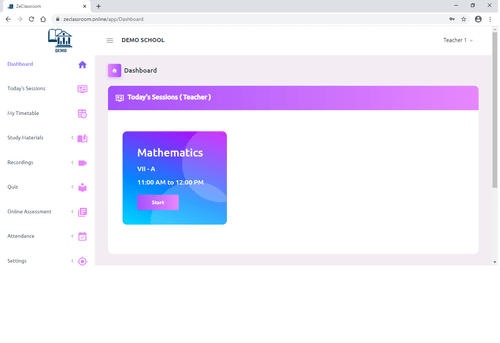
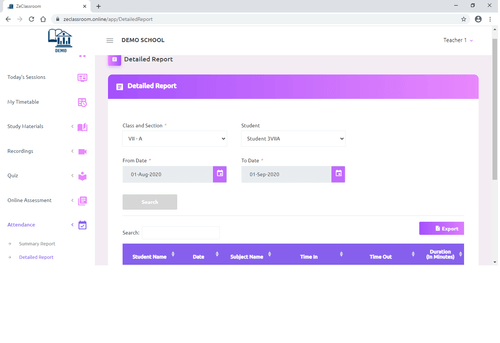
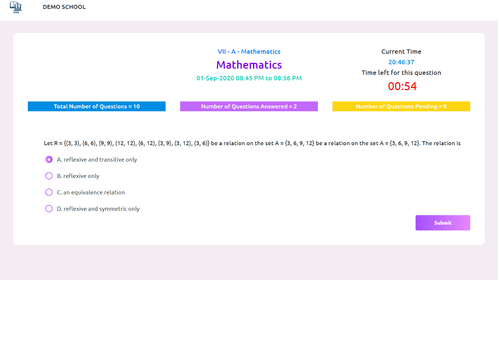
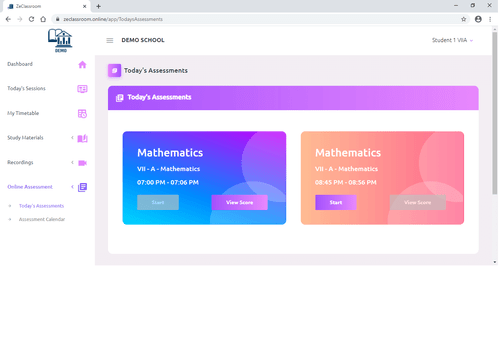
Small Business
Designed for startups and growing businesses
Medium Business
Built for business growth and flexibility
Enterprises
Designed for complex and large-scale business needs
5
Out of 5

Overall Rating
Based on
2 Verified Reviews
Rating Breakdown
100% Recommend this Product
Add Review
Nov 20, 2020
Techjockey Verified
“Best virtual classroom software I have seen”
Pros
We have been using ZeClassroom for few months now. This has turned out to be a game changer in the way we conduct classes in our school. Really well thought of functionalities which eases the management of online classes for the management and the teachers. Conducting regular classes and tests for students on regular basis is so easy now. Teachers also like the interactive quiz while they take classes which helps to make their students attentive in the class. The reports and management dashboard are really useful for us to track how things are going.
Cons
None
Nov 7, 2020
Techjockey Verified
“ZeClassroom one of the best online classroom sw.”
Pros
We are using ZeClassroom in our coaching center. They have webinar as well as two way modes of video conferencing. They have multiple features like Online Exam, Quiz, Live Sessions, Study Materials, Recording etc. It helped us to have one single platform for our students. It also consumes very less internet data for the students. Also the application is very easy to use for the students and is compatible in phone and desktop. The product is very affordable compared to other products with many features. The support team is also available when we needed assistance.
Cons
NO CONS

ZeClassroom
Price On Request
Desktop
Mobile
Web based
On Premises
Windows
Mac OS
Google Classroom
Price On Request
Desktop
Mobile
Web based
On Premises
Windows
Mac OS

MyClassRoom
Price On Request
Desktop
Mobile
Web based
On Premises
Windows
Mac OS

Fluxy AI
Price On Request
Desktop
Mobile
Web based
On Premises
Windows
Mac OS

LearnCube
Price On Request
Desktop
Mobile
Web based
On Premises
Windows
Mac OS

Classin
Price On Request
Desktop
Mobile
Web based
On Premises
Windows
Mac OS

MeritHub
Price On Request
Desktop
Mobile
Web based
On Premises
Windows
Mac OS

Campusdean Virtual Classroom
Price On Request
Desktop
Mobile
Web based
On Premises
Windows
Mac OS

Electa
Price On Request
Desktop
Mobile
Web based
On Premises
Windows
Mac OS

K12 Online
Price On Request
Desktop
Mobile
Web based
On Premises
Windows
Mac OS

Elvis ERP Virtual
₹ 5084
Desktop
Mobile
Web based
On Premises
Windows
Mac OS
(0) Product(s) selected
Available
Price on Request
Starting Price:
$19
Starting Price:
$30
Available
Price on Request

Available
Price on Request

Available
Price on Request

Available
Price on Request

Available
Price on Request

Available
Price on Request
ZeClassroom pricing can be requested at techjockey.com. Pricing is customised based on specific business needs.
ZeClassroom is a web-based platform, so it works on all major operating systems like Windows, macOS, Linux, and can also be accessed via mobile browsers.
ZeClassroom enables teachers to conduct live classes, share materials, assign tasks, and track student progress through an integrated virtual classroom interface.
Yes, it is suitable for small educational institutes, coaching centers, and training businesses looking to deliver online learning efficiently.
ZeClassroom typically provides demos for interested users. Institutions can request a demo to explore its features and usability.
Key features include live video classes, attendance tracking, assignments, assessments, content sharing, and interactive tools like chat and whiteboards.
ZeClassroom may offer mobile accessibility via browser or app (depending on provider setup), but it is primarily used as a web-based platform.
Teachers, students, schools, colleges, coaching centers, and corporate trainers are the main users of ZeClassroom.
ZeClassroom follows standard security practices such as secure logins and data protection measures to ensure safe online learning environments.
It is used to conduct and manage online classes, share learning resources, and facilitate interactive digital education.
20,000+ Software Listed
Best Price Guranteed
Free Expert Consultation
2M+ Happy Customers
Terms and Condtions

Users with registered businesses can purchase goods from merchants on the platform to satisfy their business needs. Users are not permitted to utilize any products acquired through the platform for resale, advertising, business, or further distribution.
For each purchase made, users will receive a Tax Invoice (or 'GST invoice') that includes specific details such as:
the GSTIN of the user associated with their registered business, and
the specified Entity Name for their business.
It should be noted that not all products are eligible for GST Invoice. Only the products displayed by participating sellers with the 'GST-based Invoice Available' callout on the product description page would qualify.
Certain goods and services are not eligible to get a GST Invoice, including items with VAS, i.e., Value Added Services (e.g., Total Mobile Protection/Assured Buyback) and those involving an exchange offer at the time of purchase.
Users must ensure the accuracy of the GSTIN, and business entity name provided for the GST Invoice. Requests for corrections into GST Invoice would not be accommodated by Techjockey.com or any Seller, and any issues arising from user-provided information are the sole responsibility of users.
Techjockey.com is not liable for the GST Invoice or any associated input tax credit. To efficiently claim an input tax credit, users should select the registered place of business address as per the GST authority's data and follow the provisions of the GST Act and rules.
To claim an input tax credit, the delivery and billing addresses must match. Furthermore, input tax credits will not be granted if the delivery address and GSTIN on the invoice are from different states. In case of incorrect GST details provided during the order placement, the order will be canceled automatically.