linkedin
GOFRUGAL Restaurant Pos logo
play How can restaurants prepare for the new normal ? | Restaurant Management System Re-imagined gofrugal restaurant pos
gofrugal restauran pos management
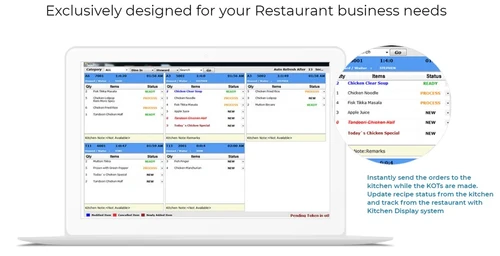
gofrugal restaurant pos kitchen display

GOFRUGAL Restaurant Pos

Brand: GOFRUGAL

  • 4.1

  • 3 Ratings

Restaurant pos software from GoFrugal aims at managing end to end operations at a restaurant unit/chain of restaurants. The cloud-based Restaurant Software software helps manage the day to day activities including point of sale, billing, accounting, inventory, food cost reports, mobile order taking,...

See More

Have you used GOFRUGAL Restaurant Pos before?

Share your insights for better experience

Add a Review
Starting Price
₹8,999 excl.GST
₹ 10,619 incl. GST

View plans

offer Save upto 18%, Get GST Invoice on your business purchase T&C
offer Buy Now & Pay Later, Check offer on payment page.
Buy Now
100% Genuine
Products
Best Price
Guaranteed
Safe & Secure
Payment
  • Description

  • Pricing

  • Features

  • Specification

  • Review

  • Compare

  • Alternatives

  • FAQ

Starting at ₹8,999
Buy Now

GOFRUGAL Restaurant Pos Software Overview

Restaurant pos software from GoFrugal aims at managing end to end operations at a restaurant unit/chain of restaurants. The cloud-based Restaurant Software software helps manage the day to day activities including point of sale, billing, accounting, inventory, food cost reports, mobile order taking, security, recipe management, and much more.  The cloud-based software allows the restaurants to manage all operations universally without any extra effort and cost. Restaurants can track the orders placed, KOTs, order status and generate billing for the orders readily from a single platform. With reduced order processing and increased table turnaround time, the solution also helps in acquiring more loyal customers.

Product Features
Restaurant Software from GoFrugal is one stop shop for all automation needs of effective restaurant management. This cloud-based software allows the software access from anywhere anytime and with mobile support, the solution empowers the businesses with global restaurant management capabilities. The powerful reporting tools available within the software equip the users to generate analytical data to create useful business insights on the go. This scalable and robust solution addresses efficient execution of the vital processes including order taking, KOT processing, inventory tracking, accounting, billing, order delivery, loyalty programs and many more. Exquisite features of Retail Software include:

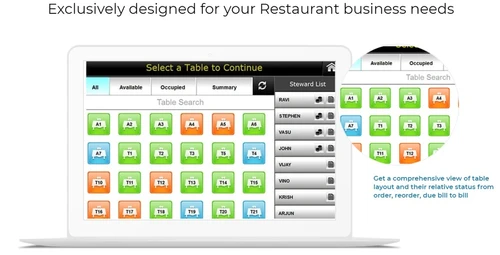
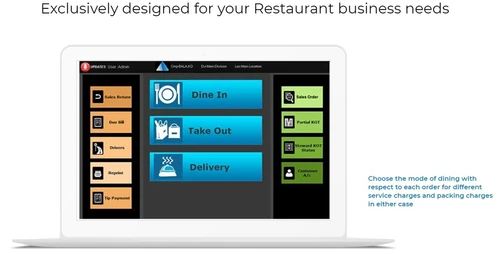
  • Guest Seating & Service: The innovative solution provides a quick glance dashboard to help restaurant managers quickly know the table summary for occupied and available tables. The users can also identify which 'Captain' and 'Steward' is serving which table and the number of guests. Restaurants can monitor dine in, take away and delivery effortlessly. Merging of KOTs and convert a KOT to bill are made simpler. The software also gives absolute clarity on combo and special offer details in billing.
  • Recipe & Menu management: Restaurants can create recipe banks by mapping relevant ingredients, which are in different UOM's (unit of measurements). Accurate food costing with our Food Costing Reports (FCR) along with variance can be evaluated. Recipe costs can be arrived based on the utilization and wastage at the end-of the day and dynamic recipe can be made possible with features like adding substitutes, modifiers, classifiers, style and design.
  • Inventory and Production: The production process helps in arriving at the exact costing of preparing a dish including the cost of ingredients, electricity, labor cost, packing cost and more. Day-end easy auditing of inventory can be simplified with physical inventory methodologies, which enables accurate measure of pilferage. Production planning helps to calculate how much inventory of ingredients is required for preparing the food, accurate reports of what ingredients were issued, actual production, wastage, and costing can be readily generated.
  • Tip & Check Handling: These features help generating bills and account for tips with ease and converting KOTs to bills instantly. Bills of different tables can be merged with waiter names or bills of guests can be split in a single table.
  • Customer Offers And Loyalty: Restaurants can create combo packs based on customer preferences and release coupon codes/ vouchers. Offers can be customized for different categories of customers like corporates, regulars, students etc. The solution integrated with SMS facility allows to send greetings to customers, announce discounts on their birthdays, offers and keep in regular touch.
  • Food Costing & Wastage Reports: Ingredients utilization vs physical stock can be verified to make appropriate decisions. A graphical dashboard of top 'N' recipe sales, customers and suppliers for quick and easy understanding of business is provided within the solution. Wastage and pilferage reports to monitor everyday loss can also be generated with these features.
  • POS Integrations: POS integrations or Restaurant software with business boosters such as ecommerce, accounting, loyalty program and payments make this easily deployable software more sought.
  • Cloud For QSR: Being a cloud POS, this most user-friendly software allows the restaurant management possible from anywhere anytime and from any device thereby contributing to always encash the business opportunities.
  • Restaurant Chain Business Management: It is a comprehensive solution for restaurant chains gets a live telecast of the business operations and performance with centralized management software helping in consolidating the data from the many kitchens or outlets.
  • Delivery & Order Management: Restaurants can manage and track door delivery process by properly assigning drivers or delivery boys quickly. The solution empowers with full proof order taking process by capturing order specific details such as delivery date/time, special requirements and advance receipt details etc. errorlessly.
  • Integrated Accounting: Budgeting, cash flow analysis, ledger management and all vital accounting processes can be well executed and managed with the accounting integration in the software. It is quite simple and easy to print account statements and cheques from books such as ledger, journals etc. with Easy Print design tool provided by the solution. Age wise outstanding report for customers and suppliers can be generated to help you to have better visibility.


Pricing of GOFRUGAL Restaurant Pos

The pricing of GOFRUGAL Restaurant Pos is available at INR 8999 per year at techjockey.com.


Read more

GOFRUGAL Company Details

Founded Year:  2004

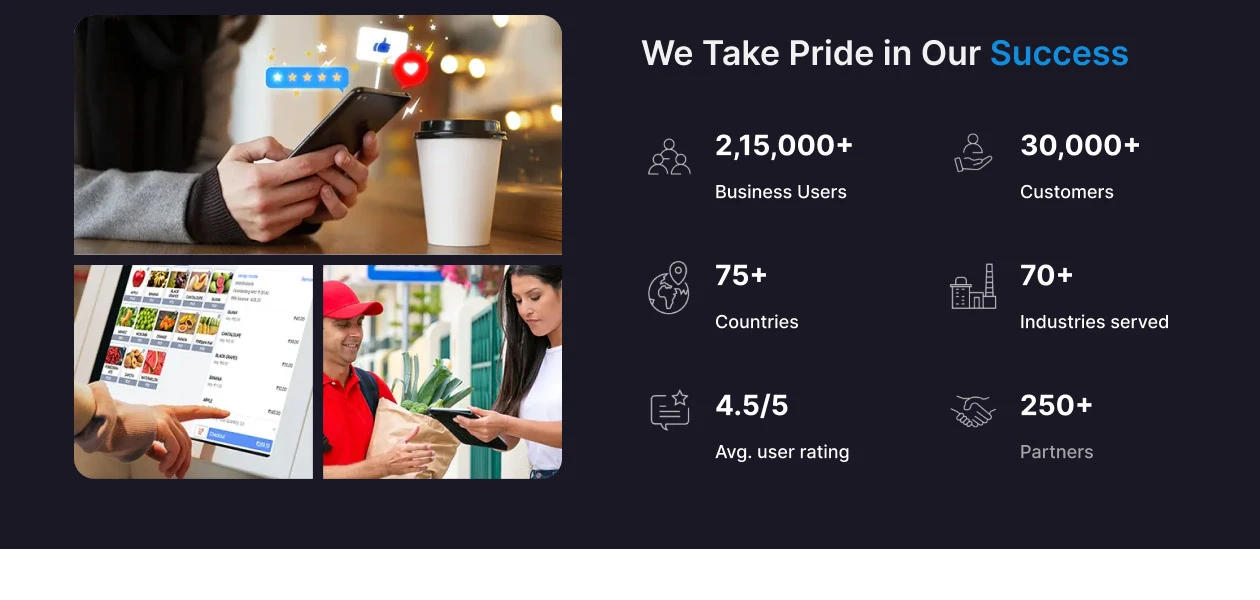
Gofrugal is a digital-first company offering cloud and mobile ERP solutions to Retail, Restaurant and Distribution businesses. Established in 2004, it helps businesses embrace agility and transform digitally to stay competitive in the dynamic market.

Director/Founders Kumar Vembu
Company Size 101-500 Employees

GOFRUGAL Restaurant Pos Pricing & Plans

Starter

Calculated Price

8999 Exclusive of all taxes
    • Quantity

      Quantity
      Quantity
    • Yearly

      Yearly
      Yearly

Key Features

  • Sell Management

  • Purchase & Reorder

  • Inventory management

  • Reports

  • Recipe Management

Standard

Calculated Price

14999 Exclusive of all taxes
    • Quantity

      Quantity
      Quantity
    • Yearly

      Yearly
      Yearly

Key Features

  • Sell Management

  • Purchase & Reorder

  • Inventory management

  • Reports

  • Recipe Management

Professional

Calculated Price

24999 Exclusive of all taxes
    • Quantity

      Quantity
      Quantity
    • Yearly

      Yearly
      Yearly

Key Features

  • Purchase & Reorder

  • Inventory management

  • Reports

  • Recipe Management

GOFRUGAL Restaurant Pos Features

  • icon_check Billing & Invoicing
  • icon_check Customer Management
  • icon_check Recipe Management
    Create recipe banks by mapping relevant ingredients which are in different UOM's(unit of measurements) Dynamic recipe made
  • icon_check Feedbacks
  • icon_check Menu Management
  • icon_check Home Delivery Management
    Increase order capability and reach more customers, through our centralized Call center module. Foolproof order taking
  • icon_check Third Party Integration
  • icon_check Inventory Management
    Production planning will help to calculate how much inventory of ingredients is required for preparing the
  • icon_check KOT Management
  • icon_check Loyalty Program
    Have offers customized for different categories of customers like - corporates, regulars, students and more SMS greetings
  • icon_check Point of Sale (POS)
    Quick and efficient restaurant billing with the touch of your fingers.  Get visual representation of table status;
  • icon_check Table Management
    Use Mobile order taking app SERVJOY with accurate and faster control over : Tables. Number of guests seated. Waiters
  • icon_check Schemes & Offers
    Retain your customers by appreciating their Loyalty by giving customized offers. Points allocated automatically to
  • icon_check Multi Branch
  • icon_check Expense Management
  • icon_check Mobile App
    Objective oriented Mobile apps for: Order taking.(Servjoy) Table Management.(Servjoy) Customer
  • icon_check Analytics & Reporting
    Get accurate reports on what ingredients are well consumed and what is wasted. Optimize next purchase to profit
GOFRUGAL Restaurant Pos Demo Video play icon

Get GOFRUGAL Restaurant Pos Demo

Watch the demo video to explore key features, real workflows, and how the software fits your business needs.
Understand
Key Features
Personal
Demo Insights
Interactive
Demo Support
Product Enrichment Section Image

GOFRUGAL Restaurant Pos Specifications

Supported Platforms
Windows Windows iOS iOS Android Android
Devices
Desktop Desktop Mobile Mobile Tablet Tablet iPad iPad
Deployment
Cloud-Based Cloud-Based Perpetual Perpetual
Suitable For
Hospitality
Business Specific
Restaurants
Business Size
Small Business Startups Medium Business Enterprises SMBs SMEs
Customer Support
Phone Email Live Chat
Language
English
Integration
API Integration
Training Resources
Live Online Documentation Videos
AI Features
AI Integrated
Technology
Next Generation

Explore the Best Alternative Solutions Similar to Your Business Size and Needs

GOFRUGAL Restaurant Pos Review

4.1

Out of 5

img

Overall Rating

Based on
3 Verified Ratings

Rating Breakdown

  • Features 3.8
  • Value for Money 3.8
  • Ease of Use 4.3
  • Customer Support 4.6

93% Recommend this Product

Add Review

Techjockey Trusted Reviews from Verified Users

No reviews are currently available for GOFRUGAL Restaurant Pos. Discover similar Restaurant POS Software reviews
  • Petpooja

    4.1

    Whats great - The software is easy to use and understand. Currently, it has all the features required to run a restaurant efficiently. read more

  • Mink Foodiee Restaurant POS

    4.8

    Whats great - Works with almost all devices, Very easy to setup and use with many services like crm, loyalty programs, inventory managemen... read more

  • TMBill POS

    4.2

    Whats great - No expertise and solution offered, only duping people. read more

Compare GOFRUGAL Restaurant Pos With other Restaurant POS Software

Products
Ratings
Pricing
Device Supported
Deployment
Supported Platforms
  • img

    GOFRUGAL Restaurant Pos

  • 4.1

  • ₹ 8999.00 excl. GST

  • Desktop

    Mobile

  • Web based

    On Premises

  • Windows

    Mac OS

  • img

    Petpooja

  • 4.2

  • ₹ 10000

  • Desktop

    Mobile

  • Web based

    On Premises

  • Windows

    Mac OS

  • img

    Feedo

  • 4.7

  • ₹ 899

  • Desktop

    Mobile

  • Web based

    On Premises

  • Windows

    Mac OS

  • img

    SpotOn

  • 4.3

  • Price On Request

  • Desktop

    Mobile

  • Web based

    On Premises

  • Windows

    Mac OS

  • img

    SpeedLine POS

  • 4.5

  • Price On Request

  • Desktop

    Mobile

  • Web based

    On Premises

  • Windows

    Mac OS

  • img

    Rezku POS

  • 4.4

  • Price On Request

  • Desktop

    Mobile

  • Web based

    On Premises

  • Windows

    Mac OS

  • img

    Track My Table

  • 4.2

  • ₹ 399

  • Desktop

    Mobile

  • Web based

    On Premises

  • Windows

    Mac OS

  • img

    RestoMPOS

  • 4.3

  • Price On Request

  • Desktop

    Mobile

  • Web based

    On Premises

  • Windows

    Mac OS

  • img

    Solo Billing

  • 4.1

  • ₹ 8000

  • Desktop

    Mobile

  • Web based

    On Premises

  • Windows

    Mac OS

  • img

    TMBill POS

  • 4.4

  • ₹ 5999

  • Desktop

    Mobile

  • Web based

    On Premises

  • Windows

    Mac OS

  • img

    FoodyQueen

  • 4.1

  • ₹ 4188

  • Desktop

    Mobile

  • Web based

    On Premises

  • Windows

    Mac OS

(2) Product(s) selected

GOFRUGAL Restaurant Pos Alternatives

See All GOFRUGAL Restaurant Pos Alternatives

Starting Price:

$55 /Month

Starting Price:

$49 /Month

Available

Price on Request

Lavu

4.1

Available

Price on Request

Starting Price:

$49 /Month

Available

Price on Request

Which operating system does GOFRUGAL Restaurant Pos support?

GOFRUGAL Restaurant Pos Restaurant Billing Software is compatible with Windows operating systems.

Is there any GOFRUGAL Restaurant Pos app?

GOFRUGAL Restaurant Pos Restaurant Billing Software app is not available.

What is deployment type of GOFRUGAL Restaurant Pos?

GOFRUGAL Restaurant Pos Restaurant Billing Software supports Web-Based.

How much does GOFRUGAL Restaurant Pos cost?

The pricing of GOFRUGAL Restaurant Pos is available at INR 8999 per year at techjockey.com.

Who are the potential users of GOFRUGAL Restaurant Pos?

GOFRUGAL Restaurant Pos Restaurant Billing Software is typically used in Hospitality.

Is there any free trial or demo for GOFRUGAL Restaurant Pos?

GOFRUGAL Restaurant Pos Restaurant Billing Software demo is available for free with Techjockey.com

Is GOFRUGAL Restaurant Pos free?

GOFRUGAL Restaurant Pos Restaurant Billing Software offers a free trial. However, the premium plan with advanced features available at Techjockey .

How can you download GOFRUGAL Restaurant Pos?

For GOFRUGAL Restaurant Pos Restaurant Billing Software installation, insert the given CD/USB flash storage in your system and open the Setup Wizard to get started.

How does GOFRUGAL Restaurant Pos work?

GOFRUGAL Restaurant Pos Restaurant Billing Software helps with Analytics & Reporting,Billing & Invoicing,Customer Management and Recipe Management. It's a complete solution for Feedbacks,Menu Management,Home Delivery Management and Third-party Integration.

20,000+ Software Listed

Best Price Guranteed

Free Expert Consultation

2M+ Happy Customers

Terms and Condtions

close

Users with registered businesses can purchase goods from merchants on the platform to satisfy their business needs. Users are not permitted to utilize any products acquired through the platform for resale, advertising, business, or further distribution.

For each purchase made, users will receive a Tax Invoice (or 'GST invoice') that includes specific details such as:

  • the GSTIN of the user associated with their registered business, and

  • the specified Entity Name for their business.

It should be noted that not all products are eligible for GST Invoice. Only the products displayed by participating sellers with the 'GST-based Invoice Available' callout on the product description page would qualify.

Certain goods and services are not eligible to get a GST Invoice, including items with VAS, i.e., Value Added Services (e.g., Total Mobile Protection/Assured Buyback) and those involving an exchange offer at the time of purchase.

Users must ensure the accuracy of the GSTIN, and business entity name provided for the GST Invoice. Requests for corrections into GST Invoice would not be accommodated by Techjockey.com or any Seller, and any issues arising from user-provided information are the sole responsibility of users.

Techjockey.com is not liable for the GST Invoice or any associated input tax credit. To efficiently claim an input tax credit, users should select the registered place of business address as per the GST authority's data and follow the provisions of the GST Act and rules.

To claim an input tax credit, the delivery and billing addresses must match. Furthermore, input tax credits will not be granted if the delivery address and GSTIN on the invoice are from different states. In case of incorrect GST details provided during the order placement, the order will be canceled automatically.