linkedin
Google Kubernetes Engine (GKE) logo
play What is Google Kubernetes Engine (GKE)?
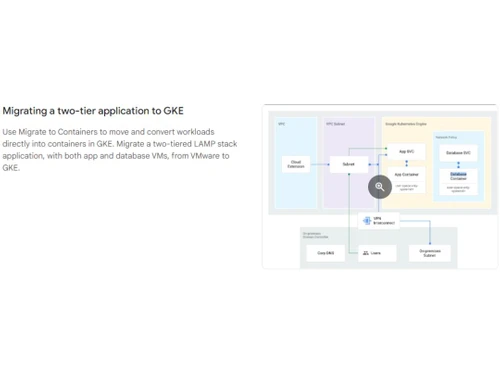
Google Kubernetes Migrating
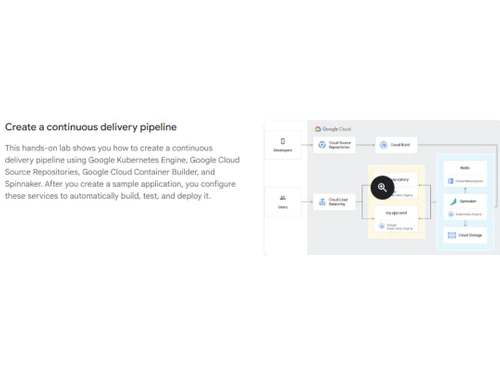
Google Kubernetes Pipeline

Google Kubernetes Engine (GKE)

Brand: Google

  • 4.2

  • 5 Ratings

Google Kubernetes Engine (GKE) empowers businesses with a scalable and efficient cloud computing solution, offering automatic container orchestration, seamless scaling, and reliable workload management.

See More

Have you used Google Kubernetes Engine (GKE) before?

Share your insights for better experience

Add a Review

Price Available on Request

Questions about pricing or customization? We’re here to help, just a click away.

100% Genuine
Products
Best Price
Guaranteed
Safe & Secure
Payment
  • Description

  • Pricing

  • Features

  • Specification

  • Review

  • Compare

  • Alternatives

  • FAQ

  • Questions

Google Kubernetes Engine (GKE) Software Overview

What is Google Kubernetes Engine?

Google Kubernetes Engine is a service provided and managed by Google Cloud Platform. Kubernetes is a container supported as an open-source platform that supports the automation of software applications, including deployment, application management, and scaling. It streamlines the process of running Kubernetes clusters by managing underlying infrastructure and management tasks. This helps the DevOps teams and developers concentrate on deploying and managing their applications.

By leveraging the power of the Kubernetes and Google Cloud Platform, developers can easily manage, deploy, and scale their containerized applications. Google Kubernetes Engine provides a serverless Kubernetes experience to the users through its Autopilot feature, thus eliminating manual configuration and monitoring requirements. It configures, manages, and creates Kubernetes clusters, including worker nodes and control planes. Using this platform, nodes can be easily scaled through resource utilization. This ensures efficient handling of varying workloads. This platform can easily integrate Google Cloud’s monitoring and logging services. This helps in providing insights into application logs and cluster performances.

It offers efficient load balancing so incoming traffic is evenly distributed among multiple pods within the cluster. It provides security features like role-based access control and network policies. It can be seamlessly integrated with Google Cloud Identity, Access Management, and other services offered by Google, like Cloud Storage, Cloud SQL, etc. Container Images are easily managed and stored due to integration with Google Container Registry.

Why Choose Google Kubernetes Engine?

It provides simplified Kubernetes management. It gives a complete Kubernetes platform that reduces the DevOps team's operational burden. Since it is a service offered by Google, the users of this platform can completely concentrate on deploying and managing applications without worrying about infrastructure, updates, and scaling.

Its scalability and reliability are The key features that make it efficient in handling large work. It offers robust auto-scaling capabilities. This helps in the efficient handling of the workload. This platform can easily support large-scale clusters of up to 15,000 nodes. This exceptional capacity of the platform makes it suitable for mission-critical applications that need dependable and scalable infrastructure.

Benefits of Google Kubernetes Engine Software

  • Managing Kubernetes: It effectively handles cluster infrastructure, allowing users to concentrate more on deploying and managing applications.
  • Cost Efficiency: Users must pay for the running pods, optimizing resource utilization.
  • Security: It provides the most advanced workload security through its network policies and GKE Sandbox.
  • Prebuilt Applications: Offers access to enterprise-ready containerized applications through prebuilt deployment templates.
  • Autoscaling: It offers enhanced efficiency through pod and cluster autoscaling by adjusting the resources as per demand.
  • Easy Workload Migration: Its “Migrate to Container” tool eases transitioning traditional applications into containers without VM layers.

Google Kubernetes Engine Pricing

Google Kubernetes Engine pricing is available on request at techjockey.com.

The pricing model is based on different parameters, including extra features, deployment type, and total users. For further queries related to the product, you can contact our product team and learn more about the pricing and offers.

Read more

Google Company Details

Founded Year:  1998

Google is a multinational corporation that specializes in Internet-related services and products.

Director/Founders Easir Arafat, Larry Page, Masudur Rahman, Mohammad Faruk, Sergey Brin
Company Size 1000+ Employees

Google Kubernetes Engine (GKE) Pricing & Plans

Looking for The Right Pricing?

Share your requirements and get a plan built around your business.

  • Define your business needs
  • Get customised pricing
  • Choose features that fit your workflow

Price Available on Request

Get personalised Google Kubernetes Engine (GKE) pricing that fits your needs. Our team will connect with you.

Google Kubernetes Engine (GKE) Features

  • icon_check Serverless Kubernetes
    Its Autopilot feature helps manage the clusters automatically, giving greater control.
  • icon_check Networking
    Secure communications through container-native networking, private and public endpoints
  • icon_check Security
    It offers advanced workload and cluster security through GKE Sandbox, RBAC, and IAM.
  • icon_check Templates
    It offers prebuilt deployment templates that are enterprise ready for quick application deployment,
  • icon_check Multi-Cluster Support
    It can scale up to more than 15,000 nodes and support multiple clusters for various workloads.
  • icon_check Migrating Workloads
    Automated tools help simplify migration from traditional applications to GKE.
  • icon_check Identity and Access Management
    These features offer granular control over cluster access and operations.
  • icon_check Hybrid Networking
    Using hybrid networking solutions, it can connect GKE clusters with on-premises resources.
  • icon_check Dashboards
    Its user-friendly interface helps in effective cluster monitoring and management.
Google Kubernetes Engine (GKE) Demo Video play icon

Get Google Kubernetes Engine (GKE) Demo

Watch the demo video to explore key features, real workflows, and how the software fits your business needs.

Understand
Key Features
Personal
Demo Insights
Interactive
Demo Support

Google Kubernetes Engine (GKE) Specifications

Supported Platforms
Ubuntu Ubuntu Windows Windows MacOS MacOS Linux Linux
Devices
Desktop Desktop
Deployment
Cloud-Based Cloud-Based
Suitable For
All Industries
Business Specific
All Businesses
Business Size
Medium Business Enterprises SMEs MSMBs MSMEs
Customer Support
Email Communities
Language
English
Training Resources
Documentation Videos

Explore the Best Alternative Solutions Similar to Your Business Size and Needs

Google Kubernetes Engine (GKE) Review

4.2

Out of 5

img

Overall Rating

Based on
5 Verified Ratings

Rating Breakdown

  • Features 4.4
  • Value for Money 4.4
  • Ease of Use 4.2
  • Customer Support 4

88% Recommend this Product

Add Review

Be the First to Review

This product has no reviews yet. Be the first to leave your feedback.

Add Review

Compare Google Kubernetes Engine (GKE) With other Infrastructure as a Service (IaaS)

Products
Ratings
Pricing
Device Supported
Deployment
Supported Platforms
  • img

    Google Kubernetes Engine (GKE)

  • 4.2

  • Price On Request

  • Desktop

    Mobile

  • Web based

    On Premises

  • Windows

    Mac OS

  • img

    Utho

  • 4.7

  • ₹ 1495

  • Desktop

    Mobile

  • Web based

    On Premises

  • Windows

    Mac OS

  • img

    RapidScale

  • 4.7

  • Price On Request

  • Desktop

    Mobile

  • Web based

    On Premises

  • Windows

    Mac OS

  • img

    Bigstep

  • 4.7

  • Price On Request

  • Desktop

    Mobile

  • Web based

    On Premises

  • Windows

    Mac OS

  • img

    Limestone Networks

  • 4.7

  • Price On Request

  • Desktop

    Mobile

  • Web based

    On Premises

  • Windows

    Mac OS

  • img

    Amazon EC2

  • 4.4

  • Price On Request

  • Desktop

    Mobile

  • Web based

    On Premises

  • Windows

    Mac OS

  • img

    BILLmanager

  • 4.6

  • Price On Request

  • Desktop

    Mobile

  • Web based

    On Premises

  • Windows

    Mac OS

(0) Product(s) selected

Google Kubernetes Engine (GKE) Alternatives

See All Google Kubernetes Engine (GKE) Alternatives

Available

Price on Request

Available

Price on Request

Available

Price on Request

Articles for Google Kubernetes Engine (GKE)

See All Related Articles

Which operating system does the Google Kubernetes Engine (GKE) Cloud Computing Software Support?

Google Kubernetes Engine (GKE) Cloud Computing software is compatible with Windows and macOS operating systems.

Is there any Google Kubernetes Engine (GKE) Cloud Computing App?

Google Kubernetes Engine (GKE) Cloud Computing app is unavailable on Android and iOS devices.

How to access MongoDB which is in Google Kubernetes Engine?

Access MongoDB in the Google Kubernetes engine by launching the topology view to deploy, choosing the type of development, and clicking continue. From the Connect to your Deployment dialog box, copy the connection command and type the connection command into a terminal.

How much does the Google Kubernetes Engine (GKE) Cloud Computing Software Cost?

Google Kubernetes Engine (GKE) Cloud Computing Software pricing is available on request at techjockey.com.

Who are the potential users of the Google Kubernetes Engine (GKE) Cloud Computing Software?

Google Kubernetes Engine (GKE) Cloud Computing Software can be used by businesses operating in the cloud.

Is there any free trial or demo for Google Kubernetes Engine (GKE) Software?

Google Kubernetes Engine (GKE) Cloud Computing Software demo is available for free with techjockey.com.

How to use shutdown script on Google Kubernetes Engine?

By utilizing the shutdown-script metadata key and the metadata-from-file flag in the Google Cloud CLI, you can specify the path to a shutdown script file.

How can you download the Google Kubernetes Engine (GKE) Cloud Computing Software?

Google Kubernetes Engine (GKE) is a cloud-based software. So, you need not download any software to use it.

How does Google Kubernetes Engine (GKE) Cloud Computing Software work?

Google Kubernetes Engine (GKE) efficiently manages and orchestrates containers on Google Cloud. It simplifies application deployment, scaling, and monitoring through the open-source Kubernetes platform. GKE empowers users to run Docker containers seamlessly, ensuring a flexible and scalable infrastructure for modern applications.

What is the relationship between Kubernetes and Google Kubernetes engine?

Google Kubernetes Engine (GKE) is a Kubernetes managed service. It runs and manages containerized applications on Google Cloud.

Google Kubernetes Engine (GKE) Questions

A:

To set up an application that has to be deployed in Kubernetes Cluster with GKE, follow the steps given below:

  • Set up the CLI environment
  • Make a Docker container and upload the container image withing it
  • Make a Kubernetes cluster in GKE
  • Deploy the application into the cluster
  • Position the application
  • Review the metrics and logs.
Nilankur Das Apr 23, 2024
Q:

What to do to avoid a single point of failure in GKE?

Surinder kumar Kumar Apr 23, 2024
A:

To avoid a single point of failure in GKE, make use of Anti-Affinity and guide the Kubernetes NOT to co-locate Pods on the same node.

Nilankur Das Apr 23, 2024
A:

The Google Kubernetes Engine team periodically performs automatic upgrades for the cluster to get newer stable versions. But you can update it manually:

  • In Google Kubernetes Engine page in Google Cloud console.
  • Choose the desired cluster name.
  • In Cluster basics, click on edit- Upgrade Available.
  • Select the preferred version, then click Save Changes.
Yatin Verma Jun 2, 2023

20,000+ Software Listed

Best Price Guranteed

Free Expert Consultation

2M+ Happy Customers

Terms and Condtions

close

Users with registered businesses can purchase goods from merchants on the platform to satisfy their business needs. Users are not permitted to utilize any products acquired through the platform for resale, advertising, business, or further distribution.

For each purchase made, users will receive a Tax Invoice (or 'GST invoice') that includes specific details such as:

  • the GSTIN of the user associated with their registered business, and

  • the specified Entity Name for their business.

It should be noted that not all products are eligible for GST Invoice. Only the products displayed by participating sellers with the 'GST-based Invoice Available' callout on the product description page would qualify.

Certain goods and services are not eligible to get a GST Invoice, including items with VAS, i.e., Value Added Services (e.g., Total Mobile Protection/Assured Buyback) and those involving an exchange offer at the time of purchase.

Users must ensure the accuracy of the GSTIN, and business entity name provided for the GST Invoice. Requests for corrections into GST Invoice would not be accommodated by Techjockey.com or any Seller, and any issues arising from user-provided information are the sole responsibility of users.

Techjockey.com is not liable for the GST Invoice or any associated input tax credit. To efficiently claim an input tax credit, users should select the registered place of business address as per the GST authority's data and follow the provisions of the GST Act and rules.

To claim an input tax credit, the delivery and billing addresses must match. Furthermore, input tax credits will not be granted if the delivery address and GSTIN on the invoice are from different states. In case of incorrect GST details provided during the order placement, the order will be canceled automatically.