linkedin
Hitask logo
play Hitask demo
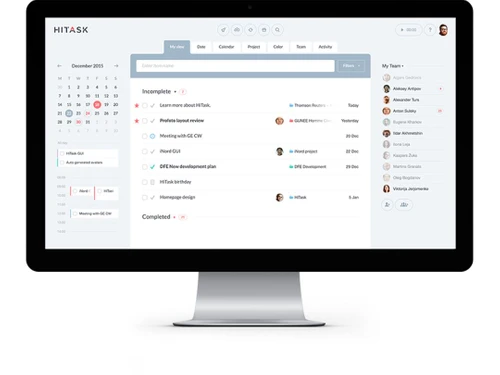
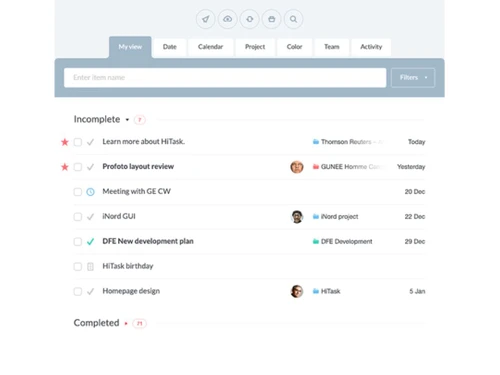
hitask view
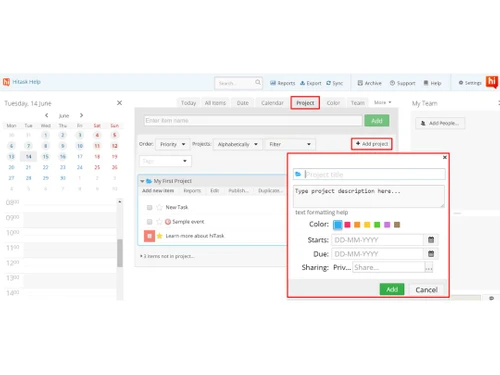
hitask project

Hitask

Brand: Human Computer

  • 4.2

  • 6 Ratings

Hitask removes project management complexity, putting you in control with an intuitive single-screen dashboard to assign, track, and complete tasks across all devices.

See More

Have you used Hitask before?

Share your insights for better experience

Add a Review
Starting Price
$5

View plans

100% Genuine
Products
Best Price
Guaranteed
Safe & Secure
Payment
  • Description

  • Pricing

  • Features

  • Specification

  • Review

  • Compare

  • Alternatives

  • FAQ

Starting at $5

Hitask Software Overview

What is Hitask?

Hitask is a task and project management software designed to remove complexity from team collaboration and place control firmly in the hands of the user. It serves as a central platform for teams to organize and streamline their workflow, enabling them to complete projects faster and with significantly less overhead. With Hitask, your team can efficiently set up new projects, assign and share tasks, utilize a centralized file library and calendar, and synchronize all work across multiple devices.

The software is built around a philosophy of simplicity and power, providing a robust set of tools without a steep learning curve. It is suitable for various industries, including marketing agencies, design companies, startups, and IT/software companies, that need to manage multiple clients, projects, and deadlines simultaneously. By centralizing communication and task tracking, Hitask helps teams stay organized, accountable, and focused on their objectives.

Why Choose Hitask?

  • Unified Workspace: The dashboard allows you to see your projects, tasks, team calendar, and team members all in a single window. This eliminates the need to switch between multiple tabs or applications, saving time and reducing confusion.
  • Intuitive Controls: Users can easily manage their work with intuitive drag-and-drop functionality to assign or modify tasks. Clicking on a task expands it for detailed editing, making the entire process seamless.
  • Cross-Platform Synchronization: Hitask ensures you are always connected to your work, whether you are at your desk or on the go. It is accessible via any web browser, offers dedicated mobile apps for iPhone, iPad, and Android, and is also available as a desktop app and a Chrome browser extension.
  • Seamless Integrations: The platform integrates with essential business tools like Google Calendar, Outlook, Zapier, and IFTTT. An open API is also available for custom software integrations, making it a flexible addition to any tech stack. Hitask also supports multiple languages, including Spanish, French, Portuguese, Russian, and Chinese.

Advanced Features of Hitask

  • Selective Sharing Permissions: Maintain control over your data by choosing which team members can view, modify, or complete specific tasks and projects.
  • Time Tracking and Reporting: Track the time spent on each task to monitor team productivity and generate detailed progress and time-spent reports for accurate project billing and analysis.
  • Hierarchical Sub-tasks: Break down large, complex tasks into smaller, more manageable sub-tasks. This nested list structure helps clarify project steps and track progress more effectively.
  • Issue Tracking Numbers: Assign a unique reference number to every item, which is particularly useful for IT support, software development, and client issue tracking.
  • Automated Repeating Tasks: Schedule tasks to repeat on a daily, weekly, monthly, or yearly basis, automating routine assignments and ensuring nothing is forgotten.
  • Data Export: Easily export project and task data to Excel and other formats for external processing, archiving, or integration with other business intelligence tools.
  • Task Comments: Add comments directly to tasks to keep discussion in context, with automatic notifications sent whenever a new comment is added.

Key Capabilities of Hitask

  • Task and Project Management: The core of Hitask allows for the creation of unlimited projects and tasks. Features like setting deadlines, color-coding, and adding tags help organize work, while a shared calendar provides a high-level overview of all team events and due dates.
  • Team Collaboration: Foster seamless teamwork with tools for assigning tasks, sharing files, and communicating directly within the workspace. The platform's team chat feature allows for quick message exchanges, while email and mobile push notifications, including multiple reminders per task, keep everyone informed of updates and completions.
  • Customization and Organization: Tailor the workspace to fit your team's needs. Use color tags and context tags to categorize items, and leverage hierarchical lists to structure projects logically.
  • Accessibility and Integration: Create tasks directly from your email inbox and synchronize your work with Outlook and Google Calendar. Full mobile support ensures that you can manage your projects from anywhere.

How to Use Hitask?

  1. Set Up Your Workspace: Sign up for an account, starting with the free plan for up to five users. No credit card is required to begin.
  2. Create Projects and Tasks: From the Single Screen Dashboard, create your first project. Begin adding tasks, setting due dates, and attaching any necessary documents from the centralized file library.
  3. Assign and Collaborate: Invite your team members to the workspace. Assign tasks to individuals or groups using simple drag-and-drop actions. Use the shared calendar and team chat to coordinate efforts.
  4. Track and Monitor: As your team works, use the time tracking feature to log hours. Generate progress reports to get a clear view of project status and team performance.
  5. Stay Synchronized: Access and manage your tasks across all your devices. Changes made on the web app are instantly reflected on your mobile device, and vice versa.

Hitask Pricing

Hitask price starts at USD 5 at techjockey.com.

The pricing model is based on different parameters, including extra features, deployment type, and the total number of users. For further queries related to the product, you can contact our product team and learn more about the pricing and offers.

Read more

Hitask Pricing & Plans

Business
Starting at $5
    • Users

      Users
      Users
    • Monthly

      Monthly
      Monthly

Key Features

  • Projects, Tasks, Events

  • Document Storage

  • Shared Calendar

  • Selective Sharing Permissions

  • Time Tracking

  • Email Tasks

  • Notification

  • Assignments

  • Repeating Tasks

  • Team Chat

Enterprise
Starting at $20
    • Users

      Users
      Users
    • Monthly

      Monthly
      Monthly

Key Features

  • Projects, Tasks, Events

  • Document Storage

  • Shared Calendar

  • Selective Sharing Permissions

  • Time Tracking

  • Email Tasks

  • Notification

  • Assignments

  • Repeating Tasks

  • Team Chat

Hitask Features

  • icon_check Task Creation
    Create tasks with due date, priority, and category fields to structure work capture in shared areas efficiently.
  • icon_check Project Assignment
    Assign tasks to precise members in defined project folders to distribute operational responsibility cleanly.
  • icon_check Calendar Scheduling
    Display tasks on a calendar view to track and arrange upcoming work against time windows with real context.
  • icon_check File Attachment
    Attach files and reference images to each task card so required material remains available in workflow context.
  • icon_check Projects, Tasks, Events
    Organize and categorize your work.
  • icon_check Document Storage
    Upload and attach files to tasks and projects.
  • icon_check Shared Calendar
    Overview of your team events in one calendar.
  • icon_check Selective Sharing Permissions
    Share with specific team members, choose who can modify or complete tasks.
  • icon_check Time Tracking
    Track time spent on tasks, generate spent time reports.
  • icon_check Email Tasks
    Create tasks by sending email to Hitask account.
  • icon_check Notification
    Email and mobile push notifications. Multiple reminders per task.
  • icon_check Assignments
    Assign tasks to your team mates, get notified when task is updated or completed.
  • icon_check Repeating Tasks
    Daily, weekly, monthly, yearly repeating events.
  • icon_check Team Chat
    Exchange messages without leaving your workspace.
Hitask Demo Video play icon

Get Hitask Demo

Watch the demo video to explore key features, real workflows, and how the software fits your business needs.

Understand
Key Features
Personal
Demo Insights
Interactive
Demo Support

Hitask Specifications

Supported Platforms
Windows Windows iOS iOS Android Android MacOS MacOS
Devices
Desktop Desktop Mobile Mobile Tablet Tablet iPad iPad
Deployment
Cloud-Based Cloud-Based
Suitable For
All Industries
Business Specific
All Businesses
Business Size
Small Business Startups Medium Business Enterprises SMBs SMEs MSMBs MSMEs Freelancers
Customer Support
Email Communities
Language
English
Training Resources
Videos

Explore the Best Alternative Solutions Similar to Your Business Size and Needs

Hitask Review

4.2

Out of 5

img

Overall Rating

Based on
6 Verified Ratings

Rating Breakdown

  • Features 3.7
  • Value for Money 4.5
  • Ease of Use 4.5
  • Customer Support 4.3

86% Recommend this Product

Add Review

Techjockey Trusted Reviews from Verified Users

No reviews are currently available for Hitask. Discover similar Task Management Software reviews

  • Task Tracker

    4.9

    Whats great - Task Tracker is a very easy-to-use application, as it is having attendance feature with accurate geolocation, assigning tasks... read more

  • Kerika

    4.9

    Whats great - Ease of Use: The software is designed to be user-friendly, making it accessible to a wide range of users within the organisat... read more

  • TaskOPad

    4.8

    Whats great - Would recommend this app for managing your daily activities. After-service is quite nice. read more

Compare Hitask With other Task Management Software

Products
Ratings
Pricing
Device Supported
Deployment
Supported Platforms
  • img

    Hitask

  • 4.2

  • Price On Request

  • Desktop

    Mobile

  • Web based

    On Premises

  • Windows

    Mac OS

  • img

    TickTick

  • 4.3

  • Price On Request

  • Desktop

    Mobile

  • Web based

    On Premises

  • Windows

    Mac OS

  • img

    Task Tracker

  • 4.9

  • ₹ 225

  • Desktop

    Mobile

  • Web based

    On Premises

  • Windows

    Mac OS

  • img

    TaskOPad

  • 4.7

  • Price On Request

  • Desktop

    Mobile

  • Web based

    On Premises

  • Windows

    Mac OS

  • img

    Zoho ToDo

  • 4.5

  • Price On Request

  • Desktop

    Mobile

  • Web based

    On Premises

  • Windows

    Mac OS

  • img

    Taskmaan

  • 4.5

  • ₹ 2000

  • Desktop

    Mobile

  • Web based

    On Premises

  • Windows

    Mac OS

  • img

    Akiflow

  • 4.7

  • Price On Request

  • Desktop

    Mobile

  • Web based

    On Premises

  • Windows

    Mac OS

  • img

    Todoist

  • 4.5

  • ₹ 330

  • Desktop

    Mobile

  • Web based

    On Premises

  • Windows

    Mac OS

  • img

    Sunsama

  • 4.4

  • Price On Request

  • Desktop

    Mobile

  • Web based

    On Premises

  • Windows

    Mac OS

(0) Product(s) selected

Hitask Alternatives

See All Hitask Alternatives

Starting Price:

$4 /Month

SAVE UPTO 17%

Available

Price on Request

Starting Price:

$34 /month

Starting Price:

$20 /month

Starting Price:

$7 /month

SAVE UPTO 50%

Starting Price:

$4 /Month

Starting Price:

$30 /Month

Articles for Hitask

See All Related Articles

Which operating system does Hitask support?

is compatible with Windows operating systems.

Is there any Hitask app?

Hitask PMS app is not available.

What is deployment type of Hitask?

Hitask supports Web-Based.

How much does Hitask cost?

Hitask PMS pricing starts at $ 5 at techjockey.com.

Who are the potential users of Hitask?

Hitask PMS is typically used in All Industries.

Is there any free trial or demo for Hitask?

Hitask PMS demo is available for free at techjockey.com.

Is Hitask free?

Hitask Project Management Software offers a free trial. However, the premium plan with advanced features available at Techjockey.

How can you download Hitask?

For Hitask Project Management Software installation, insert the given CD/USB flash storage in your system and open the Setup Wizard to get started.

How does Hitask work?

Hitask PMS helps with Projects, Tasks, Events and Document Storage. It's a complete solution for Shared Calendar,Selective Sharing Permissions,Time Tracking and Email Tasks.

Is Hitask free?

Hitask offers a free plan for up to 5 users, which includes unlimited tasks and projects, shared lists, calendars, and 0.5 GB of file storage.

What is Hitask used for?

Hitask is used for easy project and task management, helping teams organize and complete projects faster by simplifying task assignment, sharing, and collaboration.

Is Hitask a good app?

Hitask is designed to be a powerful and easy-to-use task management app that helps teams complete projects faster, reduce overhead, and stay in control with its single-screen dashboard and comprehensive features.

How do I use Hitask?

You can use Hitask through its single-screen dashboard to view and manage projects, tasks, and team members, with features like drag-and-drop for assigning tasks and clicking to modify them.

How much does Hitask cost?

Hitask price starts at USD 5 at techjockey.com.

Who can use Hitask?

Hitask is designed for teams across various industries, including marketing agencies and design companies, who need to manage projects, tasks, and collaboration efficiently.

What integrations does Hitask support?

Hitask integrates with popular tools such as Google Calendar, Outlook, iCalendar, email, Zapier, IFTTT, and offers an open API for custom software integration.

What mobile platforms does Hitask support?

Hitask provides dedicated mobile applications for iPhone, iPad, and Android devices, allowing users to manage tasks and projects on the go.

What unique features does Hitask offer for team collaboration?

Hitask enhances team collaboration with features like a shared calendar, selective sharing permissions, task assignments, team chat, task comments, and a single-screen dashboard for centralized oversight.

How does Hitask help with time management and reporting?

Hitask assists with time management through built-in time tracking for tasks, generation of spent time reports, and notifications for deadlines and due dates.

20,000+ Software Listed

Best Price Guranteed

Free Expert Consultation

2M+ Happy Customers

Terms and Condtions

close

Users with registered businesses can purchase goods from merchants on the platform to satisfy their business needs. Users are not permitted to utilize any products acquired through the platform for resale, advertising, business, or further distribution.

For each purchase made, users will receive a Tax Invoice (or 'GST invoice') that includes specific details such as:

  • the GSTIN of the user associated with their registered business, and

  • the specified Entity Name for their business.

It should be noted that not all products are eligible for GST Invoice. Only the products displayed by participating sellers with the 'GST-based Invoice Available' callout on the product description page would qualify.

Certain goods and services are not eligible to get a GST Invoice, including items with VAS, i.e., Value Added Services (e.g., Total Mobile Protection/Assured Buyback) and those involving an exchange offer at the time of purchase.

Users must ensure the accuracy of the GSTIN, and business entity name provided for the GST Invoice. Requests for corrections into GST Invoice would not be accommodated by Techjockey.com or any Seller, and any issues arising from user-provided information are the sole responsibility of users.

Techjockey.com is not liable for the GST Invoice or any associated input tax credit. To efficiently claim an input tax credit, users should select the registered place of business address as per the GST authority's data and follow the provisions of the GST Act and rules.

To claim an input tax credit, the delivery and billing addresses must match. Furthermore, input tax credits will not be granted if the delivery address and GSTIN on the invoice are from different states. In case of incorrect GST details provided during the order placement, the order will be canceled automatically.