USA
USA UAE
UAESmall Business
Designed for startups and growing businesses


See More





Brand: HyperDrive
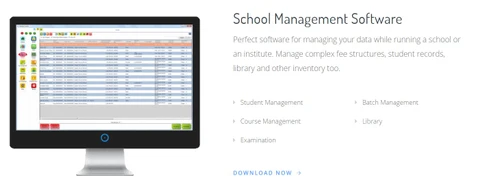
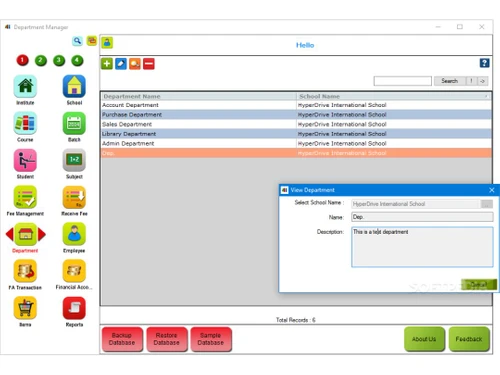
HD School is school management software by Hyperdrive, which can be used for managing daily activities of schools, institutes and training centers. It allows educational institutes manage difficult tasks such as: Fee structures Student records Library subscriptions and book listing Attendance recording Timetable generation, and much more. The school management software also helps educational inst...
See MoreHave you used HDSchool before?
Share your insights for better experience
View plans
 Save upto 18%, Get GST Invoice on your business purchase T&C Buy Now & Pay Later, Check offer on payment page.
 Brand: HyperDrive
Founded Year: 2018
Hyper Drive Solutions is software product development company.
 Fee Management School District Student Management Faculty & Staff Management Statutory Compliances Payroll Analytical Reports SMS and Email Parent login Fees Collection Admission Management Attendance Management Course Management Exam Management Homework Management Library Management Parent Portal Store Management Finance & Accounting Classroom Management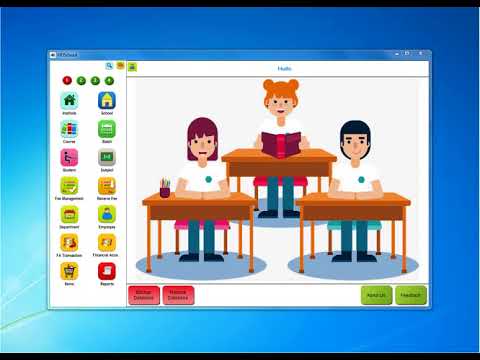

Watch the demo video to explore key features, real workflows, and how the software fits your business needs.
 Windows
  Desktop
  Cloud-Based
  Perpetual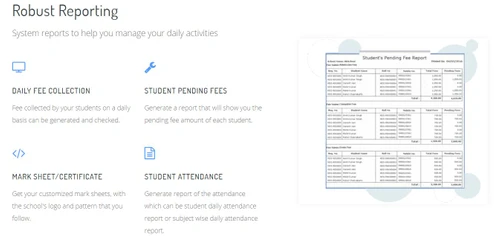
Small Business
Designed for startups and growing businesses
Medium Business
Built for business growth and flexibility
Enterprises
Designed for complex and large-scale business needs
4.7
Out of 5

Overall Rating
Based on
10 Verified Reviews
Rating Breakdown
100% Recommend this Product
Add ReviewCustomers express high satisfaction with HDSchool, praising its effectiveness in facilitating communication between teachers and students, as well as its user-friendly interface. Users appreciate the centralized platform for managing student data, attendance, and academic support, which enhances their ability to monitor student progress and needs. The consistent feedback highlights the software's seamless integration with existing systems and its overall simplicity. Notably, there are no significant complaints or dislikes mentioned, indicating a strong overall approval from users across various roles in educational institutions.

Aug 1, 2022
Techjockey Verified
“perfect for schools”
Pros
a fantastic tool for teachers to communicate with students and monitor student development. Anyone with access to canread the notes, making it a fantastic place to write messages about particular students. We should also motivate learners to use it so they can read messages.
Cons
nothing to dislike
Jul 10, 2022
Techjockey Verified
“Accounts management of the organization made easy”
Pros
I believe that many academic personnel can interact with students in a central location. It is useful to get opinions from academic staff about how students are doing in their courses. It is a terrific approach for advisers to record meeting minutes and keep track of each student's unique background. The user interface is nice and simple to understand and operate.
Cons
nothing
Jun 11, 2022
Techjockey Verified
“Good attendance management system”
Pros
It is simple to utilise the system. Easily incorporated with Blackboard and Canvas. There are numerous ways for faculty to identify students who require academic assistance.
Cons
nothing

HDSchool
₹ 13000.00 excl. GST
Desktop
Mobile
Web based
On Premises
Windows
Mac OS
Vedcool
₹ 11000
Desktop
Mobile
Web based
On Premises
Windows
Mac OS

School Magica
₹ 20000
Desktop
Mobile
Web based
On Premises
Windows
Mac OS

Edunext School ERP
Price On Request
Desktop
Mobile
Web based
On Premises
Windows
Mac OS

E-School ERP
₹ 40000
Desktop
Mobile
Web based
On Premises
Windows
Mac OS

Edu Manage Plus
₹ 18
Desktop
Mobile
Web based
On Premises
Windows
Mac OS
Gati School ERP
Price On Request
Desktop
Mobile
Web based
On Premises
Windows
Mac OS
EduOpus
Price On Request
Desktop
Mobile
Web based
On Premises
Windows
Mac OS

SchoolEZY
₹ 25000
Desktop
Mobile
Web based
On Premises
Windows
Mac OS

Ranndass School ERP
Price On Request
Desktop
Mobile
Web based
On Premises
Windows
Mac OS

MyAppClass
₹ 11999
Desktop
Mobile
Web based
On Premises
Windows
Mac OS
(0) Product(s) selected
Available
Price on Request
Available
Price on Request
Available
Price on Request
Available
Price on Request

Available
Price on Request
Starting Price:
₹180 /Month
Available
Price on Request

Available
Price on Request

Starting Price:
₹12,000 /Year

Starting Price:
₹5,000 /Year

Available
Price on Request
Customers can get real-time help with tutorials and get in-depth information regarding how to use this software.
Yes, Hyperdrive HD School has an in-built payment gateway, which supports all types of digital payment methods
Hyperdrive HD School can work with almost every printer available in the market. You can even use a barcode printer for store management.
No, Hyperdrive HD School does not sell hardware. For hardware recommendations, please request a call from Techjockey.
Techjockey offers a demo for Hyperdrive HD School. Please request a call to get the demo scheduled.
20,000+ Software Listed
Best Price Guranteed
Free Expert Consultation
2M+ Happy Customers
Terms and Condtions

Users with registered businesses can purchase goods from merchants on the platform to satisfy their business needs. Users are not permitted to utilize any products acquired through the platform for resale, advertising, business, or further distribution.
For each purchase made, users will receive a Tax Invoice (or 'GST invoice') that includes specific details such as:
the GSTIN of the user associated with their registered business, and
the specified Entity Name for their business.
It should be noted that not all products are eligible for GST Invoice. Only the products displayed by participating sellers with the 'GST-based Invoice Available' callout on the product description page would qualify.
Certain goods and services are not eligible to get a GST Invoice, including items with VAS, i.e., Value Added Services (e.g., Total Mobile Protection/Assured Buyback) and those involving an exchange offer at the time of purchase.
Users must ensure the accuracy of the GSTIN, and business entity name provided for the GST Invoice. Requests for corrections into GST Invoice would not be accommodated by Techjockey.com or any Seller, and any issues arising from user-provided information are the sole responsibility of users.
Techjockey.com is not liable for the GST Invoice or any associated input tax credit. To efficiently claim an input tax credit, users should select the registered place of business address as per the GST authority's data and follow the provisions of the GST Act and rules.
To claim an input tax credit, the delivery and billing addresses must match. Furthermore, input tax credits will not be granted if the delivery address and GSTIN on the invoice are from different states. In case of incorrect GST details provided during the order placement, the order will be canceled automatically.