linkedin
Indigo.Design logo
play Indigo.Design Tour
Indigo Design Flexible System
Indigo Design Rapid Prototyping

Indigo.Design

Brand: INFRAGISTICS

  • 5

  • 1 Rating & 1 Review

Indigo Design combines UI prototyping, user testing, design systems, app building, and code generation for seamless collaboration between designers and developers.

See More

Have you used Indigo.Design before?

Share your insights for better experience

Add a Review
Starting Price
$55

View plans

100% Genuine
Products
Best Price
Guaranteed
Safe & Secure
Payment
  • Description

  • Pricing

  • Features

  • Specification

  • Review

  • Compare

  • FAQ

Starting at $55

Indigo.Design Software Overview

What is Indigo Design?

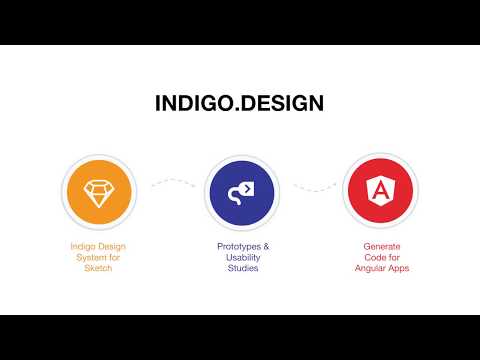
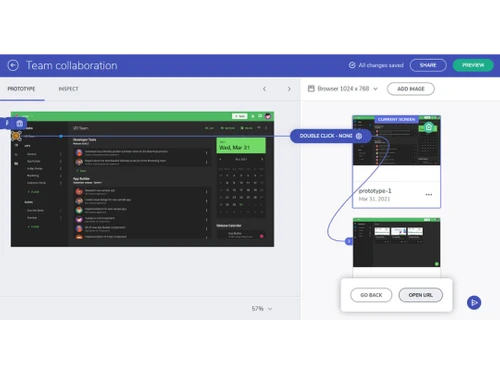
Indigo Design, developed by Infragistics, is a Prototyping tool. It allows design and development teams to collaborate efficiently by combining UI prototyping, design systems, user testing, and code generation in a single workflow.

Using the Indigo Design Desktop app, teams can build interactive prototypes, perform usability testing, and generate production-ready code for Angular, React, Blazor, or Web Components.

It also integrates with Figma-based design systems and offers a cloud-based App Builder for rapid application development, streamlining the design-to-code process and speeding up time to market.

Why Choose Indigo Design Software?

  • All-in-One Design Platform: Combines UI prototyping, design systems, usability testing, app building, and code generation in one platform.
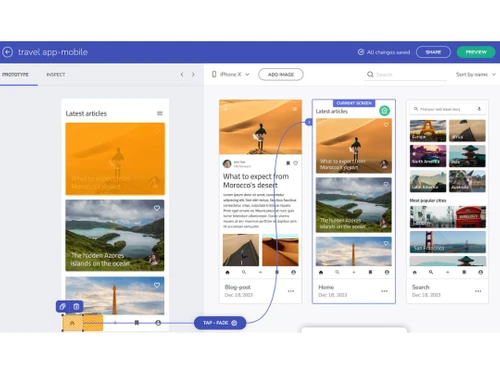
  • Rapid Prototyping: Quickly create interactive, high-fidelity prototypes to visualize and test ideas.
  • Design-to-Code Automation: Automatically generate production-ready code for Angular, React, Blazor, and Web Components.
  • Seamless Collaboration: Bridges the gap between designers and developers for smoother workflow.
  • Integration with Figma: Supports Figma-based design systems for consistency and efficiency.
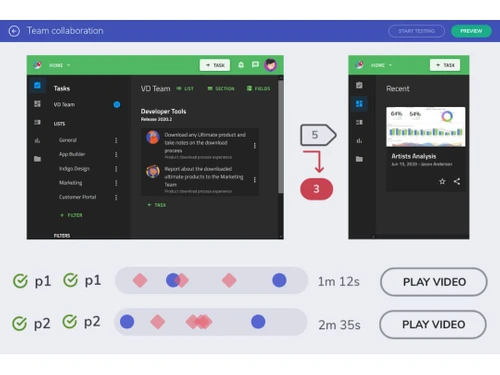
  • Usability Testing: Conduct remote or in-person user testing to gather actionable feedback.
  • Cloud-Based App Builder: Develop applications rapidly using a no-code/low-code approach.
  • Reusable Design Components: Create and maintain design system libraries to ensure brand consistency.
  • Cross-Platform Support: Compatible with Windows, macOS, and major web browsers.
  • Responsive Design: Design interfaces easily for desktop, mobile, and tablet devices.
  • Time-Saving Workflows: Reduces handoff time between design and development teams.

Benefits of Indigo Design Software

  • Interactive UI Kits: Use pre-built UI kits to accelerate design processes.
  • Version Control: Track changes and maintain multiple versions of design projects.
  • Customizable Components: Easily adapt components to meet unique project requirements.
  • Visual Feedback Tools: Collaborators can comment directly on prototypes for clarity.
  • Streamlined Design Handoff: Developers get ready-to-use code, reducing manual work and errors.
  • Scalable for Teams: Supports teams of all sizes, from startups to large enterprises.
  • Enhanced Productivity: Consolidates multiple tools into one, minimizing tool switching.
  • Supports Agile Development: Facilitates iterative design and rapid prototyping in Agile workflows.
  • Accelerates Time-to-Market: Speeds up the entire product development lifecycle from design to deployment.

Indigo Design Pricing

Indigo Design price starts at $55 at techjockey.com.

The pricing model is based on different parameters, including extra features, deployment type, and the total number of users. For further queries related to the product, you can contact our product team and learn more about the pricing and offers.

Read more

INFRAGISTICS Company Details

Founded Year:  1989

Infragistics is a worldwide leader in providing tools to accelerate application design and development.

Director/Founders Dean Guida
Company Size 101-500 Employees

Indigo.Design Pricing & Plans

Indigo.Design Essential
Key Features
  • Powerful, rapid prototyping for unlimited web, mob
  • Remote User Testing with Analytics
  • Video Replays for User Tests
  • Group and Team Collaboration
Starting at $55
    • Quantity

      Quantity
      Quantity
    • Monthly

      Monthly
      Monthly

Key Features

  • Powerful, rapid prototyping for unlimited web, mob

  • Remote User Testing with Analytics

  • Video Replays for User Tests

  • Group and Team Collaboration

Indigo.Design Features

  • icon_check User-Test Early
    Conduct usability testing early in the design process to gather feedback.
  • icon_check One, Flexible Design System
    Maintain a single, adaptable design system for consistency across projects.
  • icon_check Interactive Prototyping
    Build clickable prototypes to visualize and test user experiences.
  • icon_check Pre-built UI Components
    Use ready-made UI elements to speed up design and development.
  • icon_check Design to Code Integration
    Automatically convert designs into production-ready code.
  • icon_check Version Control
    Track changes and manage multiple versions of your designs easily.
  • icon_check Real-Time Collaboration
    Enable teams to work together simultaneously on projects for faster feedback.
Indigo.Design Demo Video play icon

Get Indigo.Design Demo

Watch the demo video to explore key features, real workflows, and how the software fits your business needs.

Understand
Key Features
Personal
Demo Insights
Interactive
Demo Support

Indigo.Design Specifications

Supported Platforms
Ubuntu Ubuntu Windows Windows iOS iOS MacOS MacOS Linux Linux
Devices
Desktop Desktop
Deployment
Cloud-Based Cloud-Based Perpetual Perpetual
Suitable For
All Industries
Business Specific
All Businesses
Business Size
Small Business Medium Business SMBs SMEs
Customer Support
Phone Email Live Chat Forums
Language
English
Integration
API Integration
Training Resources
Documentation

Explore the Best Alternative Solutions Similar to Your Business Size and Needs

Indigo.Design Review

5

Out of 5

img

Overall Rating

Based on
1 Verified Review

Rating Breakdown

  • Features 5
  • Value for Money 5
  • Ease of Use 5
  • Customer Support 5

100% Recommend this Product

Add Review

Varun Chadha

5

Reviewed on: Aug 30, 2021

Techjockey Verified

“Amazing software”

Pros

Amazing software

Cons

NO CONS
Compare Indigo.Design With other Prototyping Tools

Products
Ratings
Pricing
Device Supported
Deployment
Supported Platforms
  • img

    Indigo.Design

  • 5

  • Price On Request

  • Desktop

    Mobile

  • Web based

    On Premises

  • Windows

    Mac OS

  • img

    Marvel

  • 4.3

  • Price On Request

  • Desktop

    Mobile

  • Web based

    On Premises

  • Windows

    Mac OS

  • img

    ProtoPie

  • 4.4

  • Price On Request

  • Desktop

    Mobile

  • Web based

    On Premises

  • Windows

    Mac OS

  • img

    Proto.io

  • 4.4

  • Price On Request

  • Desktop

    Mobile

  • Web based

    On Premises

  • Windows

    Mac OS

  • img

    Origami Design

  • 4.3

  • Price On Request

  • Desktop

    Mobile

  • Web based

    On Premises

  • Windows

    Mac OS

  • img

    Justinmind

  • 4.5

  • Price On Request

  • Desktop

    Mobile

  • Web based

    On Premises

  • Windows

    Mac OS

  • img

    Flinto

  • 4.7

  • Price On Request

  • Desktop

    Mobile

  • Web based

    On Premises

  • Windows

    Mac OS

  • img

    Bravo Studio

  • 4.3

  • Price On Request

  • Desktop

    Mobile

  • Web based

    On Premises

  • Windows

    Mac OS

  • img

    Supernova

  • Price On Request

  • Desktop

    Mobile

  • Web based

    On Premises

  • Windows

    Mac OS

  • img

    Axure RP

  • 4.7

  • Price On Request

  • Desktop

    Mobile

  • Web based

    On Premises

  • Windows

    Mac OS

(0) Product(s) selected

Articles for Indigo.Design

See All Related Articles

How much does Indigo Design Software cost?

The starting price of Indigo Design is $55, as listed on techjockey.com.

Is there a mobile app available for Indigo Design Software?

Yes, Indigo Design supports iOS mobile app.

Which operating systems are compatible with Indigo Design Software?

Indigo Design works on Ubuntu, Windows, iOS, MacOS and Linux.

Does Indigo Design Software offer a free trial?

Yes, a free trial is available on the Indigo Design website.

How does Indigo Design Software function?

Indigo Design enables prototyping, testing, design, and code generation in one platform.

Who uses Indigo Design Software?

Designers, developers, and product teams use Indigo Design for UI/UX design and app development.

Is a free demo available for Indigo Design Software?

Yes, Indigo Design free demo can be requested online.

Is Indigo Design Software available for free?

No, Indigo Design is not available for free.

20,000+ Software Listed

Best Price Guranteed

Free Expert Consultation

2M+ Happy Customers

Terms and Condtions

close

Users with registered businesses can purchase goods from merchants on the platform to satisfy their business needs. Users are not permitted to utilize any products acquired through the platform for resale, advertising, business, or further distribution.

For each purchase made, users will receive a Tax Invoice (or 'GST invoice') that includes specific details such as:

  • the GSTIN of the user associated with their registered business, and

  • the specified Entity Name for their business.

It should be noted that not all products are eligible for GST Invoice. Only the products displayed by participating sellers with the 'GST-based Invoice Available' callout on the product description page would qualify.

Certain goods and services are not eligible to get a GST Invoice, including items with VAS, i.e., Value Added Services (e.g., Total Mobile Protection/Assured Buyback) and those involving an exchange offer at the time of purchase.

Users must ensure the accuracy of the GSTIN, and business entity name provided for the GST Invoice. Requests for corrections into GST Invoice would not be accommodated by Techjockey.com or any Seller, and any issues arising from user-provided information are the sole responsibility of users.

Techjockey.com is not liable for the GST Invoice or any associated input tax credit. To efficiently claim an input tax credit, users should select the registered place of business address as per the GST authority's data and follow the provisions of the GST Act and rules.

To claim an input tax credit, the delivery and billing addresses must match. Furthermore, input tax credits will not be granted if the delivery address and GSTIN on the invoice are from different states. In case of incorrect GST details provided during the order placement, the order will be canceled automatically.