linkedin
Invest Plus logo
play Invest Plus Software Desktop Overview
InvestPlus
InvestPlus

Invest Plus

Brand: Ideas Infosoft

  • 4.8

  • 5 Ratings & 5 Reviews

InvestPlus is a portfolio management software which complies with Indian finance laws. The software allows investors, no matter how new they are to the game, a gateway to financial management and accounting. The software simplifies complex business jargons to make the task of investment easy. It helps in managing portfolios and assets efficiently from a single platform. The portfolio management s...

See More

Have you used Invest Plus before?

Share your insights for better experience

Add a Review

Price Available on Request

Questions about pricing or customization? We’re here to help, just a click away.

100% Genuine
Products
Best Price
Guaranteed
Safe & Secure
Payment
  • Description

  • Pricing

  • Features

  • Specification

  • Review

  • Compare

  • Alternatives

  • FAQ

Invest Plus Software Overview

What is InvestPlus?

InvestPlus is a portfolio management software which complies with Indian finance laws. The software allows investors, no matter how new they are to the game, a gateway to financial management and accounting. The software simplifies complex business jargons to make the task of investment easy. It helps in managing portfolios and assets efficiently from a single platform. The portfolio management software facilitates personal accounting with a single click. Further, the software offers a multi-user interface to manage several portfolios of your family members.

InvestPlus provides features for loan management among other liability monitoring functions. The software consists of over 300 customized and insightful reports for investors to check how their investments are performing. Investors receive rate update balances with a zooming facility for final account statements to entry level vouchers. Lastly, this portfolio management safeguard all the investment data of the user.

How does InvestPlus portfolio management software helps in boosting finance management automation?

InvestPlus portfolio management software allows users to take control of their investments and take it in the right direction. It provides auditable and streamlined financial management for investors and simultaneously ensures that the user gets complete visibility into their financial performance. The software helps with:

  1. Personal accounts
  2. Asset management
  3. Investment management
  4. Securities
  5. F & O
  6. Mutual funds management
  7. SIPs
  8. Loan reminders
  9. Professional scheduler
  10. Financial appointment diary

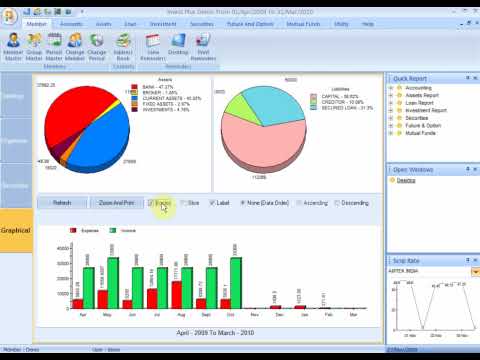
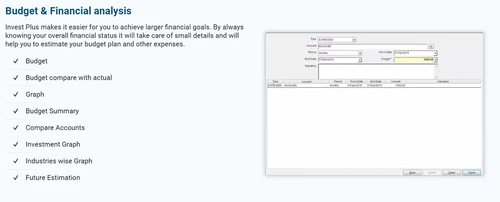
InvestPlus allows users to categorize their transactions and set budget limits to manage and track the expenses. It splits transactions across various categories for efficient visibility. The software helps in scheduling recurring transactions, such as, mortgage and paychecks. Another key aspect of using InvestPlus is that it provides the information regarding where the invested money is going. It provides information in detailed statistical and graphical format for easy reading.

What are the areas that InvestPlus portfolio management software for Indian stock market help with?

Here are a few areas that InvestPlus assists investors with:

  1. Full cycle bookkeeping
  2. Financial statement preparation
  3. Cashflow analysis
  4. Ledgers and journals
  5. Bank reconciliation statements
  6. Asset valuation and management
  7. Loan management
  8. F&O, mutual funds status, and securities
  9. Organizing personal information
  10. Scheduling

What is the price of InvestPlus Portfolio Management Software?

The price of InvestPlus is available on request. Please request a call for further inquiries regarding the price related information.

Read more

Invest Plus Pricing & Plans

Looking for The Right Pricing?

Share your requirements and get a plan built around your business.

  • Define your business needs
  • Get customised pricing
  • Choose features that fit your workflow

Price Available on Request

Get personalised Invest Plus pricing that fits your needs. Our team will connect with you.

Invest Plus Features

  • icon_check Portfolio Management
    InvestPlus works as a single platform to manage all the financial portfolios of the investor. From loans to insurance to SIPs,
  • icon_check Bank Reconciliation
    Investors can directly import their bank reconciliation statements for all the investments through this portfolio management
  • icon_check Full Cycle Book Keeping
    The software allows users to manage bookkeeping for the entire financial term efficiently.
  • icon_check Scheduling
    Investors can schedule investments, meetings with brokers, report generation, etc.
  • icon_check Financial Goals
    This portfolio management software enables investors to set financial goals and make the investments accordingly.
  • icon_check Ledger Keeping
    InvestPlus allows investors to manage their ledger records accurately. It records every single change or advancement in their
  • icon_check Accounting Module
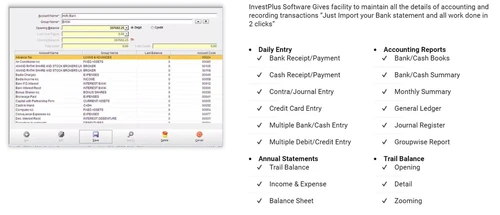
    The software helps make personalized bookkeeping easy. It records every transaction and maintain all the details of accounting
  • icon_check Financial Analysis and Reports
    Investors can check whether they have achieved their financial goals by the end of the term, and it provides minute details to
  • icon_check Asset Management
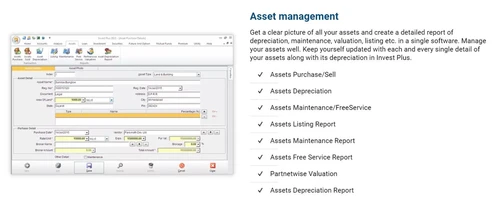
    The portfolio management solution provides a clearer picture of all the assets and their reports regarding depreciation,
  • icon_check Loan Management
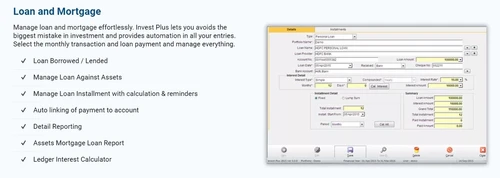
    Investors can also manage their loans with this software. It generates reminders for due payments on monthly basis and records it
  • icon_check Insurance Management
    InvestPlus makes it easy for the investors to keep tabs on their regular investment related payments. It covers all the basic
  • icon_check Stock Management
    The software allows investors to manage their stock investments and check their prices regularly. It can directly import broker
  • icon_check Mutual Fund Investment
    Investors are not required to import data externally from mutual fund It automatically manages SIP records and ledger accounts
  • icon_check Special Features
    The software offers features to plan and schedule different investments.
Invest Plus Demo Video play icon

Get Invest Plus Demo

Watch the demo video to explore key features, real workflows, and how the software fits your business needs.

Understand
Key Features
Personal
Demo Insights
Interactive
Demo Support

Invest Plus Specifications

Supported Platforms
Windows Windows
Devices
Desktop Desktop
Deployment
Cloud-Based Cloud-Based
Suitable For
Finance
Business Specific
Banking
Language
English

Invest Plus Reviews

4.8

Out of 5

img

Overall Rating

Based on
5 Verified Reviews

Rating Breakdown

  • Features 4.4
  • Value for Money 4.7
  • Ease of Use 4.4
  • Customer Support 4.7

84% Recommend this Product

Add Review

Pros

  • "Quick and User-friendly support. All my expectations were met."

    Lalit YadavAug 1, 2018

Cons

  • "No billing GST tds reconciliation staff HR attendance and Prof tax."

    Siddharth RajkumarJan 25, 2024

Siddharth Rajkumar

Founder

Industry: Legal Services

4.5

Reviewed on: Jan 25, 2024

Techjockey Verified

“Above average software.”

Pros

The software has some features which are not available in any software. Eg you can just upload the photo of assets. They have good details of assets shares investments etc. no other software has it. But to be dynamic there are more needs like invoicing for professionals GST TDS staff payments etc. I have been using this software for more than 10 years and wish to add features. Prices are the best.

Cons

No billing GST tds reconciliation staff HR attendance and Prof tax.

Reason to switch

I am happy with it but feel that time has come for a single composite software with option to delete what is not needed.

Mohini Shete

User

4.5

Reviewed on: Feb 19, 2019

Techjockey Verified

“Amazing service”

Pros

I bought Invest Plus software from techjockey, Delhi. It is best. All features are great. Support is also excellent . They all are very friendly. I would say please suggest your friend to go for this software. Thank to TECHJOCKEY TEAM.

Cons

NO CONS

Navdeep Chawla

User

5

Reviewed on: Oct 3, 2017

Techjockey Verified

“simple & starightforward to use”

Pros

Techjockey helped our company match up with the best software to fulfill our needs. Now we are able to better manage our business. The support team at Techjockey sure know what they are doing and they know the right answers. Everyone there deserves a raise. Thank you so much for all you have done to help our business head in the right direction. Keep up the great work!!

Cons

N/A

See All Invest Plus Reviews

Compare Invest Plus With other Portfolio Management Software

Products
Ratings
Pricing
Device Supported
Deployment
Supported Platforms
  • img

    Invest Plus

  • 4.8

  • Price On Request

  • Desktop

    Mobile

  • Web based

    On Premises

  • Windows

    Mac OS

  • img

    MProfit

  • 4.4

  • ₹ 18000

  • Desktop

    Mobile

  • Web based

    On Premises

  • Windows

    Mac OS

  • img

    i4invest

  • 4.3

  • ₹ 1500

  • Desktop

    Mobile

  • Web based

    On Premises

  • Windows

    Mac OS

  • img

    Et Portfolio

  • 4.4

  • Price On Request

  • Desktop

    Mobile

  • Web based

    On Premises

  • Windows

    Mac OS

  • img

    Family Wealth Guru

  • 4.2

  • Price On Request

  • Desktop

    Mobile

  • Web based

    On Premises

  • Windows

    Mac OS

(0) Product(s) selected

Invest Plus Alternatives

See All Invest Plus Alternatives

Starting Price:

₹1,500 /Year

Can I use InvestPlus portfolio management software on smartphone?

InvestPlus as of now is not available for smartphones.

Who can use InvestPlus?

InvestPlus is designed for all kinds of investors ranging from amateurs to professionals. The software facilitates working of seasonal investors, professionals, and portfolio management advisors, such as brokers.

Where does InvestPlus save all the user information?

This portfolio management software uses on-premise based deployment to store the data.

Can I use InvestPlus on Mac PC?

No, InvestPlus is only available for Windows operating system.

How to get a demo for InvestPlus?

Interest buyers can request for a call back from Techjockey. Our sales professionals will reach out to you at your preferred time.

20,000+ Software Listed

Best Price Guranteed

Free Expert Consultation

2M+ Happy Customers

Terms and Condtions

close

Users with registered businesses can purchase goods from merchants on the platform to satisfy their business needs. Users are not permitted to utilize any products acquired through the platform for resale, advertising, business, or further distribution.

For each purchase made, users will receive a Tax Invoice (or 'GST invoice') that includes specific details such as:

  • the GSTIN of the user associated with their registered business, and

  • the specified Entity Name for their business.

It should be noted that not all products are eligible for GST Invoice. Only the products displayed by participating sellers with the 'GST-based Invoice Available' callout on the product description page would qualify.

Certain goods and services are not eligible to get a GST Invoice, including items with VAS, i.e., Value Added Services (e.g., Total Mobile Protection/Assured Buyback) and those involving an exchange offer at the time of purchase.

Users must ensure the accuracy of the GSTIN, and business entity name provided for the GST Invoice. Requests for corrections into GST Invoice would not be accommodated by Techjockey.com or any Seller, and any issues arising from user-provided information are the sole responsibility of users.

Techjockey.com is not liable for the GST Invoice or any associated input tax credit. To efficiently claim an input tax credit, users should select the registered place of business address as per the GST authority's data and follow the provisions of the GST Act and rules.

To claim an input tax credit, the delivery and billing addresses must match. Furthermore, input tax credits will not be granted if the delivery address and GSTIN on the invoice are from different states. In case of incorrect GST details provided during the order placement, the order will be canceled automatically.