linkedin
Jobscan logo
play AI-Powered Cover Letter Generator | Jobscan
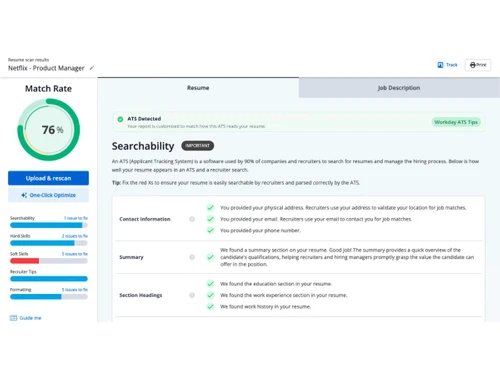
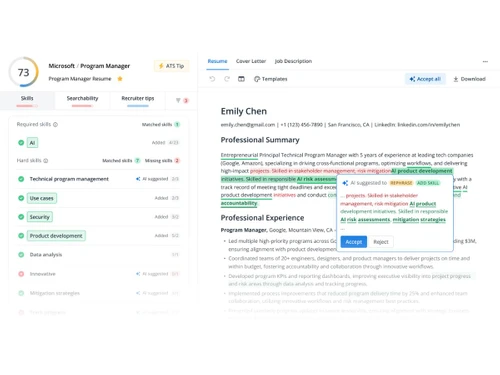
Jobscan-match report
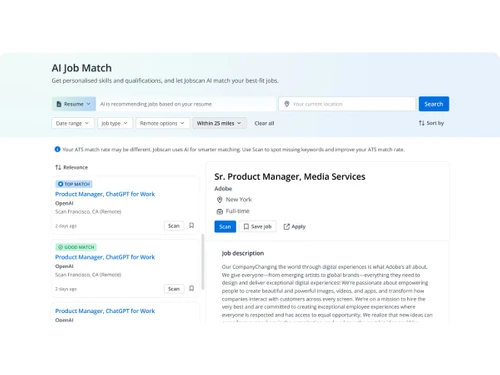
Jobscan-job match

Jobscan

Brand: Jobscan

  • No Ratings & Reviews

Have you used Jobscan before?

Share your insights for better experience

Add a Review
Starting Price
$50

View plans

100% Genuine
Products
Best Price
Guaranteed
Safe & Secure
Payment
  • Description

  • Pricing

  • Features

  • Specification

  • Review

Starting at $50

Jobscan Software Overview

Jobscan Company Details

Founded Year:  2014

Building the best tools for job seekers with AI.

Director/Founders James Hu
Company Size 1-100 Employees

Jobscan Pricing & Plans

Monthly
Key Features
  • Unlimited Resume Scans
  • Unlimited AI Optimizations
  • AI Cover Letter Generator
  • AI Bullet Point Generator
  • Linkedin Optimizer
  • Unlimited keyword comparisons
Starting at $50
    • Licenses

      Licenses
      Licenses
    • Monthly

      Monthly
      Monthly

Key Features

  • Unlimited Resume Scans

  • Unlimited AI Optimizations

  • AI Cover Letter Generator

  • AI Bullet Point Generator

  • Linkedin Optimizer

  • Unlimited keyword comparisons

Jobscan Features

Job Posting and Distribution

  • icon_check Job Template Library
    Access predefined job description templates to standardize and accelerate job posting.
  • icon_check Internal Requisition Process
    Streamline job requisition creation and approval, ensuring alignment with hiring goals.
  • icon_check Multi-Channel Job Posting
    Post jobs across multiple platforms simultaneously to increase reach and attract diverse talent.
  • icon_check Career Page Integration
    Integrate branded career pages or your own carer page for a cohesive candidate experience and better employer branding.
  • icon_check SEO Optimization
    Optimize job posts for better visibility and search rankings across job boards and search engines.
  • icon_check Job Board Integration
    Post job openings directly to integrated job boards, reducing manual effort.

Candidate Sourcing

  • icon_check Social Media Integration
    Post and promote job openings across social media platforms to reach a broader audience.
  • icon_check Candidate Database
    Centralize and manage candidate profiles, resumes, and application history efficiently.
  • icon_check Candidate Sourcing Tools
    Access tools to source candidates from databases, job boards, and social media networks.
  • icon_check Employee Referral Management
    Track employee referrals to encourage internal recruitment and streamline referral management.
  • icon_check Talent Pool Management
    Maintain a searchable database of potential candidates for future hiring needs.

Resume Management

  • icon_check Resume Parsing
    Extract and structure resume data automatically for faster, accurate candidate analysis.
  • icon_check Resume Formatting Standardization
    Standardize resume formatting for consistency and easy comparison.
  • icon_check Keyword and Skill Matching
    Match keywords & skills in resumes with job requirements to find the best candidates.
  • icon_check ATS Scoring
    Rates candidates’ resumes against job criteria to prioritize the best matches
  • icon_check Duplicate Detection
    Identify and flag duplicate profiles to maintain an organized, streamlined candidate database.
  • icon_check Semantic Search
    Analyzes meaning in job and resume terms to enhance search accuracy.

Application and Pipeline Management

  • icon_check Application Status Tracking
    Monitor and update candidates' application statuses throughout the hiring process.
  • icon_check Candidate Profiles
    Maintain detailed candidate profiles, tracking past interactions and progress.
  • icon_check Pipeline Management
    Track candidate progress through customizable hiring stages for better visibility.
  • icon_check Hotlist Management
    Keep high-potential candidates on a priority list for quick access and future openings.
  • icon_check Bulk Processing
    Perform bulk actions like sending emails or updating candidate statuses for efficiency.

Screening and Assessment

  • icon_check Automated Screening
    Filter candidates automatically based on predefined criteria to save time.
  • icon_check Skill Assessments
    Evaluates candidate skills relevant to the role through tests or AI-based scoring.
  • icon_check Background Check Integration
    Seamlessly initiate background checks with third-party services from the platform.
  • icon_check Behavioral Assessments
    Evaluate candidates' soft skills and behavioral traits for role alignment.
  • icon_check Custom Scoring
    Create scoring criteria to rate candidates based on skills and assessments.

Interview Management

  • icon_check Interview Scheduling
    Schedule interviews effortlessly, syncing with team calendars for easy planning.
  • icon_check Feedback Scorecards
    Structured scorecards for consistent candidate evaluation and easy comparison.
  • icon_check Collaboration Tools
    Enable team collaboration through shared notes and evaluations in one platform.

Communication and Engagement

  • icon_check Real-time Status Updates
    Keep candidates and recruiters informed with instant status updates on applications.
  • icon_check Automated Messaging
    Send automatic, personalized messages to candidates to keep them engaged throughout.
  • icon_check Bulk Email and SMS Templates
    Pre-set templates for efficient, scalable communication with multiple candidates.
  • icon_check Candidate Nurturing Campaigns
    Engage passive candidates through personalized campaigns to maintain long-term connections.
  • icon_check Passive Activity Tracking
    Monitor engagement levels of passive candidates for future hiring opportunities.

Workflow and Pipeline Automation

  • icon_check Job Post Automation
    Schedule and automate job postings across platforms to optimize reach.
  • icon_check Pipeline Customization
    Customize recruitment pipelines to suit unique processes for different roles.
  • icon_check Automated Workflows
    Automate recruitment stages to save time and ensure consistent processes.
  • icon_check Rules-Based Automation
    Automate workflows using if-then rules for repetitive recruitment tasks.
  • icon_check Requisition Approvals
    Streamline and automate the approval process for job requisitions.

Offer Management and Onboarding

  • icon_check Offer Letter Management
    Create offer letters quickly with standardized templates for easy and consistent offers.
  • icon_check E-Signature Integration
    Enable candidates to sign offers electronically for a fast, paperless acceptance process.
  • icon_check Pre-Onboarding Tools
    Simplify onboarding with pre-hire forms and resources to prepare new hires.

Reporting and Analytics

  • icon_check Recruitment Analytics
    Track key hiring metrics to measure recruitment efficiency and refine strategies.
  • icon_check Source Effectiveness
    Assess which hiring sources yield the best candidates and ROI to optimize sourcing.
  • icon_check Diversity and Compliance Reporting
    Generate reports to ensure hiring practices align with diversity goals.
  • icon_check Workflow Insights
    Visualize hiring workflows to identify bottlenecks and improve process efficiency.
  • icon_check Predictive Analytics
    Uses data to forecast hiring success and candidate job-fit probability.
  • icon_check Recruiter Performance
    Track recruiter efficiency with metrics like time-to-fill and candidate quality.

Integrations

  • icon_check Whatsapp Integration
    Communicate with candidates via WhatsApp for faster responses and updates.
  • icon_check CRM Integration
    Connect with CRM tools for comprehensive client and candidate relationship management.
  • icon_check Communication Tools Integration
    Sync with email, video, and chat for seamless communication.
  • icon_check Third Party Integration
    Integrate with other HR, payroll, and productivity tools for streamlined data flow.
  • icon_check API Integration
    Connect the ATS with other systems for seamless data transfer and functionality.
  • icon_check Skill Assessment Integration
    Integrate third-party tools for candidate skill testing and evaluation.
  • icon_check Calendar Integration
    Sync with calendars to manage interview scheduling and reminders.
  • icon_check Email Integration
    Send and track emails directly from the ATS to streamline candidate communication.
  • icon_check HR Software Integration
    Connect with HRIS or HRMS systems for unified workforce management.

Security and Compliance

  • icon_check Data Encryption
    Secure candidate data with encryption to protect sensitive information.
  • icon_check GDPR Compliant
    Ensure data privacy in line with GDPR standards for legal data management.
  • icon_check Role-Based Access Control (RBAC)
    Set role-based access permissions to safeguard data from unauthorized access.
  • icon_check Data Backup and Recovery
    Regular data audits and backups to maintain system integrity and recoverability.
  • icon_check Audit Trails
    Maintain records of system actions for compliance and accountability.

AI Capabilities

  • icon_check AI Candidate Matching
    Compare candidate profiles to job requirements, identifying top matches
  • icon_check AI Resume Screening
    Use AI to parse, analyze, and rank resumes for role suitability.
  • icon_check Automated Resume Parsing
    This feature extracts key details from resumes, streamlining data entry for recruiters.
  • icon_check AI Chatbots
    Engage candidates with automated chatbots for quick responses and FAQs.
  • icon_check Automated Interview Scheduling
    Automatically schedule interviews based on candidate and recruiter availability.

Alerts & Notifications

  • icon_check Candidate Status Notifications
    Send notifications to candidates about their application status updates
  • icon_check System-Level Alerts
    Receive alerts for system updates, errors, or required actions.
  • icon_check Interview-Related Alerts
    Notify stakeholders about scheduled interviews or feedback deadlines.
  • icon_check Customizable Alerts
    Set up custom notifications for specific recruitment events or actions.
  • icon_check Task and Workflow Notifications
    Keep recruiters informed about assigned tasks or pending workflow actions.
Jobscan Demo Video play icon

Get Jobscan Demo

Watch the demo video to explore key features, real workflows, and how the software fits your business needs.

Understand
Key Features
Personal
Demo Insights
Interactive
Demo Support

Jobscan Specifications

Supported Platforms
Windows Windows iOS iOS Android Android MacOS MacOS Linux Linux
Devices
Desktop Desktop Mobile Mobile Tablet Tablet iPad iPad
Deployment
Cloud-Based Cloud-Based
Suitable For
All Industries
Business Specific
All Businesses
Business Size
Individual Small Business Startups Medium Business Enterprises SMBs SMEs MSMEs Freelancers
Customer Support
Email Live Chat
Language
English
Training Resources
Webinars Documentation Videos
AI Features
AI Integrated
Technology
Next Generation

Jobscan Review

Techjockey Trusted Reviews from Verified Users

No reviews are currently available for Jobscan. Discover similar Applicant Tracking System reviews

  • atsMantra

    4.7

    Whats great - It is easy to save your data, so it is easy to store data for a lifetime in ATS. read more
  • PyjamaHR

    4.6

    Whats great - All the relevant features which are required to be in there and within the budget. As per the company, they are currently dev... read more

  • Greenhouse

    4.3

    Whats great - Greenhouse has been a reliable solution for us, thanks to its user-friendly interface, hassle-free interview scheduling, and ... read more

Articles for Jobscan

See All Related Articles

20,000+ Software Listed

Best Price Guranteed

Free Expert Consultation

2M+ Happy Customers

Terms and Condtions

close

Users with registered businesses can purchase goods from merchants on the platform to satisfy their business needs. Users are not permitted to utilize any products acquired through the platform for resale, advertising, business, or further distribution.

For each purchase made, users will receive a Tax Invoice (or 'GST invoice') that includes specific details such as:

  • the GSTIN of the user associated with their registered business, and

  • the specified Entity Name for their business.

It should be noted that not all products are eligible for GST Invoice. Only the products displayed by participating sellers with the 'GST-based Invoice Available' callout on the product description page would qualify.

Certain goods and services are not eligible to get a GST Invoice, including items with VAS, i.e., Value Added Services (e.g., Total Mobile Protection/Assured Buyback) and those involving an exchange offer at the time of purchase.

Users must ensure the accuracy of the GSTIN, and business entity name provided for the GST Invoice. Requests for corrections into GST Invoice would not be accommodated by Techjockey.com or any Seller, and any issues arising from user-provided information are the sole responsibility of users.

Techjockey.com is not liable for the GST Invoice or any associated input tax credit. To efficiently claim an input tax credit, users should select the registered place of business address as per the GST authority's data and follow the provisions of the GST Act and rules.

To claim an input tax credit, the delivery and billing addresses must match. Furthermore, input tax credits will not be granted if the delivery address and GSTIN on the invoice are from different states. In case of incorrect GST details provided during the order placement, the order will be canceled automatically.