USA
USA UAE
UAESmall Business
Designed for startups and growing businesses


See More





Brand: GREENHOUSE
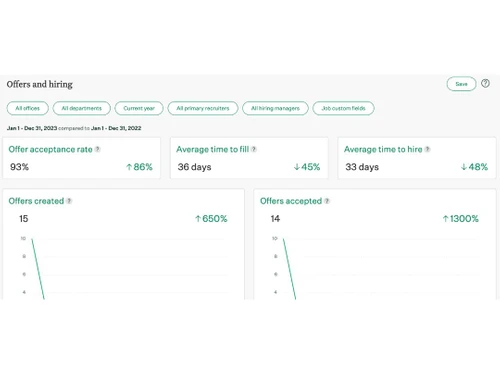
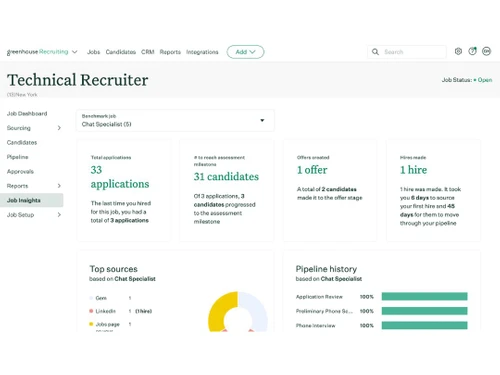
The Greenhouse Recruitment System streamlines hiring processes with robust features, including applicant tracking, customizable workflows, and comprehensive reporting.
See MoreHave you used Greenhouse before?
Share your insights for better experience
Brand: GREENHOUSE
Founded Year: 2012
Greenhouse is a talent acquisition software company that offers its suite of tools and services to help businesses with the hiring process.
Looking for The Right Pricing?
Share your requirements and get a plan built around your business.
Price Available on Request
Get personalised Greenhouse pricing that fits your needs. Our team will connect with you.
Job Posting and Distribution
 Multi-Channel Job Posting Career Page Integration Job Template Library Job Board Integration Internal Requisition Process SEO Optimization
 Candidate Sourcing
Social Media Integration Candidate Sourcing Tools Talent Pool Management Employee Referral Management Candidate Database Resume Management
Keyword and Skill Matching Semantic Search Resume Parsing Resume Formatting Standardization Duplicate Detection ATS Scoring Application and Pipeline Management
Pipeline Management Candidate Profiles Application Status Tracking Bulk Processing Hotlist Management Screening and Assessment
Automated Screening Skill Assessments Behavioral Assessments Custom Scoring Background Check Integration Interview Management
Collaboration Tools Interview Scheduling Feedback Scorecards Communication and Engagement
Passive Activity Tracking Automated Messaging Real-time Status Updates Bulk Email and SMS Templates Candidate Nurturing Campaigns Workflow and Pipeline Automation
Job Post Automation Automated Workflows Rules-Based Automation Requisition Approvals Pipeline Customization Offer Management and Onboarding
E-Signature Integration Offer Letter Management Pre-Onboarding Tools Reporting and Analytics
Predictive Analytics Recruitment Analytics Source Effectiveness Diversity and Compliance Reporting Workflow Insights Recruiter Performance Integrations
Email Integration CRM Integration API Integration Third Party Integration Whatsapp Integration Calendar Integration Communication Tools Integration Skill Assessment Integration HR Software Integration Security and Compliance
Data Encryption GDPR Compliant Role-Based Access Control (RBAC) Audit Trails Data Backup and Recovery AI Capabilities
AI Candidate Matching AI Resume Screening Automated Resume Parsing AI Chatbots Automated Interview Scheduling Alerts & Notifications
Candidate Status Notifications Interview-Related Alerts System-Level Alerts Customizable Alerts Task and Workflow Notifications Others
Smart Call Tracking Video Resume Support Expense Management 

Watch the demo video to explore key features, real workflows, and how the software fits your business needs.
 Ubuntu
  Windows
  MacOS
MacOS  Linux
Linux  Desktop
  Cloud-Based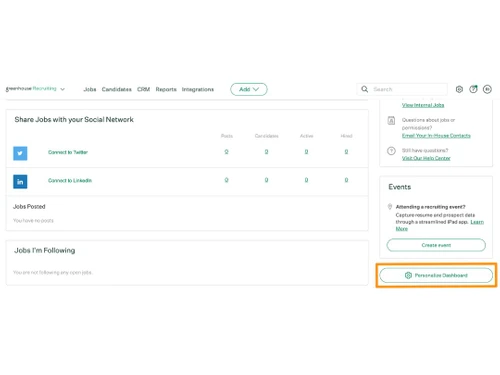

Small Business
Designed for startups and growing businesses
Medium Business
Built for business growth and flexibility
Enterprises
Designed for complex and large-scale business needs
4.2
Out of 5

Overall Rating
Based on
15 Verified Reviews
Rating Breakdown
86% Recommend this Product
Add ReviewOverall, users appreciate Greenhouse for its user-friendly interface, robust automation, and excellent customer support, which significantly enhance the hiring process. Many find the customizable features and reporting capabilities beneficial for strategic decision-making. However, some common limitations include a high cost, challenges with integration, and a lack of live customer service options, which can hinder effective problem resolution. Users also express a desire for improved reporting customization and additional communication features, such as SMS integration.
Pros
"I appreciate Greenhouse's logical workflows and user-friendly customization options. Its seamless integration with various tools adds to its functionality."
"This highly recommended ATS. Easy to customize with excellent customer support service."
Cons
"Greenhouse lacks integration with WhatsApp, a widely-used communication platform. This limitation hinders seamless communication within the system."
"Honestly, there's nothing to dislike about Greenhouse. As we explore more features beyond the basics, we continue to be impressed."
"While there's nothing to dislike, making it a bit easier to copy interview plans to new jobs would be a welcome improvement."

Jul 9, 2024
Techjockey Verified
“Simplifying Hiring with Greenhouse”
Pros
Greenhouse has been a reliable solution for us, thanks to its user-friendly interface, hassle-free interview scheduling, and easy process tracking. Automation handles most tasks, and the Client Success and Support teams are excellent resources for advice and information.
Cons
One drawback is the payment structure, which depends on headcount rather than the number of hires. This means you pay the same fee even if you don't have massive hiring volumes each year. Additionally, the integration with Greenhouse Onboarding isn't as seamless as we expected, and it comes with some limitations.
Reason to switch
It simplifies your recruiting process by automating tasks. Greenhouse provides user-friendly workflows, easy interview scheduling, and efficient process tracking. The system's automation ensures smooth operations, and the support teams are ready to assist with any questions or concerns.
Jul 11, 2024
Techjockey Verified
“Streamlined Hiring with User-Friendly Interface and Smart Automation”
Pros
Greenhouse offers a beautiful and user-friendly design, making the hiring process enjoyable and intuitive. Facilitates strategic hiring decisions through customizable interview scorecards, aiding in effective candidate evaluation. Presents data in visually appealing reports and pipelines, enhancing the overall understanding of recruitment metrics. It allows flexible customization of interview plans and hiring teams, tailoring the process to the specific needs of each job opening. Streamlines the decision-making process by automatically nudging key decision-makers and offering clean and comprehensive candidate profiles.
Cons
The main drawback is the high cost associated with Greenhouse, making it a significant investment for businesses. Takes time to implement and learn; can be challenging to understand the platform thoroughly. Limited support options, with no option for direct phone support, relying mainly on chat and chatbot assistance. While reporting capabilities are improving, users desire more robust analytics and advanced data analysis features. Customizing candidate emails can be difficult for users without basic HTML skills. Users are somewhat restricted to recruiting the "Greenhouse way" regarding naming conventions, limiting flexibility.
Reason to switch
Greenhouse empowers hiring teams to make informed decisions by visually displaying candidate assessments. It ensures a smooth hiring process with automatic nudges, reminders, and predictive analytics. The platform effectively tackles common hiring issues, such as duplicate applicants and managing jobs with multiple openings. The robust architecture supports these functionalities, making Greenhouse a valuable asset for efficient recruitment.
Jul 8, 2024
Techjockey Verified
“Greenhouse”
Pros
It can easily customize your experience effortlessly with a good level of flexibility. Seamlessly integrate with other systems thanks to easy setup options. Access excellent help resources and top-notch customer support.
Cons
It can be glitchy, and we wish it were more intuitive. Also, having access to the kick-off form during the phone screen stage would be a significant improvement. The pipeline view only displays ten candidates at a time, requiring additional clicks to manage all candidates at this stage. The Scheduling tool lacks the ability to pre-choose slots, limiting control and practicality. The Bulk action function is not as helpful as desired, particularly when trying to send availability to multiple candidates. The manual email approach is time-consuming. The reporting function needs more customization, especially for generating reports on time to post to start date targets. It would be beneficial if Greenhouse could track Gmail responses both ways, not just the ones sent through the Greenhouse system.
Reason to switch
Greenhouse helps streamline the hiring process. With its user-friendly interface, customization options, and strong support system, it facilitates seamless integration and efficient management of candidates. However, it has some quirks like the clunky Kick Off form and limitations in the Scheduling tool. If you prioritize a clean interface, customization, and helpful support, Greenhouse is worth considering for your hiring needs.

Greenhouse
Price On Request
Desktop
Mobile
Web based
On Premises
Windows
Mac OS
atsPulse
₹ 499
Desktop
Mobile
Web based
On Premises
Windows
Mac OS

atsMantra
₹ 2847
Desktop
Mobile
Web based
On Premises
Windows
Mac OS

PeopleZep ATS
₹ 1500
Desktop
Mobile
Web based
On Premises
Windows
Mac OS

Kula
Price On Request
Desktop
Mobile
Web based
On Premises
Windows
Mac OS

PyjamaHR
₹ 1000
Desktop
Mobile
Web based
On Premises
Windows
Mac OS

Freshteam
₹ 1399
Desktop
Mobile
Web based
On Premises
Windows
Mac OS

Comeet
Price On Request
Desktop
Mobile
Web based
On Premises
Windows
Mac OS

Spark Hire Recruit
Price On Request
Desktop
Mobile
Web based
On Premises
Windows
Mac OS

Paradox
Price On Request
Desktop
Mobile
Web based
On Premises
Windows
Mac OS

Gem ATS
Price On Request
Desktop
Mobile
Web based
On Premises
Windows
Mac OS
(0) Product(s) selected
Starting Price:
$399 /Month
Starting Price:
$299
Starting Price:
$299 /Month
Available
Price on Request
Available
Price on Request

Available
Price on Request

Available
Price on Request
Available
Price on Request

Available
Price on Request

Available
Price on Request
Greenhouse software is compatible with Windows and macOS operating systems.
Greenhouse Recruitment app is not available on Android and iOS devices.
Greenhouse system supports web-based deployment.
Greenhouse Recruitment Software pricing is available on request at techjockey.com.
Greenhouse Recruitment Software can be used by recruitment agencies, HR, startups, businesses, and individuals who need recruitment software.
Greenhouse Recruitment system demo is available for free with techjockey.com.
Greenhouse Recruitment Software does not offer a free trial.
Greenhouse Recruitment Software is a web-based platform. So, you need not download any software or app to use it.
Greenhouse is a recruitment software that helps businesses streamline their hiring process. It allows employers to post job listings, track applicants, and evaluate candidates through a user-friendly interface, making talent acquisition more efficient and effective.
When using the Greenhouse ATS, people often find that automatic replies seem impersonal, feedback takes a long time, and candidates don't get updates right away.
0 0
Yes, it is possible to confirm interviews with candidates using Greenhouse ATS by sending them calendar invites that include the recruiter. To do this follow the steps given below:
0 0
Blacklisting can happen if a candidate repeatedly applies for unrelated roles, provides false information, or behaves unprofessionally. You can contact the hiring team to get clarification on why you were blacklisted.
0 0
20,000+ Software Listed
Best Price Guranteed
Free Expert Consultation
2M+ Happy Customers
Terms and Condtions

Users with registered businesses can purchase goods from merchants on the platform to satisfy their business needs. Users are not permitted to utilize any products acquired through the platform for resale, advertising, business, or further distribution.
For each purchase made, users will receive a Tax Invoice (or 'GST invoice') that includes specific details such as:
the GSTIN of the user associated with their registered business, and
the specified Entity Name for their business.
It should be noted that not all products are eligible for GST Invoice. Only the products displayed by participating sellers with the 'GST-based Invoice Available' callout on the product description page would qualify.
Certain goods and services are not eligible to get a GST Invoice, including items with VAS, i.e., Value Added Services (e.g., Total Mobile Protection/Assured Buyback) and those involving an exchange offer at the time of purchase.
Users must ensure the accuracy of the GSTIN, and business entity name provided for the GST Invoice. Requests for corrections into GST Invoice would not be accommodated by Techjockey.com or any Seller, and any issues arising from user-provided information are the sole responsibility of users.
Techjockey.com is not liable for the GST Invoice or any associated input tax credit. To efficiently claim an input tax credit, users should select the registered place of business address as per the GST authority's data and follow the provisions of the GST Act and rules.
To claim an input tax credit, the delivery and billing addresses must match. Furthermore, input tax credits will not be granted if the delivery address and GSTIN on the invoice are from different states. In case of incorrect GST details provided during the order placement, the order will be canceled automatically.






![6 Tips to Create an ATS Friendly Resume in 2026 [10+ Templates]](https://cdn.techjockey.com/blog/wp-content/uploads/2023/07/01133743/ATS-Friendly-Resume-in-2023_feature.webp?d=265x163 "Blog - 6 Tips to Create an ATS Friendly Resume in 2026 [10+ Templates]")