 USA
USA UAE
UAESmall Business
Designed for startups and growing businesses

See More





Brand: Joomla
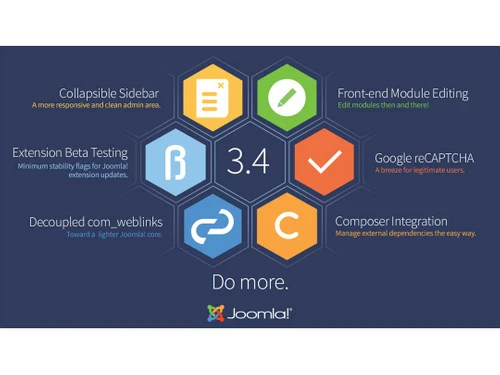
Joomla is a free, award-winning CMS that lets users create websites and powerful online applications. It’s user-friendly, SEO-optimized, supports 76+ languages, and offers extensive customization with thousands of templates and extensions. Perfect for any website!
See MoreHave you used Joomla before?
Share your insights for better experience
Brand: Joomla
Founded Year: 2005
Joomla, The CMS Trusted By Millions for their Websites Joomla is an award-winning content management system (CMS), which enables you to build Web sites and powerful online applications.
Looking for The Right Pricing?
Share your requirements and get a plan built around your business.
Price Available on Request
Get personalised Joomla pricing that fits your needs. Our team will connect with you.
 Page Creation and Management Media Library Revision History Multi-Language Content Content Versioning WYSIWYG Editor Templates Dashboard and Analytics File Management Plugins and Extensions Cache Management

Watch the demo video to explore key features, real workflows, and how the software fits your business needs.
 Windows
  MacOS
MacOS  Desktop
  Cloud-Based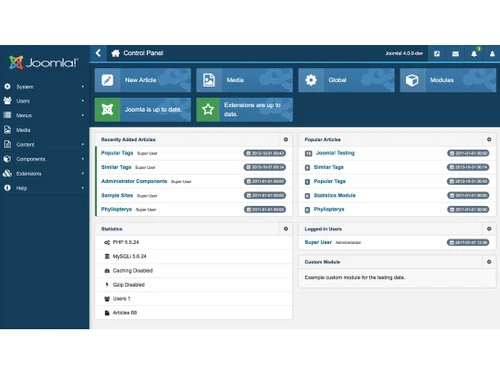
Small Business
Designed for startups and growing businesses
Medium Business
Built for business growth and flexibility
Enterprises
Designed for complex and large-scale business needs
3.8
Out of 5

Overall Rating
Based on
10 Verified Reviews
Rating Breakdown
81% Recommend this Product
Add ReviewJoomla is generally well-received for its flexibility and comprehensive content management capabilities, making it a strong choice for users requiring advanced features and control. Many users appreciate its multilingual support and the variety of extensions available. However, common complaints include a steep learning curve, challenges with managing extensions, and less robust community support compared to competitors like WordPress. Frequent updates and the complexity of customization can also be frustrating for some users, particularly those less familiar with technical aspects.
Pros
"Joomla is perfect tool for creating sites with restricted access areas. Its management of code and performance is good."
Cons
"The number of plugins and features available is less compared to WordPress. "
"Customizing templates and extensions can get complicated if you're new to PHP and MVC. For simpler CMS sites, Joomla might be overkill. "
"The constant updates can be a hassle, as it seems like there’s always a new version to install. "

Jul 11, 2024
Techjockey Verified
“Joomla gave me a lot of flexibility, but managing extensions was tricky”
I used to work with Wix, but after some time, I felt like I outgrew its capabilities. Joomla offered me more options, and it felt like a good middle ground between simple platforms like Wix and more advanced ones like Drupal.
Pros
Joomla has been a great tool for creating my website because of how flexible it is. I was impressed with the wide range of extensions and templates that made my site look professional without much effort. Its multilingual capabilities were a big plus, as I needed to create content in multiple languages, and Joomla handled it with ease.
Cons
One of the major challenges I faced with Joomla was managing the extensions. Sometimes, the updates would cause conflicts with other parts of the site, and I had to spend hours fixing things. Also, while it offers flexibility, there’s still a bit of a learning curve, especially if you want to make bigger changes to the site’s appearance or functionality.
Reason to switch
I wanted a platform that had more advanced features but didn’t feel too overwhelming.
Sep 16, 2024
Techjockey Verified
“Joomla: A Reliable CMS with a range of features”
Joomla is a reliable content management system for sites requiring flexibility.
Pros
Joomla is perfect tool for creating sites with restricted access areas. Its management of code and performance is good.
Cons
The number of plugins and features available is less compared to WordPress.
Reason to switch
I chose Joomla for its specialized access control and site management capabilities. While WordPress offers more plugins, Joomla’s detailed control features better met my needs.
Jun 11, 2024
Techjockey Verified
“Joomla: A Perfect CMS with Useful Extensions”
Joomla provides a range of extensions and an easy-to-use editor, making it accessible for users without coding experience. However, the platform can be a bit clunky to navigate, and the lack of a dedicated support team can be a drawback compared to paid alternatives.
Pros
Joomla offers a large number of components and plugins, which can be very useful for enhancing your site. The editor is easy to use and doesn’t require coding skills, making it accessible for beginners.
Cons
Navigating Joomla can be clunky, and support is not as robust as paid options. The open-source nature means fewer dedicated support resources.
Reason to switch
I chose Joomla for its extensive extension library and ease of use. Although Wix offers more straightforward site creation, Joomla’s flexibility and range of features were more suitable for my specific needs.

Joomla
Price On Request
Desktop
Mobile
Web based
On Premises
Windows
Mac OS
Grav
Price On Request
Desktop
Mobile
Web based
On Premises
Windows
Mac OS

OpenText Web CMS
Price On Request
Desktop
Mobile
Web based
On Premises
Windows
Mac OS

Wix
Price On Request
Desktop
Mobile
Web based
On Premises
Windows
Mac OS

Cosmic AI
Price On Request
Desktop
Mobile
Web based
On Premises
Windows
Mac OS

Scrintal
Price On Request
Desktop
Mobile
Web based
On Premises
Windows
Mac OS

Contentful
Price On Request
Desktop
Mobile
Web based
On Premises
Windows
Mac OS

Wordable
Price On Request
Desktop
Mobile
Web based
On Premises
Windows
Mac OS
Bear CMS
Price On Request
Desktop
Mobile
Web based
On Premises
Windows
Mac OS

Genei
Price On Request
Desktop
Mobile
Web based
On Premises
Windows
Mac OS

Scalenut
Price On Request
Desktop
Mobile
Web based
On Premises
Windows
Mac OS
(2) Product(s) selected
Available
Price on Request
Available
Price on Request
Starting Price:
$99 /Month
Starting Price:
$5 /Month

Starting Price:
$149

Starting Price:
€29

Starting Price:
$5

Starting Price:
$99

Starting Price:
$170

Starting Price:
$18 /Month

Available
Price on Request




Yes, Joomla offers a wide range of templates, both free and premium, that you can use to design your website. These templates are customizable, allowing you to change the layout, colors, and features to match your brand or personal style.
Some disadvantages of Joomla include a steeper learning curve compared to other CMS platforms, especially for beginners. Additionally, Joomla requires regular updates and maintenance to keep it secure, and not all extensions are free, which might increase costs.
The main advantage of Joomla is its flexibility. It offers extensive customization options through its numerous templates and extensions, making it suitable for a wide range of websites, from small blogs to large corporate portals. It also supports multilingual content out of the box.
Joomla is used because it provides a powerful, flexible platform for building and managing websites. It’s suitable for users ranging from beginners to advanced developers, offering features like SEO tools, multilingual support, and strong security, making it ideal for various types of websites.
Joomla is used by a diverse group of users, including small businesses, large corporations, non-profits, and government organizations. It's also popular among developers and web designers who appreciate its flexibility and extensive customization options.
Yes, Joomla is a Content Management System (CMS) platform. It allows users to create, manage, and publish content on websites without needing to know advanced programming languages, making it accessible to a wide audience.
Yes, Joomla is free to download and use. However, there may be additional costs for premium templates, extensions, and services such as web hosting and custom development, depending on your specific needs.
To create module in Joomla, follow the steps given below:
0 0
To add a new page in Joomla, follow the steps given below:
0 0
One can Secure their Joomla Website by using SSL Certification, deleting unwanted & unsecured extensions and using a strong security extension. Using the latest version of Joomla & extensions and backing up regularly is also a good method to secure a Joomla website.
0 0
The best Joomla hosting provider depends on your needs, however, some of the most popular options are as follows:
0 0
Yes, Joomla is advanced enough to host a business website
0 0
20,000+ Software Listed
Best Price Guranteed
Free Expert Consultation
2M+ Happy Customers
Terms and Condtions

Users with registered businesses can purchase goods from merchants on the platform to satisfy their business needs. Users are not permitted to utilize any products acquired through the platform for resale, advertising, business, or further distribution.
For each purchase made, users will receive a Tax Invoice (or 'GST invoice') that includes specific details such as:
the GSTIN of the user associated with their registered business, and
the specified Entity Name for their business.
It should be noted that not all products are eligible for GST Invoice. Only the products displayed by participating sellers with the 'GST-based Invoice Available' callout on the product description page would qualify.
Certain goods and services are not eligible to get a GST Invoice, including items with VAS, i.e., Value Added Services (e.g., Total Mobile Protection/Assured Buyback) and those involving an exchange offer at the time of purchase.
Users must ensure the accuracy of the GSTIN, and business entity name provided for the GST Invoice. Requests for corrections into GST Invoice would not be accommodated by Techjockey.com or any Seller, and any issues arising from user-provided information are the sole responsibility of users.
Techjockey.com is not liable for the GST Invoice or any associated input tax credit. To efficiently claim an input tax credit, users should select the registered place of business address as per the GST authority's data and follow the provisions of the GST Act and rules.
To claim an input tax credit, the delivery and billing addresses must match. Furthermore, input tax credits will not be granted if the delivery address and GSTIN on the invoice are from different states. In case of incorrect GST details provided during the order placement, the order will be canceled automatically.



