linkedin
KEMP Load Balancer logo
play Load balancer from KEMP
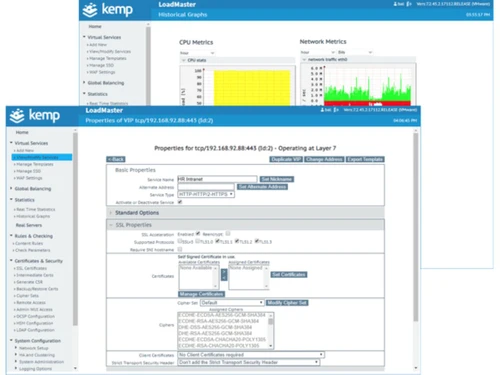
kemp load balancer home
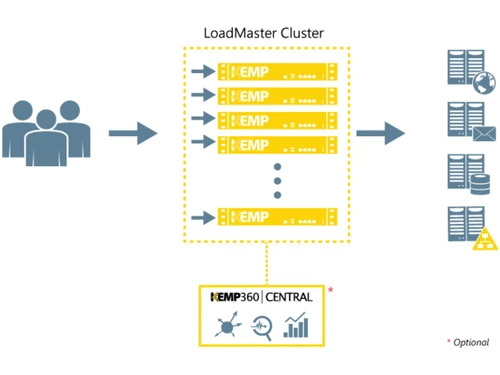
kemp load balancer work

KEMP Load Balancer

Brand: KEMP Tech

  • 4.6

  • 1 Rating & 1 Review

KEMP Load Balancer is a load balancing software which is optimized and certified for Microsoft workloads. It is a cloud based software that is easy to configure, deploy and manage. It has features such as SSL Offload/SSL acceleration, application acceleration, Web Application Firewall (WAF), Layer 4...

See More

Have you used KEMP Load Balancer before?

Share your insights for better experience

Add a Review

Price Available on Request

Questions about pricing or customization? We’re here to help, just a click away.

100% Genuine
Products
Best Price
Guaranteed
Safe & Secure
Payment
  • Description

  • Pricing

  • Features

  • Specification

  • Review

  • Compare

  • Alternatives

  • FAQ

KEMP Load Balancer Software Overview

KEMP Load Balancer is a load balancing software which is optimized and certified for Microsoft workloads. It is a cloud based software that is easy to configure, deploy and manage. It has features such as SSL Offload/SSL acceleration, application acceleration, Web Application Firewall (WAF), Layer 4 and Layer 7 Load Balancing and Cookie Persistence, full HTTP/2 support, global server load balancing, application health checking, content switching, adaptive (server resource) load balancing.

Read more

KEMP Load Balancer Pricing & Plans

Looking for The Right Pricing?

Share your requirements and get a plan built around your business.

  • Define your business needs
  • Get customised pricing
  • Choose features that fit your workflow

Price Available on Request

Get personalised KEMP Load Balancer pricing that fits your needs. Our team will connect with you.

KEMP Load Balancer Features

  • icon_check Collaboration
    Directs traffic to the right servers based on content rules for shared services and microservices environments.
  • icon_check Layer 4 Balancing
    Distributes network traffic based on transport layer data like IP addresses and TCP port numbers for fast data routing.
  • icon_check Layer 7 Switching
    Makes intelligent routing decisions based on application content such as HTTP headers, cookies, and specific URL paths.
  • icon_check SSL Offloading
    Handles intensive encryption and decryption tasks on the load balancer to free up CPU resources on the backend servers.
  • icon_check Health Checking
    Continuously monitors server status to ensure that traffic is only directed to active and fully functional web nodes.
  • icon_check Session Affinity
    Ensures that a user stays connected to the same backend server during their session to maintain data consistency today.
  • icon_check Data Compression
    Automatically compresses static and dynamic HTTP/HTTPS content to reduce bandwidth and speed delivery.
  • icon_check Health Monitoring
    Continuously checks server health via ICMP and Layer 7 probes to ensure failover and high availability.
  • icon_check SSL Security
    Provides SSL/TLS offloading, support for multiple certs, FIPS 140‑2 encryption, and certificate automation.
  • icon_check Web Application Firewall
    Mitigates OWASP Top 10 threats, SQLi/XSS attacks, and enforces per-app security policies.
  • icon_check Switching
    Routes requests at Layer 7 based on URL, headers, or cookies to balance application traffic intelligently.
KEMP Load Balancer Demo Video play icon

Get KEMP Load Balancer Demo

Watch the demo video to explore key features, real workflows, and how the software fits your business needs.

Understand
Key Features
Personal
Demo Insights
Interactive
Demo Support

KEMP Load Balancer Specifications

Supported Platforms
Windows Windows
Devices
Desktop Desktop
Deployment
Cloud-Based Cloud-Based
Suitable For
All Industries
Business Specific
All Businesses
Business Size
Small Business Startups Medium Business Enterprises
Customer Support
Phone Email
Language
English
Training Resources
In Person

KEMP Load Balancer Review

4.6

Out of 5

img

Overall Rating

Based on
1 Verified Review

Rating Breakdown

  • Features 5
  • Value for Money 5
  • Ease of Use 4
  • Customer Support 4.5

90% Recommend this Product

Add Review

prakash sarkar

4.6

Reviewed on: Jul 7, 2022

Techjockey Verified

“"KEMP Load Balancer: Streamlining Microsoft Workloads"”

Pros

1.Microsoft Optimization: Tailored for seamless integration with Microsoft workloads. 2.Cloud-Based Ease: Easy setup, deployment, and management in a cloud environment. 3.Feature-Rich: SSL Offload, WAF, Layer 4/7 Balancing, Cookie Persistence, HTTP/2 support, global balancing, and adaptive load balancing. 4.Performance Boost: Supports HTTP/2 for faster data transfer and optimizes server resource utilization.

Cons

1.Learning Curve: New users may face challenges due to the extensive feature set. 2.Cost Consideration: Higher upfront cost compared to simpler alternatives.

Switched from KEMP Load Balancer

Compare KEMP Load Balancer With other Load Balancing Software

Products
Ratings
Pricing
Device Supported
Deployment
Supported Platforms
  • img

    KEMP Load Balancer

  • 4.6

  • Price On Request

  • Desktop

    Mobile

  • Web based

    On Premises

  • Windows

    Mac OS

  • img

    NGINX Plus

  • 4.1

  • Price On Request

  • Desktop

    Mobile

  • Web based

    On Premises

  • Windows

    Mac OS

  • img

    Radware Alteon

  • 4.4

  • Price On Request

  • Desktop

    Mobile

  • Web based

    On Premises

  • Windows

    Mac OS

  • img

    NetScaler ADC

  • 4.2

  • Price On Request

  • Desktop

    Mobile

  • Web based

    On Premises

  • Windows

    Mac OS

  • img

    Cedexis Openmix

  • 4.1

  • Price On Request

  • Desktop

    Mobile

  • Web based

    On Premises

  • Windows

    Mac OS

(2) Product(s) selected

KEMP Load Balancer Alternatives

See All KEMP Load Balancer Alternatives

Available

Price on Request

Available

Price on Request

Articles for KEMP Load Balancer

See All Related Articles

...

...

20,000+ Software Listed

Best Price Guranteed

Free Expert Consultation

2M+ Happy Customers

Terms and Condtions

close

Users with registered businesses can purchase goods from merchants on the platform to satisfy their business needs. Users are not permitted to utilize any products acquired through the platform for resale, advertising, business, or further distribution.

For each purchase made, users will receive a Tax Invoice (or 'GST invoice') that includes specific details such as:

  • the GSTIN of the user associated with their registered business, and

  • the specified Entity Name for their business.

It should be noted that not all products are eligible for GST Invoice. Only the products displayed by participating sellers with the 'GST-based Invoice Available' callout on the product description page would qualify.

Certain goods and services are not eligible to get a GST Invoice, including items with VAS, i.e., Value Added Services (e.g., Total Mobile Protection/Assured Buyback) and those involving an exchange offer at the time of purchase.

Users must ensure the accuracy of the GSTIN, and business entity name provided for the GST Invoice. Requests for corrections into GST Invoice would not be accommodated by Techjockey.com or any Seller, and any issues arising from user-provided information are the sole responsibility of users.

Techjockey.com is not liable for the GST Invoice or any associated input tax credit. To efficiently claim an input tax credit, users should select the registered place of business address as per the GST authority's data and follow the provisions of the GST Act and rules.

To claim an input tax credit, the delivery and billing addresses must match. Furthermore, input tax credits will not be granted if the delivery address and GSTIN on the invoice are from different states. In case of incorrect GST details provided during the order placement, the order will be canceled automatically.