USA
USA UAE
UAESmall Business
Designed for startups and growing businesses

See More





Brand: Kissflow
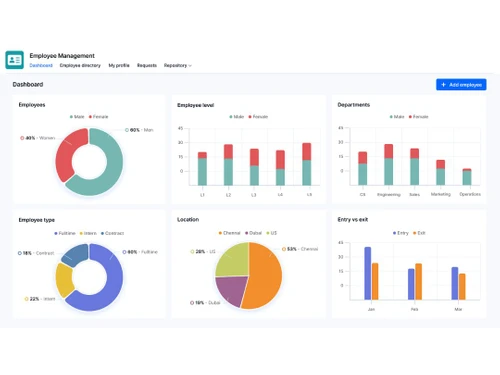
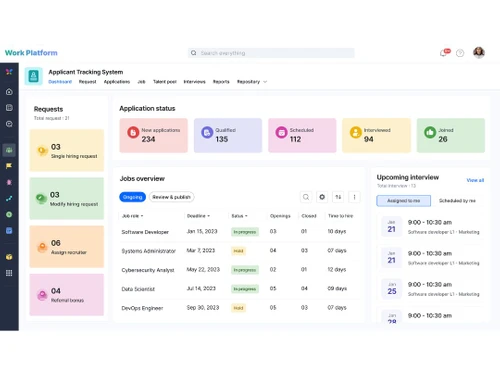
Kissflow is a business process management software that is specifically designed to manage the workflow of an organization and increase the productivity of its operations. It also manages employee attendance effectively. You can integrate various applications with this software to provide a custom application that suits your business needs. The software comes inbuilt with over 14 customizable fi...
See MoreHave you used Kissflow before?
Share your insights for better experience
Brand: Kissflow
Founded Year: 2012
Experience the Power of Simple to drive digital transformation that delivers process improvements, operational efficiencies, and enterprise-grade governance. Enable cross-functional collaboration on a powerful, yet simple-to-use Low-Code Platform that users will love.
 Process Management Workflow Management Project Management Case Management Reports Multi Language Support SAML SSO Analytics Collaboration

Watch the demo video to explore key features, real workflows, and how the software fits your business needs.




 Ubuntu
  Windows
  MacOS
MacOS  Linux
Linux  Desktop
  Cloud-Based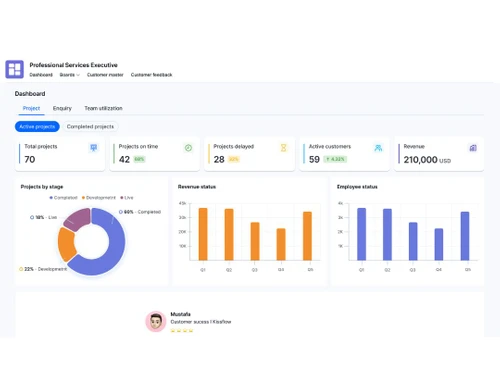
Small Business
Designed for startups and growing businesses
Medium Business
Built for business growth and flexibility
Enterprises
Designed for complex and large-scale business needs
4.5
Out of 5

Overall Rating
Based on
5 Verified Reviews
Rating Breakdown
94% Recommend this Product
Add ReviewUsers generally express strong satisfaction with Kissflow, highlighting its effectiveness in streamlining processes and facilitating vendor selection. Many appreciate the quick setup of demos and the platform's ability to automate business applications, contributing to enhanced efficiency. However, a common limitation noted is the difficulty in searching for specific data within reports, which can hinder quick access to information. Overall, the sentiment leans positive, with users feeling confident in the service provided.
Pros
"It is one platform with unlited automation. once we installed it we were sure it will provide us with unlimited number of automated business applications."
"Great service! Helped us narrow down the vendors quickly and gave us welcomed information on best practices as well."
Cons
"It does not support easy searching of data. we need to go through the whole report to find a partcicular information."
"It does not support easy searching of data. we need to go through the whole report to find a partcicular information."


Feb 26, 2018
Techjockey Verified
“Great Site to Begin the Process!”
Pros
Great service! Helped us narrow down the vendors quickly and gave us welcomed information on best practices as well.
Cons
N/A
Feb 19, 2018
Techjockey Verified
“great purchase”
Pros
I was in need of software. They got me in contact with five valid contenders. Demos were set up within a couple of days and I have down selected a product that I feel confident will meet our needs. I was pleased with the service despite being nervous that I would just get spammed by using it.
Cons
N/A
May 23, 2018
Techjockey Verified
“It stands for Keep it Simple &Smart Workflow. It truely does justice to its name.”
Pros
It has helped us streamline our processes to the teams resulting in more effective and efficient administration. It can be rated as no.1 BPM toll without any doubt. It undoubtedly makes workflow process simple and smart.
Cons
It does not support easy searching of data. we need to go through the whole report to find a partcicular information.

Kissflow
Price On Request
Desktop
Mobile
Web based
On Premises
Windows
Mac OS

Zoho Creator
₹ 720
Desktop
Mobile
Web based
On Premises
Windows
Mac OS

Gooey AI
Price On Request
Desktop
Mobile
Web based
On Premises
Windows
Mac OS

FlutterFlow
₹ 1300
Desktop
Mobile
Web based
On Premises
Windows
Mac OS

Microsoft PowerApps
₹ 19980
Desktop
Mobile
Web based
On Premises
Windows
Mac OS

BuildAI
Price On Request
Desktop
Mobile
Web based
On Premises
Windows
Mac OS
WEM
Price On Request
Desktop
Mobile
Web based
On Premises
Windows
Mac OS

Tableflow
₹ 3500
Desktop
Mobile
Web based
On Premises
Windows
Mac OS

Ninox
Price On Request
Desktop
Mobile
Web based
On Premises
Windows
Mac OS

Adalo
Price On Request
Desktop
Mobile
Web based
On Premises
Windows
Mac OS

Plasmic
Price On Request
Desktop
Mobile
Web based
On Premises
Windows
Mac OS
(0) Product(s) selected
Starting Price:
$399 /Month
Starting Price:
$20
Available
Price on Request
Starting Price:
$156 /User/Year
Starting Price:
$49 /Month
Starting Price:
$50 /Developer/Month

Starting Price:
$15 /User/Month

Starting Price:
$12 /User/Month

Starting Price:
$29 /Month

Starting Price:
€25 /Seat/Month

Starting Price:
$29 /Month
No, unfortunately, there is no mobile app version for Kissflow. Currently, the software is available only in the desktop version and runs exclusively on Windows OS.
Kissflow is designed for your entire organisation, right from managers to your teams, allowing you to digitise all your work. Each of your team members can track and follow the tasks assigned to them. Team leaders can create and monitor the workflow and forms with ease.
Kissflow comes with about 160+ pre-installed templates designed for easing out process, cases, projects and datasets. You can even install your desired templates from the marketplace of the software, and configure them as per your requirements.
Yes, with Kissflow all your data is safe and secure. The software uses SSL over HTTPS for encrypting your data over wire. Moreover, it stores all the user's data in Google Cloud SQL, which is a world-class data centre from Google.
Yes, users can get a live demo of the latest version Kissflow at a convenient time. Interested users can simply drop us a demo or tutorial request and schedule their desired date and time.
20,000+ Software Listed
Best Price Guranteed
Free Expert Consultation
2M+ Happy Customers
Terms and Condtions

Users with registered businesses can purchase goods from merchants on the platform to satisfy their business needs. Users are not permitted to utilize any products acquired through the platform for resale, advertising, business, or further distribution.
For each purchase made, users will receive a Tax Invoice (or 'GST invoice') that includes specific details such as:
the GSTIN of the user associated with their registered business, and
the specified Entity Name for their business.
It should be noted that not all products are eligible for GST Invoice. Only the products displayed by participating sellers with the 'GST-based Invoice Available' callout on the product description page would qualify.
Certain goods and services are not eligible to get a GST Invoice, including items with VAS, i.e., Value Added Services (e.g., Total Mobile Protection/Assured Buyback) and those involving an exchange offer at the time of purchase.
Users must ensure the accuracy of the GSTIN, and business entity name provided for the GST Invoice. Requests for corrections into GST Invoice would not be accommodated by Techjockey.com or any Seller, and any issues arising from user-provided information are the sole responsibility of users.
Techjockey.com is not liable for the GST Invoice or any associated input tax credit. To efficiently claim an input tax credit, users should select the registered place of business address as per the GST authority's data and follow the provisions of the GST Act and rules.
To claim an input tax credit, the delivery and billing addresses must match. Furthermore, input tax credits will not be granted if the delivery address and GSTIN on the invoice are from different states. In case of incorrect GST details provided during the order placement, the order will be canceled automatically.