linkedin
Lightyear logo
play Introducing Lightyear
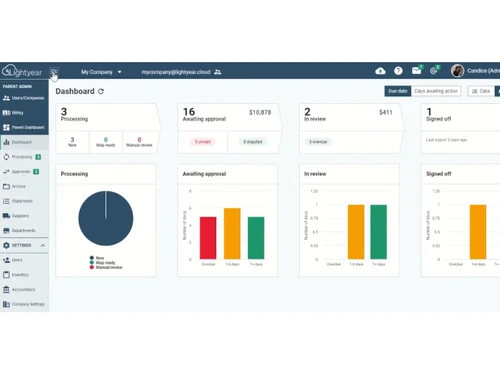
Lightyear dashboard
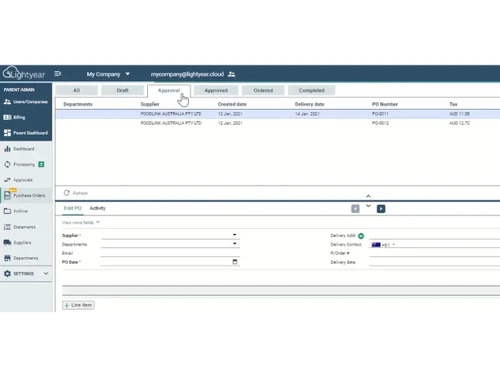
Lightyear admin

Lightyear

Brand: The Lightyear Corporation

  • 4.1

  • 3 Ratings

Lightyear is a cloud-based tool that automates invoice processing and accounts payable with smart approvals and real-time syncing.

See More

Have you used Lightyear before?

Share your insights for better experience

Add a Review
Starting Price
£125

View plans

100% Genuine
Products
Best Price
Guaranteed
Safe & Secure
Payment
  • Description

  • Pricing

  • Features

  • Specification

  • Review

  • Compare

  • Alternatives

  • FAQ

Starting at £125

Lightyear Software Overview

What is Lightyear?

Lightyear is a powerful business software that helps companies handle invoices, approvals, and payments faster and with fewer errors. It simplifies your accounts payable process using automation tools like 3-way matching, approval workflows, and real-time syncing with your accounting systems. It is especially useful for growing businesses that want to remove manual paperwork and switch to digital finance management.

This all-in-one accounting software and accounts payable software helps finance teams save time on invoice entry, verify bank details, keep track of expenses, and follow proper audit trails. With features like role-based access control and instant data extraction, Lightyear makes your financial process faster, safer, and more accurate.

Why Choose Lightyear?

  • Faster invoice processing: Lightyear automates invoice entry and reduces the time spent on manual data work.
  • Accurate data extraction: It pulls data from invoices with high accuracy using AI-based reading tools.
  • Strong approval workflows: You can assign invoice approvals to the right team members easily.
  • Smart 3-way matching: Matches invoices with purchase orders and delivery notes to avoid fraud or errors.
  • Easy expense control: Track and manage company spending in one place with detailed logs.

Benefits of Lightyear

  • Saves hours for finance teams: Automates repetitive tasks so staff can focus on more important work.
  • Reduces payment errors: Bank detail verification and matching help avoid wrong or duplicate payments.
  • Improves cash flow visibility: Real-time data helps track payments and plan budgets better.
  • Supports multiple currencies: Works well for businesses dealing with vendors across the globe.
  • Reduces paperwork: Cloud storage and digital records remove the need for physical files.
  • Streamlines approvals: Invoices are automatically sent to the right people for review.
  • Better vendor communication: Keeps track of invoice status, approvals, and changes easily.
  • Faster reporting: Detailed logs and reports help with audits and month-end closing.
  • Stronger internal controls: User roles and alerts protect financial data and prevent misuse.
  • Easy to train and use: The interface is user-friendly, even for teams new to automation.

Lightyear Pricing

Lightyear price starts at 125 Pounds at techjockey.com. The pricing model is based on different parameters, including extra features, deployment type, and the total number of users. For further queries related to the product, you can contact our product team and learn more about the pricing and offers.

Read more

The Lightyear Corporation Company Details

Founded Year:  2017

Lightyear is a Software Service (SaaS) business focused on developing and building cutting-edge fintech products.

Director/Founders Chris Gregg, Roger Gregg
Company Size 1-100 Employees

Lightyear Pricing & Plans

Starter
Starting at £125
    • Licenses

      Licenses
      Licenses
    • Monthly

      Monthly
      Monthly

Key Features

  • Purchase orders

  • Expense Management

  • Line data extraction by default

  • Automated approval workflows

  • Automatic statement reconciliation

Business
Starting at £279
    • Licenses

      Licenses
      Licenses
    • Monthly

      Monthly
      Monthly

Key Features

  • All starter features +

  • Goods received notes

  • 3-way purchase order matching

  • Inventory

  • Credit plan from 500+

Enterprise
Starting at £499
    • Licenses

      Licenses
      Licenses
    • Monthly

      Monthly
      Monthly

Key Features

  • All business features +

  • White labeling

  • Enterprise Single-Sign On

  • Dedicated Account Manager

  • Larger credit packages

Lightyear Features

  • icon_check Data Extraction
    Pulls invoice data quickly and accurately using OCR and AI for faster processing.
  • icon_check Automated Bookkeeping
    Automatically posts approved invoices to your accounting software.
  • icon_check 3-Way Matching
    Compares invoices, POs, and delivery notes to spot mismatches or fraud.
  • icon_check Approval Workflows
    Sends invoices to the right team members for faster and rule-based approvals.
  • icon_check Bank Detail Verification
    Checks vendor banking details before payment to prevent errors.
  • icon_check Expense Management
    Monitors, organizes, and analyzes all spending by department or team.
  • icon_check Audit Trail
    Keeps a detailed record of every invoice action for tracking and audits.
  • icon_check Real-Time Sync
    Syncs invoices and data instantly with your accounting system.
  • icon_check Role-Based Access Control (RBAC)
    Gives each user only the access they need based on their job role.
Lightyear Demo Video play icon

Get Lightyear Demo

Watch the demo video to explore key features, real workflows, and how the software fits your business needs.

Understand
Key Features
Personal
Demo Insights
Interactive
Demo Support

Lightyear Specification

Supported Platforms
Ubuntu Ubuntu Windows Windows MacOS MacOS Linux Linux
Devices
Desktop Desktop
Deployment
Web-Based Web-Based
Suitable For
All Industries
Business Specific
All Businesses
Business Size
Small Business Startups Medium Business Enterprises SMBs SMEs MSMBs MSMEs
Customer Support
Email Communities
Language
English
Training Resources
Videos

Lightyear Review

4.1

Out of 5

img

Overall Rating

Based on
3 Verified Ratings

Rating Breakdown

  • Features 4
  • Value for Money 4.3
  • Ease of Use 4.3
  • Customer Support 4.1

80% Recommend this Product

Add Review

Techjockey Trusted Reviews from Verified Users

No reviews are currently available for Lightyear. Discover similar Accounts Payable Software reviews

  • Tankhwa Patra

    4.7

    Whats great - Tankhwa Patra offers prominent features like attendance management, time recording, notifications, and sheet balance. In addi... read more

  • Highradius

    4.2

    Whats great - The layout's simplicity. The computer also performs the majority of the work required to identify any differences or conflict... read more

  • OneFinOps

    5.0

    Whats great - The platform has substantially reduced manual tracking and improved operational visibility. read more

Compare Lightyear With other Accounts Payable Software

Products
Ratings
Pricing
Device Supported
Deployment
Supported Platforms
  • img

    Lightyear

  • 4.1

  • Price On Request

  • Desktop

    Mobile

  • Web based

    On Premises

  • Windows

    Mac OS

  • img

    Airbase

  • 4.1

  • Price On Request

  • Desktop

    Mobile

  • Web based

    On Premises

  • Windows

    Mac OS

  • img

    Finifi io

  • 4

  • Price On Request

  • Desktop

    Mobile

  • Web based

    On Premises

  • Windows

    Mac OS

  • img

    Medius

  • Price On Request

  • Desktop

    Mobile

  • Web based

    On Premises

  • Windows

    Mac OS

  • img

    Dost

  • Price On Request

  • Desktop

    Mobile

  • Web based

    On Premises

  • Windows

    Mac OS

  • img

    onPhase

  • Price On Request

  • Desktop

    Mobile

  • Web based

    On Premises

  • Windows

    Mac OS

  • img

    Yooz

  • 4.1

  • Price On Request

  • Desktop

    Mobile

  • Web based

    On Premises

  • Windows

    Mac OS

  • img

    Quadient AP

  • 4.5

  • Price On Request

  • Desktop

    Mobile

  • Web based

    On Premises

  • Windows

    Mac OS

(2) Product(s) selected

Lightyear Alternatives

See All Lightyear Alternatives

Available

Price on Request

Available

Price on Request

Available

Price on Request

Available

Price on Request

Available

Price on Request

Yooz

4.1

Available

Price on Request

Articles for Lightyear

See All Related Articles

How much does Lightyear cost?

Lightyear pricing starts at GBP 125 on Techjockey. This business software helps companies manage invoices, payments, and approvals easily with automation.

How does Lightyear work for finance teams?

Lightyear takes scanned or emailed invoices, extracts the data, matches them with purchase records, and pushes everything into your accounting tool.

Who is Lightyear made for?

It is best for finance departments in small to medium businesses, accountants, and purchasing teams who handle many invoices daily.

Can Lightyear connect with QuickBooks or Xero?

Yes, Lightyear supports real-time syncing with many accounting platforms like QuickBooks, Xero, and others.

How does Lightyear prevent wrong payments?

It verifies vendor bank details and uses matching tools to detect errors or mismatches before payments are made.

Is Lightyear safe to use for financial data?

Yes, it has strong security tools like role-based access and full audit trails to protect sensitive information.

Does Lightyear support different approval levels?

Yes, you can create custom approval workflows based on invoice size, department, or vendor type.

What happens if there's a mismatch in 3-way matching?

The system highlights mismatches between invoice, PO, and delivery so users can review and fix them before payment.

Can I use Lightyear from home or mobile?

Yes, since it is cloud-based, users can access it from any location and manage work remotely.

Is training required to use Lightyear?

Most users find it easy to use, and Techjockey can help with onboarding or product demos if needed.

20,000+ Software Listed

Best Price Guranteed

Free Expert Consultation

2M+ Happy Customers

Terms and Condtions

close

Users with registered businesses can purchase goods from merchants on the platform to satisfy their business needs. Users are not permitted to utilize any products acquired through the platform for resale, advertising, business, or further distribution.

For each purchase made, users will receive a Tax Invoice (or 'GST invoice') that includes specific details such as:

  • the GSTIN of the user associated with their registered business, and

  • the specified Entity Name for their business.

It should be noted that not all products are eligible for GST Invoice. Only the products displayed by participating sellers with the 'GST-based Invoice Available' callout on the product description page would qualify.

Certain goods and services are not eligible to get a GST Invoice, including items with VAS, i.e., Value Added Services (e.g., Total Mobile Protection/Assured Buyback) and those involving an exchange offer at the time of purchase.

Users must ensure the accuracy of the GSTIN, and business entity name provided for the GST Invoice. Requests for corrections into GST Invoice would not be accommodated by Techjockey.com or any Seller, and any issues arising from user-provided information are the sole responsibility of users.

Techjockey.com is not liable for the GST Invoice or any associated input tax credit. To efficiently claim an input tax credit, users should select the registered place of business address as per the GST authority's data and follow the provisions of the GST Act and rules.

To claim an input tax credit, the delivery and billing addresses must match. Furthermore, input tax credits will not be granted if the delivery address and GSTIN on the invoice are from different states. In case of incorrect GST details provided during the order placement, the order will be canceled automatically.