linkedin
ManageEngine Firewall Analyzer logo
play Firewall Analyzer Product Overview
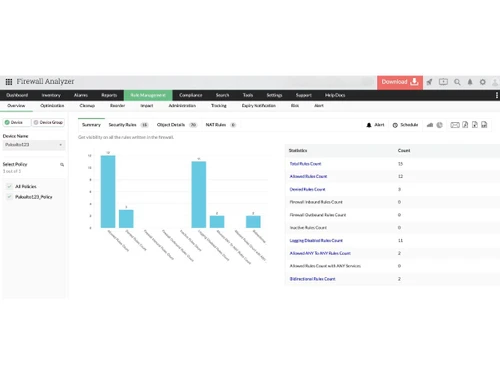
manageengine firewall analyzer dashboard
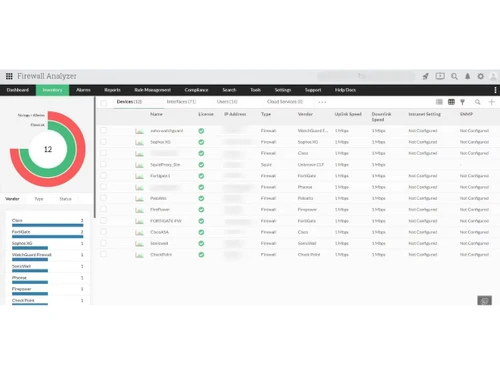
ManageEngine Firewall Analyzer inventory

ManageEngine Firewall Analyzer

Brand: Zoho Corporation

  • 4.2

  • 2 Ratings & 2 Reviews

ManageEngine Firewall Analyzer is a firewall log analysis and network security management software that helps organizations monitor firewall activity, analyze logs, detect security threats, and meet compliance requirements.

See More

Have you used ManageEngine Firewall Analyzer before?

Share your insights for better experience

Add a Review
Starting Price
$395

View plans

100% Genuine
Products
Best Price
Guaranteed
Safe & Secure
Payment
  • Description

  • Pricing

  • Features

  • Specification

  • Review

  • Compare

  • Alternatives

  • FAQ

Starting at $395

ManageEngine Firewall Analyzer Software Overview

What is ManageEngine Firewall Analyzer?

ManageEngine Firewall Analyzer is a comprehensive, agent-less software designed for log analytics and configuration management of network security devices. As a leading solution in the network monitoring tools category, it provides network administrators and security professionals with complete visibility and control over their entire security infrastructure. The software collects, analyzes, and reports on logs from a wide array of perimeter devices, including firewalls, proxy servers, VPNs, and Intrusion Detection/Prevention Systems (IDS/IPS). By translating complex log data into actionable insights, it helps organizations understand bandwidth usage, manage security policies, and fortify their network defense posture. Firewall Analyzer is vendor-agnostic, offering seamless support for devices from major vendors like Cisco, Palo Alto, Fortinet, Check Point, and Juniper.

Why Choose ManageEngine Firewall Analyzer?

  • Unified Network Security View: It centralizes log data from diverse security devices into a single, intuitive console, providing a holistic view of network activity and potential threats.
  • Actionable Intelligence: The platform transforms raw, cryptic log data into easy-to-understand reports, real-time alerts, and interactive dashboards, enabling IT teams to respond to security events instantaneously.
  • Operational Efficiency: By automating routine tasks like compliance reporting, rule analysis, and change tracking, it significantly reduces the manual workload on IT staff, allowing them to focus on strategic security initiatives.
  • Quick Deployment: As an agent-less solution, Firewall Analyzer can be deployed and configured in minutes, delivering valuable insights almost immediately without complex endpoint configurations.

Advanced Features of ManageEngine Firewall Analyzer

  • Firewall Policy Management: Analyze the effectiveness and usage of firewall rules to identify redundant, unused, or overly permissive policies. This allows for fine-tuning rules to optimize firewall performance and tighten security.
  • Automated Change Management: Receive instant notifications on any changes made to firewall configurations. The tool maintains a complete audit trail, detailing who made what change, when, and why, which is crucial for security and troubleshooting.
  • Network Forensic Audits: The powerful log search engine enables security analysts to conduct in-depth forensic investigations. Pinpoint the exact log entry related to a security incident in minutes to understand its root cause and impact.
  • User Activity & VPN Monitoring: Gain granular visibility into user internet behavior, including sites accessed and bandwidth consumed. The tool also provides real-time monitoring of VPN usage, tracking active sessions, and bandwidth consumption by user or group.

Key Capabilities of ManageEngine Firewall Analyzer

  • Log Analysis and Reporting: Automatically collects and parses logs to generate over 1,000 pre-defined reports on traffic, security events, and user activity. Reports can be customized and exported to formats like PDF and CSV.
  • Bandwidth & Traffic Analysis: Monitor bandwidth consumption in real-time to identify anomalies and sudden spikes. Get in-depth details on top users, protocols, and websites consuming network resources.
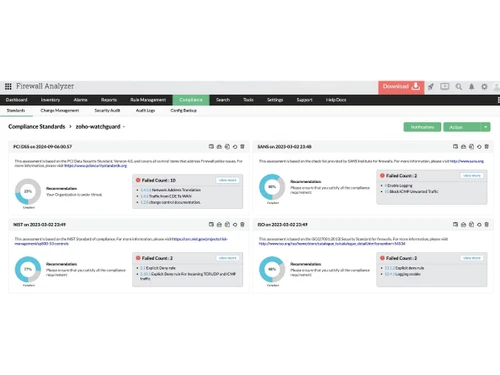
  • Compliance Management: Simplify security audits with out-of-the-box reports for regulatory standards such as PCI DSS, ISO 27001, and SANS. The tool helps validate firewall configurations against internal and external security policies.
  • Security Threat Intelligence: Get detailed information on network attacks, security breaches, and viruses detected by your perimeter devices. The system provides alerts for security events, helping you mitigate threats proactively.

How to Use ManageEngine Firewall Analyzer?

  1. Installation: Deploy the software on a server within your network. As it is agent-less, no software needs to be installed on the firewalls themselves.
  2. Device Configuration: Configure your network devices (firewalls, proxies, etc.) to forward their logs to the Firewall Analyzer server, typically using the standard syslog protocol.
  3. Discovery and Analysis: The tool automatically discovers the devices sending logs, begins parsing the data, and populates its dashboards with real-time information.
  4. Reporting and Alerting: Utilize the pre-built reports or create custom ones to analyze trends. Configure alerts to be notified immediately of specific security events or configuration changes.

ManageEngine Firewall Analyzer Pricing

ManageEngine Firewall Analyzer price starts at USD 395 at techjockey.com.

The pricing model is based on different parameters, including extra features, deployment type, and the total number of users. For further queries related to the product, you can contact our product team and learn more about the pricing and offers.

Read more

Zoho Corporation Company Details

Founded Year:  1996

Zoho Corporation is an Indian multinational company that specialises in software development, cloud computing, and web-based business tools. It is best known for Zoho Office suite and its enterprise IT management division, ManageEngine

Director/Founders Sridhar Vembu / Tony Thomas
Company Size 1000+ Employees

ManageEngine Firewall Analyzer Pricing & Plans

Standard Edition
Starting at $395
    • Licenses

      Licenses
      Licenses
    • Yearly

      Yearly
      Yearly

Key Features

  • 1 Device Pack with 2 Users

  • Real-Time Firewall Monitoring

  • Log Analysis

  • Bandwidth Monitoring

  • Threat Intelligence Insights

Professional Edition
Starting at $595
    • Licenses

      Licenses
      Licenses
    • Yearly

      Yearly
      Yearly

Key Features

  • 1 Device Pack with 2 Users

  • Real-Time Firewall Monitoring

  • Log Analysis

  • Bandwidth Monitoring

  • Threat Intelligence Insights

Enterprise Edition
Starting at $8395
    • Licenses

      Licenses
      Licenses
    • Yearly

      Yearly
      Yearly

Key Features

  • 20 Devices Pack with 2 Users

  • Real-Time Firewall Monitoring

  • Log Analysis

  • Bandwidth Monitoring

  • Threat Intelligence Insights

ManageEngine Firewall Analyzer Features

  • icon_check Real-Time Firewall Monitoring
    Monitor firewall traffic and security events with live visibility.
  • icon_check Log Analysis
    Analyze firewall logs to detect threats and traffic anomalies quickly.
  • icon_check Rule Analysis
    Review rule usage, optimize policies, and remove risky firewall rules.
  • icon_check Change Management
    Track firewall configuration changes with complete audit trails.
  • icon_check Compliance Management
    Automate PCI-DSS, ISO, NIST, and regulatory compliance reporting.
  • icon_check Bandwidth Monitoring
    Analyze bandwidth consumption by users, apps, and devices in real time.
  • icon_check Threat Intelligence Insights
    Detect evolving cyber threats with actionable security intelligence.
  • icon_check Security Audit Reporting
    Generate detailed firewall and network security audit reports.
  • icon_check VPN Monitoring
    Monitor VPN sessions, usage trends, and bandwidth consumption centrally.
  • icon_check Network Forensic Analysis
    Investigate incidents using raw log search and forensic analysis tools.
  • icon_check Multi-Vendor Firewall Support
    Supports Cisco, Fortinet, Palo Alto, Check Point, and more.
  • icon_check Dashboards
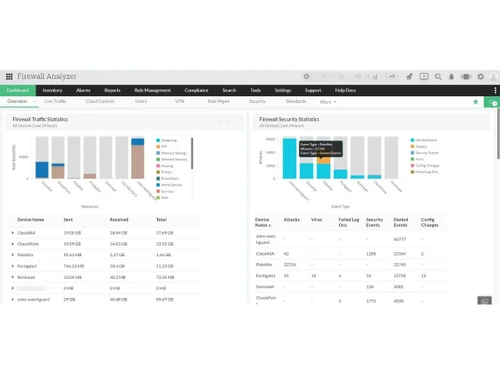
    Visualize firewall traffic, attacks, and usage from one dashboard.
  • icon_check Real-Time Security Alerts
    Receive instant alerts for anomalies and security incidents.
  • icon_check Trend Analysis
    Analyze traffic, protocol, and bandwidth trends over time.
  • icon_check Scheduled Reporting & Export
    Schedule reports and export data in PDF, CSV, and HTML formats.
ManageEngine Firewall Analyzer Demo Video play icon

Get ManageEngine Firewall Analyzer Demo

Watch the demo video to explore key features, real workflows, and how the software fits your business needs.

Understand
Key Features
Personal
Demo Insights
Interactive
Demo Support

ManageEngine Firewall Analyzer Specifications

Supported Platforms
Windows Windows
Devices
Desktop Desktop
Deployment
Cloud-Based Cloud-Based Perpetual Perpetual
Suitable For
All Industries
Business Specific
All Businesses
Language
English

Explore the Best Alternative Solutions Similar to Your Business Size and Needs

ManageEngine Firewall Analyzer Reviews

4.2

Out of 5

img

Overall Rating

Based on
2 Verified Reviews

Rating Breakdown

  • Features 4.2
  • Value for Money 4.3
  • Ease of Use 4.6
  • Customer Support 4.5

95% Recommend this Product

Add Review

Pradeep Kumar Gupta

User

4.3

Reviewed on: Sep 1, 2018

Techjockey Verified

“excellent customer service, very understanding”

Pros

Initially, I had thought I would regret buying from here... But I couldn't have been more wrong.

Cons

N/A

VIPIN KUMAR

User

4.2

Reviewed on: Aug 25, 2018

Techjockey Verified

“time saver”

Pros

Excellent service and aftercare with helping with questions relating to installation. Also a price that is amazing.?

Cons

N/A
Compare ManageEngine Firewall Analyzer With other Network Monitoring Tools

Products
Ratings
Pricing
Device Supported
Deployment
Supported Platforms
  • img

    ManageEngine Firewall Analyzer

  • 4.2

  • Price On Request

  • Desktop

    Mobile

  • Web based

    On Premises

  • Windows

    Mac OS

  • img

    NCrpted Connectin

  • 4.4

  • Price On Request

  • Desktop

    Mobile

  • Web based

    On Premises

  • Windows

    Mac OS

  • img

    Checkmk

  • 4.3

  • Price On Request

  • Desktop

    Mobile

  • Web based

    On Premises

  • Windows

    Mac OS

  • img

    Intruder

  • 4.1

  • Price On Request

  • Desktop

    Mobile

  • Web based

    On Premises

  • Windows

    Mac OS

  • img

    Auvik

  • 4.2

  • Price On Request

  • Desktop

    Mobile

  • Web based

    On Premises

  • Windows

    Mac OS

(0) Product(s) selected

ManageEngine Firewall Analyzer Alternatives

See All ManageEngine Firewall Analyzer Alternatives

Starting Price:

$225 /Month

Starting Price:

$99 /Month

Available

Price on Request

Available

Price on Request

Available

Price on Request

Available

Price on Request

Articles for ManageEngine Firewall Analyzer

See All Related Articles

How can I license ManageEngine Firewall Analyzer?

Firewall Analyzer’s license is based on the number firewall devices that require monitoring.

How many users or websites can be monitored in ManageEngine Firewall Analyzer?

There is no upper limit for users or websites that can be added and monitored through ManageEngine Firewall Analyzer.

Can I get a demo for ManageEngine Firewall Analyzer?

Techjockey provides a demo before purchase for ManageEngine Firewall Analyzer. Please request a call to get the demo scheduled.

How many collector servers can a single admin server manage through Firewall Analyzer?

A single admin server can supervise up to 50 collector servers.

Can ManageEngine Firewall Analyzer monitor mobile devices??

ManageEngine Firewall Analyzer can monitor mobile devices as well, if added as a network device.

What is ManageEngine Firewall Analyzer?

ManageEngine Firewall Analyzer is an agentless log analytics and configuration management software designed for network security devices. It provides complete visibility and control over your network security system, helping administrators understand bandwidth utilization and manage firewalls, VPNs, proxy servers, IDS, and IPS.

What types of network devices and vendors does Firewall Analyzer support?

Firewall Analyzer is vendor-agnostic and supports an extensive array of perimeter security devices. This includes almost all open source and commercial network firewalls such as Check Point, Cisco, Juniper, Fortinet, Palo Alto, Dell, as well as VPNs, IDS/IPS, and proxy servers.

What are the key features of ManageEngine Firewall Analyzer?

Key features include Firewall Policy Management for rule analysis, Change Management with instant notifications, Network Security Management for attack insights, User Internet Activity Monitoring, Real-time VPN and Proxy Server Monitoring, Compliance Management with automated audits, Network Forensic Audits, Log Analysis, and Network Traffic and Bandwidth Monitoring.

How does Firewall Analyzer assist with network security and compliance?

It helps by providing detailed information on network attacks and security breaches, offering real-time alerts to security events, and automating compliance audits with out-of-box reports. It also validates firewall security through audit and device configuration analysis reports, and enables quick network forensic audits.

Is ManageEngine Firewall Analyzer scalable for larger networks?

Yes, ManageEngine Firewall Analyzer is designed to be highly scalable. It can easily manage up to 1200 security devices in real-time, making it suitable for a wide variety of IT infrastructures and growing network demands.

What are the deployment requirements for ManageEngine Firewall Analyzer?

Firewall Analyzer is an agentless software, meaning it does not require agents to be installed on devices. It boasts quick deployment, requires no additional hardware, and has a minimal entry cost, contributing to a low Total Cost of Ownership (TCO).

How is ManageEngine Firewall Analyzer priced?

ManageEngine Firewall Analyzer price starts at USD 395 at techjockey.com.

Who can use ManageEngine Firewall Analyzer?

ManageEngine Firewall Analyzer is ideal for network administrators, security teams, IT managers, managed security service providers (MSSPs), and compliance teams that need to monitor firewall activity, analyze security logs, detect threats, and meet regulatory requirements.

20,000+ Software Listed

Best Price Guranteed

Free Expert Consultation

2M+ Happy Customers

Terms and Condtions

close

Users with registered businesses can purchase goods from merchants on the platform to satisfy their business needs. Users are not permitted to utilize any products acquired through the platform for resale, advertising, business, or further distribution.

For each purchase made, users will receive a Tax Invoice (or 'GST invoice') that includes specific details such as:

  • the GSTIN of the user associated with their registered business, and

  • the specified Entity Name for their business.

It should be noted that not all products are eligible for GST Invoice. Only the products displayed by participating sellers with the 'GST-based Invoice Available' callout on the product description page would qualify.

Certain goods and services are not eligible to get a GST Invoice, including items with VAS, i.e., Value Added Services (e.g., Total Mobile Protection/Assured Buyback) and those involving an exchange offer at the time of purchase.

Users must ensure the accuracy of the GSTIN, and business entity name provided for the GST Invoice. Requests for corrections into GST Invoice would not be accommodated by Techjockey.com or any Seller, and any issues arising from user-provided information are the sole responsibility of users.

Techjockey.com is not liable for the GST Invoice or any associated input tax credit. To efficiently claim an input tax credit, users should select the registered place of business address as per the GST authority's data and follow the provisions of the GST Act and rules.

To claim an input tax credit, the delivery and billing addresses must match. Furthermore, input tax credits will not be granted if the delivery address and GSTIN on the invoice are from different states. In case of incorrect GST details provided during the order placement, the order will be canceled automatically.