linkedin
ManageEngine Log360 logo
ManageEngine Log360-features
ManageEngine Log360-monitoring
ManageEngine Log360-analytics

ManageEngine Log360

Brand: Zoho Corporation

  • 4.2

  • 4 Ratings

ManageEngine Log360 helps organizations combat alert fatigue, accelerate incident response, and strengthen threat detection with AI-driven analytics in a unified SIEM platform.

See More

Have you used ManageEngine Log360 before?

Share your insights for better experience

Add a Review

Price Available on Request

Questions about pricing or customization? We’re here to help, just a click away.

100% Genuine
Products
Best Price
Guaranteed
Safe & Secure
Payment
  • Description

  • Pricing

  • Features

  • Specification

  • Review

  • Compare

  • Alternatives

  • FAQ

ManageEngine Log360 Overview

What is ManageEngine Log360?

ManageEngine Log360 is a unified Security Information and Event Management (SIEM) solution designed to serve as a central command center for a Security Operations Center (SOC). It offers a comprehensive, one-stop platform for log management and network security challenges by integrating capabilities for Data Loss Prevention (DLP) and Cloud Access Security Broker (CASB). The software provides complete control over your network by consolidating security telemetry from critical sources like Active Directory, cloud infrastructure, network devices, and endpoints into a single, manageable console.

This tightly-integrated solution effectively combines the power of multiple ManageEngine products, including ADAudit Plus, EventLog Analyzer, and Cloud Security Plus, to deliver holistic visibility and robust security orchestration across your entire IT environment.

Why Choose ManageEngine Log360?

  • Eliminate Alert Fatigue: Log360 transforms your signal-to-noise ratio with intelligent detection management. Its machine learning capabilities analyze historical patterns to create adaptive thresholds, distinguishing normal fluctuations from true anomalies. This, combined with granular, object-level filtering, drastically reduces false positives.
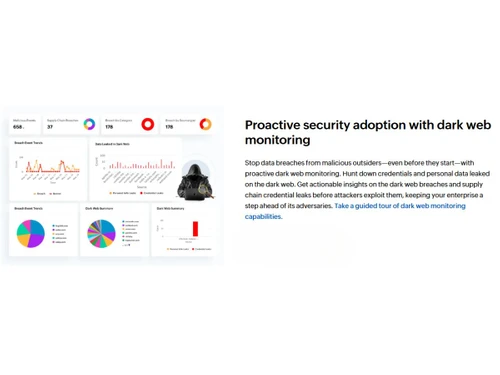
  • Proactive Security Posture: The platform moves beyond simple log analysis with proactive features like dark web monitoring. It actively hunts for credentials and personal data leaked on the dark web, providing actionable insights on potential breaches before attackers can exploit them.
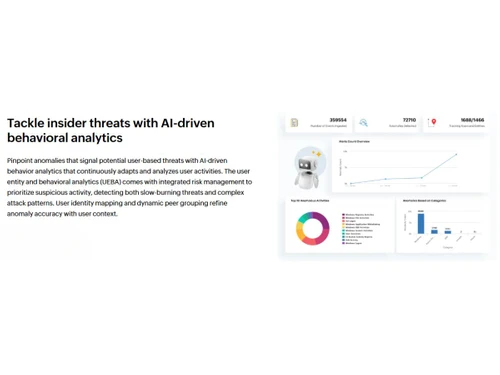
  • Combat Insider Threats: With AI-driven User and Entity Behavior Analytics (UEBA), Log360 pinpoints anomalies that signal potential user-based threats. It continuously analyzes user activities, maps identities, and uses dynamic peer grouping to refine anomaly detection accuracy for both slow-burning and complex attack patterns.
  • Automated Incident Response: Log360 includes a built-in Security Orchestration, Automation, and Response (SOAR) engine. It equips teams with over 50 default playbooks and a visual builder to orchestrate complex workflows, enabling swift threat neutralization and minimizing potential damage.

Advanced Features of ManageEngine Log360

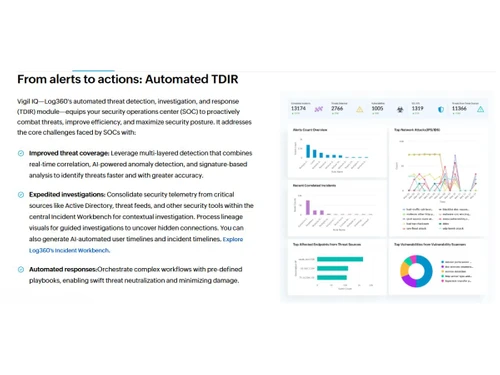
  • Vigil IQ (Automated TDIR): This Threat Detection, Investigation, and Response module allows SOCs to instantly deploy over 2,000 cloud-delivered, MITRE ATT&CK-mapped detection rules. It automates the entire incident response lifecycle, from detection to containment.
  • Centralized Incident Workbench: Expedite investigations by consolidating security data from Active Directory, threat feeds, and other tools into a central workbench. It provides process lineage visuals and AI-automated user and incident timelines for deep, contextual analysis.
  • No-Code Precision Tuning: Security analysts can easily adjust any of the 2,000+ detection rules through an intuitive visual interface without needing to write complex queries in KQL, SPL, or AQL. This simplifies the process of tuning out benign activities.
  • Ask Zia & Zia Agents (Generative AI): Log360's AI layer spans every stage of security operations. Ask Zia lets analysts query logs and alerts in plain English from any screen, while Zia Agents extend this into autonomous investigation. MCP Server integration also connects Log360 to AI clients like Claude and Copilot for cross-stack investigations, cutting hours of work down to minutes.
  • Integrated Data Security: The platform includes built-in DLP and CASB capabilities to discover, classify, and secure sensitive data across the network, preventing breaches and ensuring compliance.
  • Extensive Log and Threat Intelligence Coverage: Log360 includes 750+ pre-built log parsers, 1,000+ analytical widgets, 30+ audit-ready compliance templates, and access to over 1,000 million threat feeds from trusted technology partners.

Modules of ManageEngine Log360

  • ADAudit Plus: For in-depth auditing of Active Directory changes, user logons, and GPO changes.
  • EventLog Analyzer: For real-time log collection, analysis, and reporting from network devices, servers, and applications.
  • O365 Manager Plus: For managing and auditing Microsoft 365 environments, including Exchange Online and Azure Active Directory.
  • Exchange Reporter Plus: For monitoring, auditing, and reporting on Microsoft Exchange Servers.
  • Cloud Security Plus: For monitoring and analyzing activity within public cloud infrastructures like AWS and Azure.

How to Use ManageEngine Log360?

  1. Collect & Consolidate: The first step is to collect logs and security data from a wide array of sources, including servers, applications, databases, endpoints, and cloud services, using both agent-based and agentless methods.
  2. Detect & Analyze: The platform applies its extensive library of correlation rules, anomaly detection algorithms, and threat intelligence feeds to the collected data to identify potential threats in real-time.
  3. Investigate & Contextualize: Once an alert is triggered, analysts use the Incident Workbench to investigate. They can leverage AI-generated timelines and visual aids to understand the attack's scope and uncover hidden connections.
  4. Respond & Remediate: Finally, teams can execute automated responses using pre-defined or custom-built playbooks to contain the threat, minimize damage, and restore normal operations.

ManageEngine Log360 Pricing

ManageEngine Log360 pricing details are available on request on techjockey.com.

The pricing model is based on different parameters, including extra features, deployment type, and the total number of users. For further queries related to the product, you can contact our product team and learn more about the pricing and offers.

Read more

Zoho Corporation Company Details

Founded Year:  1996

Zoho Corporation is an Indian multinational company that specialises in software development, cloud computing, and web-based business tools. It is best known for Zoho Office suite and its enterprise IT management division, ManageEngine

Director/Founders Sridhar Vembu / Tony Thomas
Company Size 1000+ Employees

ManageEngine Log360 Pricing & Plans

Looking for The Right Pricing?

Share your requirements and get a plan built around your business.

  • Define your business needs
  • Get customised pricing
  • Choose features that fit your workflow

Price Available on Request

Get personalised ManageEngine Log360 pricing that fits your needs. Our team will connect with you.

ManageEngine Log360 Features

  • icon_check Log Collection
    Collects logs from servers, applications, databases, endpoints, and devices using agent-based and agentless methods.
  • icon_check Real Time Monitoring
    Provides dashboards and alerts for immediate visibility into network activity, system events, and user behavior.
  • icon_check Event Correlation
    Links related events across multiple sources using predefined and custom rules to detect security incidents quickly.
  • icon_check Compliance Reports
    Offers prebuilt audit-ready reports for PCI DSS, HIPAA, GDPR, SOX, and other regulatory compliance standards.
  • icon_check Incident Management
    Generates alerts, tickets, and workflows to investigate and remediate security incidents efficiently.
  • icon_check Threat Intelligence
    Integrates with threat feeds and security frameworks (MITRE ATT&CK) to enrich log data with risk context.
  • icon_check Scalability
    Supports distributed architectures for large enterprises with options for on-premises and cloud deployments.
  • icon_check SOAR Automation
    Automates response workflows and integrates playbooks for faster incident containment and remediation.
  • icon_check UEBA (User & Entity Behavior Analytics)
    Uses machine learning to detect insider threats, compromised accounts, and anomalous entity behaviors.

ManageEngine Log360 Specification

Supported Platforms
Ubuntu Ubuntu Windows Windows MacOS MacOS Linux Linux
Devices
Desktop Desktop
Deployment
Web-Based Web-Based
Suitable For
Education Healthcare Finance Governments
Business Specific
All Businesses
Business Size
Small Business Medium Business Enterprises
Customer Support
Email Communities
Language
English
Training Resources
Videos

Explore the Best Alternative Solutions Similar to Your Business Size and Needs

ManageEngine Log360 Review

4.2

Out of 5

img

Overall Rating

Based on
4 Verified Ratings

Rating Breakdown

  • Features 4.2
  • Value for Money 4.2
  • Ease of Use 4.3
  • Customer Support 4.2

80% Recommend this Product

Add Review

Be the First to Review

This product has no reviews yet. Be the first to leave your feedback.

Add Review

Compare ManageEngine Log360 With other SIEM Tools

Products
Ratings
Pricing
Device Supported
Deployment
Supported Platforms
  • img

    ManageEngine Log360

  • 4.2

  • Price On Request

  • Desktop

    Mobile

  • Web based

    On Premises

  • Windows

    Mac OS

  • img

    Microsoft Sentinel

  • 4.5

  • Price On Request

  • Desktop

    Mobile

  • Web based

    On Premises

  • Windows

    Mac OS

  • img

    Wazuh

  • 4.2

  • Price On Request

  • Desktop

    Mobile

  • Web based

    On Premises

  • Windows

    Mac OS

  • img

    Panther SIEM

  • 4.2

  • Price On Request

  • Desktop

    Mobile

  • Web based

    On Premises

  • Windows

    Mac OS

  • img

    Datadog Cloud SIEM

  • 4.2

  • Price On Request

  • Desktop

    Mobile

  • Web based

    On Premises

  • Windows

    Mac OS

  • img

    LevelBlue SIEM

  • 4.1

  • Price On Request

  • Desktop

    Mobile

  • Web based

    On Premises

  • Windows

    Mac OS

  • img

    Logpoint SIEM

  • 4.4

  • Price On Request

  • Desktop

    Mobile

  • Web based

    On Premises

  • Windows

    Mac OS

  • img

    Elastic Security

  • 4.0

  • Price On Request

  • Desktop

    Mobile

  • Web based

    On Premises

  • Windows

    Mac OS

  • img

    Fluency SIEM

  • 4.2

  • Price On Request

  • Desktop

    Mobile

  • Web based

    On Premises

  • Windows

    Mac OS

(2) Product(s) selected

ManageEngine Log360 Alternatives

See All ManageEngine Log360 Alternatives

Available

Price on Request

Available

Price on Request

Available

Price on Request

DNIF

4.2

Starting Price:

$2 /Month

Which operating system does Manageengine Log360 support?

Manageengine Log360 Server Solution is compatible with Windows operating systems.

What is deployment type of Manageengine Log360?

Manageengine Log360 Server Solution supports Web-Based.

Who are the potential users of Manageengine Log360?

Manageengine Log360 Server Solution is typically used in All Industries.

Is there any free trial or demo for Manageengine Log360?

Manageengine Log360 Server Solution demo is available for free at Techjockey.

Is Manageengine Log360 free?

Manageengine Log360 Server Solution offers a free trial. However, the premium plan with advanced features available at Techjockey.

How can you download Manageengine Log360?

For Manageengine Log360 Server Solution installation, insert the given CD/USB flash storage in your system and open the Setup Wizard to get started.

How does Manageengine Log360 work?

Manageengine Log360 Server Solution helps with Active Directory,Network Security Management,Administrative Support and Secured server. It's a complete solution for Audit.

What is ManageEngine Log360 used for?

ManageEngine Log360 is a unified SIEM solution used for comprehensive log management, network security, and automating threat detection, investigation, and response for security operations centers.

Is ManageEngine Log360 a SIEM?

Yes, ManageEngine Log360 is a unified Security Information and Event Management (SIEM) solution that also integrates Data Loss Prevention (DLP) and Cloud Access Security Broker (CASB) capabilities.

What is the difference between Log360 and EventLog Analyzer?

ManageEngine Log360 is a comprehensive SIEM suite that combines the capabilities of multiple products, including EventLog Analyzer, into a single integrated solution for broader security challenges.

Is ManageEngine Log360 free?

ManageEngine Log360 offers paid editions with pricing details available on request on techjockey.com, and it also provides a Free Edition for users with smaller environment requirements.

What is Vigil IQ in Log360?

Vigil IQ is Log360's automated threat detection, investigation, and response (TDIR) module that helps security teams proactively combat threats using features like an Incident Workbench and automated playbooks.

How does Log360 help reduce alert fatigue?

Log360 reduces alert fatigue with precision tuning features, including a no-code visual interface for adjusting detection rules and ML-powered adaptive thresholds to distinguish real threats from noise.

What is Zia Insights?

Zia Insights is a generative AI feature within Log360 that simplifies security investigations by providing human-readable summaries of logs, mapping events to the MITRE ATT&CK framework, and offering remediation guidance.

Does Log360 monitor for insider threats?

Yes, Log360 tackles insider threats using AI-driven User and Entity Behavior Analytics (UEBA) to pinpoint anomalies in user activities and prioritize suspicious behavior.

Can Log360 monitor for leaked credentials?

Yes, Log360 includes a proactive dark web monitoring feature designed to hunt for credentials and personal data that have been leaked on the dark web before they can be exploited.

How much does Log360 cost?

ManageEngine Log360 pricing details are available on request on techjockey.com.

Who can use Log360?

ManageEngine Log360 is ideal for SOC teams, IT security professionals, and organizations in finance, government, education, healthcare, and other regulated industries that require centralized security monitoring and compliance.

20,000+ Software Listed

Best Price Guranteed

Free Expert Consultation

2M+ Happy Customers

Terms and Condtions

close

Users with registered businesses can purchase goods from merchants on the platform to satisfy their business needs. Users are not permitted to utilize any products acquired through the platform for resale, advertising, business, or further distribution.

For each purchase made, users will receive a Tax Invoice (or 'GST invoice') that includes specific details such as:

  • the GSTIN of the user associated with their registered business, and

  • the specified Entity Name for their business.

It should be noted that not all products are eligible for GST Invoice. Only the products displayed by participating sellers with the 'GST-based Invoice Available' callout on the product description page would qualify.

Certain goods and services are not eligible to get a GST Invoice, including items with VAS, i.e., Value Added Services (e.g., Total Mobile Protection/Assured Buyback) and those involving an exchange offer at the time of purchase.

Users must ensure the accuracy of the GSTIN, and business entity name provided for the GST Invoice. Requests for corrections into GST Invoice would not be accommodated by Techjockey.com or any Seller, and any issues arising from user-provided information are the sole responsibility of users.

Techjockey.com is not liable for the GST Invoice or any associated input tax credit. To efficiently claim an input tax credit, users should select the registered place of business address as per the GST authority's data and follow the provisions of the GST Act and rules.

To claim an input tax credit, the delivery and billing addresses must match. Furthermore, input tax credits will not be granted if the delivery address and GSTIN on the invoice are from different states. In case of incorrect GST details provided during the order placement, the order will be canceled automatically.