linkedin
Meistertask logo
play Meistertask Tutorial | How to Use Meistertask as a Beginner
Meistertask overview
Meistertask product

Meistertask

Brand: MeisterLabs

  • 4.2

  • 4 Ratings

MeisterTask is a powerful project management software that helps businesses and teams efficiently manage and track their tasks. Its flexible and intuitive design allows users to plan, track, and collaborate on projects seamlessly, ensuring that team members stay on the same page and meet deadlines. ...

See More

Have you used Meistertask before?

Share your insights for better experience

Add a Review
Starting Price
$9

View plans

100% Genuine
Products
Best Price
Guaranteed
Safe & Secure
Payment
  • Description

  • Pricing

  • Features

  • Specification

  • Review

  • Compare

  • Alternatives

  • FAQ

Starting at $9

Meistertask Software Overview

What is MeisterTask?

MeisterTask is an easy-to-use business software and project management software that allows teams to collaborate and manage projects effectively. This cloud-based mind mapping software provides a clear overview of tasks, deadlines, and project timelines. With its simple yet powerful features, MeisterTask empowers teams to organize work, monitor progress, and meet deadlines more efficiently.

MeisterTask integrates task management, communication, and project planning into one platform. You can create projects, assign tasks, track progress, and communicate with team members in real-time. The tool allows users to visualize work using boards, lists, and task details to enhance workflow efficiency. The intuitive interface and seamless collaboration make it an ideal solution for businesses of all sizes, from startups to large enterprises.

Why Choose MeisterTask Mind Mapping Software?

  • Easy-to-Use Interface: MeisterTask offers an intuitive and user-friendly interface, allowing teams to easily navigate and manage their projects.
  • Real-Time Collaboration: Team members can collaborate in real-time, discussing tasks, sharing files, and tracking progress seamlessly.
  • Integrated with MindMeister: MeisterTask integrates with MindMeister, a mind-mapping tool that helps teams brainstorm and plan projects.
  • Automated Workflows: Configure automatic actions to improve team productivity and streamline repetitive tasks, saving time and effort.
  • Flexible Project Planning: Create projects, assign tasks to team members, and track progress with a simple, customizable workflow.
  • Task Relationships: Easily link tasks to each other, such as marking tasks as related, duplicated, or blocked, helping teams manage dependencies.
  • Seamless Communication: All task details are centralized in one place, allowing for smooth communication and easy tracking of project progress.
  • Task Notifications: Stay informed about task progress and dependencies with automatic notifications, ensuring no task is left behind.

Benefits of MeisterTask

  • Improved Team Productivity: With tools like task automation and real-time updates, teams can work more efficiently and meet deadlines consistently.
  • Enhanced Collaboration: MeisterTask allows teams to communicate, share files, and track progress all within the platform, improving collaboration.
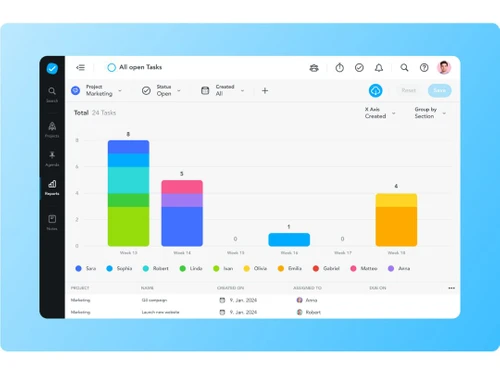
  • Better Project Visibility: With a visual representation of tasks and deadlines, teams can quickly see the status of projects, preventing delays.
  • Customizable Workflows: Customize your project workflow to suit your team’s needs, enabling better organization and task management.
  • Increased Accountability: By assigning clear tasks and deadlines, team members know their responsibilities, reducing confusion and ensuring accountability.
  • Improved Communication: The platform centralizes all project-related communication, reducing the risk of missed messages or miscommunication.
  • Greater Task Organization: Organize tasks into sections, boards, and lists for better clarity and easy tracking of work progress.
  • Easy Integration: MeisterTask integrates with various third-party applications, such as Slack, Google Drive, and Dropbox, streamlining workflows.

Pricing of MeisterTask

MeisterTask price starts at $ 9 at techjockey.com.

The pricing model is based on different parameters, including extra features, deployment type, and the total number of users. For further queries related to the product, you can contact our product team and learn more about the pricing and offers.

Read more

MeisterLabs Company Details

Founded Year:  2006

Meister develops and provides web-based productivity tools focusing on simplicity, usability and easy collaboration.

Director/Founders Michael Hollauf, Till Vollmer
Company Size 1-100 Employees

Meistertask Pricing & Plans

Pro
Starting at $9
    • Licenses

      Licenses
      Licenses
    • Monthly

      Monthly
      Monthly

Key Features

  • Unlimited attachments

  • Unlimited version history

  • Multiple admins

  • Google Workspace integration

  • MS exports

  • Custom branding

Business
Starting at $16
    • Licenses

      Licenses
      Licenses
    • Monthly

      Monthly
      Monthly

Key Features

  • Unlimited mind maps

  • Up to 2 attachments

  • 7-day version history

  • File exports

  • Print mind maps

  • Microsoft Teams integration

Meistertask Features

  • icon_check Task Board View
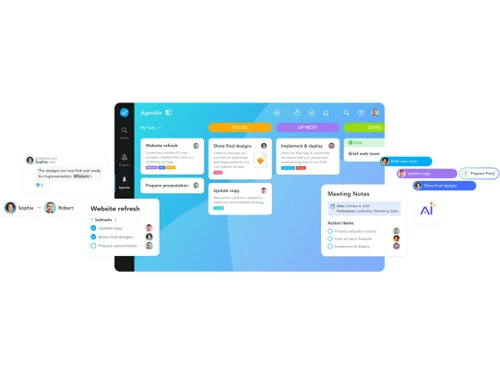
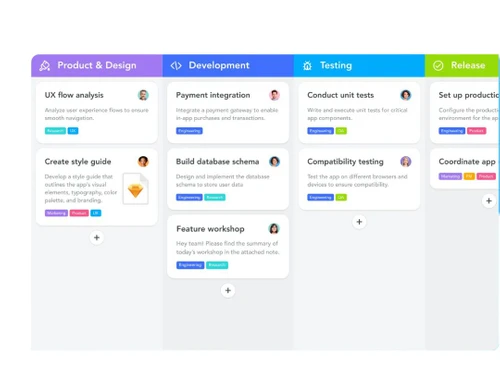
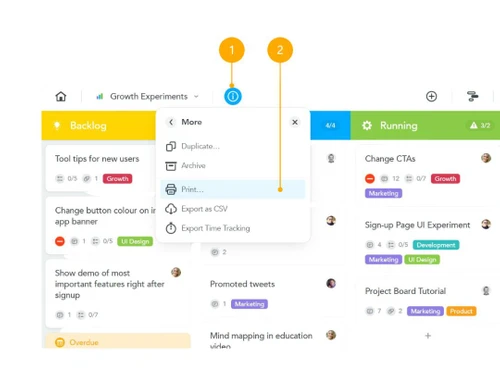
    Visual Kanban-style boards let you drag tasks across workflow stages for clear status and progress tracking.
  • icon_check Subtasks & Checklists
    Break tasks into smaller steps or checklist items to model granular workflows inside a larger task container.
  • icon_check Task Assignment
    Assign a task to a specific team member, and optionally watchers, so owners and accountability are clear.
  • icon_check Due Dates & Deadlines
    Specify due date (and optionally start-date) for tasks to keep work aligned with schedules and priorities.
  • icon_check Custom Tags/Labels
    Use colour-coded tags or labels for tasks (priority, category, client) to enable flexible filtering and sorting.
  • icon_check Time Tracking
    Log time spent on tasks via built-in tracker (or integrations) to monitor effort and resource consumption.
  • icon_check Recurring Tasks
    Configure tasks to repeat at set intervals to handle routine or cyclical work without manual recreation.
  • icon_check Workflow Automations
    Set rule-based triggers and actions (e.g., when task moves, assign someone) to eliminate repetitive manual steps.
  • icon_check Timeline View
    Display tasks on a timeline (Gantt-style) for scheduling dependencies, spotting bottlenecks and managing deadlines.
  • icon_check Project Planning
    Create a project, add team members, assign tasks, and follow progress to ensure smooth workflow management.
  • icon_check Integrated Task Management
    Seamlessly integrates with MindMeister, the mind mapping app that allows teams to brainstorm together in real time.
  • icon_check Communication
    Tasks in MeisterTask hold all the information needed, enabling discussions, file sharing, and collaboration within the task.
  • icon_check Integration & Automation
    MeisterTask is open and flexible, integrating with other tools and allowing automatic workflows to reduce manual work.
  • icon_check Task Relationships
    Stay updated on task progress and changes with real-time notifications to keep the team on track.
  • icon_check Section Actions
    Configure automatic actions within projects to let the system manage repetitive tasks, improving efficiency.
Meistertask Demo Video play icon

Get Meistertask Demo

Watch the demo video to explore key features, real workflows, and how the software fits your business needs.

Understand
Key Features
Personal
Demo Insights
Interactive
Demo Support

Meistertask Specifications

Supported Platforms
Windows Windows
Devices
Desktop Desktop
Deployment
Cloud-Based Cloud-Based
Suitable For
All Industries
Business Specific
All Businesses
Customer Support
Email Live Chat
Language
English
Training Resources
Documentation Videos

Explore the Best Alternative Solutions Similar to Your Business Size and Needs

Meistertask Review

4.2

Out of 5

img

Overall Rating

Based on
4 Verified Ratings

Rating Breakdown

  • Features 4.3
  • Value for Money 4.3
  • Ease of Use 4.2
  • Customer Support 4

92% Recommend this Product

Add Review

Techjockey Trusted Reviews from Verified Users

No reviews are currently available for Meistertask. Discover similar Task Management Software reviews
  • Task Tracker

    4.9

    Whats great - Task Tracker is a very easy-to-use application, as it is having attendance feature with accurate geolocation, assigning tasks... read more

  • Kerika

    4.9

    Whats great - Ease of Use: The software is designed to be user-friendly, making it accessible to a wide range of users within the organisat... read more

  • TaskOPad

    4.8

    Whats great - Would recommend this app for managing your daily activities. After-service is quite nice. read more

Compare Meistertask With other Task Management Software

Products
Ratings
Pricing
Device Supported
Deployment
Supported Platforms
  • img

    Meistertask

  • 4.2

  • Price On Request

  • Desktop

    Mobile

  • Web based

    On Premises

  • Windows

    Mac OS

  • img

    TickTick

  • 4.3

  • Price On Request

  • Desktop

    Mobile

  • Web based

    On Premises

  • Windows

    Mac OS

  • img

    Task Tracker

  • 4.9

  • ₹ 225

  • Desktop

    Mobile

  • Web based

    On Premises

  • Windows

    Mac OS

  • img

    TaskOPad

  • 4.7

  • Price On Request

  • Desktop

    Mobile

  • Web based

    On Premises

  • Windows

    Mac OS

  • img

    Zoho ToDo

  • 4.5

  • Price On Request

  • Desktop

    Mobile

  • Web based

    On Premises

  • Windows

    Mac OS

  • img

    Taskmaan

  • 4.5

  • ₹ 2000

  • Desktop

    Mobile

  • Web based

    On Premises

  • Windows

    Mac OS

  • img

    Akiflow

  • 4.7

  • Price On Request

  • Desktop

    Mobile

  • Web based

    On Premises

  • Windows

    Mac OS

  • img

    Todoist

  • 4.5

  • ₹ 330

  • Desktop

    Mobile

  • Web based

    On Premises

  • Windows

    Mac OS

  • img

    Sunsama

  • 4.4

  • Price On Request

  • Desktop

    Mobile

  • Web based

    On Premises

  • Windows

    Mac OS

(2) Product(s) selected

Meistertask Alternatives

See All Meistertask Alternatives

Starting Price:

$4 /Month

SAVE UPTO 17%

Available

Price on Request

Starting Price:

$34 /month

Starting Price:

$20 /month

Starting Price:

$7 /month

SAVE UPTO 50%

Starting Price:

$4 /Month

Starting Price:

$30 /Month

Articles for Meistertask

See All Related Articles

How can MeisterTask improve team collaboration?

MeisterTask enhances team collaboration by allowing real-time communication and task sharing. Teams can leave comments, share files, and track progress all within the platform, ensuring smooth project execution.

Can MeisterTask help with project planning?

Yes, MeisterTask allows you to create detailed projects, assign tasks, and track progress. The visual board feature helps in planning tasks and managing workflows, ensuring better planning and execution.

Does MeisterTask have integration options?

MeisterTask offers integrations with various apps like Google Drive, Slack, and Dropbox. It also integrates seamlessly with MindMeister, a mind mapping tool for brainstorming ideas.

Is MeisterTask suitable for large teams?

Yes, MeisterTask is suitable for teams of all sizes. Its features like task automation, team collaboration, and workflow customization make it ideal for both small and large organizations.

Can I automate tasks in MeisterTask?

Yes, MeisterTask allows you to configure automatic actions within your projects. This helps to automate repetitive tasks, saving time and improving efficiency.

What are task relationships in MeisterTask?

Task relationships allow you to mark tasks as related, duplicated, or blocked by other tasks. This helps teams track dependencies and stay informed about the status of each task.

Can I create custom workflows in MeisterTask?

Yes, MeisterTask offers customizable workflows. You can create tasks, assign team members, and set up steps in a way that suits your team’s needs.

How does MeisterTask improve task management?

MeisterTask offers an organized approach to task management, providing clear task assignments, deadlines, and progress tracking, ensuring tasks are completed on time.

Is there a mobile version of MeisterTask?

Yes, MeisterTask offers a mobile app, allowing you to manage tasks and stay updated on the go. It’s available for both Android and iOS devices.

Can I track the progress of tasks in MeisterTask?

Yes, you can easily track the progress of tasks in MeisterTask using boards, lists, and task details. The platform allows for clear visualization of task completion.

How much does MeisterTask cost?

MeisterTask price starts at $ 9 at techjockey.com.

20,000+ Software Listed

Best Price Guranteed

Free Expert Consultation

2M+ Happy Customers

Terms and Condtions

close

Users with registered businesses can purchase goods from merchants on the platform to satisfy their business needs. Users are not permitted to utilize any products acquired through the platform for resale, advertising, business, or further distribution.

For each purchase made, users will receive a Tax Invoice (or 'GST invoice') that includes specific details such as:

  • the GSTIN of the user associated with their registered business, and

  • the specified Entity Name for their business.

It should be noted that not all products are eligible for GST Invoice. Only the products displayed by participating sellers with the 'GST-based Invoice Available' callout on the product description page would qualify.

Certain goods and services are not eligible to get a GST Invoice, including items with VAS, i.e., Value Added Services (e.g., Total Mobile Protection/Assured Buyback) and those involving an exchange offer at the time of purchase.

Users must ensure the accuracy of the GSTIN, and business entity name provided for the GST Invoice. Requests for corrections into GST Invoice would not be accommodated by Techjockey.com or any Seller, and any issues arising from user-provided information are the sole responsibility of users.

Techjockey.com is not liable for the GST Invoice or any associated input tax credit. To efficiently claim an input tax credit, users should select the registered place of business address as per the GST authority's data and follow the provisions of the GST Act and rules.

To claim an input tax credit, the delivery and billing addresses must match. Furthermore, input tax credits will not be granted if the delivery address and GSTIN on the invoice are from different states. In case of incorrect GST details provided during the order placement, the order will be canceled automatically.