linkedin
MindMup logo
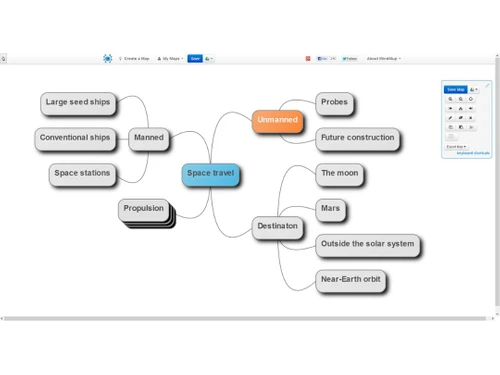
play Productivity theme for MindMup -MindMup Demo
mindmup file
mindmup review

MindMup

Brand: Sauf Pompiers

  • 4.3

  • 6 Ratings

MindMup is an online mind mapping tool designed to help users visually organize their ideas and projects. It is suitable for individuals, teams, and organizations looking to collaborate and manage tasks efficiently. The platform allows users to create, edit, and share mind maps directly from a brows...

See More

Have you used MindMup before?

Share your insights for better experience

Add a Review
Starting Price
$3

View plans

100% Genuine
Products
Best Price
Guaranteed
Safe & Secure
Payment
  • Description

  • Pricing

  • Features

  • Specification

  • Review

  • Compare

  • Alternatives

  • FAQ

Starting at $3

MindMup Software Overview

What is MindMup?

MindMup is a cloud-based business software and project management software that enables users to easily create mind maps for brainstorming, task management, and project planning.

As a widely-used mind mapping software, it offers simplicity and flexibility, making it an ideal tool for individuals and teams across different industries. The platform allows users to map out ideas, structure information visually, and manage projects efficiently, whether working solo or in collaboration with others.

With MindMup Cloud, users can store their mind maps online and access them from any device. It also integrates with Google Drive, allowing users to save maps directly to the cloud and share them with team members for real-time collaboration.

The tool is also equipped with Google Analytics tracking, which is valuable for monitoring user interactions and behaviors within maps. It supports a variety of use cases, including project management, task allocation, and decision-making, all from an intuitive interface.

MindMup’s ability to restore and autosave maps ensures that no work is lost during the mapping process. The platform’s user management and administration features also make it easy to manage access and permissions within teams, ensuring that everyone has the appropriate level of control over projects and documents.

Why Choose MindMup Mind Mapping Software?

  • Cloud-Based Access: MindMup offers seamless cloud integration, enabling users to store and access maps from any device at any time.
  • Collaboration: The platform allows teams to collaborate on mind maps in real-time, facilitating faster decision-making and project management.
  • Google Drive Integration: MindMup integrates directly with Google Drive, simplifying file storage, sharing, and collaboration with your existing workflows.
  • Simplicity: The interface is intuitive, making it easy for users of all experience levels to create, manage, and share mind maps.
  • Cost-Effective: With its free basic version and affordable premium plans, MindMup provides a cost-effective solution for individuals and businesses alike.

Benefits of MindMup Mind Mapping Software

  • Collaborative Platform: Work together with teams in real-time, sharing and editing mind maps to speed up brainstorming sessions and task planning.
  • Flexible Cloud Storage: Save maps to MindMup Cloud or directly to Google Drive, ensuring easy access from any location or device.
  • Visual Task Management: Organize tasks, ideas, and projects visually, making it easier to see connections and plan workflows.
  • Seamless Integration: Integrates with existing tools like Google Analytics, allowing users to track engagement and improve workflows.
  • Document Control: Manage document versions and access settings, ensuring that only authorized users can view or edit certain maps.
  • Automatic Save and Restore: Maps are automatically saved to prevent data loss, with the option to restore older versions when needed.
  • User Permissions: Admins can control who accesses, edits, or manages the maps, making it easier to oversee team projects.

Pricing of MindMup Mind Mapping Software

MindMup price starts at $ 3 at techjockey.com. The pricing model is based on different parameters, including extra features, deployment type, and the total number of users. For further queries related to the product, you can contact our product team and learn more about the pricing and offers.

Read more

Sauf Pompiers Company Details

Founded Year:  2013

Sauf Pompiers Limited is an active company incorporated on 25 October 2013 with the registered office located in Leigh-on-Sea, Essex.

Director/Founders MR DAVID FRANCK DEFLORINIER
Company Size 1-100 Employees

MindMup Pricing & Plans

PERSONAL GOLD
Starting at $3
    • Licenses

      Licenses
      Licenses
    • Monthly

      Monthly
      Monthly

Key Features

  • Save maps to MindMup Cloud-private

  • Allowed e-mails/accounts-1

  • Track published maps using Google Analytics

ORGANISATIONAL GOLD
Starting at $100
    • Licenses

      Licenses
      Licenses
    • Yearly

      Yearly
      Yearly

Key Features

  • Save maps to MindMup Cloud-private and team maps

  • Allowed e-mails/accounts-Entire Google Apps or Off

  • Single sign-on integration with your user manageme

MindMup Features

  • icon_check Cloud-Based Storage
    Saves mind maps securely in the cloud for instant access from any device, preventing data loss and enabling continuity of work.
  • icon_check Attachment Support
    Allows adding images, documents, and notes to map nodes, enriching context and improving information depth within visual
  • icon_check Task Management
    Integrates simple task properties like priorities, progress tracking, and responsibilities, helping users turn ideas into
  • icon_check Collaboration
    Teams can work on maps in real-time, streamlining communication and idea sharing.
  • icon_check Restore
    Automatically saves maps and provides an option to restore previous versions when necessary.
  • icon_check MindMup Cloud
    Secure storage of maps in the cloud, ensuring access from any device.
  • icon_check Save Maps to Google Drive
    Maps can be saved directly to Google Drive, simplifying collaboration and cloud storage.
  • icon_check Document Management
    Manage multiple versions of mind maps and control who has access to view or edit them.
  • icon_check Google Analytics Tracking
    Track map usage and performance to optimize user engagement.
  • icon_check User Management
    Admins can set permissions, control user access, and manage roles within a team.
  • icon_check Administration
    Offers robust admin controls to manage teams, documents, and workflow processes efficiently.
MindMup Demo Video play icon

Get MindMup Demo

Watch the demo video to explore key features, real workflows, and how the software fits your business needs.

Understand
Key Features
Personal
Demo Insights
Interactive
Demo Support

MindMup Specifications

Supported Platforms
Ubuntu Ubuntu Windows Windows MacOS MacOS Linux Linux
Devices
Desktop Desktop
Deployment
Cloud-Based Cloud-Based
Suitable For
All Industries
Business Specific
All Businesses
Business Size
Small Business Startups Medium Business Enterprises
Customer Support
Phone Email Communities
Language
English
Training Resources
Documentation Videos

Explore the Best Alternative Solutions Similar to Your Business Size and Needs

MindMup Review

4.3

Out of 5

img

Overall Rating

Based on
6 Verified Ratings

Rating Breakdown

  • Features 4.2
  • Value for Money 4.4
  • Ease of Use 4.3
  • Customer Support 4.4

95% Recommend this Product

Add Review

Be the First to Review

This product has no reviews yet. Be the first to leave your feedback.

Add Review

Compare MindMup With other Mind Mapping Software

Products
Ratings
Pricing
Device Supported
Deployment
Supported Platforms
  • img

    MindMup

  • 4.3

  • Price On Request

  • Desktop

    Mobile

  • Web based

    On Premises

  • Windows

    Mac OS

  • img

    Mapify

  • 4.1

  • Price On Request

  • Desktop

    Mobile

  • Web based

    On Premises

  • Windows

    Mac OS

  • img

    MindView

  • 4.2

  • Price On Request

  • Desktop

    Mobile

  • Web based

    On Premises

  • Windows

    Mac OS

  • img

    XMind

  • 4

  • Price On Request

  • Desktop

    Mobile

  • Web based

    On Premises

  • Windows

    Mac OS

  • img

    MindMap AI

  • 3.9

  • Price On Request

  • Desktop

    Mobile

  • Web based

    On Premises

  • Windows

    Mac OS

  • img

    FreeMind

  • 4.1

  • Price On Request

  • Desktop

    Mobile

  • Web based

    On Premises

  • Windows

    Mac OS

  • img

    GitMind

  • 4.2

  • Price On Request

  • Desktop

    Mobile

  • Web based

    On Premises

  • Windows

    Mac OS

  • img

    EdrawMind

  • 4.2

  • ₹ 2559

  • Desktop

    Mobile

  • Web based

    On Premises

  • Windows

    Mac OS

  • img

    Scapple

  • 4.3

  • ₹ 1439

  • Desktop

    Mobile

  • Web based

    On Premises

  • Windows

    Mac OS

(0) Product(s) selected

MindMup Alternatives

See All MindMup Alternatives

Starting Price:

$10 /Month

Starting Price:

$240 /Year

Available

Price on Request

Starting Price:

$5 /Month

Starting Price:

$6 /Month

Ayoa

3.9

Starting Price:

$17 /Month

Starting Price:

$63 /Yearly

SAVE UPTO 50%

Starting Price:

$30 /License

Articles for MindMup

See All Related Articles

What is MindMup used for?

MindMup is used for creating visual mind maps that help with brainstorming, task management, and project planning.

Can I save MindMup maps to Google Drive?

Yes, you can easily save your mind maps directly to Google Drive for cloud storage and sharing.

How much does MindMup Mind Mapping Software Cost?

MindMup price starts at $ 3 at techjockey.com.

Is MindMup free?

MindMup offers a free version with basic features, and premium plans are available for additional functionalities.

Does MindMup support collaboration?

Yes, MindMup allows real-time collaboration, enabling teams to work together on mind maps simultaneously.

How does MindMup integrate with Google Analytics?

MindMup tracks user interactions and performance through Google Analytics, allowing users to monitor map engagement.

Can I restore older versions of my mind maps?

Yes, MindMup has an auto-save feature that allows users to restore previous versions of their maps.

Is there a mobile app for MindMup?

MindMup is a web-based platform accessible from any device with an internet connection, eliminating the need for a separate app.

How does MindMup handle document management?

MindMup offers features for managing different versions of mind maps, as well as permissions to control access and edits.

Is there a limit on the number of users?

The number of users varies based on the pricing plan, with premium versions allowing for more users and greater control.

Does MindMup offer security for shared documents?

Yes, MindMup provides access control and security features to protect shared maps and ensure only authorized users can view or edit them.

20,000+ Software Listed

Best Price Guranteed

Free Expert Consultation

2M+ Happy Customers

Terms and Condtions

close

Users with registered businesses can purchase goods from merchants on the platform to satisfy their business needs. Users are not permitted to utilize any products acquired through the platform for resale, advertising, business, or further distribution.

For each purchase made, users will receive a Tax Invoice (or 'GST invoice') that includes specific details such as:

  • the GSTIN of the user associated with their registered business, and

  • the specified Entity Name for their business.

It should be noted that not all products are eligible for GST Invoice. Only the products displayed by participating sellers with the 'GST-based Invoice Available' callout on the product description page would qualify.

Certain goods and services are not eligible to get a GST Invoice, including items with VAS, i.e., Value Added Services (e.g., Total Mobile Protection/Assured Buyback) and those involving an exchange offer at the time of purchase.

Users must ensure the accuracy of the GSTIN, and business entity name provided for the GST Invoice. Requests for corrections into GST Invoice would not be accommodated by Techjockey.com or any Seller, and any issues arising from user-provided information are the sole responsibility of users.

Techjockey.com is not liable for the GST Invoice or any associated input tax credit. To efficiently claim an input tax credit, users should select the registered place of business address as per the GST authority's data and follow the provisions of the GST Act and rules.

To claim an input tax credit, the delivery and billing addresses must match. Furthermore, input tax credits will not be granted if the delivery address and GSTIN on the invoice are from different states. In case of incorrect GST details provided during the order placement, the order will be canceled automatically.