linkedin
Mindomo logo
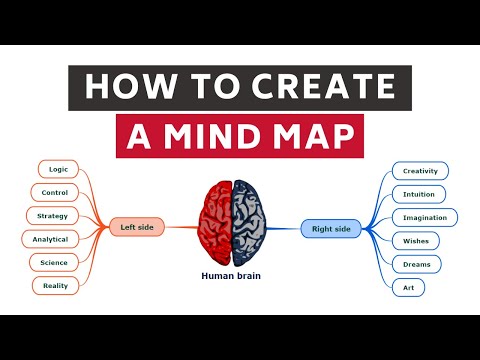
play How to create a mind map (Tutorial) 2020
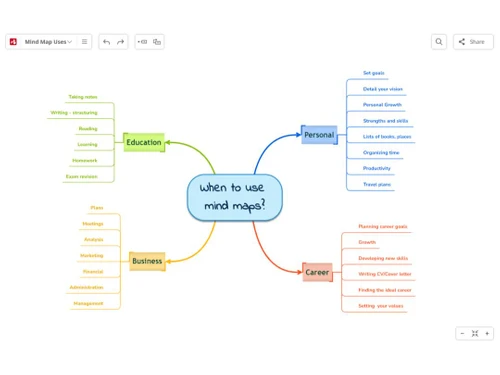
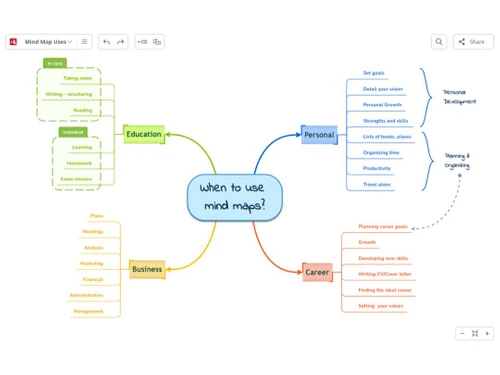
mindomo-business
mindomo-career

Mindomo

Brand: Expert Software Applications srl.

  • 4.2

  • 5 Ratings

Mindomo is an online mind mapping software that allows you to make intellectual diagrams to execute a plan. It additionally offers you to work together with your team. One of the best programs in its league, Mindomo helps you with creative reasoning, finding connections, etc. With this software, students and teachers can work together with one another and take notes besides conceptualizing their...

See More

Have you used Mindomo before?

Share your insights for better experience

Add a Review
Starting Price
€72

View plans

100% Genuine
Products
Best Price
Guaranteed
Safe & Secure
Payment
  • Description

  • Pricing

  • Features

  • Specification

  • Review

  • Compare

  • Alternatives

  • FAQ

Starting at €72

Mindomo Software Overview

What is Mindomo?

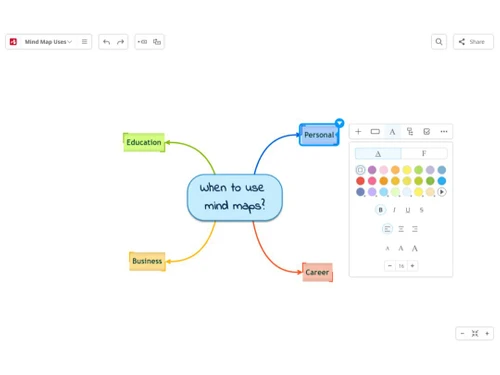
Mindomo is an online mind mapping software that allows you to make intellectual diagrams to execute a plan. It additionally offers you to work together with your team. One of the best programs in its league, Mindomo helps you with creative reasoning, finding connections, etc. 

With this software, students and teachers can work together with one another and take notes besides conceptualizing their tasks. Its teamwork tool, students can create a concept map to align their thoughts during a project drafting.

This mind mapping software can integrate numerous educational software and productivity suits like Desire2Learn, Office 365, Moodle and Canvas. This helps the students and teachers to create diagrams and transfer techniques and tools into multiple programs in a seamless way. 

One of the main benefits of having Mindomo is that it easily maps ideas, lets you access the application on mobile devices and also record every change made.

Benefits of associating with Mindomo:

  1. Presenting Maps: Concepts become easy to track for students as they can easily map out the ideas directly on the application. With just one single click, they can easily transform the structure into a presentation mode. Also, the students can innovate and interact with the charts and diagrams to depict how their ideas have developed.
  2. Mobile Applications: With Mindomo mind mapping software, one does not have to depend on the desktop or the web browser, and they can be easily integrated into any mobile device.
  3. Full Change Audit: Mindomo registers every single change and documents it in the account history of a map’s creation, comprising the media and other information.
  4. Web Image Search: To add more value to the application, you can add images and additional information about the topic.
  5. Multimedia Notes: For the teachers, they can add multimedia notes like audios or videos to the map for enhanced communication.
Read more

Expert Software Applications srl. Company Details

Founded Year:  2007

Mindomo is the leading application to organize your thoughts, present ideas, take or record notes, study and memorize, plan your work and keep track of your goals, brainstorm, and many more.

Director/Founders Zoltán Lörincz
Company Size 1-100 Employees

Mindomo Pricing & Plans

premium(€6 per month, Billed Annually)
Starting at €72
    • Users

      Users
      Users
    • Yearly

      Yearly
      Yearly

Key Features

  • Unlimited Diagrams

  • Business templates

  • 50 AI Credits/month*

  • Printing

  • File and multimedia attachments

  • Password protected diagrams

  • Desktop Premium

  • 10 export formats

  • Two-factor authentication BEST VALUE PROFESSIONA

Professional(1 user + 5 guests )€13.5 per Month,Billed Annually)
Starting at €162
    • Users (1 user + 5 guests)

      Users (1 user + 5 guests)
      Users (1 user + 5 guests)
    • Yearly

      Yearly
      Yearly

Key Features

  • All PREMIUM plan features

  • 5 guest users

  • 60 AI Credits/month*

  • Guest editing

  • Premium sharing

  • Business templates

Mindomo Features

  • icon_check Mind Map Creation
    Create visually structured mind maps using nodes, branches, and connectors to organize thoughts and ideas in a hierarchical
  • icon_check Concept Mapping
    Build conceptual relationship diagrams to show how ideas connect, enabling deeper understanding of complex topics and knowledge
  • icon_check Presentation Mode
    Convert mind maps into dynamic slide-style presentations, making it easy to present ideas visually without external tools.
  • icon_check Task Management
    Assign tasks, due dates, and priorities directly within maps to transform brainstorming ideas into actionable work items.
  • icon_check Collaboration
    Easily compress your mind map and allows easy sharing of files with your collaborators for them to access the map from their own
  • icon_check Sharing
    The local files will be uploaded to the Mindomo server, and the files attached online will be downloaded and saved locally.
  • icon_check Unlimited mind maps, outlines, Gantt charts
    You can turn any mind map to an editable outline or to create your outlines from the beginning. You can also create a Gantt chart
  • icon_check Templates
    Mindomo provides templates to the beginners so that they can familiarize themselves with how Mindomo works and save their time
  • icon_check Printing
    You can print mind maps as PDFs in A2, A3, A4, Tabloid, Letter, and Original sizes.  
  • icon_check Password Protected maps
    You can even use your mind maps outside the Mindomo mind mapping software in numerous formats: Mindomo Pack Map, Mindomo File,
  • icon_check Import & Export Facilities
    You can easily import and export themes in Mindomo. It allows you to work with previously crafted versions of map themes, and can
  • icon_check Backup to Dropbox, OneDrive, Google Drive
    You can save and store your diagrams with Google Drive, Dropbox and OneDrive without any extra charges.  
  • icon_check Shared team Folder
    This allows you to share your mind map with external collaborators as well and turn them into guest.  
Mindomo Demo Video play icon

Get Mindomo Demo

Watch the demo video to explore key features, real workflows, and how the software fits your business needs.

Understand
Key Features
Personal
Demo Insights
Interactive
Demo Support

Mindomo Specifications

Supported Platforms
Windows Windows iOS iOS Android Android Linux Linux
Devices
Desktop Desktop Mobile Mobile
Deployment
Cloud-Based Cloud-Based
Suitable For
All Industries
Business Specific
All Businesses
Business Size
Small Business Startups Medium Business SMBs
Customer Support
Email
Language
English
Training Resources
Videos

Explore the Best Alternative Solutions Similar to Your Business Size and Needs

Mindomo Review

4.2

Out of 5

img

Overall Rating

Based on
5 Verified Ratings

Rating Breakdown

  • Features 4.3
  • Value for Money 4.2
  • Ease of Use 4.3
  • Customer Support 4.1

94% Recommend this Product

Add Review

Be the First to Review

This product has no reviews yet. Be the first to leave your feedback.

Add Review

Compare Mindomo With other Mind Mapping Software

Products
Ratings
Pricing
Device Supported
Deployment
Supported Platforms
  • img

    Mindomo

  • 4.2

  • Price On Request

  • Desktop

    Mobile

  • Web based

    On Premises

  • Windows

    Mac OS

  • img

    Mapify

  • 4.1

  • Price On Request

  • Desktop

    Mobile

  • Web based

    On Premises

  • Windows

    Mac OS

  • img

    MindView

  • 4.2

  • Price On Request

  • Desktop

    Mobile

  • Web based

    On Premises

  • Windows

    Mac OS

  • img

    XMind

  • 4

  • Price On Request

  • Desktop

    Mobile

  • Web based

    On Premises

  • Windows

    Mac OS

  • img

    MindMap AI

  • 3.9

  • Price On Request

  • Desktop

    Mobile

  • Web based

    On Premises

  • Windows

    Mac OS

  • img

    FreeMind

  • 4.1

  • Price On Request

  • Desktop

    Mobile

  • Web based

    On Premises

  • Windows

    Mac OS

  • img

    GitMind

  • 4.2

  • Price On Request

  • Desktop

    Mobile

  • Web based

    On Premises

  • Windows

    Mac OS

  • img

    EdrawMind

  • 4.2

  • ₹ 2559

  • Desktop

    Mobile

  • Web based

    On Premises

  • Windows

    Mac OS

  • img

    Scapple

  • 4.3

  • ₹ 1439

  • Desktop

    Mobile

  • Web based

    On Premises

  • Windows

    Mac OS

(0) Product(s) selected

Mindomo Alternatives

See All Mindomo Alternatives

Starting Price:

$10 /Month

Starting Price:

$240 /Year

Available

Price on Request

Starting Price:

$5 /Month

Starting Price:

$6 /Month

Ayoa

3.9

Starting Price:

$17 /Month

Starting Price:

$63 /Yearly

SAVE UPTO 50%

Starting Price:

$30 /License

Articles for Mindomo

See All Related Articles

Does Mindomo work on all browsers?

Yes, Mindomo works on all modern and latest browsers like Google Chrome, Microsoft Edge, Firefox, Opera and Safari.

Does Mindomo provide tutorials?

Yes, Mindomo offers an affiliate program which allows the users to earn one month of premium membership.

Are there multiple languages for Mindomo?

Yes, Mindomo is available multiple languages like English, Spanish, Deutsch, French, Italian and other 11 International languages more.

Does Mindomo has backup?

Yes, all data with Mindomo is encrypted and daily backed up to a different data center.

Can more users be added to the same plan?

Yes, one can add multiple users to the same plan from the ‘My Account’ page.

20,000+ Software Listed

Best Price Guranteed

Free Expert Consultation

2M+ Happy Customers

Terms and Condtions

close

Users with registered businesses can purchase goods from merchants on the platform to satisfy their business needs. Users are not permitted to utilize any products acquired through the platform for resale, advertising, business, or further distribution.

For each purchase made, users will receive a Tax Invoice (or 'GST invoice') that includes specific details such as:

  • the GSTIN of the user associated with their registered business, and

  • the specified Entity Name for their business.

It should be noted that not all products are eligible for GST Invoice. Only the products displayed by participating sellers with the 'GST-based Invoice Available' callout on the product description page would qualify.

Certain goods and services are not eligible to get a GST Invoice, including items with VAS, i.e., Value Added Services (e.g., Total Mobile Protection/Assured Buyback) and those involving an exchange offer at the time of purchase.

Users must ensure the accuracy of the GSTIN, and business entity name provided for the GST Invoice. Requests for corrections into GST Invoice would not be accommodated by Techjockey.com or any Seller, and any issues arising from user-provided information are the sole responsibility of users.

Techjockey.com is not liable for the GST Invoice or any associated input tax credit. To efficiently claim an input tax credit, users should select the registered place of business address as per the GST authority's data and follow the provisions of the GST Act and rules.

To claim an input tax credit, the delivery and billing addresses must match. Furthermore, input tax credits will not be granted if the delivery address and GSTIN on the invoice are from different states. In case of incorrect GST details provided during the order placement, the order will be canceled automatically.