linkedin
MyQ logo
play Get to Know the Latest MyQ X 10.1
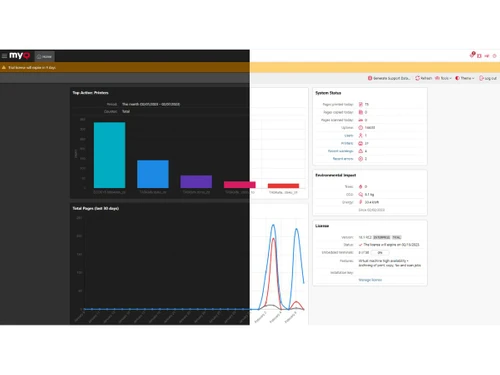
MyQ-dashboard
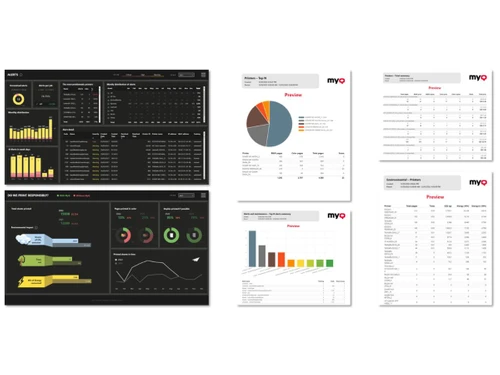
MyQ-reporting

MyQ

Brand: MyQ

  • 4.3

  • 5 Ratings

MyQ transforms chaotic printing tasks into smooth workplace productivity. Secure access keeps confidential documents safely under control.

See More

Have you used MyQ before?

Share your insights for better experience

Add a Review

Price Available on Request

Questions about pricing or customization? We’re here to help, just a click away.

100% Genuine
Products
Best Price
Guaranteed
Safe & Secure
Payment
  • Description

  • Pricing

  • Features

  • Specification

  • Review

  • FAQ

MyQ Software Overview

What is MyQ Software?

MyQ is a print management platform built for modern workplace document handling. Businesses put their trust in it for organizing printing activities across different professional environments. This utility software supports smoother document workflows without creating unnecessary operational complications. Offices can manage printing responsibilities with better structure through centralized workplace coordination systems.

The advanced print management system also helps organizations maintain better control over workplace printing environments. Educational institutions and companies may use it for improving operational document management activities. The platform fits comfortably inside offices that require handling regular printing and scanning responsibilities. Its organized system supports cleaner workplace processes throughout busy operational schedules.

Why Choose MyQ Software?

  • Safer Document Access: Sensitive files receive stronger protection during office printing activities. Authorized employees handle documents with better control.
  • Cleaner Office Workflow: Daily printing tasks carry better organization across workplace operations. Employees can manage document activities with less confusion.
  • Easy Printer Management: Workplace printers appear simpler to organize during busy office schedules. Department coordination carries better operational structure.
  • Easy Mobile Printing: Employees can print documents comfortably via connected phones and workplace applications. Flexible work environments carry smoother coordination overall.
  • Useful Printing Insights: Printing activities appear easier to understand through organized workplace reports. Business planning carries clearer operational understanding afterward.
  • Reduced Paper Waste: Workplace printing habits carry better resource control during office activities. Businesses can manage document usage with greater efficiency overall.

Benefits of MyQ Software

  • Faster File Access: Printed documents remain easier to locate during workplace activities. Employees can save valuable time during busy schedules.
  • Personalized Workflows: Workplace terminals display actions matching employee-related everyday responsibilities. Document handling carries better convenience during operations.
  • Reliable Scan Sharing: Scanned files connect properly with workplace storage and sharing platforms. Document coordination carries better convenience during activities.
  • Consistent Printing Rules: Workplace printing policies carry clearer implementation across office departments daily. Operational activities follow better organizational structure afterward.
  • Multi-Brand Compatibility: Different printer brands function properly across professional workplace environments daily. Technical coordination involves fewer operational interruptions.
  • Stronger Administrative Oversight: Workplace printing operations become easier to monitor during hectic office responsibilities. Management coordination carries better operational control.

MyQ Software Pricing

MyQ Software price is available on request at techjockey.com.

The pricing model is based on different parameters, including extra features, deployment type, and the total number of users. For further queries related to the product, you can contact our product team and learn more about the pricing and offers.

Read more

MyQ Company Details

Founded Year:  2014

MyQ is a print software company that designs printing management software.

Director/Founders Martin Janus
Company Size 1-100 Employees

MyQ Pricing & Plans

Looking for The Right Pricing?

Share your requirements and get a plan built around your business.

  • Define your business needs
  • Get customised pricing
  • Choose features that fit your workflow

Price Available on Request

Get personalised MyQ pricing that fits your needs. Our team will connect with you.

MyQ Features

  • icon_check Print Job Accounting
    Tracks every print, copy, and scan job by user, device, department, or project for accurate cost visibility.
  • icon_check Secure Print Release
    Holds print jobs until users authenticate at the device, preventing document leaks and uncollected prints.
  • icon_check User Authentication
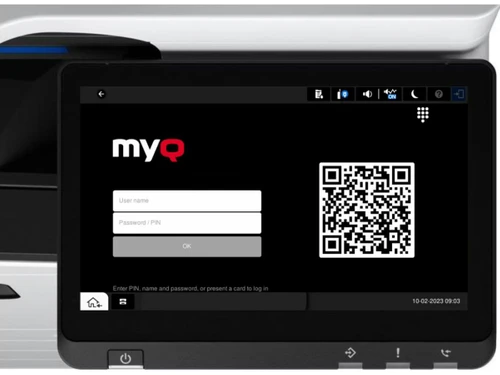
    Supports PIN, card, mobile app, and directory login methods to ensure controlled and secure device access.
  • icon_check Fleet Management
    Centralized monitoring of printers and MFPs with status, alerts, and device utilization insights.
  • icon_check Cost Control & Quotas
    Applies print rules, budgets, and quotas to reduce waste and enforce responsible printing behavior.
  • icon_check Workflow Automation
    Automates scan-to-email, scan-to-folder, scan-to-cloud, and OCR workflows from device panels.
  • icon_check Mobile Printing
    Enables users to print securely from smartphones, tablets, and laptops without installing drivers.
  • icon_check Cloud Printing Support
    Supports hybrid and cloud environments, allowing printing across locations with minimal infrastructure.
  • icon_check Reporting & Analytics
    Provides visual dashboards and exportable reports to analyze usage trends and optimize resources.
  • icon_check Embedded Device Terminals
    Offers native touchscreen interfaces on MFPs for job management, authentication, and workflows.
  • icon_check Rules-Based Printing Policies
    Automatically enforces duplex, grayscale, or device routing rules based on user or document type.
  • icon_check Multi-Vendor Printer Support
    Works with printers and MFPs from major brands, enabling a unified mixed-fleet environment.
  • icon_check Admin Console
    Web-based administration interface for managing users, devices, policies, and workflows.
  • icon_check Integrations
    Integrates with Active Directory and LDAP for seamless user management and access control.
  • icon_check Data Security & Compliance
    Encrypts data, logs activities, and supports compliance requirements for regulated environments.
MyQ Demo Video play icon

Get MyQ Demo

Watch the demo video to explore key features, real workflows, and how the software fits your business needs.

Understand
Key Features
Personal
Demo Insights
Interactive
Demo Support

MyQ Specifications

Supported Platforms
Windows Windows MacOS MacOS Linux Linux
Devices
Desktop Desktop
Deployment
Cloud-Based Cloud-Based
Suitable For
All Industries
Business Specific
All Businesses
Business Size
Small Business Startups Medium Business Enterprises
Customer Support
Email Communities
Language
English
Training Resources
Videos

MyQ Review

4.3

Out of 5

img

Overall Rating

Based on
5 Verified Ratings

Rating Breakdown

  • Features 4
  • Value for Money 4.4
  • Ease of Use 4.4
  • Customer Support 4.5

80% Recommend this Product

Add Review

Be the First to Review

This product has no reviews yet. Be the first to leave your feedback.

Add Review

How much does MyQ Software cost?

MyQ print management software pricing is available on request at techjockey.com. Final costs may vary (for different individuals) depending on feature selection, deployment type, and user requirements.

Who uses MyQ Software?

Businesses, educational institutions, and offices commonly use MyQ Software for print management activities. It also suits organizations handling secure document workflows and printer fleet management.

Is there a mobile app available for MyQ Software?

Yes, a mobile application is available for MyQ print management software users. The application is called MyQ X Mobile Client.

Which operating systems are compatible with MyQ Software?

MyQ supports Windows, macOS, and Linux operating systems. Users can manage workplace printing activities across different desktop environments.

Does MyQ Software offer a free trial?

Yes, MyQ does offer a free trial for interested users. Businesses can easily explore its capabilities before purchasing the software product.

How does MyQ Software function?

MyQ manages workplace printing via secure authentication and organized document workflows. The platform also supports mobile printing, reporting, and printer fleet management activities.

20,000+ Software Listed

Best Price Guranteed

Free Expert Consultation

2M+ Happy Customers

Terms and Condtions

close

Users with registered businesses can purchase goods from merchants on the platform to satisfy their business needs. Users are not permitted to utilize any products acquired through the platform for resale, advertising, business, or further distribution.

For each purchase made, users will receive a Tax Invoice (or 'GST invoice') that includes specific details such as:

  • the GSTIN of the user associated with their registered business, and

  • the specified Entity Name for their business.

It should be noted that not all products are eligible for GST Invoice. Only the products displayed by participating sellers with the 'GST-based Invoice Available' callout on the product description page would qualify.

Certain goods and services are not eligible to get a GST Invoice, including items with VAS, i.e., Value Added Services (e.g., Total Mobile Protection/Assured Buyback) and those involving an exchange offer at the time of purchase.

Users must ensure the accuracy of the GSTIN, and business entity name provided for the GST Invoice. Requests for corrections into GST Invoice would not be accommodated by Techjockey.com or any Seller, and any issues arising from user-provided information are the sole responsibility of users.

Techjockey.com is not liable for the GST Invoice or any associated input tax credit. To efficiently claim an input tax credit, users should select the registered place of business address as per the GST authority's data and follow the provisions of the GST Act and rules.

To claim an input tax credit, the delivery and billing addresses must match. Furthermore, input tax credits will not be granted if the delivery address and GSTIN on the invoice are from different states. In case of incorrect GST details provided during the order placement, the order will be canceled automatically.