linkedin
Xerox logo
play Xerox Managed Print Services (MPS) High-Performing Workplace
Xerox MPS Solutions
Xerox MPS Solutions

Xerox

Brand: Xerox

  • 4.0

  • 5 Ratings

Xerox is a comprehensive print management solution that optimizes workflows, strengthens security, and controls costs, helping organizations build a more productive and sustainable workplace.

See More

Have you used Xerox before?

Share your insights for better experience

Add a Review

Price Available on Request

Questions about pricing or customization? We’re here to help, just a click away.

100% Genuine
Products
Best Price
Guaranteed
Safe & Secure
Payment
  • Description

  • Pricing

  • Features

  • Specification

  • Review

  • Compare

  • Alternatives

  • FAQ

Xerox Software Overview

What is Xerox?

Xerox Managed Print Services (MPS) is a comprehensive print management software and service solution designed to optimize an organization's entire printing infrastructure. It goes beyond simply managing printers; it encompasses everything related to devices, supplies, support, security, and the document workflows that intersect with them. By leveraging advanced analytics, cloud technology, and robust security protocols, Xerox MPS helps businesses gain complete visibility and control over their document processes and associated costs.

The core objective of the service is to transform a standard printing environment into an intelligent, efficient, and secure workplace asset. This is achieved by automating manual steps, enhancing document security, boosting overall productivity, and improving environmental sustainability. The solution integrates both paper and digital platforms to create a seamless and modern work experience for employees, whether they are in the office or working remotely.

Why Choose Xerox?

  • Improved Return on Investment (ROI): Xerox helps consolidate print devices, which lowers operational costs and improves energy consumption. Through proactive infrastructure management and intuitive reporting dashboards, businesses can track usage, establish budgets, and identify opportunities for further cost savings.
  • Enhanced Employee Productivity: By identifying and automating paper-intensive workflows, Xerox eliminates manual, error-prone processes. It empowers a mobile workforce with secure, flexible print, scan, and storage capabilities that can be accessed from anywhere, ensuring a consistent digital experience.
  • Comprehensive Information Security: In an era of increasing cyber threats, printers are often an overlooked vulnerability. Xerox MPS implements a multi-layered security strategy to protect documents, devices, and data, helping to prevent breaches and detect attacks across all endpoints.
  • Greater Sustainability: The service provides tools and analytics to help businesses reduce their environmental footprint. By optimizing device usage, minimizing paper waste, and lowering power consumption, organizations can achieve their sustainability goals while also improving profitability.

Advanced Features of Xerox

  • ConnectKey Technology: This technology platform provides a foundation for comprehensive security, protecting every potential point of failure in the print environment.
  • Cloud Integration: Offers a scalable and low-touch IT infrastructure, enabling advanced capabilities and solutions that are easily accessible and manageable.
  • Device and User Analytics: Provides deep insights into print usage and user behavior. These analytics help organizations understand their print environment, track performance, and uncover opportunities for improvement.
  • Workflow Automation and Digitization: Tools to transform paper-based processes into efficient digital workflows. This includes scanning documents directly into business applications and creating searchable digital files for easy access and retrieval.
  • Xerox Workplace Suite/Cloud: Manages secure print release, reduces uncollected print jobs, and enforces print policies such as automatic duplexing to control costs and waste.
  • Xerox DocuShare Content Management Platform: A cloud-based document management system that helps organizations store, organize, and retrieve digitized records to improve collaboration and decision-making.
  • Specialized Printing Utilities: The platform supports high-precision output functionalities, including secure card printing for identification and financial instruments, as well as automated cheque printing.
  • Environmental Certifications: Xerox devices carry recognized certifications including ENERGY STAR, Blue Angel, and EPEAT, and are supported by the Xerox Supplies Recycling Program to help organizations further reduce their environmental impact.

Key Capabilities of Xerox

  • Workplace Efficiency: This capability focuses on analytics and optimization to make the print infrastructure more efficient and affordable. It addresses challenges like high operational costs and lack of visibility into print usage by consolidating devices, proactively managing the fleet for maximum uptime, and providing clear dashboards for tracking and budgeting.
  • Employee Productivity: Centered on office and mobile workflow automation, this capability helps create a better work environment for an evolving workforce. It tackles untamed paper processes by digitizing records, enabling secure mobile access to print and scan functions, including Xerox Mobile Print and PrintSafe, and creating automated workflows that reduce manual effort and increase accuracy.
  • Information Security: This capability provides robust data, document, and device security to protect against internal and external threats. Recognizing that printers are vulnerable endpoints, Xerox employs a comprehensive security approach to prevent unauthorized access, detect potential attacks, and safeguard sensitive information across the network.

How to Use Xerox?

  1. Assessment and Analysis: Xerox experts begin by conducting a thorough assessment of your current print infrastructure, document workflows, and costs.
  2. Strategic Design: Based on the assessment, Xerox designs a tailored solution to meet your specific business goals, whether they are related to cost reduction, security enhancement, or productivity improvement.
  3. Implementation: The new solution, including any necessary hardware, software, and workflow adjustments, is deployed across your organization with minimal disruption.
  4. Proactive Management and Optimization: Xerox takes over the day-to-day management of your print environment. This includes monitoring devices, replenishing supplies, providing support, and delivering regular performance reports to ensure continuous improvement and optimization.

Xerox Pricing

Xerox pricing details are available on request at techjockey.com.

The pricing model is based on different parameters, including extra features, deployment type, and the total number of users. For further queries related to the product, you can contact our product team and learn more about the pricing and offers.

Read more

Xerox Pricing & Plans

Looking for The Right Pricing?

Share your requirements and get a plan built around your business.

  • Define your business needs
  • Get customised pricing
  • Choose features that fit your workflow

Price Available on Request

Get personalised Xerox pricing that fits your needs. Our team will connect with you.

Xerox Features

  • icon_check Card Printing
    A specialized high-precision output utility used to produce secure identification cards and financial instruments with automated
  • icon_check Cheque Printing
  • icon_check Invoice Printing
    A mission-critical financial bridge that integrates with ERP systems to automate the generation, formatting, and batch
  • icon_check Bulk Printing
    A high-performance production engine featuring FreeFlow® technology used to manage massive print jobs with automated job
  • icon_check Reporting
    A data-driven analytical suite providing real-time visibility into print fleet usage, supply levels, and departmental costs for
  • icon_check Mobile App
    A specialized remote-control gateway that allows users to scan, print, and release documents securely using their smartphone as a
  • icon_check Assessment Management
    Accurate savings analytics start with detailed knowledge of your current operating environment. We help you identify ways to
  • icon_check Content Management
    Capture, store, share and transform paper-based and electronic documents from the web, desktop applications, tablets, smartphones
  • icon_check File Handling
    Understand how, where and why documents are used, and then work smarter through digitization, workflow optimization and
  • icon_check Workflow Management
    Harness the power of ConnectKey technology to create highly targeted workflows that aren’t available through off-the-shelf
  • icon_check Mobile Support
    Our mobile print app locates printers within a public print network using GPS and maps, and securely sends a print job to the
  • icon_check Gamification
    A gamification approach to sustainability management and reducing print volumes.
  • icon_check Audit
    Software scans your network and audits entire printer fleets, then manages firmware updates and ongoing reporting.
Xerox Demo Video play icon

Get Xerox Demo

Watch the demo video to explore key features, real workflows, and how the software fits your business needs.

Understand
Key Features
Personal
Demo Insights
Interactive
Demo Support

Xerox Specifications

Supported Platforms
Windows Windows MacOS MacOS
Devices
Desktop Desktop
Deployment
Cloud-Based Cloud-Based
Suitable For
All Industries
Business Specific
All Businesses
Business Size
Individual Small Business Medium Business SMEs
Customer Support
Live Chat Forums
Language
English
Training Resources
Live Online

Explore the Best Alternative Solutions Similar to Your Business Size and Needs

Medium Business

Built for business growth and flexibility

PaperCut

4.1

MyQ

4.3

uniFLOW

4.4

See More

Xerox Review

4.0

Out of 5

img

Overall Rating

Based on
5 Verified Ratings

Rating Breakdown

  • Features 3.7
  • Value for Money 4.1
  • Ease of Use 3.8
  • Customer Support 4.5

92% Recommend this Product

Add Review

Be the First to Review

This product has no reviews yet. Be the first to leave your feedback.

Add Review
Compare Xerox With other Print Management Software

Products
Ratings
Pricing
Device Supported
Deployment
Supported Platforms
  • img

    Xerox

  • 4.0

  • Price On Request

  • Desktop

    Mobile

  • Web based

    On Premises

  • Windows

    Mac OS

  • img

    Vasion Print

  • 4.2

  • Price On Request

  • Desktop

    Mobile

  • Web based

    On Premises

  • Windows

    Mac OS

  • img

    YSoft SAFEQ

  • 4.3

  • Price On Request

  • Desktop

    Mobile

  • Web based

    On Premises

  • Windows

    Mac OS

  • img

    MyQ

  • 4.3

  • Price On Request

  • Desktop

    Mobile

  • Web based

    On Premises

  • Windows

    Mac OS

  • img

    uniFLOW

  • 4.4

  • Price On Request

  • Desktop

    Mobile

  • Web based

    On Premises

  • Windows

    Mac OS

  • img

    ThinPrint

  • 4.2

  • Price On Request

  • Desktop

    Mobile

  • Web based

    On Premises

  • Windows

    Mac OS

  • img

    PrintPLANR

  • 4.2

  • Price On Request

  • Desktop

    Mobile

  • Web based

    On Premises

  • Windows

    Mac OS

  • img

    Printix

  • 4.0

  • Price On Request

  • Desktop

    Mobile

  • Web based

    On Premises

  • Windows

    Mac OS

  • img

    PressWise

  • 4.2

  • Price On Request

  • Desktop

    Mobile

  • Web based

    On Premises

  • Windows

    Mac OS

  • img

    PaperCut

  • 4.1

  • Price On Request

  • Desktop

    Mobile

  • Web based

    On Premises

  • Windows

    Mac OS

(0) Product(s) selected

Xerox Alternatives

See All Xerox Alternatives

Available

Price on Request

Available

Price on Request
Which operating system does Xerox MPS Solutions support?

Xerox MPS Solutions is compatible with Windows operating systems.

Is there any Xerox MPS Solutions app?

Xerox MPS Solutions app is not available.

What is deployment type of Xerox MPS Solutions?

Xerox MPS Solutions supports Web-Based.

Who are the potential users of Xerox MPS Solutions?

Xerox MPS Solutions is typically used in All Industries.

Is there any free trial or demo for Xerox MPS Solutions?

Xerox MPS Solutions demo is available for free at Techjockey.com.

Is Xerox MPS Solutions free?

Xerox MPS Solutions offers a free trial. However, the premium plan with advanced features available at Techjockey.

How can you download Xerox MPS Solutions?

For Xerox MPS Solutions installation, insert the given CD/USB flash storage in your system and open the Setup Wizard to get started.

How does Xerox MPS Solutions work?

Xerox MPS Solutions helps with Assessment Management, Content Management, File Handling and Workflow Management. It's a complete solution for Mobile Support, Gamification, Audit and Card Printing.

What is Xerox Workplace Suite?

Xerox Workplace Suite is a comprehensive software solution that provides secure and flexible print management and workflow automation, enabling both office and mobile employees to print, scan, and store documents efficiently.

How do I use Xerox secure print?

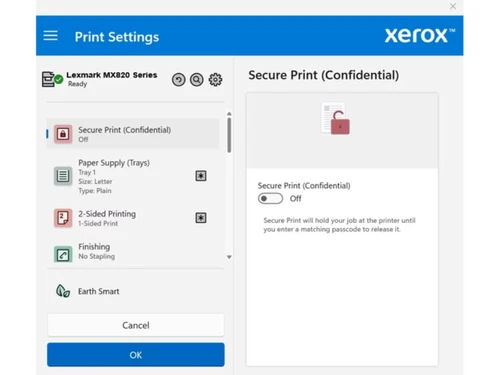
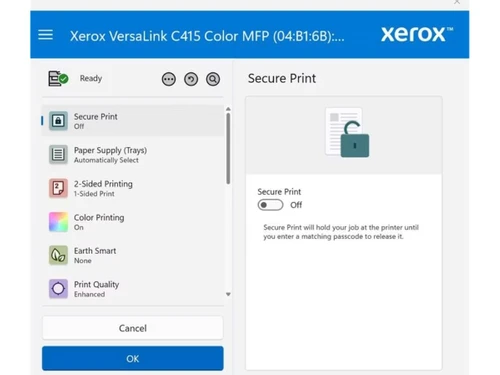
You use Xerox secure print by sending your print job to a secure queue, which then requires you to authenticate at the printer with a card or code before the document is released, protecting sensitive information.

What is Xerox print management software?

Xerox print management software is a solution that helps businesses gain visibility and control over their printing infrastructure to save money, automate processes, boost productivity, and improve document security.

How do I set up Xerox Follow-Me printing?

Xerox Follow-Me printing is set up as part of the Managed Print Services to allow users to print to a central queue and securely release their job from any network-connected printer, offering enhanced mobility and convenience.

What is Xerox DocuShare used for?

Xerox DocuShare is used to digitize paper-intensive processes by scanning documents into searchable digital files that can be easily accessed, stored, and shared, thereby improving workflow efficiency and information retrieval.

How much does Xerox Managed Print Services cost?

Xerox Managed Print Services pricing details are available on request at techjockey.com.

How does Xerox address security for its print devices?

Xerox addresses security through a comprehensive approach built into its Managed Print Services and ConnectKey Technology, which helps prevent breaches and protect documents, devices, and data from evolving threats.

How can Xerox Managed Print Services improve your company's sustainability?

Xerox Managed Print Services improves sustainability by consolidating print devices to lower energy consumption and proactively managing your infrastructure to reduce paper usage and waste.

What kind of analytics does Xerox provide for print infrastructure?

Xerox provides device and user analytics through intuitive dashboards and reporting to track print usage, monitor performance, and identify opportunities for cost savings and efficiency improvements.

20,000+ Software Listed

Best Price Guranteed

Free Expert Consultation

2M+ Happy Customers

Terms and Condtions

close

Users with registered businesses can purchase goods from merchants on the platform to satisfy their business needs. Users are not permitted to utilize any products acquired through the platform for resale, advertising, business, or further distribution.

For each purchase made, users will receive a Tax Invoice (or 'GST invoice') that includes specific details such as:

  • the GSTIN of the user associated with their registered business, and

  • the specified Entity Name for their business.

It should be noted that not all products are eligible for GST Invoice. Only the products displayed by participating sellers with the 'GST-based Invoice Available' callout on the product description page would qualify.

Certain goods and services are not eligible to get a GST Invoice, including items with VAS, i.e., Value Added Services (e.g., Total Mobile Protection/Assured Buyback) and those involving an exchange offer at the time of purchase.

Users must ensure the accuracy of the GSTIN, and business entity name provided for the GST Invoice. Requests for corrections into GST Invoice would not be accommodated by Techjockey.com or any Seller, and any issues arising from user-provided information are the sole responsibility of users.

Techjockey.com is not liable for the GST Invoice or any associated input tax credit. To efficiently claim an input tax credit, users should select the registered place of business address as per the GST authority's data and follow the provisions of the GST Act and rules.

To claim an input tax credit, the delivery and billing addresses must match. Furthermore, input tax credits will not be granted if the delivery address and GSTIN on the invoice are from different states. In case of incorrect GST details provided during the order placement, the order will be canceled automatically.