linkedin
NetHunt CRM logo
play Sales Analytics Tips How to Write a Monthly Sales Report
nethunt-crm-dashboard
nethunt-crm-management

NetHunt CRM

Brand: NetHunt

  • 4.3

  • 5 Ratings

NetHunt CRM streamlines pharma sales by unifying all communication channels, automating tasks, and integrating AI for intelligent insights directly within Google Workspace.

See More

Have you used NetHunt CRM before?

Share your insights for better experience

Add a Review
Starting Price
$30

View plans

100% Genuine
Products
Best Price
Guaranteed
Safe & Secure
Payment
  • Description

  • Pricing

  • Features

  • Specification

  • Review

  • Compare

  • Alternatives

  • FAQ

Starting at $30

NetHunt CRM Software Overview

What is NetHunt CRM?

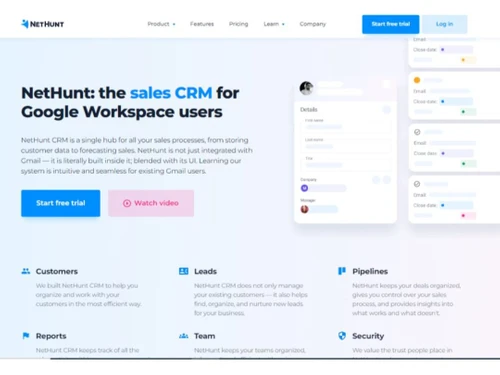
NetHunt CRM is an end-to-end Customer Relationship Management software designed specifically for sales teams. It distinguishes itself by deeply integrating into the Google Workspace ecosystem, effectively transforming your Gmail inbox into a powerful CRM hub. The platform serves as a central point for all customer communications, unifying channels such as Gmail, Professional Network, WhatsApp, Instagram, Facebook, and VoIP into a single, actionable interface.

The system is engineered to manage the entire sales process, from lead generation and nurturing to deal tracking and performance analysis. By consolidating communication and sales data, NetHunt CRM provides a complete historical view of every customer interaction, empowering sales representatives to close deals with greater confidence and efficiency. Recently, the platform has been enhanced with AI capabilities powered by MCP (Model Context Protocol), allowing users to interact with their CRM data using tools like ChatGPT and Claude for more intuitive data retrieval and analysis.

Why Choose NetHunt CRM?

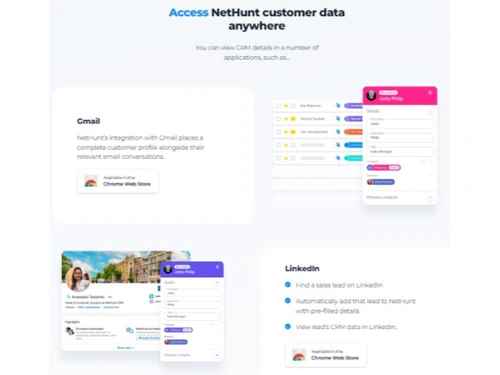
  • Native Gmail Integration: NetHunt operates directly within your Gmail inbox, eliminating the need to constantly switch between applications. Users can manage pipelines, update customer records, and track communications without ever leaving their email client.
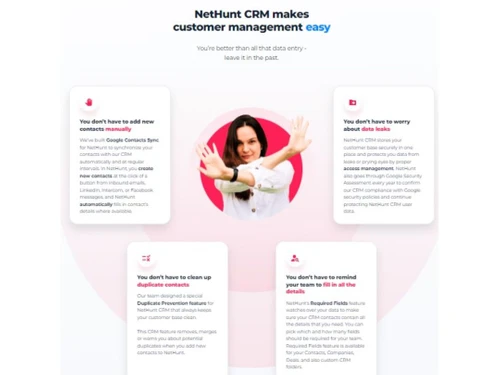
  • Ease of Use: The platform is designed for simplicity and rapid adoption. Teams can sync their email, invite members, and begin managing customers within minutes, minimizing the typical learning curve associated with new CRM implementations.
  • Deep Customization: Nethunt is highly adaptable to unique business processes. Users can modify nearly every aspect of the CRM, including custom fields, pipeline stages, data views, and automation workflows, ensuring the software aligns perfectly with their specific sales methodology.
  • Multi-Channel Communication Hub: It consolidates all sales channels into one unified view. This provides a complete and chronological history of every interaction, whether it occurred via email, a professional network, or a messaging app, giving sales reps the full context they need for every conversation.

Advanced Features of NetHunt CRM

  • Sales Automation: Automate repetitive and time-consuming tasks to free up your sales team. This includes automatic data entry, intelligent lead routing to the appropriate sales manager, and automated updates to deal stages based on trigger events.
  • Multi-Channel Engagement: Create and automate sophisticated outreach sequences that combine emails and Professional Network messages to connect with prospects more effectively across different platforms.
  • AI-Powered Functionality: Leverage modern AI tools like ChatGPT to interact with your CRM data. Instead of manual searches and filter creation, users can simply ask questions in natural language to retrieve information, generate reports, or summarize customer histories.
  • Lead Generation and Enrichment: Capture leads from a variety of sources, including website forms, emails, social media, and messengers. The system can also enrich these profiles with verified contact details to build comprehensive customer records.
  • In-Depth Analytics and Reporting: Gain critical insights with powerful reporting tools. Track sales performance, generate accurate revenue forecasts, analyze team activity by channel and representative, and identify the best-performing lead sources to optimize your strategy.
  • Webhooks and API Access: For businesses with complex tech stacks, Nethunt provides webhooks and API access to facilitate real-time data transfer and create seamless workflows across multiple systems.

Key Capabilities of NetHunt CRM

  • Lead and Deal Management: Visually organize and track sales opportunities through customizable pipelines. The system allows for the creation of multiple pipelines to manage different sales processes, with clear visibility into every deal's stage and status.
  • Productivity and Collaboration: Enhance team efficiency with built-in collaboration tools. Users can @mention colleagues on records for assistance, leave comments, log calls and meeting notes, and manage duplicates to maintain a clean database.
  • Workflow Automation: Build powerful 'if-this-then-that' workflows using triggers and actions. A trigger (e.g., a deal stage change) can initiate an action, such as creating a task, sending a personalized email from a template, or posting a notification in a Slack channel.
  • Mobile Access: Stay connected and productive on the go with dedicated iOS and Android applications. The mobile apps provide access to critical CRM data, allowing sales reps to manage their pipeline and customer interactions from anywhere.

How to Use NetHunt CRM?

  1. Setup and Integration: Begin by integrating NetHunt with your Google Workspace account. This process is quick and embeds the CRM's full functionality directly into the Gmail interface.
  2. Capture and Organize Leads: Populate your pipeline by capturing leads from web forms, emails, and connected messaging apps. NetHunt automatically creates records and enriches them with available data.
  3. Manage the Sales Pipeline: Drag and drop deals across different stages of your customized pipeline. Create tasks, set reminders, and log all interactions to keep opportunities moving forward.
  4. Automate Engagement: Use the automation builder to create email sequences and follow-up tasks. Personalize mass email campaigns with CRM data to nurture leads at scale.
  5. Analyze and Optimize: Regularly review the built-in reports to monitor team performance, track key sales metrics, and forecast future revenue. Use these insights to refine your sales strategy and processes for continuous improvement.

NetHunt CRM Pricing

NetHunt CRM price starts at USD 30 at techjockey.com.

The pricing model is based on different parameters, including extra features, deployment type, and the total number of users. For further queries related to the product, you can contact our product team and learn more about the pricing and offers.

Read more

NetHunt Company Details

Founded Year:  2015

NetHunt CRM

Director/Founders Andrei Petrik
Company Size 1-100 Employees

NetHunt CRM Pricing & Plans

Basic
Starting at $30
    • Users

      Users
      Users
    • Monthly

      Monthly
      Monthly

Key Features

  • CRM essentials

  • Integration with Gmail and Google Workspace

  • Google Contacts Sync

  • Basic emailing features

Basic plus
Starting at $42
    • Users

      Users
      Users
    • Monthly

      Monthly
      Monthly

Key Features

  • Mass email campaigns

  • Extra folders & views

  • Extra custom roles

  • 2 additional messenger accounts to connect

Business
Starting at $60
    • Users

      Users
      Users
    • Monthly

      Monthly
      Monthly

Key Features

  • Sales automation

  • Email sequences

  • Reports

  • VoIP integrations

NetHunt CRM Features

  • icon_check Drip Campaigns
  • icon_check Lead capturing
  • icon_check Contact Management
  • icon_check Deals & Opportunities Management
  • icon_check Lead Management
  • icon_check Call Logs & Meeting Notes
  • icon_check Data Import/Export
  • icon_check Tasks & Reminder
  • icon_check Integrations
  • icon_check Automation
  • icon_check Productivity
  • icon_check Admin Features
  • icon_check Support
NetHunt CRM Demo Video play icon

Get NetHunt CRM Demo

Watch the demo video to explore key features, real workflows, and how the software fits your business needs.

Understand
Key Features
Personal
Demo Insights
Interactive
Demo Support

NetHunt CRM Specifications

Supported Platforms
Windows Windows
Devices
Desktop Desktop
Deployment
Cloud-Based Cloud-Based
Suitable For
All Industries
Business Specific
All Businesses
Business Size
Small Business Startups Medium Business SMBs SMEs
Customer Support
Phone Email
Language
English
Training Resources
Videos

Explore the Best Alternative Solutions Similar to Your Business Size and Needs

NetHunt CRM Review

4.3

Out of 5

img

Overall Rating

Based on
5 Verified Ratings

Rating Breakdown

  • Features 3.7
  • Value for Money 4.7
  • Ease of Use 4.2
  • Customer Support 4.6

88% Recommend this Product

Add Review

Techjockey Trusted Reviews from Verified Users

No reviews are currently available for NetHunt CRM. Discover similar Pharma CRM Software reviews

  • Phyzii Pharma CRM

    4.5

    Whats great - Easy to use for reporting and app usage for detailed, especially in the app everything is provided connected to product data. read more

  • Medismo Pharmasoft

    4.0

    Whats great - The best features and selections follow current market trends. read more

  • Focus X

    4.3

    Whats great - the software is intuitive and easy to navigate with industry-ready templates. It matches perfectly and fulfills my business n... read more

Compare NetHunt CRM With other Pharma CRM Software

Products
Ratings
Pricing
Device Supported
Deployment
Supported Platforms
  • img

    NetHunt CRM

  • 4.3

  • Price On Request

  • Desktop

    Mobile

  • Web based

    On Premises

  • Windows

    Mac OS

  • img

    Phyzii Pharma CRM

  • 4.5

  • Price On Request

  • Desktop

    Mobile

  • Web based

    On Premises

  • Windows

    Mac OS

  • img

    Creatio

  • 4.5

  • Price On Request

  • Desktop

    Mobile

  • Web based

    On Premises

  • Windows

    Mac OS

  • img

    Amiga Cloud

  • 4.1

  • Price On Request

  • Desktop

    Mobile

  • Web based

    On Premises

  • Windows

    Mac OS

  • img

    automateCRM

  • 4.9

  • ₹ 2000

  • Desktop

    Mobile

  • Web based

    On Premises

  • Windows

    Mac OS

  • img

    Teleduce

  • 4.3

  • Price On Request

  • Desktop

    Mobile

  • Web based

    On Premises

  • Windows

    Mac OS

  • img

    ezeeCRM

  • 4.3

  • ₹ 900

  • Desktop

    Mobile

  • Web based

    On Premises

  • Windows

    Mac OS

  • img

    Helloleads

  • 4.3

  • ₹ 400

  • Desktop

    Mobile

  • Web based

    On Premises

  • Windows

    Mac OS

  • img

    Medismo Pharmasoft

  • 4.1

  • Price On Request

  • Desktop

    Mobile

  • Web based

    On Premises

  • Windows

    Mac OS

  • img

    Ammras

  • 4.5

  • ₹ 200

  • Desktop

    Mobile

  • Web based

    On Premises

  • Windows

    Mac OS

  • img

    Acme Insights

  • 4.7

  • Price On Request

  • Desktop

    Mobile

  • Web based

    On Premises

  • Windows

    Mac OS

(2) Product(s) selected

NetHunt CRM Alternatives

See All NetHunt CRM Alternatives

Starting Price:

$40 /Monthly

Is there any free trial or demo for Nethunt Crm?

Nethunt Crm Pharma CRM Software demo is available for free at Techjockey.

Is Nethunt Crm free?

Nethunt Crm Pharma CRM Software offers a free trial. However, the premium plan with advanced features available at Techjockey.

How can you download Nethunt Crm?

For Nethunt Crm Pharma CRM Software installation, insert the given CD/USB flash storage in your system and open the Setup Wizard to get started.

What is NetHunt CRM?

NetHunt CRM is an end-to-end sales CRM designed to unify all customer conversations from various channels like Gmail, Professional Network, WhatsApp, and VoIP into one place, transforming them into actionable data for sales success. It also integrates with AI tools and allows users to manage their sales process directly within Google Workspace.

How much does NetHunt CRM cost?

NetHunt CRM price starts at USD 30 at techjockey.com.

Is NetHunt CRM free?

NetHunt CRM is not free, but it offers a free trial for all its plans, allowing users to explore its features before committing to a subscription.

What are the features of NetHunt CRM?

NetHunt CRM provides comprehensive features including lead generation and data enrichment, visual sales pipeline management, multi-channel engagement, and robust sales automation for tasks like lead routing and email campaigns. It also offers powerful reporting tools for sales performance analysis, revenue forecasting, and activity tracking, all while integrating seamlessly with Google Workspace and AI tools.

Does Nethunt CRM integrate with Gmail?

Yes, NetHunt CRM deeply integrates with Gmail, effectively turning your Gmail inbox into a CRM. Users can unlock CRM features directly within their Gmail, manage pipelines, engage with customers, and analyze performance without leaving their email environment.

Who can use NetHunt CRM?

NetHunt CRM is designed for sales teams of all sizes, from small and growing teams to scaling businesses, and even offers special plans for startups. It caters to any business looking to streamline their sales process, manage customer relationships, and enhance productivity within Google Workspace.

How does NetHunt CRM leverage AI?

NetHunt CRM integrates with AI tools like ChatGPT and Claude, allowing users to interact with their CRM by asking AI questions instead of manual searching. This feature, powered by MCP, enhances efficiency and simplifies data retrieval within the CRM.

What communication channels does NetHunt CRM support?

NetHunt CRM serves as a multi-channel communication hub, consolidating interactions from email, Professional Network, messengers like WhatsApp and Instagram, and VoIP calls. This ensures all customer conversations are managed in one centralized location for a complete communication history.

Can NetHunt CRM be used within Google Workspace?

Yes, NetHunt CRM is built to run the entire sales process comfortably from within Google Workspace, including a dedicated Gmail add-on. This integration allows users to manage leads, track deals, and automate tasks without leaving their familiar Google environment.

What kind of sales automation does NetHunt CRM offer?

NetHunt CRM automates repetitive sales tasks such as lead capture and routing, multi-channel engagement, and personalized email campaigns using templates. It also allows for automated task creation, notifications, and deal stage updates based on trigger events, helping teams focus on relationship building and closing deals.

20,000+ Software Listed

Best Price Guranteed

Free Expert Consultation

2M+ Happy Customers

Terms and Condtions

close

Users with registered businesses can purchase goods from merchants on the platform to satisfy their business needs. Users are not permitted to utilize any products acquired through the platform for resale, advertising, business, or further distribution.

For each purchase made, users will receive a Tax Invoice (or 'GST invoice') that includes specific details such as:

  • the GSTIN of the user associated with their registered business, and

  • the specified Entity Name for their business.

It should be noted that not all products are eligible for GST Invoice. Only the products displayed by participating sellers with the 'GST-based Invoice Available' callout on the product description page would qualify.

Certain goods and services are not eligible to get a GST Invoice, including items with VAS, i.e., Value Added Services (e.g., Total Mobile Protection/Assured Buyback) and those involving an exchange offer at the time of purchase.

Users must ensure the accuracy of the GSTIN, and business entity name provided for the GST Invoice. Requests for corrections into GST Invoice would not be accommodated by Techjockey.com or any Seller, and any issues arising from user-provided information are the sole responsibility of users.

Techjockey.com is not liable for the GST Invoice or any associated input tax credit. To efficiently claim an input tax credit, users should select the registered place of business address as per the GST authority's data and follow the provisions of the GST Act and rules.

To claim an input tax credit, the delivery and billing addresses must match. Furthermore, input tax credits will not be granted if the delivery address and GSTIN on the invoice are from different states. In case of incorrect GST details provided during the order placement, the order will be canceled automatically.