USA
USA UAE
UAESmall Business
Designed for startups and growing businesses

See More




Brand: Focus Softnet
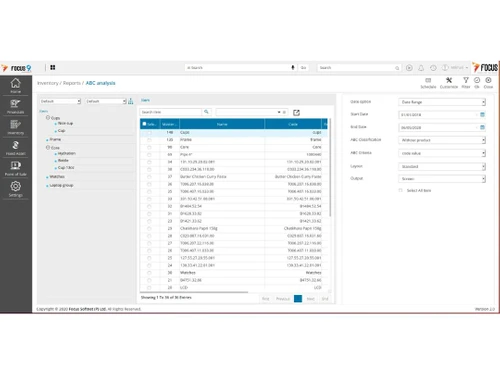
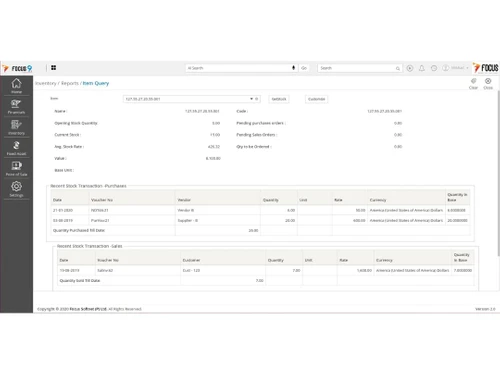
Focus X is a fully integrated ERP software designed to maximize the output for various types of operations. Focus X software analyses the inputs of different departments and provides solutions to maximize profits without over exploitation of the manpower. It is a GST-compliant and secure ERP portal that helps in achieving process improvements. This ERP software increases productivity by enabling...
See MoreHave you used Focus X before?
Share your insights for better experience
Brand: Focus Softnet
Founded Year: 1992
Focus Softnet is a global ERP solutions provider with a rich history of innovation and growth. From the first ever product launch, the emphasis was always given to R&D and to build feature-rich products based on state-of-the-art technologies.
Looking for The Right Pricing?
Share your requirements and get a plan built around your business.
Price Available on Request
Get personalised Focus X pricing that fits your needs. Our team will connect with you.
Financial/Accounts Management
 Fixed Asset Management Accounts Payable & Accounts Receivable General Ledger Budgeting And Forecasting Multi-Currency Support Tax Management Bank Reconciliation
 Human Resource Management (HRM)
Payroll Management Employee Information Management Recruitment and Onboarding Performance Management Time and Attendance Learning Management Supply Chain Management
Inventory Management Supplier Relationship Management Procurement and Purchasing Logistics and Distribution Demand Planning Transportation Management Route Planning Manufacturing
Production Planning and Scheduling Bill Of Materials (BOM) Quality Control Management Shop Floor Management Work Order Management Material Requirement Planning (MRP) Maintenance Management Customer Relationship Management (CRM)
Contact Management Sales Pipeline Management Lead Management Marketing Automation Audience Segmentation Project Management
Collaboration Tools Resource Management Cost Management Task Scheduling Time Tracking Reporting and Analytics
Sales Reports Dashboards Financial Reports Business Intelligence Custom Reports Regulatory Compliance Reports Real Time Reports Predictive Analytics Integrations
Customer Support Payment Gateway Integration API Integration Third Party Integration Ecommerce Integration Security and Compliance
Data Encryption GDPR and Other Compliance Role-Based Access Control (RBAC) Audit Management Disaster Recovery Administrative Features
Workflow Automation Workflow Approval Centralized Database Admin Panel Data Import/Export User Access Management Alerts & Notifications
Email and SMS Notifications Security Alerts Custom Event Alerts Non-Compliance Issues Others
Customization Security features Alerts & Notifications Artificial Intelligence 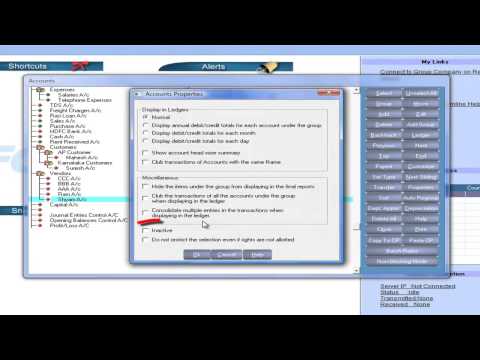

Watch the demo video to explore key features, real workflows, and how the software fits your business needs.
 Ubuntu
  Windows
  MacOS
MacOS  Linux
Linux  Desktop
  Cloud-Based
  Perpetual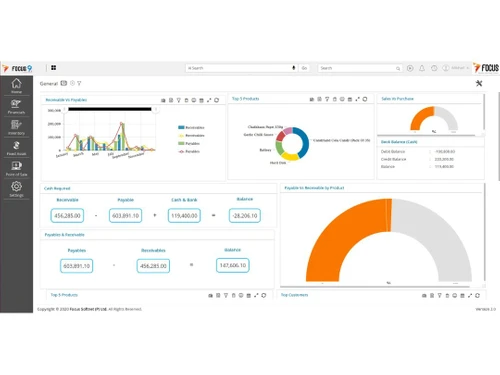

Small Business
Designed for startups and growing businesses
Medium Business
Built for business growth and flexibility
Enterprises
Designed for complex and large-scale business needs
4.2
Out of 5

Overall Rating
Based on
8 Verified Reviews
Rating Breakdown
83% Recommend this Product
Add ReviewOverall, customer sentiment towards Focus X is mixed, with users appreciating its intuitive design, ease of use, and comprehensive features tailored for various business needs. Many find the software beneficial for invoicing and time-tracking, while others highlight its flexibility and customization options. However, significant concerns arise regarding the reliability of updates and the quality of customer support, with some users experiencing persistent issues that remain unresolved. This duality in feedback suggests that while Focus X offers valuable tools, its support and update processes may need improvement.
Pros
"the software is intuitive and easy to navigate with industry-ready templates. It matches perfectly and fulfills my business need."
"The ease of use and the way the software was built around my business us case. User friendly, flexible, allow customization, a lot of features."
"Perfect, I had installed the software half an hour after purchasing it!! Great service"
Cons
"There is nothing to like least, their support and developer team is not able to fix what they sold to us"


Mar 19, 2020
Techjockey Verified
“Good ERP to take in consideration”
Pros
the software is intuitive and easy to navigate with industry-ready templates. It matches perfectly and fulfills my business need.
Cons
initial setup is bit complicated
Dec 26, 2019
Techjockey Verified
“Software is not good, Terrible updates, no support”
Pros
There is always something wrong with the updates, and they have the worst developer team, every time with an update, there is bid mess, calling their team to fix, nothing happened, only they get their annual fees in advance, then no support. we have issues been over a year, and their team are not able to fix it. so, there is nothing to like on the software, if you are always having errors and not able to use what you pay for
Cons
There is nothing to like least, their support and developer team is not able to fix what they sold to us
Nov 20, 2019
Techjockey Verified
“It super easy”
Pros
The invoicing and time-tracking system is seamless. I’ve never had an issue tracking time worked for a client, and then quickly generating an invoice that is clear to read, easy to use, and accepts all of the appropriate methods of payment. The user interface is easy to navigate, allows you keep track of your invoices, proposals, estimates, and clients.
Cons
When generating a new invoice based on Client B’s time, I want Client D’s hourly rate to be present. However, if I invoiced Client A first their rate will often pre-populate Client B’s invoice. You then have to individually change each line’s rate (if you use the detailed listing). Very frustrating and time-consuming for a simple oversight. The accounting/bookkeeping system is also very lackluster. I don’t need it to be as thorough as QuickBooks, but some printable or downloadable expense sheets would be better. Perhaps an easier way to add vendors as well.

Focus X
Price On Request
Desktop
Mobile
Web based
On Premises
Windows
Mac OS

Focus RT
Price On Request
Desktop
Mobile
Web based
On Premises
Windows
Mac OS

Dynamics 365 Business Central
₹ 665
Desktop
Mobile
Web based
On Premises
Windows
Mac OS
Fablead ERP
₹ 999
Desktop
Mobile
Web based
On Premises
Windows
Mac OS

Odoo ERP
₹ 760
Desktop
Mobile
Web based
On Premises
Windows
Mac OS

iXpert ERP
₹ 19999
Desktop
Mobile
Web based
On Premises
Windows
Mac OS

Bigsun ERP
₹ 6000
Desktop
Mobile
Web based
On Premises
Windows
Mac OS

Deskera All in One
₹ 36000
Desktop
Mobile
Web based
On Premises
Windows
Mac OS

Esarwa Enterprise ERP
Price On Request
Desktop
Mobile
Web based
On Premises
Windows
Mac OS
Axolon ERP
Price On Request
Desktop
Mobile
Web based
On Premises
Windows
Mac OS
MenThee ERP
Price On Request
Desktop
Mobile
Web based
On Premises
Windows
Mac OS
(0) Product(s) selected
Starting Price:
₹999 /Month
Starting Price:
₹6,000 /User/Month
Available
Price on Request
Available
Price on Request

Starting Price:
₹34,944 /User/Month

Starting Price:
$300 /Year

Available
Price on Request
Starting Price:
₹10,000 /Month

Available
Price on Request

Available
Price on Request

Available
Price on Request



ERP projects depend on the number of modules that it requires and the number that is implemented. Focus X ERP covers all the features required for best practices, it takes 90 days to complete the projects.
Focus X ERP software offers seamless integration with third party applications for data transfer and other business-related workflows.
The software is especially designed to meet the needs of small to mid-size businesses. Focus X is designed to meet all the business challenges for different types of businesses like manufacturing, logistics, retail, etc.
There are extra charges for these features: 1. Training, 2. Integration, 3. Customization, 4. Data Conversion, 5. Implementation
On your purchase you will sign a service level agreement that enables you to receive updates free updates.
Focus X offers flexibility in data storage with options for cloud, on-premise, and hybrid (i.e., cloud + on-premise).
Focus X is a web-based application that can be accessed through an internet browser.
There is a mobile application for Focus X ERP, but it is only available for Android smartphones.
Techjockey provides a demo for Focus X, please request a call to get the demo scheduled.
Yes, Focus X is equipped with multi-locational facility that works with both LAN and WAN.
20,000+ Software Listed
Best Price Guranteed
Free Expert Consultation
2M+ Happy Customers
Terms and Condtions

Users with registered businesses can purchase goods from merchants on the platform to satisfy their business needs. Users are not permitted to utilize any products acquired through the platform for resale, advertising, business, or further distribution.
For each purchase made, users will receive a Tax Invoice (or 'GST invoice') that includes specific details such as:
the GSTIN of the user associated with their registered business, and
the specified Entity Name for their business.
It should be noted that not all products are eligible for GST Invoice. Only the products displayed by participating sellers with the 'GST-based Invoice Available' callout on the product description page would qualify.
Certain goods and services are not eligible to get a GST Invoice, including items with VAS, i.e., Value Added Services (e.g., Total Mobile Protection/Assured Buyback) and those involving an exchange offer at the time of purchase.
Users must ensure the accuracy of the GSTIN, and business entity name provided for the GST Invoice. Requests for corrections into GST Invoice would not be accommodated by Techjockey.com or any Seller, and any issues arising from user-provided information are the sole responsibility of users.
Techjockey.com is not liable for the GST Invoice or any associated input tax credit. To efficiently claim an input tax credit, users should select the registered place of business address as per the GST authority's data and follow the provisions of the GST Act and rules.
To claim an input tax credit, the delivery and billing addresses must match. Furthermore, input tax credits will not be granted if the delivery address and GSTIN on the invoice are from different states. In case of incorrect GST details provided during the order placement, the order will be canceled automatically.