 USA
USA UAE
UAESmall Business
Designed for startups and growing businesses

See More





Brand: Ocoya
An all-in-one AI-powered digital marketing and social media management tool made to save your time and effort.
See MoreHave you used Ocoya before?
Share your insights for better experience
Brand: Ocoya
Founded Year: 2020
Ocoya is an application that specializes in product promotion, generating hashtags, ad campaigns, and image designing services.
 Images/GIF Videos Music eCommerce Hashtag Captions Scheduling Analytics Ad Campaigns Background Remover

Watch the demo video to explore key features, real workflows, and how the software fits your business needs.
 Windows
  Desktop
  Cloud-Based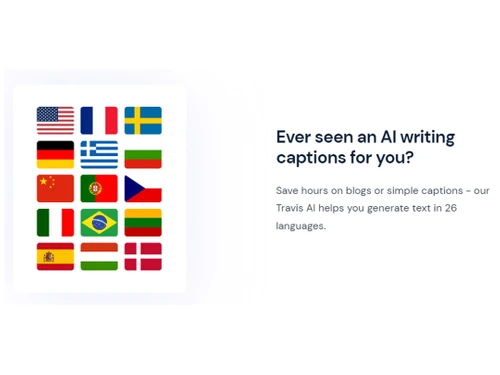


Small Business
Designed for startups and growing businesses
Medium Business
Built for business growth and flexibility
Enterprises
Designed for complex and large-scale business needs
4.4
Out of 5

Overall Rating
Based on
10 Verified Reviews
Rating Breakdown
88% Recommend this Product
Add ReviewOverall, Ocoya receives positive feedback for its multi-user capabilities, Canva integration, and efficient scheduling features, which many users find time-saving and intuitive. The ability to generate multilingual AI copy is particularly appreciated, although some users note that translations can lack cultural nuance. Common complaints include basic analytics and occasional UI glitches, such as lost drafts and minor bugs. While the platform is viewed as a strong all-in-one solution, users express a desire for more advanced reporting and design flexibility.
Pros
"Simple analytics dashboard tracks post counts, engagement metrics."
"Supports teams, multi-workspaces, branded reports (higher tiers)."
"Calendar-style scheduler and cross-platform posting save tons of time."
Cons
"Lacks deeper insights like audience demographics or competitor benchmarks."
"Advanced reporting locked behind higher tiers—mine only does basic stats."
"A random page-refresh once deleted a live draft—I had to retype it."


Jun 2, 2025
Techjockey Verified
“AgencyReady, But Analytics Upgrade Needed”
We use Ocoya at my agency; multi-user access and workspaces work well. I can assign posts and review approvals easily. But until we hit Diamond pricing, our reporting is just post-counts and likes—no branded charts or client-friendly downloads.
Pros
Supports teams, multi-workspaces, branded reports (higher tiers).
Cons
Advanced reporting locked behind higher tiers—mine only does basic stats.
Reason to switch
Switched to Ocoya for affordability and creative workflow—may add Agorapulse for advanced reporting later.
Mar 28, 2025
Techjockey Verified
“Good Canva Integration, but Could Be Smoother”
I love editing Canva graphics directly within Ocoya—it flows nicely. But I’ve had to reload mid-edit before, losing some tweaks—annoying, but rarely a dealbreaker.
Pros
You can design in Canva from within Ocoya and import assets.
Cons
Sometimes UI lagged and reloading lost changes.
Reason to switch
I integrated Canva into Ocoya to simplify drag-and-drop design in my workflow.
Feb 11, 2025
Techjockey Verified
“MultiLanguage AI Copy Is a Huge Win”
My brand targets Spain and Brazil, and being able to generate copy in multiple languages is a lifesaver. The Spanish captions are decent but can feel literal sometimes—like the AI misses cultural nuance. They’re working on improvements.
Pros
Travis AI supports 28+ languages—great for diverse audiences.
Cons
Some languages still have rough translations, especially idioms.
Reason to switch
I switched to Ocoya to reach multi-lingual audiences without juggling different tools.

Ocoya
Price On Request
Desktop
Mobile
Web based
On Premises
Windows
Mac OS

Hootsuite
₹ 2600
Desktop
Mobile
Web based
On Premises
Windows
Mac OS

MySampark
Price On Request
Desktop
Mobile
Web based
On Premises
Windows
Mac OS

Loomly
Price On Request
Desktop
Mobile
Web based
On Premises
Windows
Mac OS

Inflact
Price On Request
Desktop
Mobile
Web based
On Premises
Windows
Mac OS

TubeBuddy
Price On Request
Desktop
Mobile
Web based
On Premises
Windows
Mac OS

Predis AI
Price On Request
Desktop
Mobile
Web based
On Premises
Windows
Mac OS

Zoho Social
₹ 900
Desktop
Mobile
Web based
On Premises
Windows
Mac OS

Postly
Price On Request
Desktop
Mobile
Web based
On Premises
Windows
Mac OS

Buffer
Price On Request
Desktop
Mobile
Web based
On Premises
Windows
Mac OS

Postiz
Price On Request
Desktop
Mobile
Web based
On Premises
Windows
Mac OS
(0) Product(s) selected
Starting Price:
$65 /Month
Starting Price:
$4 /Month
Starting Price:
$29 /Month

Starting Price:
$29 /Month

Starting Price:
$30 /Month

Starting Price:
$1,249
Available
Price on Request

Starting Price:
$37 /Month

Starting Price:
$49 /Month

Starting Price:
$29 /Month

Starting Price:
$79 /Month






Ocoya helps you create, write, and schedule social media posts using AI tools, all from one easy dashboard.
Ocoya plans start at $19 per month, with options for individuals, teams, and businesses.
Ocoya is used by business owners, marketers, freelancers, and content creators who want to save time and post consistently.
Ocoya supports Instagram, Facebook, X, LinkedIn, TikTok, Pinterest, and more.
Yes, it includes an AI writing tool to generate captions, ads, blogs, and more instantly.
Yes, You can sync your store, generate product content, and promote with ease.
Yes, Ocoya offers a free trial so you can explore all key features before buying.
Yes, it offers collaboration tools for teams with role-based access and permissions.
Yes, API is available for custom integrations and automations.
20,000+ Software Listed
Best Price Guranteed
Free Expert Consultation
2M+ Happy Customers
Terms and Condtions

Users with registered businesses can purchase goods from merchants on the platform to satisfy their business needs. Users are not permitted to utilize any products acquired through the platform for resale, advertising, business, or further distribution.
For each purchase made, users will receive a Tax Invoice (or 'GST invoice') that includes specific details such as:
the GSTIN of the user associated with their registered business, and
the specified Entity Name for their business.
It should be noted that not all products are eligible for GST Invoice. Only the products displayed by participating sellers with the 'GST-based Invoice Available' callout on the product description page would qualify.
Certain goods and services are not eligible to get a GST Invoice, including items with VAS, i.e., Value Added Services (e.g., Total Mobile Protection/Assured Buyback) and those involving an exchange offer at the time of purchase.
Users must ensure the accuracy of the GSTIN, and business entity name provided for the GST Invoice. Requests for corrections into GST Invoice would not be accommodated by Techjockey.com or any Seller, and any issues arising from user-provided information are the sole responsibility of users.
Techjockey.com is not liable for the GST Invoice or any associated input tax credit. To efficiently claim an input tax credit, users should select the registered place of business address as per the GST authority's data and follow the provisions of the GST Act and rules.
To claim an input tax credit, the delivery and billing addresses must match. Furthermore, input tax credits will not be granted if the delivery address and GSTIN on the invoice are from different states. In case of incorrect GST details provided during the order placement, the order will be canceled automatically.


